
Cscore
cscore is a minimal-footprint library providing commonly used helpers & patterns for your C# projects. It can be used in both pure C# and Unity projects.
Install / Use
/learn @cs-util-com/CscoreREADME
The cscore Library








Website • GitHub • Examples • Getting started • Demo (in your browser) • Contributing
cscore is a lightweight library providing commonly used helpers & patterns for both your pure C# and Unity projects.
Fewer 3rd party libraries and dependencies included in a project means fewer code and complexity which in the end leads to less bugs. On the other hand having zero dependencies very likely means that a few fundamental concepts and patterns you will have to implement over and over for each new project. This repo tries to provide a single source for a few simple to extend features to make sure these work great together and build up on each other. Some things like logging, communication of components, dependency and state management, easy to use IO and similar fundamental challenges in software are things all applications benefit from.
This is why I think it makes sense to put this into a single compact core library with great test coverage and
great documentation. And these two can go hand in hand, well written tests can serve as a easy to
understand documentation + usage examples, which automatically stay up to date since they have to
change with the code over time. That's how the unit tests in this project ensure all features are
well tested and documented. See below for some extracts from these tests. To ensure full test
coverage mutation testing is used (thanks to Stryker!)
All components are loosly coupled so that components can be used individually when needed without deep knowledge about the full cscore library required.
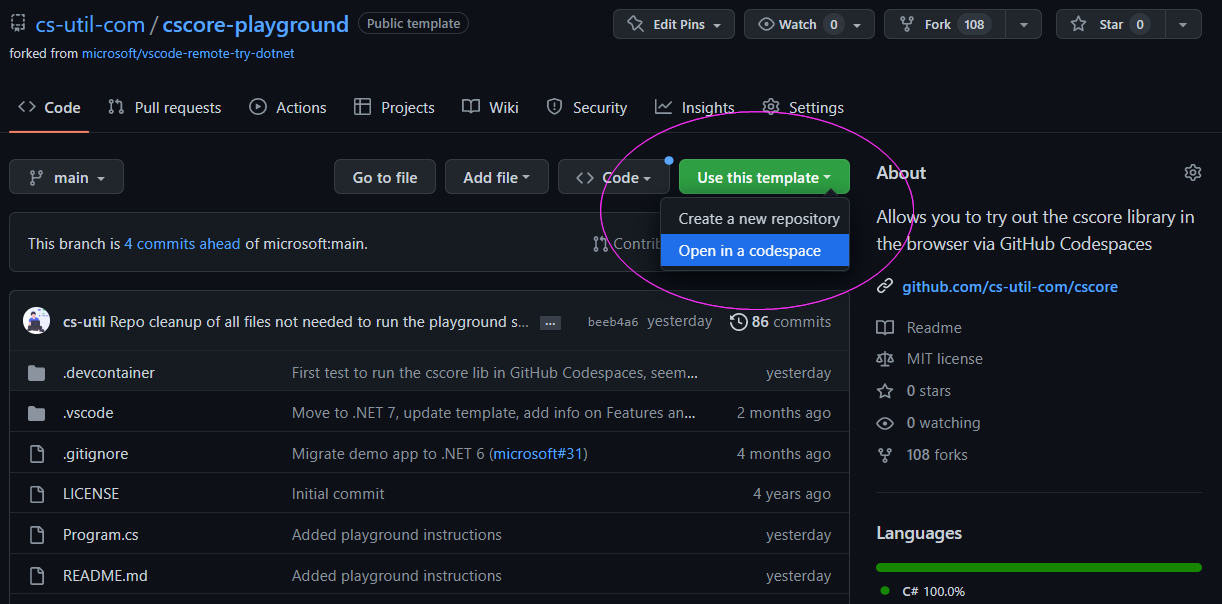
Test cscore in the browser
Go to the cscore-playground to test the library in your browser (via GitHub codespaces):
Overview
The following summary gives a quick overview of all library features:
Pure C# Components
The aim of the cscore package as to stay is slim/minimal as possible while including the feature and functionality typical projects would benefit from.
- Log - A minimalistic logging wrapper + AssertV3 to add saveguards anywhere in your logic
- EventBus - Publish and subscribe to global events from anywhere in your code. Handles 1 million events a second with minimal memory footprint!
- Injection Logic - A simple inversion of control pattern that does not rely on magic. Relies on the EventBus system, so it has the same speed as well!
- JSON Parsing - Reading and writing JSON through a simple interface. Default implementation uses Json.NET to ensure high performance
- REST Extensions - Extensions to simplify sending REST requests in as few lines as possible without limiting flexibility
- Directory & File Extensions - To simplify handling files, folders and persisting data
- Common String extension methods demonstrated in StringExtensionTests.cs
- Functional extensions and Transducers to allow functional data mapping (filter, map, reduce, ..)
- Simple statemachines that work on your existing classes
- An asynchronous chainable key value store (get & set) that can be used for anything from simple persistent settings to remote server/DB access
- An immutable datastore (Redux syntax) that includes undo/redo, timetravel (replay recordings) and a thunk middleware (dispatching async tasks)
- A JsonMerger helper to allow simple Json merging and diffing logic that helps to update an instance of a class using a Three-way merge
- An AutoMapper to map fields and attributes from one class to another using simple json serialization under the hood.
- Many other helpful extension methods best demonstrated in HelperMethodTests.cs
Additional Unity Components
- GameObject.Subscribe & MonoBehaviour.Subscribe - Listening to events while respecting the lifecycle of Unity objects
- MonoBehaviour Injection & Singletons - Using the injection logic to create and access Unity objects
- The Link Pattern - Making it easy to connect prefabs with code (and by that separate design & UI from your logic)
- The ViewStack Pattern - Using GameObjects as separate views stacked in a parent object and controlled by a single ViewStack to introduce a simple solution for switching views and UI screens.
- MonoBehaviour.ExecuteDelayed & MonoBehaviour.ExecuteRepeated - Executing asynchronous actions delayed and/or repeated
- UnityWebRequest.SendV2 - UnityWebRequest extension methods
- PlayerPrefsV2 - Adds
SetBool,SetStringEncryptedand more, see PlayerPrefsV2Tests.cs for all examples - Running xUnit tests in Unity - Execute your xUnit tests in Unity even in the built application to ensure everything works as expected in the production runtime
💡 Usage & Examples
See below for a full usage overview to explain the APIs with simple examples.
Logging
A lightweight zero config Log wrapper that is automatically stripped from production builds and can be combined with other logging libraries like Serilog for more complex use cases.
Log.d("I'm a log message");
Log.w("I'm a warning");
Log.e("I'm an error");
Log.e(new Exception("I'm an exception"));
Log.w("I'm a warning with params:", "param 1", 2, "..");


// Performance (timings & memory) logging example:
void MyMethod1() {
    using (Log.MethodEntered()) {
        // Some method body (duration and memory will be logged)
    }
}

// Or written with a different using syntax:
void MyMethod1(int myVar123) {
    using Stopwatch timing = Log.MethodEnteredWith(myVar123);
    // Some method body (duration and memory will be logged)
}
This will result in the following output in the Log:
> I'm a log message
  * at LogTests.TestBasicLogOutputExamples() c:\..\LogTests.cs:line 19
  ..

> WARNING: I'm a warning
  * at LogTests.TestBasicLogOutputExamples() c:\..\LogTests.cs:line 20
     ..

>>> EXCEPTION: com.csutil.Error: I'm an error
 : [[com.csutil.Error: I'm an error]]
    * at LogTests.TestBasicLogOutputExamples() c:\..\LogTests.cs:line 21
     ..

>>> EXCEPTION: System.Exception: I'm an exception
 : [[System.Exception: I'm an exception]]
    * at LogTests.TestBasicLogOutputExamples() c:\..\LogTests.cs:line 22
     ..

> WARNING: I'm a warning with params: : [[param 1, 2, ..]]
     ..

--> MyMethod1
     ..
<-- MyMethod1 finished after 3 ms, allocated managed mem: 525,40 KB, allocated mem: 12,00 KB
Creating logging-adapters is simple, the following logging-adapters can be used out of the box (and they can be seen as examples/templates):
-
LogToConsole.cs - The default logger which uses the normal
System.Console -
LogToUnityDebugLog.cs - The default logger when using the library in Unity projects, when using it
UnityEngine.Debug.Logis used for all logging events -
LogToFile.cs - Allows to write all log outputs into a persisted file
-
LogToMultipleLoggers.cs - Allows to use multiple loggers in parallel, e.g. to log to the console, a file and a custom error reporting system simultaneously
The used logging-adapter can be set via Log.instance = new MyCustomLogImpl();
Through this abstraction it becomes easy to later switch
Related Skills
node-connect
347.2kDiagnose OpenClaw node connection and pairing failures for Android, iOS, and macOS companion apps
frontend-design
108.0kCreate distinctive, production-grade frontend interfaces with high design quality. Use this skill when the user asks to build web components, pages, or applications. Generates creative, polished code that avoids generic AI aesthetics.
openai-whisper-api
347.2kTranscribe audio via OpenAI Audio Transcriptions API (Whisper).
qqbot-media
347.2kQQBot 富媒体收发能力。使用 <qqmedia> 标签,系统根据文件扩展名自动识别类型(图片/语音/视频/文件)。
