
Crysterm
Console / terminal GUI toolkit for Crystal.
Install / Use
/learn @crystallabs/CrystermREADME



Crysterm
Crysterm is a console/terminal toolkit for Crystal.
At the moment Crysterm follows closely the implementation and behavior of libraries that inspired it, Blessed and Blessed-contrib for Node.js. However, being implemented in Crystal (an OO language), it tries to use the language's best practices, avoid bugs and problems found in Blessed, and also (especially in the future) incorporate more aspects of Qt.
Trying out the examples
git clone https://github.com/crystallabs/crysterm
cd crysterm
shards --ignore-crystal-version

export TERM=xterm-256color

crystal examples/hello.cr
crystal examples/hello2.cr
crystal examples/tech-demo.cr

# And other examples from directories examples/, small-tests/, test/ and test-auto/.
Using it as a module in your project
Add the dependency to shard.yml:
dependencies:
  crysterm:
    github: crystallabs/crysterm
    branch: master
Then add some code to your project, e.g.:
require "crysterm"

alias C = Crysterm

screen = C::Screen.new

# Optionally, you can include widgets in the current namespace:
# include Crysterm::Widgets

hello = C::Widget::Box.new \
  name: "helloworld box", # Symbolic name
  top: "center",          # Can also be of format 10, "50%", or "50%+-10"
  left: "center",         # Can also be of format 10, "50%", or "50%+-10"
  width: 20,              # Can also be of format 10, "50%", or "50%+-10"
  height: 5,              # Can also be of format 10, "50%", or "50%+-10"
  content: "{center}'Hello {bold}world{/bold}!'\nPress q to quit.{/center}",
  parse_tags: true,       # Parse {} tags within content (default already is true)
  style: C::Style.new(fg: "yellow", bg: "blue", border: true)

screen.append hello

# When ctrl-q or q is pressed, exit.
# (We can do this by listening for C::Event::KeyPress::CtrlQ specifically,
# or for all C::Event::KeyPress and then checking the value of `e.char`.)
screen.on(C::Event::KeyPress) do |e|
  if e.char == 'q' || e.key == Tput::Key::CtrlQ
    screen.destroy
    exit
  end
end

screen.exec
Screenshots
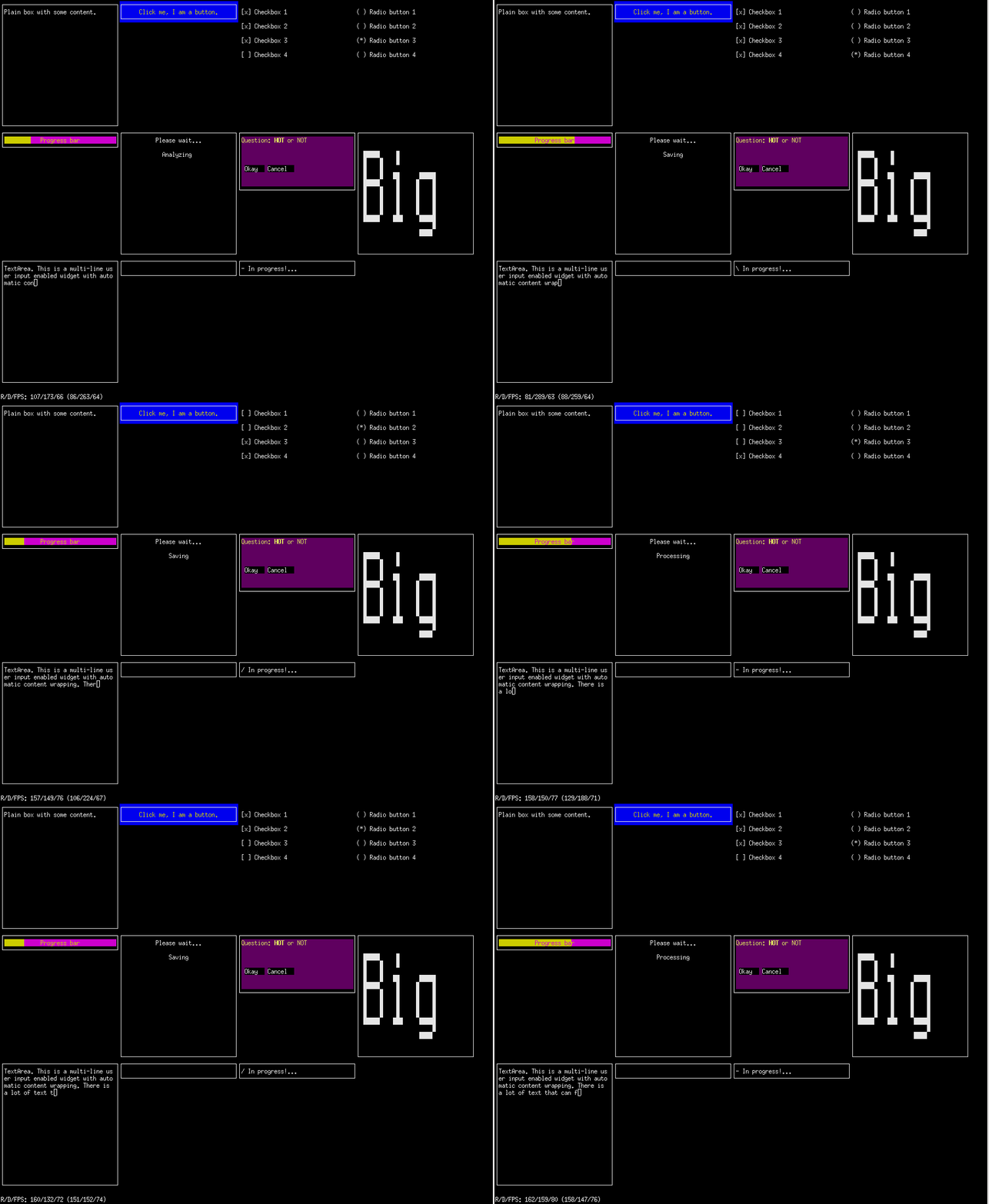
Animated demo (examples/tech-demo.cr)
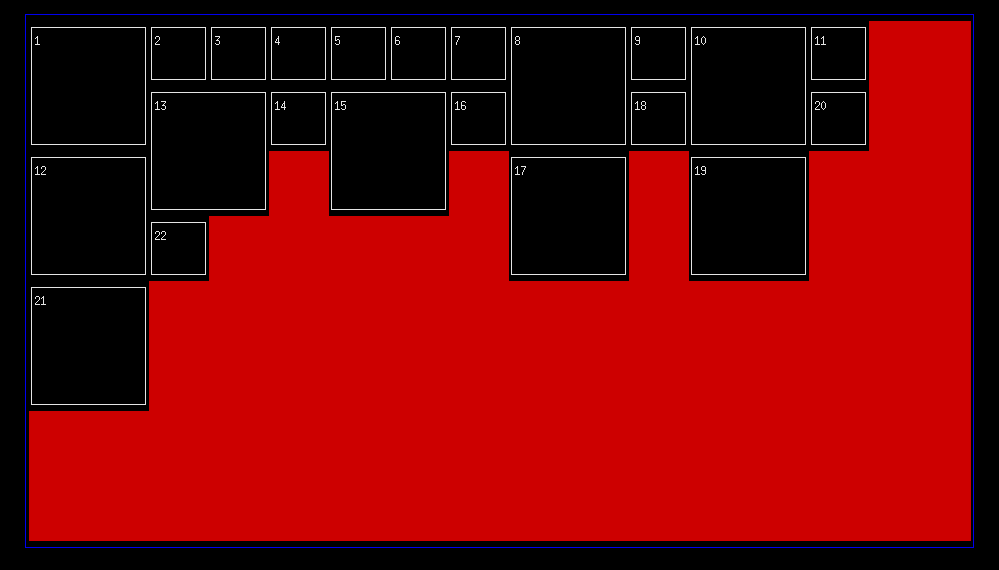
Layout engine (showing inline/masonry layout, test/widget-layout.cr)
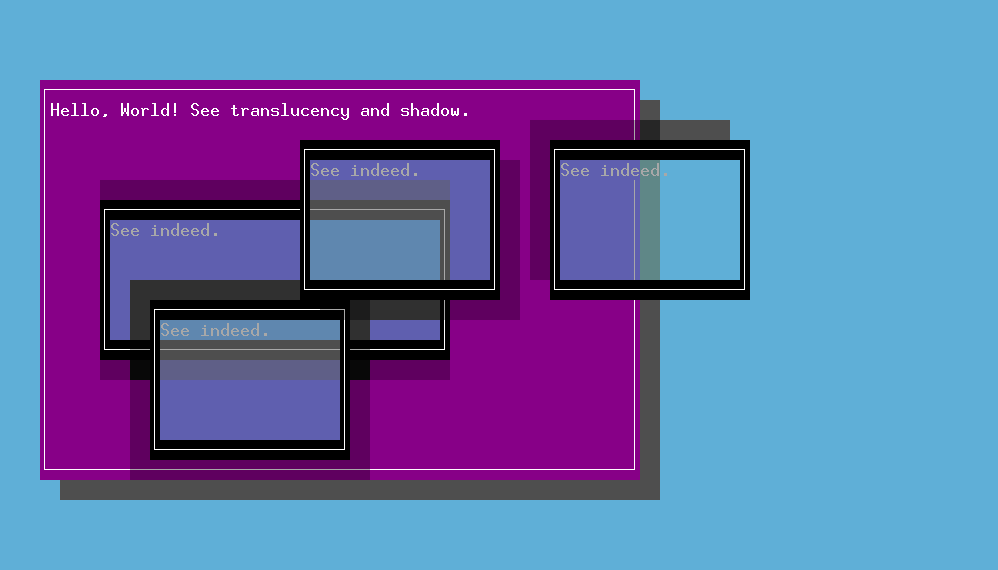
Transparency, color blending, and shadow (part of small-tests/shadow.cr)
Development
Introduction
As mentioned, Crysterm is inspired by Blessed, Blessed-contrib, and Qt.
Blessed is a large, self-contained framework. Apart from implementing Blessed's core functionality, its authors have also implemented all the necessary/prerequisite components, including an event model (a modified copy of an early Node.js EventEmitter), complete termcap/terminfo system (parsing, compilation, output, and input from terminal devices -- a complete alternative to ncurses), all types of mouse support, Unicode handling, color manipulation routines, etc. However, these implementations have been mixed with the rest of Blessed's source code, reducing the potential for their reuse.
In Crysterm, the equivalents of those components have been created as individual shards, making them available to the whole Crystal ecosystem. The event model has been implemented in event_handler, color routines in term_colors, terminal output in tput.cr, GPM mouse in gpm.cr, and terminfo library in unibilium.cr.
Unibilium.cr represents Crystal's bindings for a C terminfo library called unibilium, now maintained by Neovim. The package exists for a good number of operating systems and distributions, and one only needs the binary library installed, not headers. There is also a mostly working Crystal-native terminfo library available in terminfo.cr but, due to other priorities, trying to use that instead of unibilium is not planned. Both unibilium and native terminfo implementation for Crystal were initially implemented by Benoit de Chezelles (@bew).)
Crysterm closely follows Blessed, and copies of Blessed's comments have been included in Crysterm's sources for easier correlation and search between code, files, and features. A copy of Blessed's repository also exists in docelic/blessed-clean. It is a temporary repository in which files are deleted after their contents are reviewed and discarded or implemented in Crysterm.
Overall, heavily basing the design on Blessed was a blessing and a curse. While Blessed demos are impressive, its code has many deficiencies and partially implemented features, and certain parts are not as obvious or simple as they should be. This has slowed the development of Crysterm.
High-level development plan for Crysterm looks as follows:
- Improving Crysterm itself (fixing bugs, replacing strings with better data types (enums, classes, etc.), and doing new development).
- Porting everything of value remaining in blessed-clean (most notably: reading terminfo command responses from terminal, mouse support, full unicode (graphemes), and a number of widgets)
- Porting over widgets & ideas from blessed-contrib
- Developing more line-oriented features. Currently Crysterm is suited for full-screen app development. It would be great if line-based features were added, and if then various small line-based utilities that exist as shards/apps for Crystal would be ported to become Crysterm's line- or screen-based widgets
- Adding features and principles from Qt
Those are general guidelines. For smaller, more specific development/contribution tasks, see open issues, grep sources for "TODO", "NOTE", and "XXX", see file TODO, and see general Crystal wishlist in file CRYSTAL-WISHLIST.
Event model
Event model is at the very core of Crysterm, implemented via event_handler.
Please refer to event_handler's documentation for all usage instructions.
The events used by Crysterm and its widgets are defined in src/events.cr.
Class Hierarchy
- Top-level class is
Screen. It represents terminal used for@inputand@output - Each screen can have one or more
Widgets, arranged appropriately to implement final apps
Widgets can be added and positioned on the screen directly, but some widgets are particularly suitable for containing or arranging other/child widgets.
Most notably this is the Layout widget which can auto-size and auto-position contained widgets in the form of a grid or inline (masonry-like) layout (LayoutType::{Grid,Inline}).
There are currently no widgets that would represent GUI windows like QWindow or QMainWindow in Qt
(having title bar, menu bar, status bar, etc.), but implementing them is planned. (Windows too will inherit from Widget.)
All mentioned classes include event_handler for event-based
behavior.
Positioning and Layouts
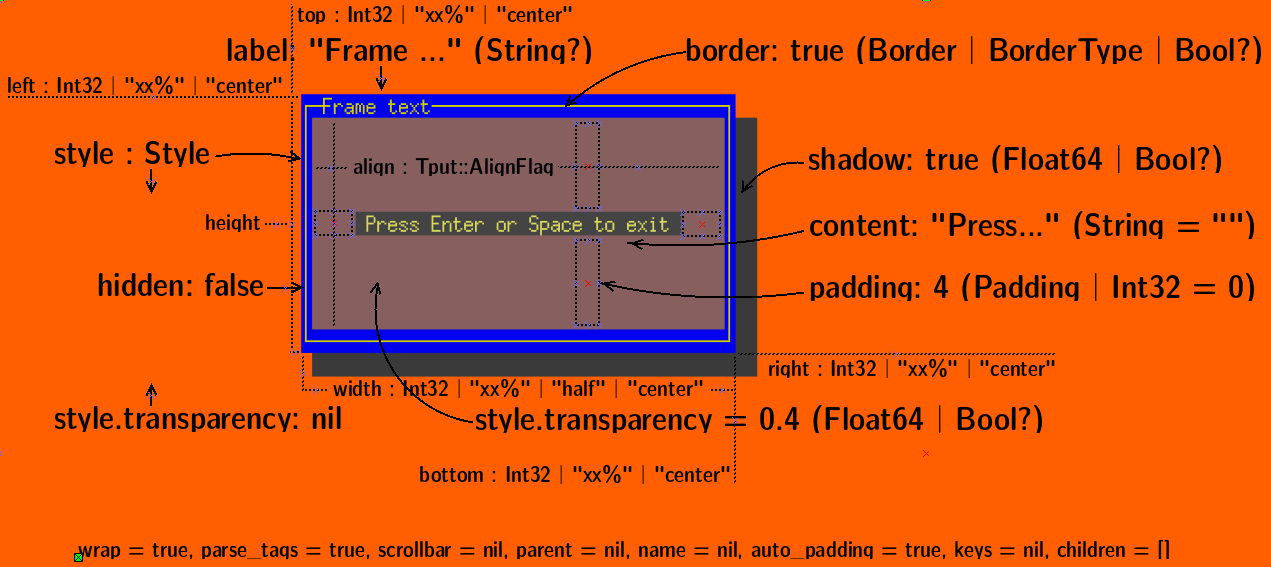
Widget positions and sizes work like in Blessed. They can be specified as numbers (e.g. 10), percentages (e.g. "10%"), both (e.g. "10%+2"), or specific keywords ("center" which has an effect of 50% - self.width_or_height//2, or "resizable" which adjusts in runtime).
That model is simple and works quite OK, although it is not as developed as the model in Qt. For example, there is no way to shrink or grow widgets disproportionally when window is resized, and there is no way to define maximum or minimum size. (Well, minimum size calculation does exist for resizable widgets, but only for trying to find the minimum size based on actual contents, rather than programmer's wishes. (What we call "resizable" is suboptimally called "shrink" in Blessed because it can also grow.))
The interface for getting or setting values has been streamlined (further explanations below the table):
| Spec | Absolute position | Relative position | Inner content offset | |------|----------|----------|-----------------------| | left / left= | aleft | rleft | ileft | | top / top= | atop | rtop | itop | | right / right= | aright | rright | iright | | bottom / bottom= | abottom | rbottom | ibottom | | width / width= | awidth | - | iwidth | | height / height= | aheight | - | iheight |
"Spec" methods get or set the values exactly as the user specified them (e.g. "50%+2" or "center"). Absolute methods return computed values as integers in reference to screen. Relative methods return computed values as integers in reference to parent widget (or screen if parent is not defined). Inner methods return offsets of content inside the widget (i.e. they report the sum of thickness of all widget's inner decorations like borders, padding, etc.)
For definitive guide on positioning, see documentation/positioning.md.
Speaking of layouts, the one lay
