
Itol.toolkit
:exclamation: This is a read-only mirror of the CRAN R package repository. itol.toolkit — Helper Functions for 'Interactive Tree Of Life'. Homepage: https://tongzhou2017.github.io/itol.toolkit/
Install / Use
/learn @cran/Itol.toolkitREADME
The itol.toolkit is an R package that provides helper functions for the Interactive Tree Of Life (iTOL). This package has been selected as a third-party tool in iTOL documentation and is recommended as one of the Top 40 New CRAN packages in January 2023 by the R Views channel of RStudio.
First version published in Bioinformatics journal, Please cite:
Zhou, T., Xu, K., Zhao, F., Liu, W., Li, L., Hua, Z., & Zhou, X. (2023). itol. toolkit accelerates working with iTOL (Interactive Tree of Life) by an automated generation of annotation files. Bioinformatics, 39(6), btad339. https://doi.org/10.1093/bioinformatics/btad339
Features
-
Support all 114 themes among all 23 template types in iTOL v6
-
High throughput generate templates in one command
-
Learn published template themes and use theme
-
Save all-in-one reproducible data locally
Installation
Based on the dependence packages from CRAN and Bioconductor source. We recommend to use pak to install itol.toolkit package automatically to avoid problems.
install.packages("pak")

# from CRAN
pak::pak('itol.toolkit')

# from GitHub
pak::pak('TongZhou2017/itol.toolkit')
If you prefer not to use the pak method, you can still use the traditional installation method.<details><summary>[Click to view] Traditional method</summary> To install the stable versions, you can use the CRAN official repository. For development versions, you can use the GitHub repository. However, if you need to install packages from Bioconductor, you'll need to use the BiocManager package.
# install Biostrings
# install.packages("BiocManager")
BiocManager::install("Biostrings")

# from CRAN
install.packages("itol.toolkit")

# from GitHub
# install.packages("devtools") # if you have not installed "devtools" package
devtools::install_github("TongZhou2017/itol.toolkit")
Please note that in order to use this software, you will need to manually install the required dependencies from Bioconductor. A complete list of the necessary packages and installation instructions can be found in the supplementary materials.</details>
If you encounter any issues during the installation process, such as problems caused by other systems, R versions, or dependency packages, please refer to the supplementary materials for a solution.
Quickstart
# load package
library(itol.toolkit)

# read data
tree <- system.file("extdata",
                    "tree_of_itol_templates.tree",
                    package = "itol.toolkit")
data("template_groups")
df_group <- data.frame(id = unique(template_groups$group),
                       data = unique(template_groups$group))

# create hub
hub <- create_hub(tree = tree)

## create unit
unit <- create_unit(data = df_group,
                    key = "Quickstart",
                    type = "DATASET_COLORSTRIP",
                    tree = tree)

## add unit into hub
hub <- hub + unit

## write template file
write_hub(hub,getwd())
Documents
We have documents for every single function and some important tips for users.
Single functions
-
COLLAPSE: collapse branches by range id or node id.
-
PRUNE: drop out branches.
-
SPACING: adjust branch spacing.
-
TREE_COLORS: set branch style at range, clade, branch, label, and background level.
-
DATASET_STYLE: set branch style at branch and label level.
-
LABELS: change node name.
-
DATASET_TEXT: add text by HTML.
-
DATASET_COLORSTRIP: add color strip with text.
-
DATASET_BINARY: multi columns with one shape symbol.
-
DATASET_GRADIENT: one column heatmap.
-
DATASET_HEATMAP: heatmap with field tree.
-
DATASET_SYMBOL: internal tree one column with multi shape symbol.
-
DATASET_EXTERNALSHAPE: outside multi column with multi shape symbol.
-
DATASET_DOMAINS: strucutre with multi shape symbol.
-
DATASET_SIMPLEBAR: bar plot.
-
DATASET_MULTIBAR: multi bar plot.
-
DATASET_BOXPLOT: box plot.
-
DATASET_LINECHART: line plot.
-
DATASET_PIECHART: pie plot.
-
DATASET_ALIGNMENT: sequence alignment.
-
DATASET_CONNECTIONS: network between braches.
-
DATASET_IMAGE: add image.
-
POPUP_INFO: interactive external information.
Tips
-
Overview: overview for all functions.
-
Installation: FAQ about installation.
-
Datasets: overview of 5 example datasets for demo.
-
Colors: buildin color palette.
-
Data reproduction: learn data from template files.
-
VS table2itol: compare with the other iTOL helper tool, table2itol.
-
Tree construction: create a tree by different data and methods.
Video
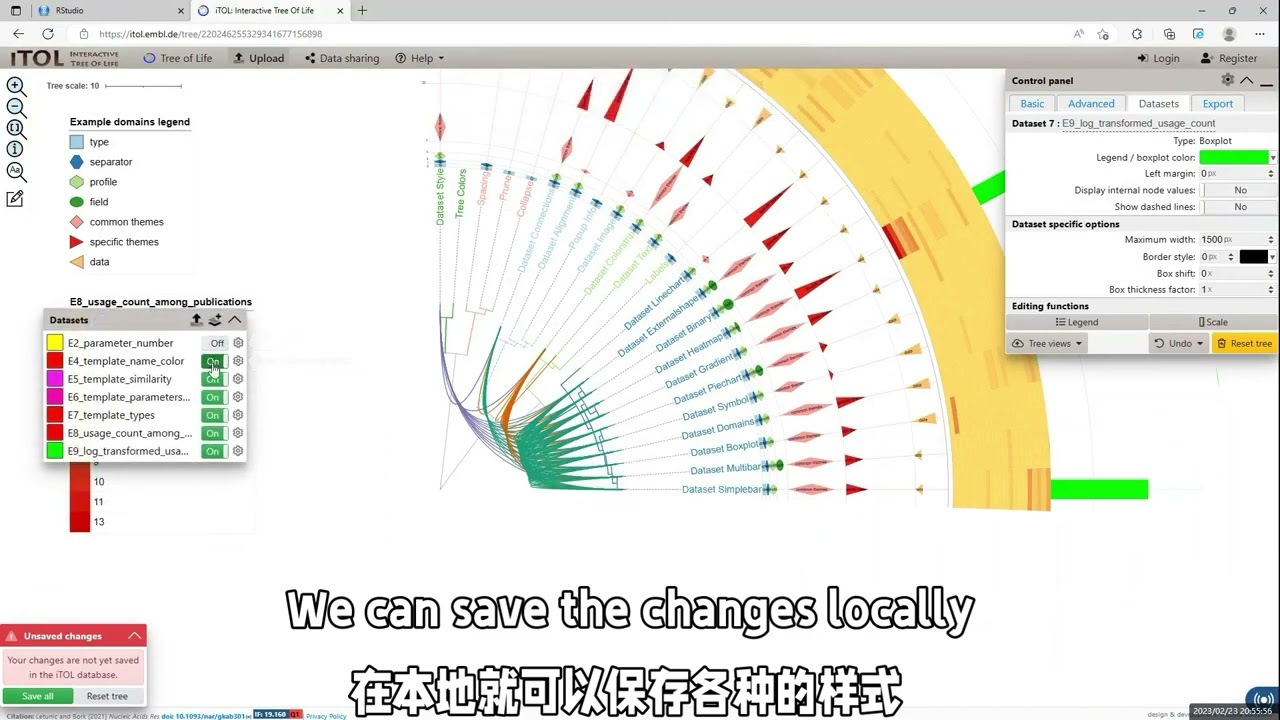
Gallery
We collected reproducible plots into a gallery page.
News
update history:
Version 1.1.11
-
Added: Dual-factor coloring support for binary dataset visualization.
-
Fixed: Legend order issues in DATASET_COLORSTRIP, DATASET_SYMBOL, and DATASET_DOMAINS functions.
Version 1.1.10
-
Added: Correcting the spelling of the
typeparameter. -
Added: Beautifying the loading prompt format.
-
Fixed: Fixing the SHOW_VALUE output parameter for the simplebar unit.
Version 1.1.9
-
Fixed: Meaningless warning in the
simplebartemplate. -
Fixed: Clustering error when
heatmapinput contains a single column. -
Added: Support for simultaneous tree output of Hub.
-
Fixed: Bug when using the
+operation withheatmapunits. -
Added: Color sorting algorithm with support for custom root colors.
-
Added: Two tree construction methods (based on string vectors and data frame row/column names).
Version 1.1.8
-
Added: Citation information while loading itol.toolkit package
-
Added: Color distance calculation and gradient color generation
-
Added: Color generation by two factors
Version 1.1.7
-
Fixed: Remove the dependence on the Biostrings package to make the installation easier.
-
Fixed: Debug the file_get_dir and file_get_name functions while without an uplevel path.
Version 1.1.6
-
Added: Add search_tree_files function to search the NEWICK format files in a directory.
-
Added: Add train_theme function to learn themes from template files in a directory.
-
Added: Update dataset5 files.
-
Fixed: Update inbuilt_theme data, which corrected the legend block in the COLOR_STRIP template file.
-
Fixed: Fix the create_uint function about the COLOR_STRIP type, which makes the legend function work in the COLOR_STRIP template.
Version 1.1.5
-
Added: Support two factor for shape and color in DATASET_DOMAIN
-
Fixed: write_hub error in DATASET_LINECHART, while node data is empty
Version 1.1.4
-
Fixed: write_hub error in DATASET_DOMAIN, while node data is empty
-
Fixed: write_unit error in LABLE, while the file parameter is empty
Version 1.1.3
-
Added: Set getwd() as default value of file parameter in write_unit function
-
Added: Added new case of the file parameter in write_unit function: If the value is a director, then use the key value in unit
Related Skills
node-connect
349.0kDiagnose OpenClaw node connection and pairing failures for Android, iOS, and macOS companion apps
frontend-design
109.4kCreate distinctive, production-grade frontend interfaces with high design quality. Use this skill when the user asks to build web components, pages, or applications. Generates creative, polished code that avoids generic AI aesthetics.
openai-whisper-api
349.0kTranscribe audio via OpenAI Audio Transcriptions API (Whisper).
qqbot-media
349.0kQQBot 富媒体收发能力。使用 <qqmedia> 标签,系统根据文件扩展名自动识别类型(图片/语音/视频/文件)。
