
substack-mcp
MCP server for Substack: rich drafts, Notes, analytics, and consented subscriber management across publications. Long-form posts stay draft-only; Notes publish immediately. Used regularly by multiple newsletters, includes a CLI.
Install / Use
claude mcp add conorbronsdon -- npx -y github:conorbronsdon/substack-mcpIf the server publishes to npm under a different name, use that package instead — check the repo README.
MCP Server
Model Context Protocol server
Quality Score
Category
Data & AnalyticsSupported Platforms
Tags
Our assessment of substack-mcp
substack-mcp scores 87/100 on our quality scale, 400th of 597 Data & Analytics skills we index.
Its MCP Server is 37 KB long, well organised into 40 sections with 12 code examples: a thorough specification that gives an agent plenty to work with.
It has 43 GitHub stars, so there is little community track record yet; judge it on its content.
Maintenance, license and trust
- The repository was last updated 2 days ago, so substack-mcp is actively maintained.
- It is released under the MIT license, a permissive license that allows use, modification and commercial use with attribution.
- Its trust signals score 97/100, with no cautions. These come from repository metadata, not a code audit — read the skill file before letting an agent act on it.
substack-mcp compared with similar skills
All 4 of these similar skills score higher than substack-mcp; compare them before choosing.
| Skill | Score | Stars | Updated | Format |
|---|---|---|---|---|
| substack-mcp (this skill)by conorbronsdon | 87 | 43 | 2d ago | MCP Server |
| Agent-Reachby Panniantong | 100 | 93.0k | 22d ago | CLAUDE.md |
| headroomby headroomlabs-ai | 100 | 74.6k | today | CLAUDE.md |
| CowAgentby zhayujie | 100 | 47.3k | today | CLAUDE.md |
| Scraplingby D4Vinci | 100 | 86.1k | today | MCP Server |
Frequently asked questions
- How do I install substack-mcp?
- Run
claude mcp add conorbronsdon -- npx -y github:conorbronsdon/substack-mcp. The install tabs above show the steps for each supported agent. - Which AI agents does substack-mcp work with?
- It is written for Claude Code and Claude Desktop, as a MCP Server file. Other agents that read the same format can often use it too.
- Is substack-mcp safe to use?
- It is MIT-licensed and scores 97/100 on trust signals. Skills are instructions an agent will follow, so read the file before installing it and do not approve commands you do not understand.
- Is substack-mcp still maintained?
- The repository was last updated 2 days ago, so substack-mcp is actively maintained.
Skill content
View source on GitHubsubstack-mcp
Create and manage your Substack newsletter from your AI assistant or terminal. Prepare rich drafts, search your archive, publish Notes, inspect analytics, and manage explicitly consented free subscribers across publications. Review and publish long-form posts in Substack.






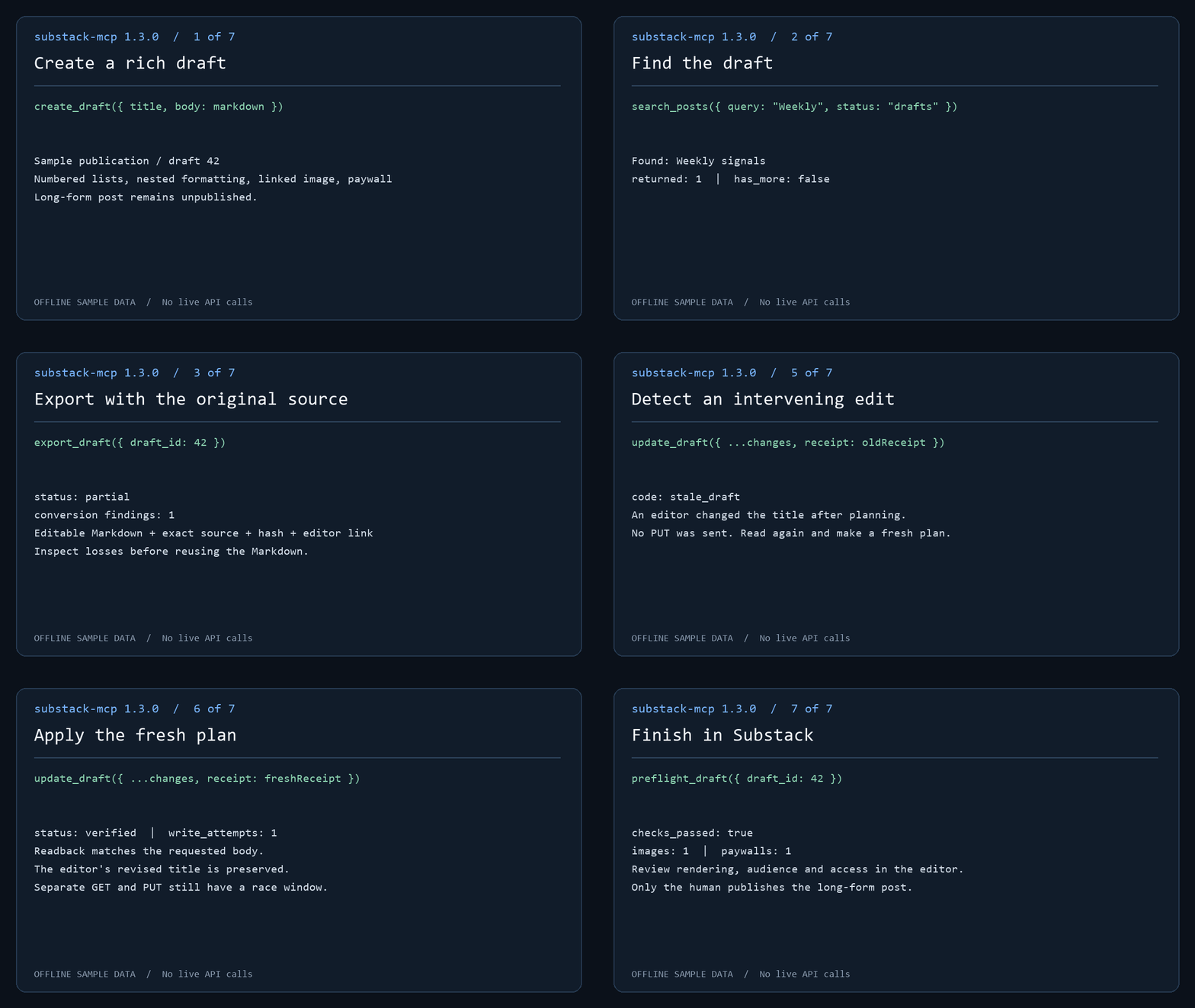
The demo runs actual MCP handlers against offline sample data. No live API calls or publication occur. Follow the draft workflow to create, find, export and review a post.
Safe by design — with one loud exception: This server cannot publish or delete long-form posts. Post tools create and edit drafts only; you review and publish manually through Substack's editor. The exception is Substack Notes: create_note and create_note_with_link publish short-form Notes immediately, because Notes have no draft state on Substack. Treat the Note tools as public-publish actions — there is no preview step and no undo from this server. The split is proportionate review, the piece of trust infrastructure for agents this server cares most about: the high-stakes surface gets a human gate, and the exception is stated loudly.
This server imposes no Bestseller-status check. Use an authenticated account with permission to manage the publication; individual operations depend on your Substack access. Connect through local stdio or self-hosted HTTP.
<a href="https://glama.ai/mcp/servers/conorbronsdon/substack-mcp"> <img width="380" height="200" src="https://glama.ai/mcp/servers/conorbronsdon/substack-mcp/badge" alt="substack-mcp MCP server" /> </a>For 1.0 setup coverage and account eligibility, see compatibility. Maintainers can use the release checklist and distribution inventory.
Contents: Quick start · Setup · Tools · Operator CLI · Draft workflow · Analytics to draft · Export · Markdown · Multiple publications · Transports · Compatibility
Quick start
-
Install and sign in. Browser login needs the optional Playwright dependency:
npm install @conorbronsdon/substack-mcp playwright
npx playwright install chromium
npx substack-mcp login https://yourblog.substack.com --user-id 12345
Use your own account's user ID (how to find it). The session is saved only after a bounded authenticated read succeeds. To paste credentials instead, see Option B.
-
Verify a read.
npx substack-mcp doctor --json --check-authmakes one bounded read per publication. It confirms read access, not your user ID or write permission. -
Connect your MCP client. Add the server to Claude Desktop or Claude Code, or use the Codex plugin. Environment variables take precedence; omit them to use the stored browser-login session. Then ask your assistant: "How many Substack subscribers do I have?"
-
Prepare a draft for review. Follow the draft workflow:
create_draft,search_posts,export_draft,preflight_draft, thenplan_draft_updateandupdate_draft. Long-form posts stay unpublished drafts until you publish them in Substack's editor.create_noteandcreate_note_with_linkpublish immediately.
Community walkthrough
Jonathan Price's I used Codex to connect ChatGPT to Substack. Then it drafted this post. walks through using Codex to install the MCP locally, connecting ChatGPT through OpenAI's Secure MCP Tunnel, and creating a private draft for manual publication. He used the connection to create the draft of the guide itself.
The guide documents his September 18, 2026 setup with version 1.2.0. Its reported
get_post 404 is fixed in 1.2.1. Client interfaces and access requirements can
change; use the setup instructions below for this package's current
configuration. This is a community walkthrough, not a hosted service provided
by this project.
Setup
Requires Node.js 22 or newer (CI covers Node 22 and 24). Browser login additionally requires Playwright.
You can supply credentials two ways: paste them as env vars (below), or run the optional browser login which captures and stores them for you.
Option A — Browser login (optional, no manual cookie copying)
Install the server and optional Playwright dependency together in a local tools directory, then sign in:
npm install @conorbronsdon/substack-mcp playwright
npx playwright install chromium
npx substack-mcp login https://yourblog.substack.com --user-id 12345
substack-mcp-login remains a supported alias. Missing publication URL and user
ID are prompted. Supply your own account's user ID (steps below); a post author's byline does
not verify your identity. The browser opens for sign-in, including any CAPTCHA.
Login then opens <publication>/publish/home and waits for the publication
session cookie; on custom domains this is connect.sid on the custom domain.
A bounded authenticated read must succeed before saving. This verifies read access, not
the configured user ID or permission to write.
Without --profile, login saves ~/.substack-mcp/session.json (directory override:
SUBSTACK_MCP_HOME). The server uses this legacy session when publication
credential environment variables and SUBSTACK_PROFILES are unset.
Default storage (SUBSTACK_CREDENTIAL_STORE=file): sessions use AES-256-GCM with a key derived from the OS account and
machine. File permissions request 0600; Windows access also depends on directory
ACLs. This is a machine-bound file, not an OS keychain or secret vault. Code
running as your OS user can derive the key. Use environment credentials if your
MCP client manages secrets for you.
Optional OS keychain: set SUBSTACK_CREDENTIAL_STORE=keychain in both the
login process and the MCP client's environment. macOS uses Keychain via
/usr/bin/security; Linux needs libsecret and secret-tool plus an unlocked Secret
Service; Windows uses Credential Manager through PowerShell's PasswordVault. All
three are exercised with synthetic credentials by the keychain CI workflow on
GitHub-hosted runners (an unlocked temporary macOS keychain and a gnome-keyring
session on Linux); desktop setups with locked keychains may still prompt. Login writes the selected account to the keychain, and the
server reads it there. Explicit keychain selection never reads the encrypted
file as a fallback. The keychain helps against other OS users, copied disks,
and some malware limited to file access. Code running as your user can usually
query the keychain. Keep the OS account and running code trusted.
On Linux, secret-tool lookup can exit 1 without an error message for either
an absent entry or a locked keyring. Named writes without --force search and
unlock first, and refuse overwrites when an entry is found.
Named profiles and migration
npx substack-mcp login https://yourblog.substack.com --user-id 12345 --profile work
npx substack-mcp profiles list
# Copy an existing legacy session without changing its file:
npx substack-mcp profiles migrate --name personal
# Copy a file session or named file profile into the keychain; source remains:
npx substack-mcp profiles migrate --to keychain
npx substack-mcp profiles migrate --to keychain --name work
Keys start with a lowercase ASCII letter and contain only lowercase letters,
digits and hyphens, up to 64 characters. Existing profiles require explicit
--force to replace. List output contains keys, readability status, publication origins and file save
times; it excludes cookies and user IDs. Unreadable profiles remain visible but
cannot be selected. Save time records local persistence, including migration; it
is not token issuance or expiration time. Listing is bounded to 32 profiles.
Profile storage requires a local filesystem supporting hard links (such as NTFS
or a typical Linux filesystem), so creation can install a complete encrypted file
without overwriting an existing name. FAT/exFAT and some network mounts are not
supported: set SUBSTACK_MCP_HOME to a suitable local directory. Do not use
--force to work around an unsupported filesystem.
Set SUBSTACK_PROFILES=work,personal in your MCP client's environment to select
up to 32 distinct profiles. Remove all publication credential variables first:
combining profile selection with legacy or named credential variables is an
error, including empty variables. Missing, corrupt or invalid selected profiles
stop startup; they never fall back to another account. Profiles on disk are
never activated by discovery. With multiple profiles, tools require an explicit
publication key and CLI reads require --publication.
To roll back, unset SUBSTACK_PROFILES and restore your previous environment
configuration. Migration preserves the legacy session byte-for-byte. These files
use the existing encryption format. profiles list lists file profiles; select
keychain profiles explicitly with SUBSTACK_PROFILES after migration or login.
Run substack-mcp status --json for offline configuration diagnostics or
substack-mcp doctor --check-auth --json for a bounded read per selected account.
Option B — Get your credentials manually
Open your Substack in a browser, then:
- Session token: For custom domains, open DevTools → Application → Cookies →
https://your-custom-domainand copyconnect.sidfrom the publication's own domain (URL-encoded string starting withs%3A). Do not copysubstack.sidfrom substack.com: it is a different session that the custom domain's admin API rejects with 403. For*.substack.compublications, useconnect.sidon that host orsubstack.sidon.substack.com. The token must match the host ofSUBSTACK_PUBLICATION_URL, with the.substack.comfallback only for Substack-hosted publications. - User ID: Follow Find your account user ID. Do not use a publication post's byline ID: publications can have multiple authors. This server does not independently verify the supplied ID.
- Publication URL: Your Substack URL, including custom domain if you have one (e.g.,
https://newsletter.yourdomain.comorhttps://yourblog.substack.com)
Find your account user ID
- In Substack, op
Truncated for display — read the full file on GitHub.
Related Skills
Agent-Reach
93.0kGive your AI agent eyes to see the entire internet. Read & search Twitter, Reddit, YouTube, GitHub, Bilibili, XiaoHongShu — one CLI, zero API fees.
headroom
74.6kCompress tool outputs, logs, files, and RAG chunks before they reach the LLM. 20% fewer tokens for coding agents, 60-95% fewer tokens for JSON, same answers. Library, proxy, MCP server.
CowAgent
47.3kOpen-source personal AI assistant & Agent Harness. Plans tasks, runs tools and skills, self-evolves with memory and knowledge. Multi-agent, multi-model, multi-channel. Lightweight, extensible, one-line install.
Scrapling
86.1k🕷️ An adaptive Web Scraping framework that handles everything from a single request to a full-scale crawl! Don't be shy, join here: https://discord.gg/EMgGbDceNQ and follow here for daily tips and tricks: https://x.com/Scrapling_dev

Languages
Trust signals
From repository metadata: license, adoption, age and documentation. Not a code audit — see the Safety scan above for what the skill file itself contains.