
Pck
The Parser Construction Kit ("Puck"): A Parser Generator and Grammar Translator in C#
Install / Use
/learn @codewitch-honey-crisis/PckREADME
PCK: The Parser Construction Kit
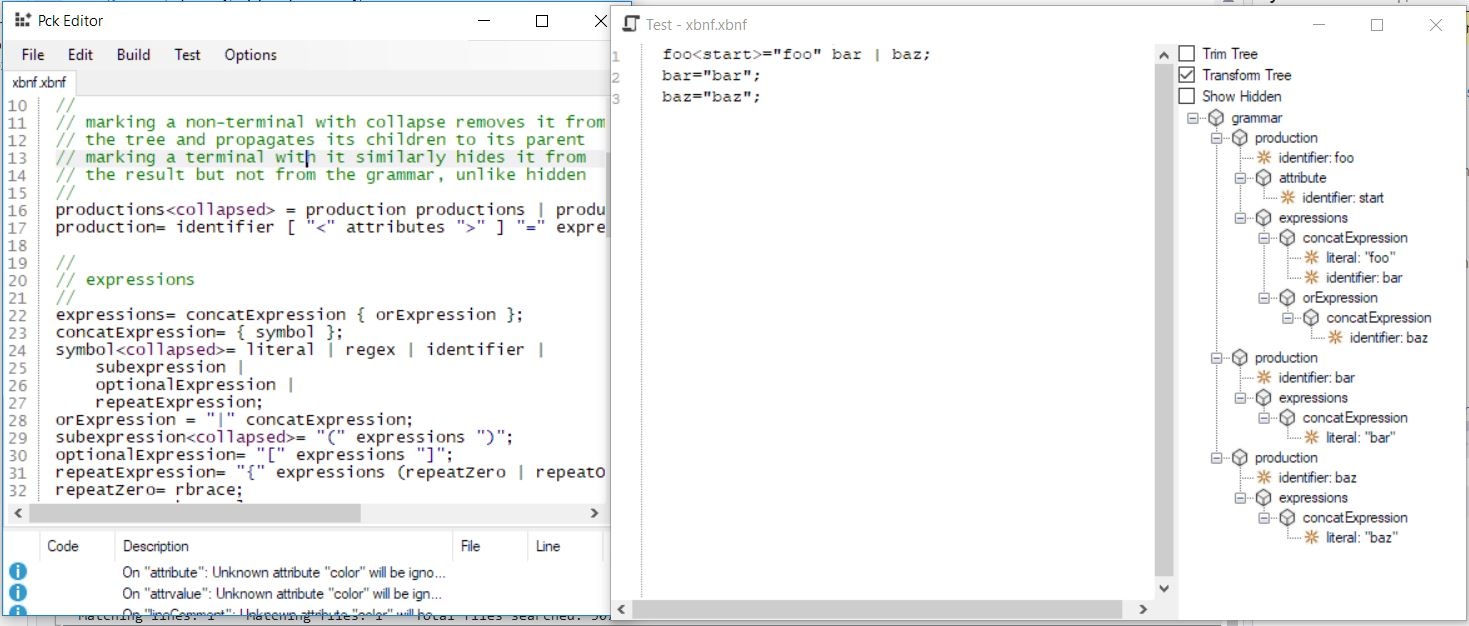 pckedit uses ICSharpCode.TextEditor's syntax highlighting technology and is a modified variant of https://www.codeproject.com/Articles/30936/Using-ICSharpCode-TextEditor
The Parser Construction Kit is a parser generator that targets the .NET platform, and is written in C#. It was designed with C# in mind. It can use the Microsoft CodeDOM to render parsers in other .NET languages and bits v0.0.1.8 and above should support VB particularly.
PCK has tools to cover three major parsing paradigms:
- LL(1) parsers: The preferred parsing mechanism if it will meet the requirements necessary.
- LALR(1) parsers: A more powerful parser that accepts more grammars, but with some drawbacks compared to LL(1), such as additional complexity, and lack of error recovery and continuation due to the nature of the algorithm.
- Hand written parsers, since these are so often useful in small doses. It would be extremely heavy handed to, for example, parse an integer using an entire context free grammar!
The runtime library required to use the generated parsers, called simply pck (pck.dll) is a small library that provides support for generated LL(1) and LALR(1) parsers, as well as support for hand written parsers using the ParseContext class.
The assorted tools that come with pck can be used for parser and lexer/tokenizer generation.
It can generate FA based lexers/tokenizers and PDA based parsers on the LL(1) algorithm, with an eye toward supporting LL(1) conflict resolution in the future. It can generate LALR(1) parsers based on an LALR(1) via SLR(1) translation. It can easily be extended to support LR(0), perhaps LR(1) and SLR(1) down the road, if desired.
Installing and updating
Install simply by taking the binaries and putting them somewhere in your path, or just navigating to that folder whenever you want to use them. Note that pckedit will automatically register itself with .xbnf and .pck extensions, and with the shell on the first time it is run, so it doesn't need to be in the path. If you never want to use the commandline, you don't have to set up the paths.
To keep them up to date, simply close all PCK programs, navigate to the folder where your binaries are - this is required regardless of your PATH variable, and then type pckver /update
Using the tools
Choosing Your Parser
You'll want to decide carefully which parser best meets your needs before you begin.
-
Use the LL(1) parser if your grammar can be recognized by it, or unless you're building a hand rolled parser The LL(1) parser is the most flexible and potentially the fastest generated parser, depending on what you're doing. It's also the easiest to use overall, although there's not a lot of difference between the generated parsers in use. Its main drawback is the limited subset of CFG grammars it can support.
-
Use the LALR(1) parser if you need greater power in terms of what your grammars can do. It can be a little more complicated if you're not using the parse tree, but rather the reader directly, though most people won't unless they need to stream. Its main limitation is error recovery. Currently it can't do it, and it will never be as good as the LL(1) error recovery even if it could, because of the way the algorithm works.
-
Use handrolled parsers either for very simple grammars where generated parsers won't really save you time, or for grammars where you need the greatest flexibility and CFG grammars just won't cut it. Its main limitation for anything other than trivial grammars is maintenance and increased potential for bugs.
Creating Grammars and Parsers
By far, the simplest way to generate a parser on a Windows OS is to use pckedit and create an XBNF grammar, then test or build the parser using the menus.
pckedit is a windows application that acts as a multiple document container for XBNF, pck, and other files, with syntax highlighting. It has menus for code generation and for testing grammars, but otherwise works a lot like notepad++. The menus operate on the current active document so be mindful of that if your menus are grayed. For example, it won't let you turn a PCK spec file into another PCK spec file, nor will it let you build/generate code from anything other than an XBNF or PCK file. Below the documents is a list of warnings and errors for the last operation. The test menu allows you to test your grammars with LL(1) and LALR(1) parsers without generating code. Generation does not create files. Files must be saved explicitly in order to be stored, unlike visual studio, for example.
Aside from pckedit, pckw and pckp (DF and Core versions of the same app, with identical functionality) provide an extensive set of operations available at the command line, including grammar transformation, exporting, and code generation for both types of parser, and for tokenizers.
PCK is designed to let you work with different parser generator tools as well.
The "XBNF" grammar format can be used to construct grammars to pass to parser generators, including YACC, with an extensible translation feature that allows for creation of future grammar and lexer file transformations.
Here's the Pckw/Pckp utility usage screen, which breaks up the different parser / lexer generator tasks into console accessible operations
They're each different builds of the same executable, although Pckw is the windows version, and Pckp is the .NET core version. Functionally they are identical.
Usage: pckw <command> [<arguments>]

Commands:

pckw fagen [<specfile> [<outputfile>]] [/class <classname>] [/namespace <namespace>] [/language <language>]

  <specfile>    The pck specification file to use (or stdin)
  <outputfile>  The file to write (or stdout)
  <classname>   The name of the class to generate (or taken from the filename or from the start symbol of the grammar)
  <namespace>   The namespace to generate the code under (or none)
  <language>    The .NET language to generate the code for (or draw from filename or C#)

  Generates an FA tokenizer/lexer in the specified .NET language.


pckw ll1gen [<specfile> [<outputfile>]] [/class <classname>] [/namespace <namespace>] [/language <language>]

  <specfile>    The pck specification file to use (or stdin)
  <outputfile>  The file to write (or stdout)
  <classname>   The name of the class to generate (or taken from the filename or from the start symbol of the grammar)
  <namespace>   The namespace to generate the code under (or none)
  <language>    The .NET language to generate the code for (or draw from filename or C#)

  Generates an LL(1) parser in the specified .NET language.

pckw ll1factor [<specfile> [<outputfile>]]

  <specfile>    The pck specification file to use (or stdin)
  <outputfile>  The file to write (or stdout)

  Factors a pck grammar spec so that it can be used with an LL(1) parser.

pckw ll1tree <specfile> [<inputfile>]

  <specfile>    The pck specification file to use
  <inputfile>   The file to parse (or stdin)

  Prints a tree from the specified input file using the specified pck specification file.

pckw lalr1gen [<specfile> [<outputfile>]] [/class <classname>] [/namespace <namespace>] [/language <language>]

  <specfile>    The pck specification file to use (or stdin)
  <outputfile>  The file to write (or stdout)
  <classname>   The name of the class to generate (or taken from the filename or from the start symbol of the grammar)
  <namespace>   The namespace to generate the code under (or none)
  <language>    The .NET language to generate the code for (or draw from filename or C#)

  Generates an LALR(1) parser in the specified .NET language.

pckw lalr1tree <specfile> [<inputfile>]

  <specfile>    The pck specification file to use
  <inputfile>   The file to parse (or stdin)

  Prints a tree from the specified input file using the specified pck specification file.

pckw xlt [<inputfile> [<outputfile>]] [/transform <transform>] [/assembly <assembly>]

  <inputfile>   The input file to use (or stdin)
  <outputfile>  The file to write (or stdout)
  <transform>   The name of the transform to use (or taken from the input and/or output filenames)
  <assembly>    The assembly to reference

  Translates an input format to an output format.

  Available transforms include:

   cgtToPck     Translates a Gold Parser cgt file into a pck spec. (requires manual intervention)
   pckToLex     Translates a pck spec to a lex/flex spec. (requires manual intervention)
   pckToYacc    Translates a pck spec to a yacc spec
   xbnfToPck    Translates an xbnf grammar to a pck spec.
so - if you want to take an XBNF document
like this
productions<collapsed> = production productions | production;
production= identifier [ "<" attributes ">" ] "=" expressions ";";

expressions<collapsed>= expression { "|" expression };
expression= { symbol };
symbol= literal | regex | identifier |
	"(" expressions ")" |
	"[" expressions "]" |
	"{" expressions ("}"|"}+");
...
and turn into a pck spec (which you have to do before you can do much else with it)
productions:collapsed
expressions:collapsed
symbollist:collapsed
attributelisttail:collapsed
grammar-> productions
productions-> production productions
productions-> production
production-> identifier lt attributes gt eq expressions semi
production-> identifier eq expressions semi
expressions-> expression expressionlisttail
expressions-> expression
expression-> symbollist
expression->
symbol-> literal
symbol-> regex
symbol-> identifier
symbol-> lparen expressions rparen
symbol-> lbracket expressions rbracket
symbol-> lbrace expressions rbrace
symbol-> lbrace expressions rbracePlus
...
you'd use the command line like
pckw xlt xbnf.xbnf xbnf.pck
now, before you can use it with an LL(1) parser (including Pck's, or say Co
