
Xtm1638
Fastest library to control TM1638 chip (for example: "LED AND KEY") based modules
Install / Use
/learn @codebeat-nl/Xtm1638README
Fastest library to control TM1638 chip (for example: "LED AND KEY") based modules
updated 30-jan-2019
Category
- Arduino C++
- Library, class xtm1638
- TM1638
- LED and KEY
About
The TM1638 can be found in combination of 8 digit, 7-segment LED displays which also incorporate 8 buttons as well as bi-colored red and green LEDs. This library allows you to control the module with ease, using MCU's optimal direct port access on AVR's or in "Arduino library compatible mode" on any other 'Arduino'. Usage demo sketches included.
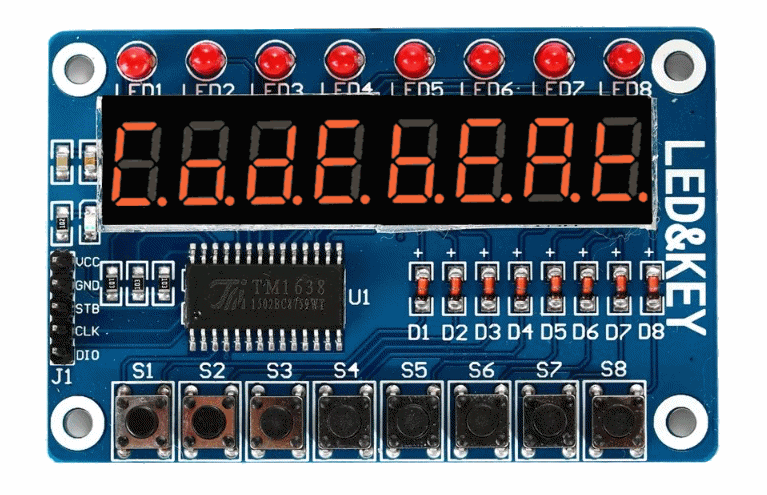
Image above: The cheapest and most common LED and KEY module
Features
- Significantly faster than existing implementations (see also benchmark results below)
- Low latency
- Configurable ports and pins
- Optimized arithmic operations (ASM for AVR), shiftdivide for C++
- SuperB speed on ATMEL/MicroChip AVR by using direct port access and assembler
- Optional 8 byte segment cache
- FastGPIO compatibility (see also xtm1638.config.h)
- Auto detection when compiling for optimal configuration
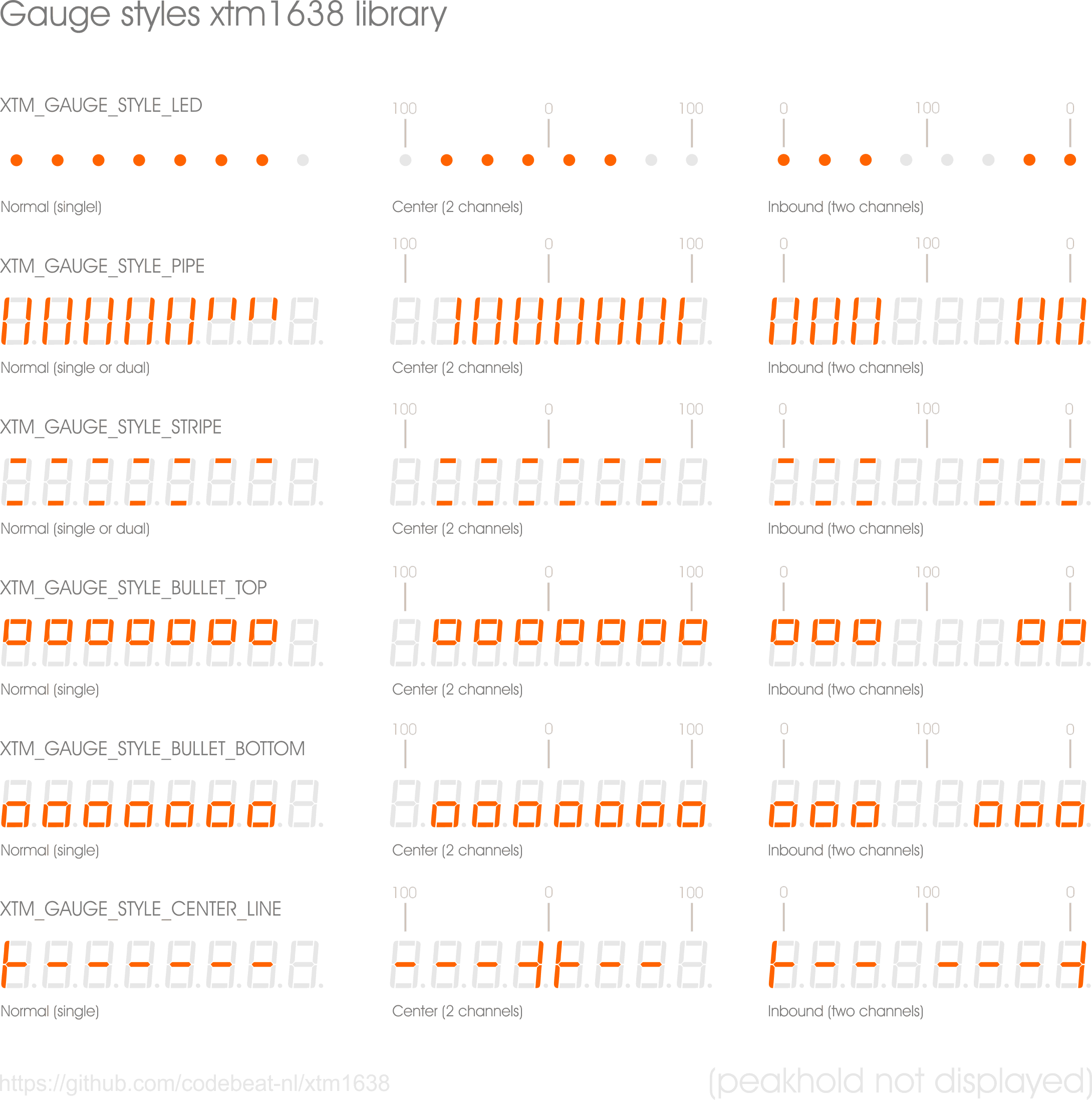
- Cool gauge feature, gauge functionality to be able to display bars, (battery) status, VU-meter, etc
- Runs on any Arduino with auto compatible mode
- Easy to use class methods
- Light weight, small memory footprint (can vary by used compile settings, Arduino IDE and library)
- Compiler configuration messages when compiling
- Configuration file included (no need to change class files)
- 5 Examples, usage sketches/demo's included
Application usage cases
- Counters which requires low latency, for example gear control
- Clocks
- Battery equipment - indicator
- Amplifiers, general display and/or VU-meter indicator
- Power supplies
- Measurement tools
- Or anything else ;-)
Benefits
- Ideal to performing other time critical tasks on the same MCU
- Use it on a low memory capacity MCU such as ATTiny85
How to install
- Download zip
- Unpack it in the libraries folder
- Rename the folder to xtm1638
- Restart IDE
- Open example by using the example and search for xtml1638
- Open xtm1638Example01
- Try to compile it (no errors = installed)
Included examples
- xtm1638Example01.ino - Hello world example
- xtm1638Example02.ino - Clock example with hours, minutes, seconds and user interface
- xtm1638Example03.ino - Characterset, gauge functionality (bars and indicators), orientation change
- xtm1638Example04.ino - Dedicated to benchmarks (see benchmarks below)
- xtm1638Example05.ino - Gauge, battery indicator, animation, orientation change .
Gauge examples
You can use the class it's gauge() function to display bars as indicators. Gauges can represent a single value or two values (balanced). There are 5 different types, each gauge type has 3 modes, normal, center or inbound. Values can be 0..100% (for each 'channel').
Benchmarks
### PERFORMANCE STATS
Running sketch: tm1386example04.ino (included stress test example)
Device/MCU    : Arduino Nano/ATMega328
                [Link](http://www.atmel.com/images/Atmel-8271-8-bit-AVR-Microcontroller-ATmega48A-48PA-88A-88PA-168A-168PA-328-328P_datasheet_Complete.pdf)
----------------------------------------------------------------------
 Mode:                         Score:       Minutes:           no-leds score:  no-leds minutes:
    Register+Multiply             94177ms      1.57 minutes        72077ms        1.20 minutes
    Register+Divide               86952ms      1.44 minutes        64852ms        1.08 minutes
    Register+ShiftDivide          76404ms      1.2734 minutes      58314ms        0.972 minutes(!)
    Register+ShiftDivide-PROGMEM  76374ms      1.2729 minutes      58283ms        0.971 minutes(!)
    Compatible Mode+Multiply      321876ms     5.36 minutes       232628ms        3.88 minutes
    Compatible Mode+Divide        314652ms     5.25 minutes       226404ms        3.77 minutes
    Compatible Mode+ShiftDivide   304093ms     5.07 minutes       219866ms        3.66 minutes

	----

   26 jan 2019 update: New records with caching (buffering)!
    Register+ShiftDivide+caching   39435ms     0.65725 minutes     22512ms        0.375 minutes(!) - speed gain: 1.9x/2.5x
    Compatible Mode+ShiftDivide+  142392ms     2.3732  minutes     59284ms        0.988 minutes(!) - speed gain: 2.1x/3.7x
    caching

   29 jan 2019 update (1): New records by using assembler (ASM)!
    ASM+ShiftDivide                37125ms     0.618 minutes(!)    30239ms        0.504 minutes(!) - speed gain: 2.1x/1.9x
    ASM+ShiftDivide+caching        23889ms     0.398 minutes(!)    17004ms        0.283 minutes(!) - speed gain: 3.1x/3.4x

   29 jan 2019 update (2): New records by using assembler (ASM) + font-table in dynamic memory!
    ASM+ShiftDivide                37095ms     0.617 minutes(!)    30209ms        0.503 minutes(!) - speed gain: 2.1x/1.9x
    ASM+ShiftDivide+caching        23860ms     0.397 minutes(!)    16974ms        0.282 minutes(!) - speed gain: 3.2x/3.5x


   30 jan 2019:
    Another gain can be reached by using new define (which is default now), XTM_AVR_SHIFTWISE_DIVIDE_ASM.
    At this moment I don't have the time to update the tables above again. Fastest speed is 12756ms =
    0.213 minutes = 12.756 seconds to count up to 100000 and display it. To achieve this, use fastest

	----

   FASTEST CONFIG (highest mem usage)     AVERAGE CONFIG (fast)            SLOWEST CONFIG (very slow compared to all others)
    # XTM_AVR_ASM_MODE                     # XTM_APPLY_CACHED_SEGMENTS      # XTM_ARDUINO_COMPATIBLE
    # XTM_APPLY_CACHED_SEGMENTS            # XTM_SHIFTWISE_DIVIDE           # XTM_ARITHMETIC_MULTIPLY
    # XTM_NOPROGMEM
    # XTM_SHIFTWISE_DIVIDE
    # XTM_AVR_SHIFTWISE_DIVIDE_ASM
Compile size
Example tm1386example04.ino:
NOTICE: Results can vary by used MCU-type, compile settings, Arduino IDE and library

Compiled size on an Arduino Nano (ATMega328), this sketch with use of:

Ricardo Batista TM1638 library    : size 4992b  462b mem
----------------------------------
This xtm1638 library,
o With normal devide or multiply:
  - Portmode (AVR only)           : size 2812b  104b mem  (AVR direct port manipulation (=much faster))
  - Arduino compatible mode       : size 3104b  104b mem  (with digitalwrite etc)
  - Arduino compatible mode  \
    without PROGMEM font table    : size 3098b  174b mem

o With ShiftDivide mode:
  - Portmode (AVR only)           : size 3018b  116b mem  (AVR direct port manipulation (=much faster))
  - Arduino compatible mode       : size 3310b  116b mem  (with digitalwrite etc)
  - Arduino compatible mode  \
    without PROGMEM font table    : size 3304b  186b mem

30 jan 2019:
Since there a few major changes, this table needs an update however I don't have the time right now to
update the tables above again. At least it compiles about 1K smaller than Batista's library.
Usage
Example for AVR's
#include <xtm1638.h>
static xtm1638 ledandkey( PB0, PB1, PB2 );
ledandkey.setChars("Hello");
Example for the other Arduino's (compatible mode)
#include <xtm1638.h>
static xtm1638 ledandkey( 8, 9, 10 );
ledandkey.setChars("Hello");
Extended usage example
 // On top of your sketch
#include <xtm1638.h>

#ifdef XTM_ARDUINO_COMPATIBLE
 // Specify (digital) PINS as described on the board
 #define PIN_LEDKEY_DATAIO  8
 #define PIN_LEDKEY_CLOCK   9
 #define PIN_LEDKEY_STROBE  10
#else
  // Specify register port PINS specified in the documentation of the board
 #define PIN_LEDKEY_DATAIO  PB0
 #define PIN_LEDKEY_CLOCK   PB1
 #define PIN_LEDKEY_STROBE  PB2
#endif

// Create the class object
static xtm1638 ledandkey( PIN_LEDKEY_DATAIO,
                          PIN_LEDKEY_CLOCK,
                          PIN_LEDKEY_STROBE
                          );

.......
void setup()
{
 ledandkey.setChars("Hello");
 delay(2000);
}

void loop()
{
 ledandkey.setChars("Input?");

  // Be gentle
  delay(300);

  if( ledandkey.getButtonPressed() == XTM_BUTTON1 )
  {
    ledandkey.setChars("Hello");
    delay(2000);
    ledandkey.setChars("Again");
    delay(2000);
  }

  ...... etc
}
Compiler messages
When compiling the code, the compiler informs you about current applied configuration. For example, when using port register on AVR's, you will see something like this:
libraries/xtm1638/xtm1638.h:85:74: note: #pragma message: Compiling 1638 H file: Port manipulation mode - PORTB
However, when compiling in compatible mode, you will see something like this:
libraries/xtm1638\xtm1638.h:123:75: note: #pragma message: Compiling 1638 H file: Arduino library compatible mode.
Config file
You are able to change the behaviour of the class by using the xtm1386.config.h file. Change this file only when there are issues on:
- Port settings
- Auto detection features (failing)
- Compatibility
- Speed or global performance
- Program versus dynamic memory usage
Port configuration
When using the class with direct port access on ATMEL AVR/MCU, you need to specify register port names of the same register port. At default the register port is PORTB (XTM_PORTB). If you want to use another port register, you must change the port option available in the included xtm1386.config.h file.
/* DEFINE A PORT TO USE (NOT REQUIRED WHEN COMPATIBLE MODE):
 -----------------------------------------------------------
  NOTE: All three pins used must be bits on the same PORT
  register (ex. PORTB).
 ------------------------------------------------------------------------
  PORTB (XTM_PORTB)           PORTD (XTM_PORTD)         PORTC (XTM_PORTC)
   PB0 D8                     PD0 D0/RX                 PC0 A0
   PB1 D9                     PD1 D1/TX                 PC1 A1
   PB2 D10
Related Skills
node-connect
339.3kDiagnose OpenClaw node connection and pairing failures for Android, iOS, and macOS companion apps
frontend-design
83.9kCreate distinctive, production-grade frontend interfaces with high design quality. Use this skill when the user asks to build web components, pages, or applications. Generates creative, polished code that avoids generic AI aesthetics.
openai-whisper-api
339.3kTranscribe audio via OpenAI Audio Transcriptions API (Whisper).
commit-push-pr
83.9kCommit, push, and open a PR
