
Cncjs
A web-based interface for CNC milling controller running Grbl, Marlin, Smoothieware, or TinyG.
Install / Use
/learn @cncjs/CncjsREADME
CNCjs 


CNCjs is a full-featured web-based interface for CNC controllers running Grbl, Marlin, Smoothieware, or TinyG.
For a more complete introduction, see the Introduction section of the wiki page.

Features
- Supported controllers
- Desktop App for Linux, Mac OS X, and Windows
- 6-axis digital readout (DRO)
- Tool path 3D visualization
- Simultaneously communicate with multiple clients
- Responsive view for small screen display with device width less than 720px
- Customizable workspace
- Custom widget (since 1.9.10)
- Custom MDI (Multiple Document Interface) command buttons (since 1.9.13)
- My Account
- Commands
- Events
- Keyboard Shortcuts
- Contour ShuttleXpress
- Multi-Language Support
- Watch Directory
- Tool Change (since 1.9.11)
- Z-Probe
Custom Widgets
- cncjs-widget-boilerplate - Creating custom widgets for CNCjs.
Pendants
Boilerplate Code
- cncjs-pendant-boilerplate - A bare minimum example to develop a cncjs pendant.
Existing Pendants
- cncjs-pendant-keyboard - A simple pendant (using wireless keyboard or usb) to CNCJS.
- cncjs-pendant-numpad - A simple pendant (using wireless numpad or usb) to CNCJS.
- cncjs-pendant-lcd - CNCjs Web Kiosk for Raspberry Pi Touch Displays.
- cncjs-pendant-ps3 - Dual Shock / PS3 Bluetooth Remote Pendant for CNCjs.
- cncjs-pendant-raspi-gpio - Simple Raspberry Pi GPIO Pendant control for CNCjs.
Tablet UI
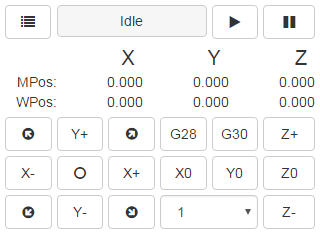
- cncjs-pendant-tinyweb - A tiny web console for small 320x240 LCD display.<br>
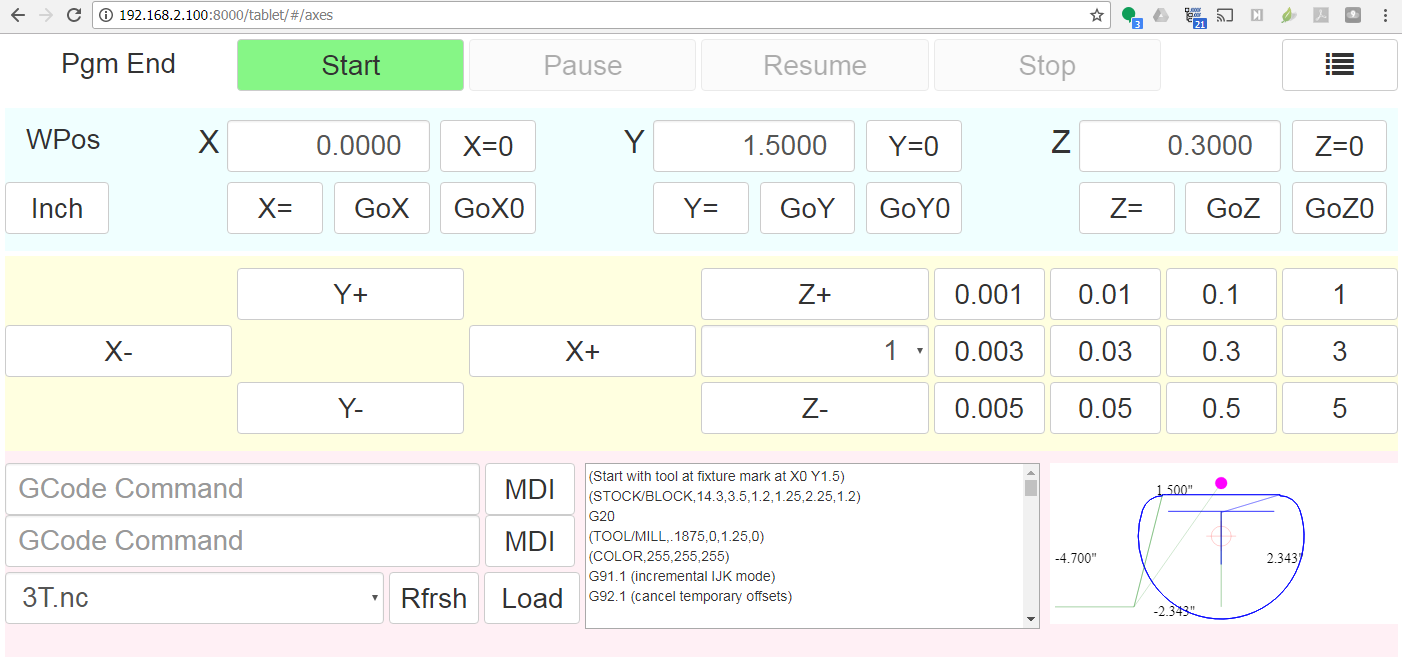
- cncjs-shopfloor-tablet - A simplified UI for cncjs optimized for tablet computers in a production (shop floor) environment.<br>
Browser Support
 <br>Chrome |
  <br>Edge |
  <br>Firefox |
  <br>IE |
  <br>Opera |
  <br>Safari
--- | --- | --- | --- | --- | --- |
Yes | Yes | Yes| Not supported | Yes | Yes |
<br>Safari
--- | --- | --- | --- | --- | --- |
Yes | Yes | Yes| Not supported | Yes | Yes |
Supported Node.js Versions
| Version | Supported Level | | :------ |:--------------- | | <= 10 | Not supported | | 12 | Supported | | >= 14 | Recommended |
Getting Started
Node.js Installation
Node.js 14 or higher is recommended. You can install Node Version Manager to manage multiple Node.js versions. If you have git installed, just clone the nvm repo, and check out the latest version:
git clone https://github.com/creationix/nvm.git ~/.nvm
cd ~/.nvm
git checkout `git describe --abbrev=0 --tags`
cd ..
. ~/.nvm/nvm.sh
Add these lines to your ~/.bash_profile, ~/.bashrc, or ~/.profile file to have it automatically sourced upon login:
export NVM_DIR="$HOME/.nvm"
[ -s "$NVM_DIR/nvm.sh" ] && . "$NVM_DIR/nvm.sh" # This loads nvm
Once installed, you can select Node.js versions with:
nvm install 14
nvm use 14
It's also recommended that you upgrade npm to the latest version. To upgrade, run:
npm install npm@latest -g
Installation
Install cncjs as a non-root user, or the serialport module may not install correctly on some platforms like Raspberry Pi.
npm install -g cncjs
If you're going to use sudo or root to install cncjs, you need to specify the --unsafe-perm option to run npm as the root account.
sudo npm install --unsafe-perm -g cncjs
Check out https://github.com/cncjs/cncjs/wiki/Installation for other installation methods.
Upgrade
Run npm install -g cncjs@latest to install the latest version. To determine the version, use cncjs --version.
Usage
Run cncjs to start the server, and visit http://yourhostname:8000/ to view the web interface. Pass --help to cncjs for more options.
pi@rpi3$ cncjs -h

  Usage: cncjs [options]


  Options:

    --version                       output the version number
    -p, --port <port>                   Set listen port (default: 8000)
    -H, --host <host>                   Set listen address or hostname (default: 0.0.0.0)
    -b, --backlog <backlog>             Set listen backlog (default: 511)
    -c, --config <filename>             Set config file (default: ~/.cncrc)
    -v, --verbose                       Increase the verbosity level (-v, -vv, -vvv)
    -m, --mount <route-path>:<target>   Add a mount point for serving static files
    -w, --watch-directory <path>        Watch a directory for changes
    --access-token-lifetime <lifetime>  Access token lifetime in seconds or a time span string (default: 30d)
    --allow-remote-access               Allow remote access to the server (default: false)
    --controller <type>                 Specify CNC controller: Grbl|Marlin|Smoothie|TinyG|g2core (default: '')
    -h, --help                          output usage information

  Examples:

    $ cncjs -vv
    $ cncjs --mount /pendant:/home/pi/tinyweb
    $ cncjs --mount /widget:~+/widget --mount /pendant:~/pendant
    $ cncjs --mount /widget:https://cncjs.github.io/cncjs-widget-boilerplate/v1/
    $ cncjs --watch-directory /home/pi/watch
    $ cncjs --access-token-lifetime 60d  # e.g. 3600, 30m, 12h, 30d
    $ cncjs --allow-remote-access
    $ cncjs --controller Grbl
Instead of passing command line options for --watch-directory, --access-token-lifetime, --allow-remote-access, and --controller, you can create a ~/.cncrc file that contains the following configuration in JSON format:
{
    "mountPoints": [
        {
            "route": "/pendant",
            "target": "/home/pi/tinyweb"
        },
        {
            "route": "/widget",
            "target": "https://cncjs.github.io/cncjs-widget-boilerplate/v1/"
        }
    ],
    "watchDirectory": "/path/to/dir",
    "accessTokenLifetime": "30d",
    "allowRemoteAccess": false,
    "controller": ""
}
To troubleshoot issues, run:
cncjs -vvv
Configuration File
The configuration file <b>.cncrc</b> contains settings that are equivalent to the cncjs command-line options. The configuration file is stored in user's home directory. To find out the actual location of the home directory, do the following:
-
Linux/Mac
echo $HOME -
Windows
echo %USERPROFILE%
Check out an example configuration file here.
File Format
See https://github.com/cncjs/cncjs/issues/242#issuecomment-352294549 for a detailed explanation.
{
  "ports": [
     {
       "path": "/dev/ttyAMA0",
       "manufacturer": ""
     }
  ],
  "baudrat
Related Skills
node-connect
339.3kDiagnose OpenClaw node connection and pairing failures for Android, iOS, and macOS companion apps
frontend-design
83.9kCreate distinctive, production-grade frontend interfaces with high design quality. Use this skill when the user asks to build web components, pages, or applications. Generates creative, polished code that avoids generic AI aesthetics.
openai-whisper-api
339.3kTranscribe audio via OpenAI Audio Transcriptions API (Whisper).
commit-push-pr
83.9kCommit, push, and open a PR

![[1]](https://cloud.githubusercontent.com/assets/447801/15633749/b817cd4a-25e7-11e6-9beb-600c65ea1324.PNG)
![[2]](https://cloud.githubusercontent.com/assets/447801/15633750/b819b5f6-25e7-11e6-8bfe-d3e6247e443b.PNG)