
Cheat.sh
the only cheat sheet you need
Install / Use
/learn @chubin/Cheat.shREADME
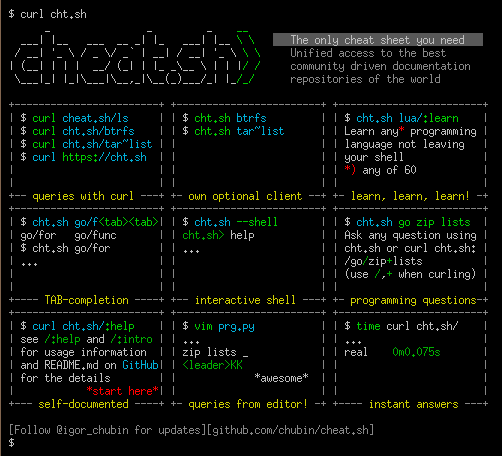
Unified access to the best community driven cheat sheets repositories of the world.
Let's imagine for a moment that there is such a thing as an ideal cheat sheet. What should it look like? What features should it have?
- Concise — It should only contain the things you need, and nothing else.
- Fast — It should be possible to use it instantly.
- Comprehensive — It should contain answers for every possible question.
- Universal — It should be available everywhere, anytime, without any preparations.
- Unobtrusive — It should not distract you from your main task.
- Tutoring — It should help you to learn the subject.
- Inconspicuous — It should be possible to use it completely unnoticed.
Such a thing exists! It's easy to install and there's even auto-complete.
Features
cheat.sh
- Has a simple curl/browser/editor interface.
- Covers 56 programming languages, several DBMSes, and more than 1000 most important UNIX/Linux commands.
- Provides access to the best community driven cheat sheets repositories in the world, on par with StackOverflow.
- Available everywhere, no installation needed, but can be installed for offline usage.
- Ultrafast, returns answers within 100 ms, as a rule.
- Has a convenient command line client,
cht.sh, that is very advantageous and helpful, though not mandatory. - Can be used directly from code editors, without opening a browser and not switching your mental context.
- Supports a special stealth mode where it can be used fully invisibly without ever touching a key and making sounds.
Contents
- Features
- Usage
- Command line client, cht.sh
- Self-Hosting
- Editors integration
- Special pages
- Search
- Programming languages cheat sheets
- Cheat sheets sources
- How to contribute
Usage
To get a cheat sheet for a UNIX/Linux command from a command line, query the service using curl or any other HTTP/HTTPS client
specifying the name of the command in the query:
    curl cheat.sh/tar
    curl cht.sh/curl
    curl https://cheat.sh/rsync
    curl https://cht.sh/tr
As you can see, you can use both HTTPS and HTTP to access the service, and both the long (cheat.sh) and the short (cht.sh) service names.
Here tar, curl, rsync, and tr are names of the UNIX/Linux commands you want to get cheat sheets for.
If you don't know the name of the command you need, you can search for it using the ~KEYWORD notation.
For example, to see how you can make snapshots of a filesystem/volume/something else:
curl cht.sh/~snapshot
The programming language cheat sheets are located in special namespaces dedicated to them.
    curl cht.sh/go/Pointers
    curl cht.sh/scala/Functions
    curl cht.sh/python/lambda
To get the list of available programming language cheat sheets, use the special query :list:
curl cht.sh/go/:list
Almost each programming language has a special page named :learn
that describes the language basics (that's a direct mapping from the "Learn X in Y" project).
It could be a good starting point if you've just started learning a language.
If there is no cheat sheet for a programming language query (and it is almost always the case), it is generated on the fly, based on available cheat sheets and answers on StackOverflow. Of course, there is no guarantee that the returned cheat sheet will be a 100% hit, but it is almost always exactly what you are looking for.
Try these (and your own) queries to get the impression of that, what the answers look like:
    curl cht.sh/go/reverse+a+list
    curl cht.sh/python/random+list+elements
    curl cht.sh/js/parse+json
    curl cht.sh/lua/merge+tables
    curl cht.sh/clojure/variadic+function
If you don't like an answer for your queries, you can pick another one. For that, repeat the query with an additional parameter /1, /2 etc. appended:
    curl cht.sh/python/random+string
    curl cht.sh/python/random+string/1
    curl cht.sh/python/random+string/2
Cheat sheets are formatted as code of the queried programming language (at least we are trying our best to do so) so they can be pasted into a program in this language directly. Text comments, if there are any, are formatted according to the language syntax.
    $ curl cht.sh/lua/table+keys
    -- lua: retrieve list of keys in a table

    local keyset={}
    local n=0

    for k,v in pairs(tab) do
      n=n+1
      keyset[n]=k
    end

    --[[
       [ Note that you cannot guarantee any order in keyset. If you want the
       [ keys in sorted order, then sort keyset with table.sort(keyset).
       [
       [ [lhf] [so/q/12674345] [cc by-sa 3.0]
       ]]
If you don't need text comments in the answer, you can eliminate them
using a special option \?Q:
    $ curl cht.sh/lua/table+keys\?Q
    local keyset={}
    local n=0

    for k,v in pairs(tab) do
      n=n+1
      keyset[n]=k
    end
And if you don't need syntax highlighting, switch it off using \?T.
You can combine the options together:
    curl cht.sh/go/reverse+a+list\?Q
    curl cht.sh/python/random+list+elements\?Q
    curl cht.sh/js/parse+json\?Q
    curl cht.sh/lua/merge+tables\?QT
    curl cht.sh/clojure/variadic+function\?QT
Full list of all options described below and in /:help.
Try your own queries. Follow these rules:
- Try to be more specific (
/python/append+fileis better than/python/fileand/python/append). - Ask practical question if possible (yet theoretical question are possible too).
- Ask programming language questions only; specify the name of the programming language as the section name.
- Separate words with
+instead of spaces. - Do not use special characters, they are ignored anyway.
- If you want to eliminate cheat sheets containing some word, add it to the query with
+-:python/multiply+matrices+-numpy
Read more about the programming languages queries below.
Command line client, cht.sh
The cheat.sh service has its own command line client (cht.sh) that
has several useful features compared to querying the service directly with curl:
- Special shell mode with a persistent queries context and readline support.
- Queries history.
- Clipboard integration.
- Tab completion support for shells (bash, fish, zsh).
- Stealth mode.
Installation
To install the client:
PATH_DIR="$HOME/bin"  # or another directory on your $PATH
mkdir -p "$PATH_DIR"
curl https://cht.sh/:cht.sh > "$PATH_DIR/cht.sh"
chmod +x "$PATH_DIR/cht.sh"
or to install it globally (for all users):
curl -s https://cht.sh/:cht.sh | sudo tee /usr/local/bin/cht.sh && sudo chmod +x /usr/local/bin/cht.sh
Note: The package "rlwrap" is a required dependency to run in shell mode. Install this using sudo apt install rlwrap
Client usage
Now, you can use cht.sh instead of curl, and write your queries in more natural way,
with spaces instead of +:
    $ cht.sh go reverse a list
    $ cht.sh python random list elements
    $ cht.sh js parse json
It is even more convenient to start the client in a special shell mode:
    $ cht.sh --shell
    cht.sh> go reverse a list
If all your queries are about the same language, you can change the context and spare repeating the programming language name:
    $ cht.sh --shell
    cht.sh> cd go
    cht.sh/go> reverse a list
or even start the client in this context:
    $ cht.sh --shell go
    cht.sh/go> reverse a list
    ...
    cht.sh/go> join a list
    ...
If you want to change the context, you can do it with the cd command,
or if you want do a single query for some other language, just prepend it with /:
    $ cht.sh --shell go
    ...
    cht.sh/go> /python dictionary comprehension
    ...
If you want to copy the last answer into the clipboard, you can
use the c (copy) command, or C (ccopy, without comments).
    cht.sh/python> append file
    #  python - How do you append to a file?

    with open("test.txt", "a") as myfile:
        myfile.write("appended text")
    cht.sh/python> C
    copy: 2 lines copied to the selection
Type help for other internal cht.sh commands.
	cht.sh> help
	help    - show this help
	hush    - do not show the 'help' string at start anymore
	cd LANG - change the language context
	copy    - copy the last answer in the clipboard (aliases: yank, y, c)
	ccopy   - copy the last answer w/o comments (cut comments; aliases: cc, Y, C)
	exit    - exit the cheat shell (aliases: quit, ^D)
	id [ID] - set/show an unique session id ("reset" to reset, "remove" to remove)
	stealth - stealth mode (automatic queries for selected text)
	update  - self update (only if the scriptfile is writeable)
	version - show current cht.sh version
	/:help  - service help
	QUERY
Related Skills
node-connect
335.9kDiagnose OpenClaw node connection and pairing failures for Android, iOS, and macOS companion apps
prose
335.9kOpenProse VM skill pack. Activate on any `prose` command, .prose files, or OpenProse mentions; orchestrates multi-agent workflows.
frontend-design
82.7kCreate distinctive, production-grade frontend interfaces with high design quality. Use this skill when the user asks to build web components, pages, or applications. Generates creative, polished code that avoids generic AI aesthetics.
Writing Hookify Rules
82.7kThis skill should be used when the user asks to "create a hookify rule", "write a hook rule", "configure hookify", "add a hookify rule", or needs guidance on hookify rule syntax and patterns.
