
Fabricius
Fabricius is an Anki plugin that bidirectionally syncs between Roam and Anki.
Install / Use
/learn @chronologos/FabriciusREADME
Fabricius (roam-to-anki v2)
Connecting the east side of the city to Tiber Island since 62 BC, the Pons Fabricius (Fabricius Bridge) is the oldest bridge in Rome to survive to the present day. - Wikipedia
Fabricius is a Roam Research plugin that allows bidirectional sync with Anki. The goal is to have robust, fast syncing for the most common use-cases.

Disclaimer: This software is provided as-is and you are responsible for your data. While we have tested this library as far as possible, there may still be bugs. You should keep backups of both Roam and Anki data.
Getting started (Roam Depot)
Setup takes about five minutes and is totally worth it!
- Install the AnkiConnect plugin for Anki.
- Configure AnkiConnect: Go to
Anki -> Tools -> Addons -> Anki Connect -> Configand amendwebCorsOriginListto includehttps://roamresearch.com - Create an Anki note type based on Cloze named
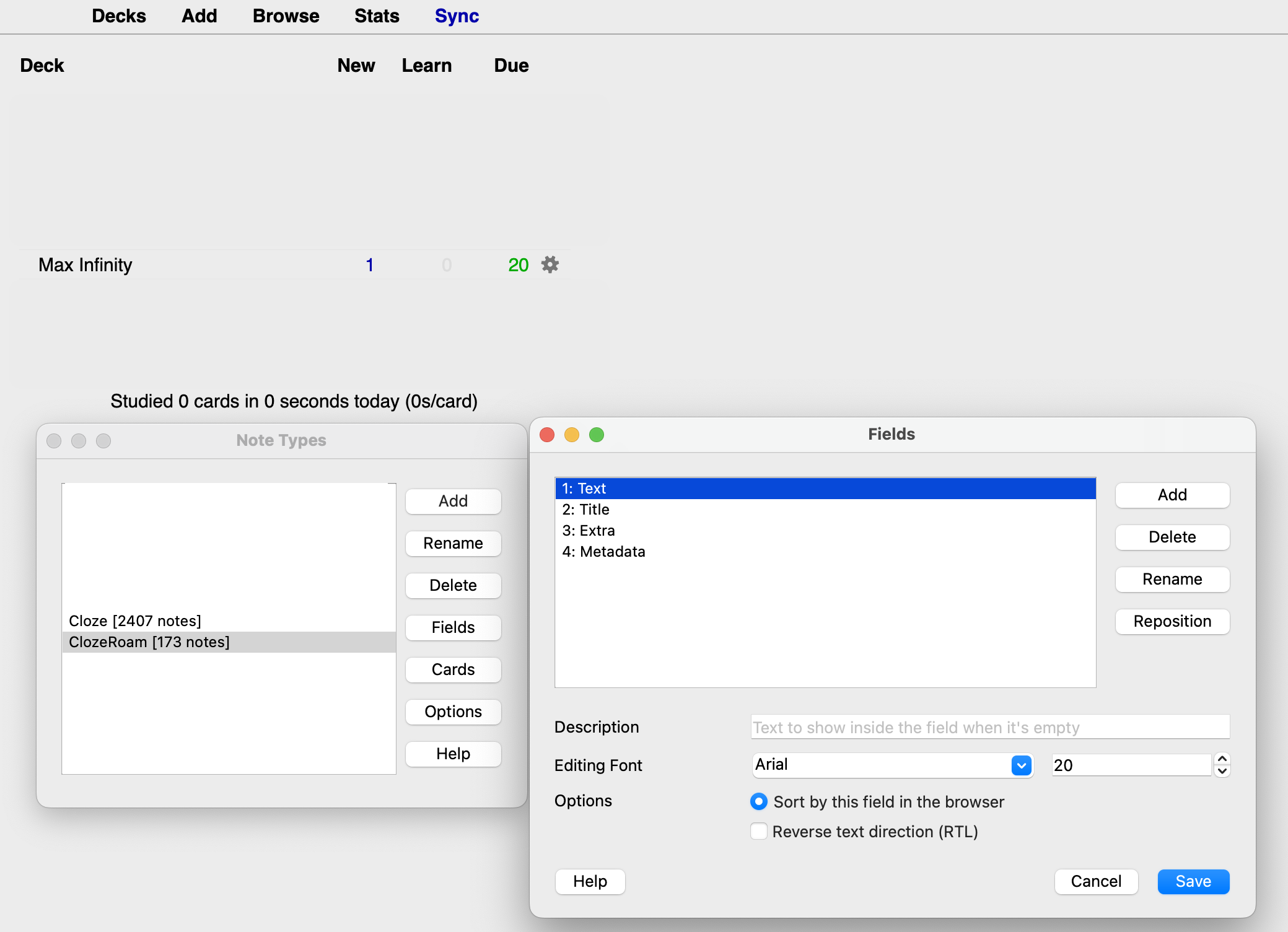
ClozeRoam. It needs to have the fieldsText,Metadata,ExtraandTitle. Upon syncing, notes will be created in a deck namedMax Infinity, which has to exist. These fields can be configured in Roam settings. - For basic flashcards, make sure you have a note type named
Basicwith fieldsFront,Back, andMetadata. This can also be configured in Roam settings. - Modify the template for the cloze note type to look something like this:
<!-- front -->
<div class='roamtitle'>{{Title}}</div>
<div id="extra">{{Extra}}</div>
{{cloze:Text}}

<!-- back -->
<div class='roamtitle'>{{Title}}</div>
<div id="extra">{{Extra}}</div>
{{cloze:Text}}
- If the extension loaded correctly, the Sync button will be on the top right. It looks like the number 8 on its side. Before clicking, make sure Anki is running.
- If cards don't sync, it's likely because Anki has been in the background for too long. Try syncing again after switching it to the foreground.
Recommended use
The recommended use is to create simple Q&A cards in Roam using the provided cloze functionality. For instance, you may be taking notes about an article or book you are reading. For each section of your notes in Roam, you could create a block for flashcards like so:
Cloze Deletion Cards
- How to cook onion soup
  - Onion soup is great...
  - Onion Soup Recipe #[[srs/cloze-g]]
    - Q: What is the cook time?
      A: {c1:20 minutes}
    - Q: How many onions should I use?
      A: {c1: 2 per person.}
  - Other tips:
    - ...
Basic Front/Back Cards
You can also create basic front/back flashcards without cloze deletion:
- Capitals of the World
  - (Front) What is the capital of England? (Back) London #[[srs/basic]]
  - (Front) What is the capital of France? (Back) Paris #[[srs/basic]]
  - (Front) What is the capital of Japan? (Back) Tokyo #[[srs/basic]]
The format is (Front) your question here (Back) your answer here #srs/basic. The tag #srs/basic is required to identify the block as a basic flashcard, but it will not appear on the actual flashcard in Anki.
Image Support
You can include images in your flashcards using standard Markdown image syntax:
- Onion Soup Recipe #[[srs/cloze-g]]
- Q: What is the cook time?
A: {c1:20 minutes}

- Q: How many onions should I use?
A: {c1: 2 per person.}
Images will be properly converted to HTML img tags in Anki and will be displayed on your flashcards. This works for both cloze deletion and basic flashcards.
Caveats and Limitations
- Don't edit the sync metadata on the Anki note.
- The Roam block UID is used to identify the corresponding note in Anki. Avoid taking actions which cause the block UID of a Roam block to change.
- You can't create a new note in Anki and sync it to Roam.
- There is no garbage collection for unused notes in Anki (yet).
- If the same uid is updated in both Roam and Anki, Roam will be taken as the source of truth.
- Changes to group tags and title tags do not cause a sync for clozes blocks underneath them. The actual cloze block must be updated.
Advanced
Single block clozes
If we have the following text in a Roam block with block id f-123:
- "In [[C]], we can have {c2:indirect references} to variables are using {c1:[[pointers]]} #srs/cloze"
we get this note in Anki with Text =
In [[C]], we can have {{c2::indirect references}} to variables using {{c1::[[pointers]]}} #srs/cloze
and Metadata = f-123.
- This assumes the default configuration of browser.js
- Note the modified cloze syntax, since Roam reserves
{{}}and::for internal use. - Please see Anki docs for more info on how a cloze note type needs to be configured (easiest is to clone the built-in Cloze note type).
Group and Title Tags - Pull in more context!
Title tags provide context for any nested blocks. Group tags augment title tags by providing extra context for a block from the closest context-providing block. The default title tag is #srs/cloze-t and syncs to the Title field. The default group tag is #srs/cloze-g and syncs to the Extra field.
So something like this in Roam:
    - Stimulants #srs/cloze-t
      - Caffeine #srs/cloze-g
          - Tastes bitter.
          - Is an {c1:adenosine} antagonist.
          - Adenosine antagonists #srs/cloze-g
            - bind to adenosine receptors with no {c1:physiological effect}.
          - Has a half-life of {c1:5} hours.
Would create 3 cloze notes.
Title: Stimulants
Text: Is an {{c1::adenosine}} antagonist.
Extra: Caffeine
Title: Stimulants
Text: Has a half-lfe of {{c1::5}} hours.
Extra: Caffeine
Title: Stimulants
Text: Bind to adenosine receptors with no {{c1::physiological effect}}.
Extra: Adenosine antagonists
Specifically, group tags work in the following way:
- Any child blocks (direct or indirect) under a block with a group tag is considered a cloze, unless there are no cloze marks
{c1:...}on it. - Clozes generated from said child blocks automatically include context from the closest parent block.
Related Skills
Writing Hookify Rules
81.7kThis skill should be used when the user asks to "create a hookify rule", "write a hook rule", "configure hookify", "add a hookify rule", or needs guidance on hookify rule syntax and patterns.
mcp-for-beginners
15.6kThis open-source curriculum introduces the fundamentals of Model Context Protocol (MCP) through real-world, cross-language examples in .NET, Java, TypeScript, JavaScript, Rust and Python. Designed for developers, it focuses on practical techniques for building modular, scalable, and secure AI workflows from session setup to service orchestration.
repomix
22.6k📦 Repomix is a powerful tool that packs your entire repository into a single, AI-friendly file. Perfect for when you need to feed your codebase to Large Language Models (LLMs) or other AI tools like Claude, ChatGPT, DeepSeek, Perplexity, Gemini, Gemma, Llama, Grok, and more.
YC-Killer
2.7kA library of enterprise-grade AI agents designed to democratize artificial intelligence and provide free, open-source alternatives to overvalued Y Combinator startups. If you are excited about democratizing AI access & AI agents, please star ⭐️ this repository and use the link in the readme to join our open source AI research team.

