
Glbinding
A C++ binding for the OpenGL API, generated using the gl.xml specification.
Install / Use
/learn @cginternals/GlbindingREADME
<br><a href="https://glbinding.org"><img src="https://raw.githubusercontent.com/cginternals/glbinding/master/glbinding-logo.svg?sanitize=true" width="50%"></a>
glbinding is a cross-platform C++ binding for the OpenGL API.







glbinding leverages C++11 features like enum classes, lambdas, and variadic templates, instead of relying on macros; all OpenGL symbols are real functions and variables. It provides type-safe parameters, per-feature API headers, lazy function resolution, multi-context and multi-thread support, global and local function callbacks, meta information about the generated OpenGL binding and the OpenGL runtime, as well as tools and examples for quick-starting your projects. Based on the OpenGL API specification (gl.xml) glbinding is generated using python scripts and templates that can be easily adapted to fit custom needs.
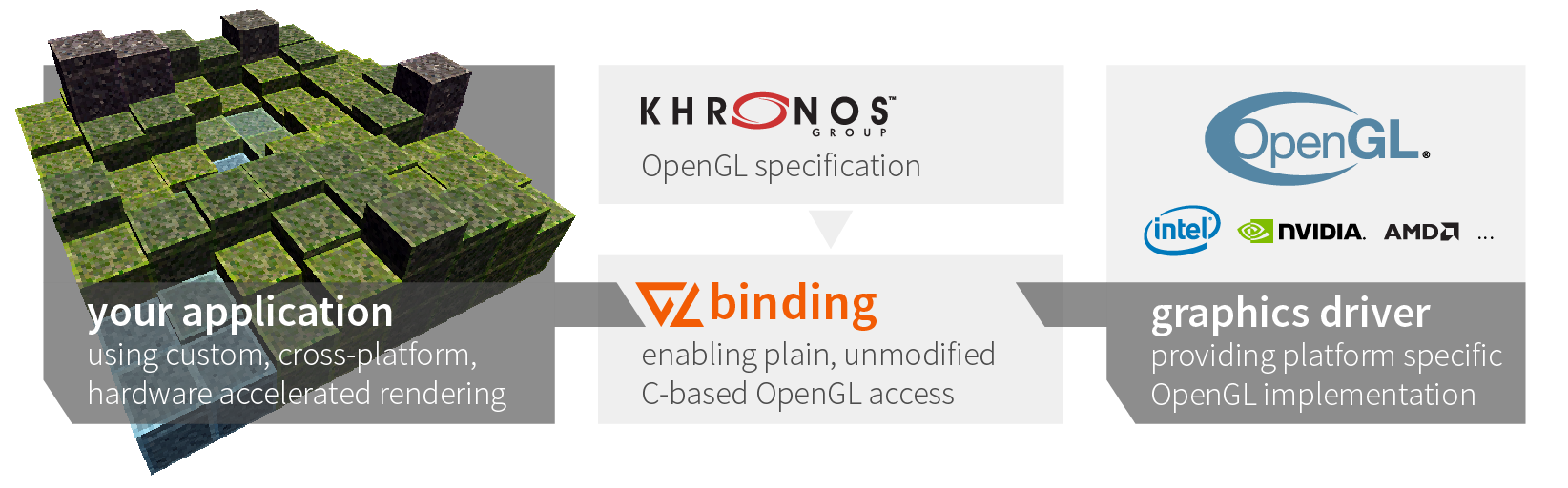
Code that is written using a typical C binding for OpenGL, e.g., GLEW, is fully compatible for the use with glbinding and causes no significant impact on runtime performance (see compare example): just replace all includes to the former binding, replace the initialization code and use the appropriate API namespace, e.g., gl for full availability of the OpenGL API.
#include <glbinding/gl/gl.h>
using namespace gl;

// ...
auto shader = glCreateShader(GL_COMPUTE_SHADER);
// ...
glbinding is compatible with OpenGL-compatible windowing toolkits and we provide example integrations for the following ones within the examples:
- GLFW OpenGL
- GTK 3 OpenGL and GTK 3 OpenGL ES (may require
GDK_GL=glesenvironment variable) - GTK 4 OpenGL and GTK 4 OpenGL ES
- Qt 5 OpenGL and Qt 5 OpenGL ES
- SDL OpenGL and SDL OpenGL ES
Resources
Installation and Development
- Install Instructions
- Build from Source
- Updating the Generated Source Code
- Tips for Linking
- Dependency on KHR Headers
- Basic Example
Feature Documentation and Code Snippets
- Type-safe Parameters
- Compilation-Centered Header Design
- Feature-Centered Header Design
- Lazy Function Resolution
- Multi-context Support
- Multi-thread Support
- Global and Local Function Callbacks
- Alternative Signatures for GLboolean and GLenum types
- Meta Information System
- Doxygen Documentations (stable, master)
Install Instructions
glbinding is available for different platforms using different distribution channels. You can either download the source and manually compile it or use one of the pre-compiled releases of this repository. For systems providing package managers, we generally strive for packages in these package managers. An overview on availability of glbinding can be found on repology.org.
Windows
The various glbinding packages can be installed either by downloading an installer, e.g., the x64 installer for glbinding v3.1.0 for Microsoft Visual Studio 2015, or downloading and extracting one of the precompiled archives, e.g. runtime, examples, dev, and tools. Since lately, glbinding is also available on vcpkg with more recent releases:
> vcpkg install glbinding
Alternatively, download the source code and commence building from source.
Ubuntu
glbinding is provided on Ubuntu using PPAs and in Ubuntu universe since Artful Aardvark. We maintain our own PPA for most recent releases. Using the current PPA as example, the following lines install glbinding including the GLFW examples:
> sudo apt-add-repository ppa:cginternals/ppa
> sudo apt-get update
> sudo apt-get install libglbinding-examples-glfw
> # start example
> /usr/share/glbinding/cubescape
To use glbinding as dependency, install the development package:
> sudo apt-get install libglbinding-dev libglbinding-dbg
Alternatively, download the source code and commence building from source.
Arch Linux
On Arch, glbinding is provided by the glbinding package in the community repository. To install glbinding execute the following line:
> sudo pacman -S glbinding
Alternatively, download the source code and commence building from source.
macOS
The package manager on macOS we depend on is homebrew. The package there is called glbinding. To install glbinding using homebrew, execute the following line:
> brew install glbinding
Alternatively, download the source code and commence building from source.
Debian-based Systems
glbinding is available for Debian 9 (Stretch), 10 (Buster), 11 (Bullseye) and Sid. Install it using apt install libglbinding-dev.
For advanced use, download the source code and commence building from source.
Cross-Platform Package Managers
As one of the cross-platform package managers, conan provides glbinding in its center index. You can use the following line to install glbinding using conan:
> conan install glbinding/3.1.0@
Build Instructions
Prerequisites and Dependencies
The only mandatory run-time dependencies of glbinding are the STL of the used compiler and an OpenGL driver library, dynamically
Related Skills
product-manager-skills
38PM skill for Claude Code, Codex, Cursor, and Windsurf: diagnose SaaS metrics, critique PRDs, plan roadmaps, run discovery, and coach PM career transitions.
devplan-mcp-server
3MCP server for generating development plans, project roadmaps, and task breakdowns for Claude Code. Turn project ideas into paint-by-numbers implementation plans.
