
Railessentials
RailEssentials is a software for controlling your Model Trains especially when ESU's ECoS 50210/50200 is used. RailEssentials provides a Track-designer, an Analyzer for automatic detection of all possible Routes between directly connected Blocks, and an Event-system (e.g. by use of S88-Feedback-Bus) for setup a fully automatic drive of all your trains. Furthermore, any Train can be manually controlled, their functions are allowed to be switched directly on and off by the user interface.
Install / Use
/learn @cbries/RailessentialsREADME
RailEssentials - MIT License



<a href="https://www.buymeacoffee.com/cbries" target="_blank"><img src="https://www.buymeacoffee.com/assets/img/custom_images/orange_img.png" alt="Buy Me A Coffee" style="height: 41px !important;width: 174px !important;box-shadow: 0px 3px 2px 0px rgba(190, 190, 190, 0.5) !important;-webkit-box-shadow: 0px 3px 2px 0px rgba(190, 190, 190, 0.5) !important;" ></a>
~~RailwayEssentials~~ is renamed to RailEssentials.
RailEssentials is a modern and intuitive software for creating and controling
model railways. Currently, the only supported control unit
is ESU's ECoS 50210/50200.
The software is based on a client-server architecture, i.e the server is the brain and bridge between the control unit
and any conntected webclient. The server is written in C# and .NET Framework and the client is written in JavaScript/TypeScript and can be
used in Chrome, Firefox,
and Vivaldi.
Table of Contents
- Tutorial: Welcome / First Steps
- Daily/Nightly Builds
- Releases
- Who is Using It?
- Contribute
- Book
- Features
- Visual Impressions
- Wiki/Documentation
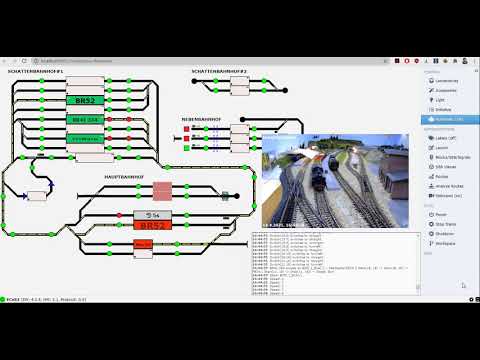
Demonstration of RailEssentials (i.e. YouTube video, no sound)
I have created a small video of my modelrailway in my basement to demonstrate that RailEssentials just work. Just click the preview to jump directly to YouTube.
Tutorial: Welcome / First Steps
For making your first steps easier with RailEssentials, a welcome tutorial has been provided.
It is part of the Wiki Page
<br>Daily/Nightly Builds
Setup/Installer
RailEssentials is automatically build everyday. During this build an always up-to-date Setup/Installer is generated and can be used to deploy the latest features on your personal computer. Currently, only Windows is supported, for other operating system the source must be used and build. The latest setup/installer is provided under the Releasetab: Daily Setup
- download the Setup of your choice (e.g.
Setup-20210322-4d9eb4.exe, where20210322stands for 22nd March 2021) - doubleblick the Setup and follow the instructions

Portable Zip-Archives
RailEssentials is automatically build everyday. The always latest version is provided under the Release tab: Daily Build
- download the archive
railessentials-dailybuild-*.zip - after unzip just call the included script
startRailEssentials.bat
As default the workspace Basement is loaded and provided and can be used directly in simulation mode.
![Locomotives2]
<br>Releases
We do not provide any official releases yet, because the software is still under development, but we provide a Daily Build. In January'21 the RailEssentials team decided to do a full rewrite. To use this software, checkout the source, and just click "Build and Run (F5)" in VisualStudio.
Contribute
Quick Start for Developer
- install
VisualStudio 2019or the old variantVisualStudio 2017 - clone the RailEssentials repository
git clone https://github.com/cbries/railessentials.gitor download the latest archive master.zip - open the solution
railessentials.sln - set
railessentialsas Startup Project - click
F5or callVisualStudio Toolbar / Debug / Start Debugging
As a result the software will build and all relevant files are copied to the Output Directory, in general this is railessentials \ bin \ Debug|Release. railessentials.exe will be executed, a command prompt opens and shows some status information. If not browser opens automatially, go to your browser and open http://localhost:8081/?workspace=Basement.
Finally, you should see something like this:

System Requirements
- Windows 10
- .NET Framework 4.8 or higher
Chrome,FirefoxorVivaldi
Bug Tracking
Have a bug or a feature request? Please open an issue here https://github.com/cbries/railessentials/issues. Please make sure that the same issue was not previously submitted by someone else.
Third-Party Components at Their Best
w2uiJavaScript UI Library for the Modern WebWebSocket4NetA popular .NET WebSocket ClientSuperSocketSuperSocket is a light weight extensible socket application framework.NewtonsoftPopular high-performance JSON framework for .NETjQueryjQuery is a fast, small, and feature-rich JavaScript library.jQuery colorpickerA full-featured colorpicker for jQueryUI with full theming support.jQuery BoxfitBoxfit is a jQuery plugin for resizing text.Contextual.jsJavascript contextual menu libraryselect2Select2 is a jQuery based replacement for select boxes. It supports searching, remote data sets, and infinite scrolling of results.FontAwesomeGet vector icons and social logos on your website with Font Awesome, the web's most popular icon set and toolkit.emgucvA cross platform .Net wrapper for the Open CV image-processing library.
Book
In the late of 2018 I wrote a book about programming the ESU's ECoS 50210.

- ISBN: 978-1-790-36403-9
- ASIN (Kindle): B07L4Z4MYL
The book introduces the basics of managing commands for remote control of your model railway by use of C# and .NET Framework/.net Core. The included examples and API information are all used in ecos, a software library hosted on GitHub which is completly used by RailEssentials (with few improvements and bug fixes). The source is completly merged into RailEssentials, i.e. check out the subdirectory ecoslibNet48.
Features
Ui
- Modern Web Frontend based on HTML5, JavaScript, Websocket-Communication
- Frontend UI usable with Chrome, Firefox, Vivaldi, Edge on any device
- Server-based architecture (currently the server is only running on Windows)
- WebCam/Video support included by default for monitoring hidden yards (i.e. includes stream server and web viewer) Wiki
- Import of Rocrail plans Wiki
- Workspace support, to switch between different plan at any time
- Track Designer based on modern web technology
- Toolbox-support with drag&drop
- Plan Item transformation directly by single clicks (i.e. move, rotate, remove)
- Text Item support (i.e. bold, italic, underline, font size, font color)
- Labels for Plan Items
- Accessory can be changed directly by clicking the individual plan item at any time
- Output/Button grouping Wiki
- Report for Locomotives, Accessories, and Sensors Wiki, Issue #9
Routing
- Block-based automatic mode, any train/locomotive can be controlled by a smart algorithmen and can travel between blocks without crossing routes
- Accessory state change during AutoMode for individual routes Wiki
- Route detection between blocks, any feasible route will be found and provided for your individual setup
- Routes with direction are recognized
- Route disabling/enabling on-demand
- Block disabling/enabling on-demand
Feedback
- S88 Viewer
Locomotives
- Locomotive lock/unlock
- Locomotive direct control via mouse over controls in the plan
- Locomotive speed curve editor (i.e. individual acceleration/deceleration)
- Locomotive image visualization [Wiki](https://gi
Related Skills
imsg
344.4kiMessage/SMS CLI for listing chats, history, and sending messages via Messages.app.
oracle
344.4kBest practices for using the oracle CLI (prompt + file bundling, engines, sessions, and file attachment patterns).
lobster
344.4kLobster Lobster executes multi-step workflows with approval checkpoints. Use it when: - User wants a repeatable automation (triage, monitor, sync) - Actions need human approval before executing (s
Hook Development
99.2kThis skill should be used when the user asks to "create a hook", "add a PreToolUse/PostToolUse/Stop hook", "validate tool use", "implement prompt-based hooks", "use ${CLAUDE_PLUGIN_ROOT}", "set up event-driven automation", "block dangerous commands", or mentions hook events (PreToolUse, PostToolUse, Stop, SubagentStop, SessionStart, SessionEnd, UserPromptSubmit, PreCompact, Notification). Provides comprehensive guidance for creating and implementing Claude Code plugin hooks with focus on advanced prompt-based hooks API.
