
SynapseXUI
A custom Synapse X user interface, made by CasperTheGhost#3549
Install / Use
/learn @casperb123/SynapseXUIREADME
DISCOUNTINUED
Table of Contents
About
A custom Synapse X user interface with the following features:
- Everything from the official UI
- Update checker/notifier
- Draggable script tabs (reorder)
- Renamable tabs and scripts
- Resizable scripts list
- Folder support for scripts list
- Both dark and light theme
- Lots of color options
- More context menu options
- Custom message/prompt window
- Roblox Scripts Hub
- Kill Roblox
- Reinstall Roblox
Any virus results are false positives, it's because of sxlib.dll and SLInjector.dll (which is a part of Synapse X)
Installation
-
Launch the official application first to make sure you have the latest sxlib
-
Make sure that you have .NET Framework 4.8 Runtime or newer installed
-
Go to the latest release and download SynapseXUI.zip
-
Extract everything into your Synapse X folder
-
Make sure your Synapse X folder contains these folders and files:
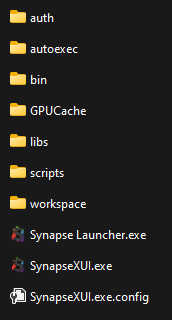
-
Run SynapseXUI.exe and the UI should open
-
Join a game, click the Attach button and have fun
Screenshots


Known bugs
- If the application crashes while loading i sadly can't do anything about it as it's because sxlib is unstable
- Sometimes you will repeatedly get an error message saying that you need to attach Synapse X before executing a script. Right now I'm not sure if it's a sxlib problem or if it's a problem with my ui
- Auto attach is not currently working
Credits
- CasperTheGhost#3549
- Synapse X developers (sxlib)
- Stack Overflow for helping with errors
