
Just
🤖 Just a command runner
Install / Use
/learn @casey/JustREADME
just is a handy way to save and run project-specific commands.
This readme is also available as a book. The book reflects the latest release, whereas the readme on GitHub reflects latest master.
(中文文档在 这里, 快看过来!)
Commands, called recipes, are stored in a file called justfile with syntax
inspired by make:
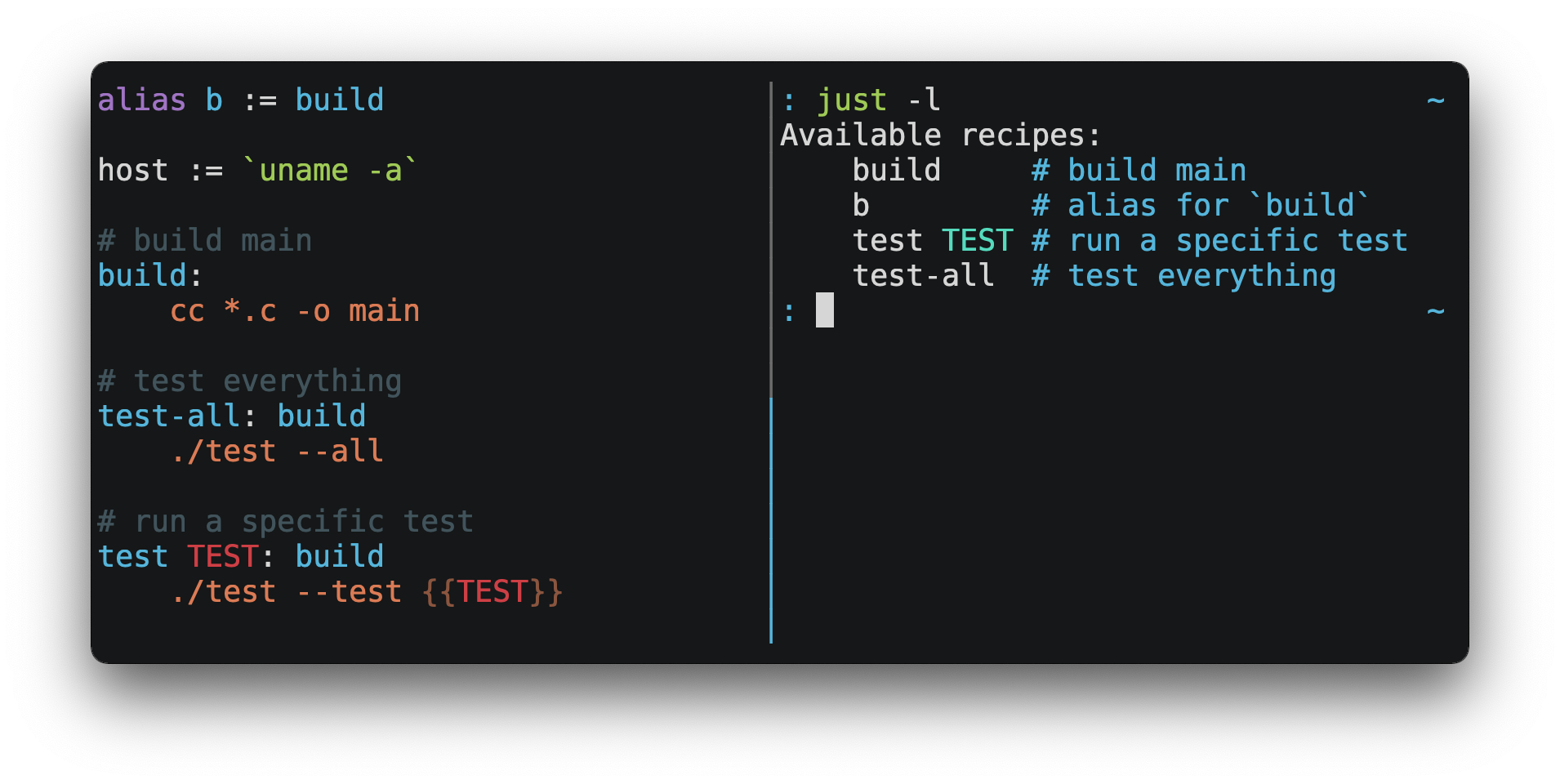
You can then run them with just RECIPE:
$ just test-all
cc *.c -o main
./test --all
Yay, all your tests passed!
just has a ton of useful features, and many improvements over make:
-
justis a command runner, not a build system, so it avoids much ofmake's complexity and idiosyncrasies. No need for.PHONYrecipes! -
Linux, MacOS, Windows, and other reasonable unices are supported with no additional dependencies. (Although if your system doesn't have an
sh, you'll need to choose a different shell.) -
Errors are specific and informative, and syntax errors are reported along with their source context.
-
Recipes can accept command line arguments.
-
Wherever possible, errors are resolved statically. Unknown recipes and circular dependencies are reported before anything runs.
-
justloads.envfiles, making it easy to populate environment variables. -
Recipes can be listed from the command line.
-
Command line completion scripts are available for most popular shells.
-
Recipes can be written in arbitrary languages, like Python or NodeJS.
-
justcan be invoked from any subdirectory, not just the directory that contains thejustfile. -
And much more!
If you need help with just please feel free to open an issue or ping me on
Discord. Feature requests and bug reports are
always welcome!
Installation
Just can be installed using your favorite package manager, by
downloading pre-built binaries, or building from source
with cargo install just.
Prerequisites
just should run on any system with a reasonable sh, including Linux, MacOS,
and the BSDs.
Windows
On Windows, just works with the sh provided by
Git for Windows,
GitHub Desktop, or
Cygwin. After installation, sh must be available in
the PATH of the shell you want to invoke just from.
If you'd rather not install sh, you can use the shell setting to use the
shell of your choice.
Like PowerShell:
# use PowerShell instead of sh:
set shell := ["powershell.exe", "-c"]

hello:
  Write-Host "Hello, world!"
…or cmd.exe:
# use cmd.exe instead of sh:
set shell := ["cmd.exe", "/c"]

list:
  dir
You can also set the shell using command-line arguments. For example, to use
PowerShell, launch just with --shell powershell.exe --shell-arg -c.
(PowerShell is installed by default on Windows 7 SP1 and Windows Server 2008 R2
S1 and later, and cmd.exe is quite fiddly, so PowerShell is recommended for
most Windows users.)
Packages
Cross-platform
<table> <thead> <tr> <th>Package Manager</th> <th>Package</th> <th>Command</th> </tr> </thead> <tbody> <tr> <td><a href=https://github.com/alexellis/arkade>arkade</a></td> <td>just</td> <td><code>arkade get just</code></td> </tr> <tr> <td><a href=https://asdf-vm.com>asdf</a></td> <td><a href=https://github.com/olofvndrhr/asdf-just>just</a></td> <td> <code>asdf plugin add just</code><br> <code>asdf install just <version></code> </td> </tr> <tr> <td><a href=https://www.rust-lang.org>Cargo</a></td> <td><a href=https://crates.io/crates/just>just</a></td> <td><code>cargo install just</code></td> </tr> <tr> <td><a href=https://github.com/cargo-bins/cargo-binstall>Cargo Binstall</a></td> <td><a href=https://crates.io/crates/just>just</a></td> <td><code>cargo binstall just</code></td> </tr> <tr> <td><a href=https://docs.conda.io/projects/conda/en/latest/index.html>Conda</a></td> <td><a href=https://anaconda.org/conda-forge/just>just</a></td> <td><code>conda install -c conda-forge just</code></td> </tr> <tr> <td><a href=https://brew.sh>Homebrew</a></td> <td><a href=https://formulae.brew.sh/formula/just>just</a></td> <td><code>brew install just</code></td> </tr> <tr> <td><a href=https://nixos.org/nix/>Nix</a></td> <td><a href=https://github.com/NixOS/nixpkgs/blob/master/pkgs/by-name/ju/just/package.nix>just</a></td> <td><code>nix-env -iA nixpkgs.just</code></td> </tr> <tr> <td><a href=https://www.npmjs.com/>npm</a></td> <td><a href=https://www.npmjs.com/package/rust-just>rust-just</a></td> <td><code>npm install -g rust-just</code></td> </tr> <tr> <td><a href=https://pipx.pypa.io/stable/>pipx</a></td> <td><a href=https://pypi.org/project/rust-just/>rust-just</a></td> <td><code>pipx install rust-just</code></td> </tr> <tr> <td><a href=https://snapcraft.io>Snap</a></td> <td><a href=https://snapcraft.io/just>just</a></td> <td><code>snap install --edge --classic just</code></td> </tr> <tr> <td><a href=https://docs.astral.sh/uv/>uv</a></td> <td><a href=https://pypi.org/project/rust-just/>rust-just</a></td> <td><code>uv tool install rust-just</code></td> </tr> </tbody> </table>BSD
<table> <thead> <tr> <th>Operating System</th> <th>Package Manager</th> <th>Package</th> <th>Command</th> </tr> </thead> <tbody> <tr> <td><a href=https://www.freebsd.org>FreeBSD</a></td> <td><a href=https://www.freebsd.org/doc/handbook/pkgng-intro.html>pkg</a></td> <td><a href=https://www.freshports.org/deskutils/just/>just</a></td> <td><code>pkg install just</code></td> </tr> <tr> <td><a href=https://www.openbsd.org>OpenBSD</a></td> <td><a href=https://www.openbsd.org/faq/faq15.html>pkg_*</a></td> <td><a href=https://cvsweb.openbsd.org/cgi-bin/cvsweb/ports/sysutils/just>just</a></td> <td><code>pkg_add just</code></td> </tr> </tbody> </table>Linux
<table> <thead> <tr> <th>Operating System</th> <th>Package Manager</th> <th>Package</th> <th>Command</th> </tr> </thead> <tbody> <tr> <td><a href=https://alpinelinux.org>Alpine</a></td> <td><a href=https://wiki.alpinelinux.org/wiki/Alpine_Linux_package_management>apk-tools</a></td> <td><a href=https://pkgs.alpinelinux.org/package/edge/community/x86_64/just>just</a></td> <td><code>apk add just</code></td> </tr> <tr> <td><a href=https://www.archlinux.org>Arch</a></td> <td><a href=https://wiki.archlinux.org/title/Pacman>pacman</a></td> <td><a href=https://archlinux.org/packages/extra/x86_64/just/>just</a></td> <td><code>pacman -S just</code></td> </tr> <tr> <td> <a href=https://debian.org>Debian 13</a> and <a href=https://ubuntu.com>Ubuntu 24.04</a> derivatives</td> <td><a href=https://en.wikipedia.org/wiki/APT_(software)>apt</a></td> <td><a href=https://packages.debian.org/trixie/just>just</a></td> <td><code>apt install just</code></td> </tr> <tr> <td><a href=https://getfedora.org>Fedora</a></td> <td><a href=https://dnf.readthedocs.io/en/latest/>DNF</a></td> <td><a href=https://src.fedoraproject.org/rpms/rust-just>just</a></td> <td><code>dnf install just</code></td> </tr> <tr> <td><a href=https://www.gentoo.org>Gentoo</a></td> <td><a href=https://wiki.gentoo.org/wiki/Portage>Portage</a></td> <td><a href=https://packages.gentoo.org/packages/dev-build/just>dev-build/just</a></td> <td> <code>emerge -av dev-build/just</code> </td> </tr> <tr> <td><a href=https://nixos.org/nixos/>NixOS</a></td> <td><a href=https://nixos.org/nix/>Nix</a></td> <td><a href=https://github.com/NixOS/nixpkgs/blob/master/pkgs/by-name/ju/just/package.nix>just</a></td> <td><code>nix-env -iA nixos.just</code></td> </tr> <tr> <td><a href=https://opensuse.org>openSUSE</a></td> <td><a href=https://en.opensuse.org/Portal:Zypper>Zypper</a></td> <td><a href=https://build.opensuse.org/package/show/Base:System/just>just</a></td> <td><code>zypper in just</code></td> </tr> <tr> <td><a href=https://getsol.us>Solus</a></td> <td><a href=https://getsol.us/articles/package-management/basics/en>eopkg</a></td> <td><a href=Related Skills
node-connect
347.2kDiagnose OpenClaw node connection and pairing failures for Android, iOS, and macOS companion apps
frontend-design
108.0kCreate distinctive, production-grade frontend interfaces with high design quality. Use this skill when the user asks to build web components, pages, or applications. Generates creative, polished code that avoids generic AI aesthetics.
openai-whisper-api
347.2kTranscribe audio via OpenAI Audio Transcriptions API (Whisper).
qqbot-media
347.2kQQBot 富媒体收发能力。使用 <qqmedia> 标签,系统根据文件扩展名自动识别类型(图片/语音/视频/文件)。
