
Zermelo
PHP/MySQL Reporting Engine designed for Laravel
Install / Use
/learn @caresetjournal/ZermeloREADME
Zermelo Reporting Engine
A PHP reporting engine that works especially well with Laravel, built with love at CareSet Systems
Reporting Approach
The basic idea in Zermelo is to let report authors think exclusively in SQL SELECT statements, and to allow Zermelo to handle the translation of the data that results from queries into complex and rich web interfaces. There are plenty of good tools available to help build SELECT statements, and there are thousands of excellent resources available to learn how to use the SELECT query functions in SQL. And if you know how to use SQL SELECT statements, then with Zermelo, you can automatically create complex and interactive web-based reports.
Generally, this happens using the ability of SQL to have aliases for the output of specific variables. For most of the reporting engines, you can have one or many SQL queries that output into specific aliased columns that Zermelo understands. And then the reporting engine will automatically populate a web-based data view with the data output. For instance, the card-based layout engine allows you to populate rows of data into BootStrap Cards. Almost every portion of the Bootstrap Card can be populated by using column names that correspond to the css classes supported inside the bootstrap card component.
The exception to this approach is the tabular data viewer. Here, you can output anything you want from your SELECT statement and Zermelo will do its best to create a online auto-paging tabular view of your data using the DataTables javascript project.
Core Reporting features
- Write SQL, automatically get a web-based report
- Decorate each row in the report with links, buttons, JS and other bootstrap-based HTML goodness.
- Control the entire web report using a single PHP file, which contains SQL and web interface decorations.
- GET/POST/JSON/URL parameters are all available as local functions/variables in the single file. This allows the SQL to be heavily modified based on the paramaters passed in to the specific report url.
- Automatically support server side data paging, allows engine to report against very large databases
- Any report data can be downloaded in CSV file(s)
- Report automatically generates JSON data source that can be used as an API
- Supports Laravel's Blade templating engine out of the box (with more effort supports any front end templating engine).
We have a feature roadmap if you want to see where we are going and an extended list of Zermello Reporting features.
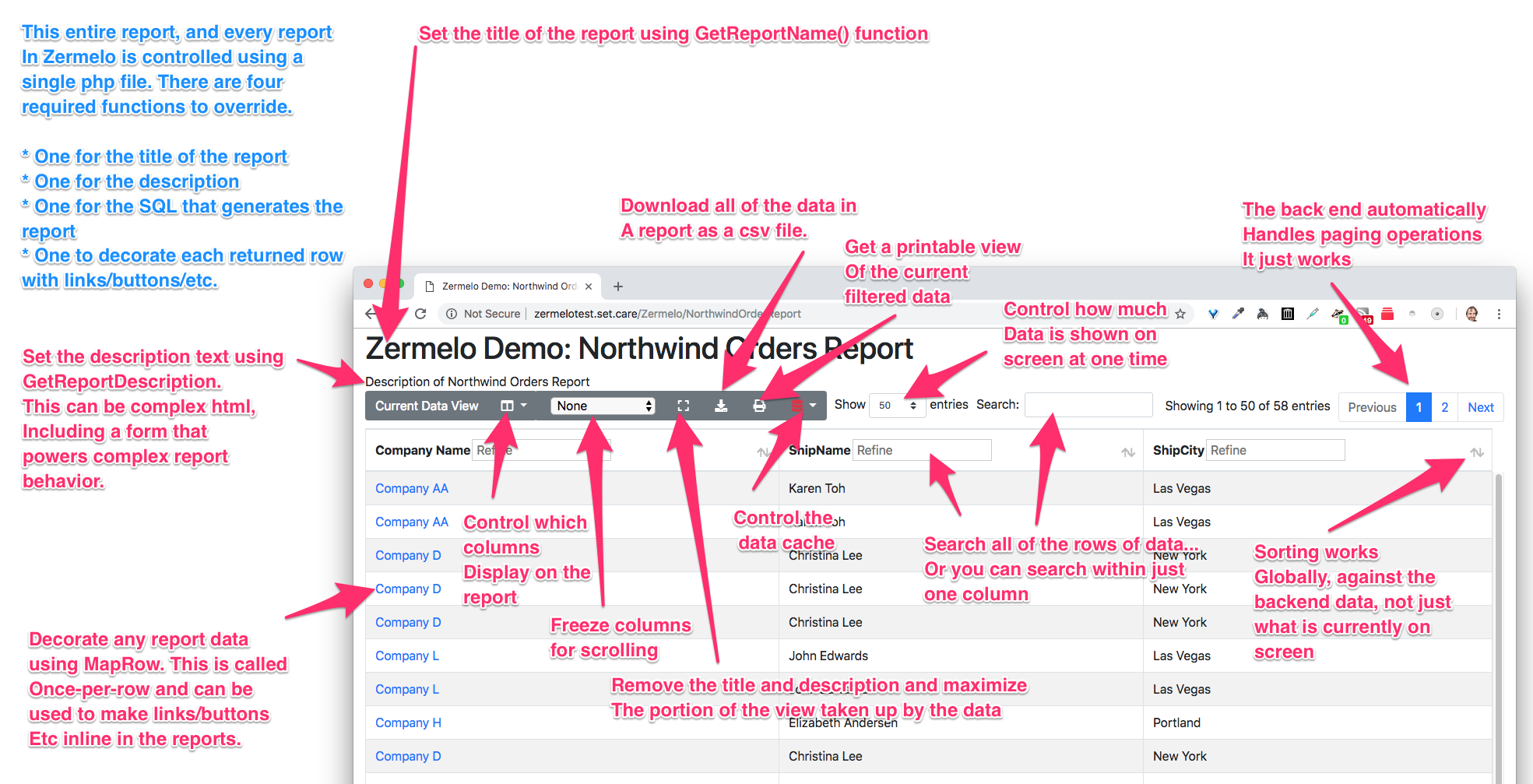
ScreenShot that explains everything
Architecture
Read the Architecture diagram Zermelo is doing the hard work of translating "mere SQL" into something that can consistently and with minimal impact on performance be loaded into a single browser session. Zermelo understands how to push the hard work to the MariaDB/MySQL server, ensuring that the browser gets its data in dribbles. The backend is having to do a huge amount of work in order make that happen.
Some queries will legitimately take hours for the backend to run, even when the resulting data is only a few hundred rows of results. In order to support these heavy loads, Zermelo understands how to cache results. It always caches the results, but for most queries, it always refreshes the cache on every browser call.
You, the user, get to control how this works. Look at the Controlling the Cache documentation to see how.
How to get started using it
Prerequisites
You will need a modern LAMP server with at least php 7.2 and at least Laravel 5.5 Complete Prerequisites Once the prerequisites are completed you should be able to check URLs on host system's browser at URL: homestead.test
Installation
Look in Basic Installation for complete installation instructions and database setup.
For a quick start, assuming your Laravel instance already has access to the DB that it needs
    $ composer require careset/zermelo
    $ php artisan zermelo:install
This will install and configure zermelo, and create an app/Reports for you to add reports too.
Next, you should test your routes...
    $ php artisan route:list | grep Zermelo
|        | GET|HEAD | Zermelo/{report_key}                                 |
|        | GET|HEAD | ZermeloCard/{report_key}                             |
|        | GET|HEAD | ZermeloGraph/{report_key}                            |
|        | GET|HEAD | api/Zermelo/{report_key}/Download/{parameters?}      |
|        | GET|HEAD | api/Zermelo/{report_key}/Summary/{parameters?}       |
|        | GET|HEAD | api/Zermelo/{report_key}/{parameters?}               |
|        | GET|HEAD | api/ZermeloGraph/{report_key}/Download/{parameters?} |
|        | GET|HEAD | api/ZermeloGraph/{report_key}/{parameters?}          |
Running Example
We provide example reports, and the schema and data needed to run those reports. This is a good place to start if you are just exploring the system. Read, Running the Examples
Configuration Notes
- Edit the file
config/zermelo.phpto change core zermelo setting these values are explained there and in Configuration Documentations - Edit the file
config/zermelobladetabular.phpto change settings specific to zermelo blade tabular view package. - Earlier in the Basic Installation you've already created an app/Reports directory. If desired, you can create a differently named report directory, but you must also change the namespace. Change the REPORT_NAMESPACE setting in config/zermelo.php to something else...
/**
 * Namespace of the report where it will attempt to load from
 */
'REPORT_NAMESPACE' =>env("REPORT_NAMESPACE","app\Reports"),
... like "Zermelo" and then create a ~/code/zermelo-demo/app/Zermelo directory to place your example report in. Note: you will also need to change the namespace of Northwind*Reports.php files to "namespace app\Zermelo;" if you change the REPORT_NAMESPACE. 4. To configure middleware, you may add, or edit the MIDDLEWARE config setting in your config/zermelo.php file. This will run the configured middleware on each API request. For example, if you have enabled Laravel's Authentication and wish to protect the Zermelo routes using the auth middleware, you may add the string "auth" to the MIDDLEWARE array in order to exeute the auth middleware on each API request to the Zermelo API. Similarly, for the front-end view packages like zermelobladetabular, you may add the "auth" string to the TABULAR_MIDDLEWARE array in zermelobladetabular.php to enable authentication on that route.
Update to New Version of zermelo
In project home dir:
$ composer update careset/zermelo
$ php artisan zermelo:install
When you install the zermelobladetabular package, Just Say No to 'replace' all those files EXCEPT: 'The [zermelo/tabular.blade.php] view already exists' Y (replace it!) 'The [zermelo/layouts/tabular.blade.php] view already exists.' Y (replace it!)
Uninstall Zermelo
You can uninstall the composer packages by running 'composer remove' to remove the requirements in composer.json, and to remove the packages from the vendor directory. In project home dir:
$ composer remove careset/zermelo
$ composer clear-cache
Make your first Report
-
In order to get your first report, you need to create a report file. The easiest way to create an new report file is to run:
php artisan zermelo:make_tabular [YourNewReportName]
To understand what this does, take a look at the example report model below.
- Edit the new file
/app/Zermelo/[YourNewReportName](or, with the defaults mentioned in the instructions,/app/Reports/[YourNewReportName]) You must fill in a reasonable GetSQL() function that returns either a single SQL text string, or an array of SQL text strings. - Point your browser to https://yourapp.example.com/Zermelo/YourNewReportName
- Enjoy seeing your data in an automatically pagable Datatables display!!
- Various functions and constants in the report file can dramatically change how the report is displayed on the front end. Use them to change the reports (a good first hack is to use the MapRow function to link one report to another report)
Features / Function Reference
Basics
GetSQL() This is the core of the report. Implement this function in your report child class, adding your SQL query to populate the report. The column names in your SELECT statement become the headers of your report by default.
GetReportName() Implement this function to return the title of the report.
GetReportDescription() Implement this function, and the returned string will be printed in the description block below title of the report. The string is not escaped, and is passed raw to the report, so it is possible to print HTML (form elements, for example)
GetReportFooter() Implement this function to return a string that will be displayed within the footer tag at the bottom of the report layout. The string is not escaped, and is passed raw to the report, so it is possible to print HTML (form elements, for example)
GetReportFooterClass() Implement this class to add specific class to your footer. Add "fixed" to make your footer fixed to the bottom, and add "centered" to center your footer content. For example, implement
