
D8gerAutoCode
🔥🔥🔥 🚀 重复编码老瞎忙,⚡️写来写去那几行, 🌱 不知工具在何方?🍻 八哥智能一键帮!
Install / Use
/learn @caofanCPU/D8gerAutoCodeREADME
D8gerAutoCode
<a href="https://github.com/caofanCPU/D8gerAutoCode"><img alt="GitHub commit activity" src="https://img.shields.io/github/commit-activity/m/caofanCPU/D8gerAutoCode"></a> <a href="https://github.com/caofanCPU/D8gerAutoCode/stargazers"><img src="https://badgen.net/github/stars/caofanCPU/D8gerAutoCode" alt="stars"></a> <a href="https://plugins.jetbrains.com/plugin/13576-d8gerautocode"><img src="https://img.shields.io/jetbrains/plugin/d/13576"></a> <a href="https://github.com/caofanCPU/D8gerAutoCode"><img src="https://img.shields.io/github/v/release/caofanCPU/D8gerAutoCode"></a> <a href="https://github.com/caofanCPU/D8gerAutoCode/issues"><img src="https://badgen.net/github/open-issues/caofanCPU/D8gerAutoCode" alt="issues"></a> <a href="http://file.debuggerpowerzcy.top/power/html/IntelliJBestAction.html"><img src="https://img.shields.io/github/search/caofanCPU/D8gerAutoCode/D8ger"></a> <a href="https://github.com/caofanCPU/D8gerAutoCode/pulls"><img src="https://badgen.net/badge/PRs/welcome/cyan" alt="PRs Welcome"></a> <a href="https://github.com/D8ger"><img src="https://badgen.net/badge/organization/join%20us/cyan" alt="open-source-organization"></a> <a href="https://github.com/caofanCPU/D8gerAutoCode/blob/master/LICENCE"><img src="https://badgen.net/github/license/caofanCPU/D8gerAutoCode?color=green" alt="license"></a>
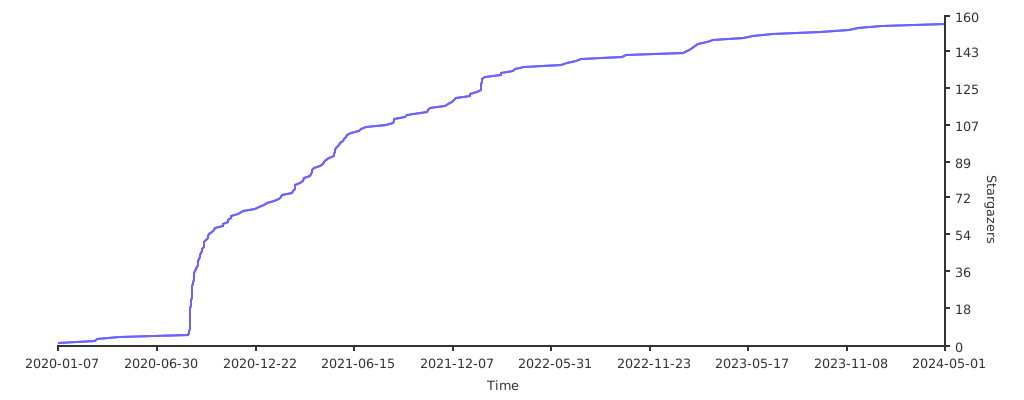
IDEA Code Automatically Generate Plugin • For Java Version
<div align="center">
<img src="http://file.debuggerpowerzcy.top/power/D8ger-V5.jpg" />
</div>
Attention
The latest version is 4.1 is approved by the official on 10th, May.
If you can't fetch it, then click here to download ~~.zip~~ file.
Important: This version has been implemented DSP(D8ger Series Plan).
That is, some functions have been migrated to another plugin named LaoYouTiao. After testing, installing two plugins will not affect performance. So, I hope you use happy and give me a 🌟, thx!
Preface
As JetBrains' said, I believe that you should be good use of tools will save you precious hours on your busing work.
I always wonder, "If someone else has already solved the repeating work, why do I need to repeat it again?"
Well, that's a valid question for my drive to find the repeat parts at daily work and develop this plugin to save my time.
Quick Start
<a href="http://file.debuggerpowerzcy.top/power/html/IntelliJBestAction.html" target="_blank">ZN程序员福利</a>
Convention
- The general problem provides standard solutions
- The personalized problem only provides example solutions
Original design intention
- Remove the fixed duplication coding for improving efficiency in development
- Provide available code templates that can be used without modification
- Support code directory configuration, only by self-guided package intelligent programming can be done in one-click
- Support user-defined configuration, you can specify which file to be generated
Features
- ~~Camel-Underline-Uppercase-Uncapitalize-Lowercase can be converted to each other by shortcut~~
alt+shift+cmd+U - The comments of generated codes support English(Default) | Chinese Simplified(Optional) configuration
- ~~JSON formatting and single line text conversion, supporting section and whole document, default shortcut~~
alt+shift+cmd+J|S - Generating
data table definition SQL|Mo|Mapper|Handler, single table addition, deletion, modification and search with paging in one click - Under the help of SwaggerApi generating
Vo|Controllerwith friendly document description, in addition to this, supportingVofield automatic sorting - For smart coding, you just need one shortcut default as
alt+shift+cmd+D - Supporting customer configuration, for example, specify the author who you are
- Reserve easter eggs, you can try to edit the blank file in IDEA and type
d8gerto get the default configuration template - ~~Reserve easter eggs, edit the blank file in IDEA and enter
nasato get the NASA configuration file template. This is very useful and efficient for handling multi-lines, especially SQL field naming processing.~~ - ~~Reserve easter eggs, edit the blank file in IDEA and enter
regexto get some commonly used regular expressions. Other code Easter eggs will be added later.~~ - For automatic sorting
Vofield , you just need one shortcut default asalt+shift+cmd+O
Using manual(v3.0+)
1.Open the configuration box to set the generation parameters, Preference --> Other Settings --> D8gerAutoCode
2.Check the file to be generated and choose the generation path, rewrite author、apiUrlPrefix and locale, and click the button to save your configuration.
Using manual(under v3.0)
-
Create Model Class
-
Select the class name and press the (default) shortcut
alt+shift+cmd+D -
Under the default configuration,
D8gerAutoCodedirectory anddata table SQL definitionsand Web codes will be generated -
So, What you need to do:
- Under a multi-module project, configure the generated file output directory, for example,
Mo.javashould be moved into themodeldirectory - Add non-null constraints to
xx.sqlas required - If you generated the Controller.java file, please note the interface returns type of
Object, it should be modified to the project's uniform return type - In the above steps the
xx.javafile will report some errors, don't worry, these just require you to import packages
- Under a multi-module project, configure the generated file output directory, for example,
-
Default configuration file template for easter egg:
- In the
resourceroot directory of the module where theModel classis located, created8ger.propertiesproperty configuration file - Type
d8gerand click onTools->D8ger->D8gerMore, and you will find some surprise
- In the
-
~~Regex template for easter egg:~~
- ~~Choose any blank file, Type
regexand click onTools->D8ger->D8gerMore, and you will find some surprise~~
- ~~Choose any blank file, Type
-
~~NASA template for easter egg:~~
- ~~Choose any blank file, Type
nasaand click onTools->D8ger->D8gerMore, and you will get the NASA manual~~ - ~~Follow the manual, custom your config and write your own multi-lines need to be batch handled, then you will find some surprise~~
- ~~Choose any blank file, Type
-
~~Camel-Underline-Uppercase-Uncapitalize-Lowercase circle convert by one-click~~
- ~~Choose word text in any editing file, press
alt+shift+cmd+U, you`ll find the changed word~~ - ~~If not satisfied just press the shortcut again and again util you are.~~
- ~~Choose word text in any editing file, press
-
You will get the following default configuration information
- It's recommended that you change the configuration items
author(you can't sign my name for the pits you dug!)apiUrlPrefix(the interface url prefix should be configured as the project interface unified URL prefix)- generate file output directory under a multi-module project
- As for
booleanconfiguration items, let you choose which files need to be generated, and specify output directory is optional
- It's recommended that you change the configuration items
By the way, these default shortcuts used in Mac OS, if you use Windows just take
cmdintoctrl.
How to install
<a href="https://plugins.jetbrains.com/plugin/13576-d8gerautocode" target="_blank"> <img src="https://cdn.jsdelivr.net/gh/YiiGuxing/TranslationPlugin@master/images/button-install.png" alt="Get from Marketplace" title="Get from Marketplace"> </a>Preference-->Plugins-->Marketplace--> typeD8--> install- IDEA official plugin library installation
- As for
Source installationrequires you're familiar with Gradle, I will add more details about how to develop a plugin by Gradle later
Bug & Question
- Known issues
Modify the
d8ger.propertiesfile before generating code, the configuration file does not take effect
Solution
0. If you upgrade version 3.0+, you won`t see it again.
1. Because the IDEA file uses the VFS mechanism, as a plug-in to use the monitoring file I think it is not cost-effective
2. I also found a reason aboub editing .properties file, sometimes it will take one or two minutes to refresh after you finished
3. So, press `cmd` + `s` to force refreshing .properties file and you will solve it.
<div align="center"> <img src="http://file.debuggerpowerzcy.top/power/W-D8ger.png" /> </div>The icon of plugin shows error like this: red square with a cross
Solution
1.This issue is caused by Intellij IDEA of new version feature.
2.Try to upgrade the version of Intellij util 2019.3.*(greater than 2019.2.*), you'll fix it.
Other issues, please come to join room
VersionRoadHistory
-
4.1
- Fix 'D8gerAutoCode' error file path parsing while in WINDOWS system. For more detail, please refer issue2
-
4.0(HIGH.START)
- Important note: This time the function is migrated and upgraded, the plug-in has been divided into functions, the purpose is to be full-time and dedicated, and the general functions are sinking to serve more programmers
- No.0: Each plug-in is positioned in two aspects, one is efficient coding, and the other is high-quality knowledge links to help users obtain enough useful information to improve their skills
- No.1: LaoYouTiao, Published, locate
- Important note: This time the function is migrated and upgraded, the plug-in has been divided into functions, the purpose is to be full-time and dedicated, and the general functions are sinking to serve more programmers
