
Not
A minimal, blazing fast, TypeScript runtime type-checker. It is intuitive, API-centric, and customisable. A must-have for API payload sanitiser, type-checking, validation, error handing and messaging helper -- all in a small and neat pack.
Install / Use
/learn @calvintwr/NotREADME


Not is the minimal and blazingly fast "implement-and-forget" runtime type-checking library written in TypeScript for instant API payload checking and sanitisation, with ready-to-use error response messages to your API requestors -- all in a small and neat pack.
import Not from 'you-are-not' // ES import syntax
const Not = require('you-are-not') // CJS require syntax

let schema    = { id: "number" } // endpoint only expects param "id"
let malicious = { id: 1, role: "admin" } //payload with malicious "role: admin"

let sanitised = Not.scrub(
    "objectName",
    schema
    payload
)
console.log(sanitised)
// outputs:
// { id: 1 }
role: "admin" is removed. Payload sanitised.
Why Not?
Not gives actionable error messages, so you know exactly what has gone wrong with your inputs/arguments/API. Use the messages directly as API replies. Build friendly APIs. Meet project deadlines.
This module has no dependencies.
Installation
npm install --save you-are-not
import Not from 'you-are-not'
Simple Usage
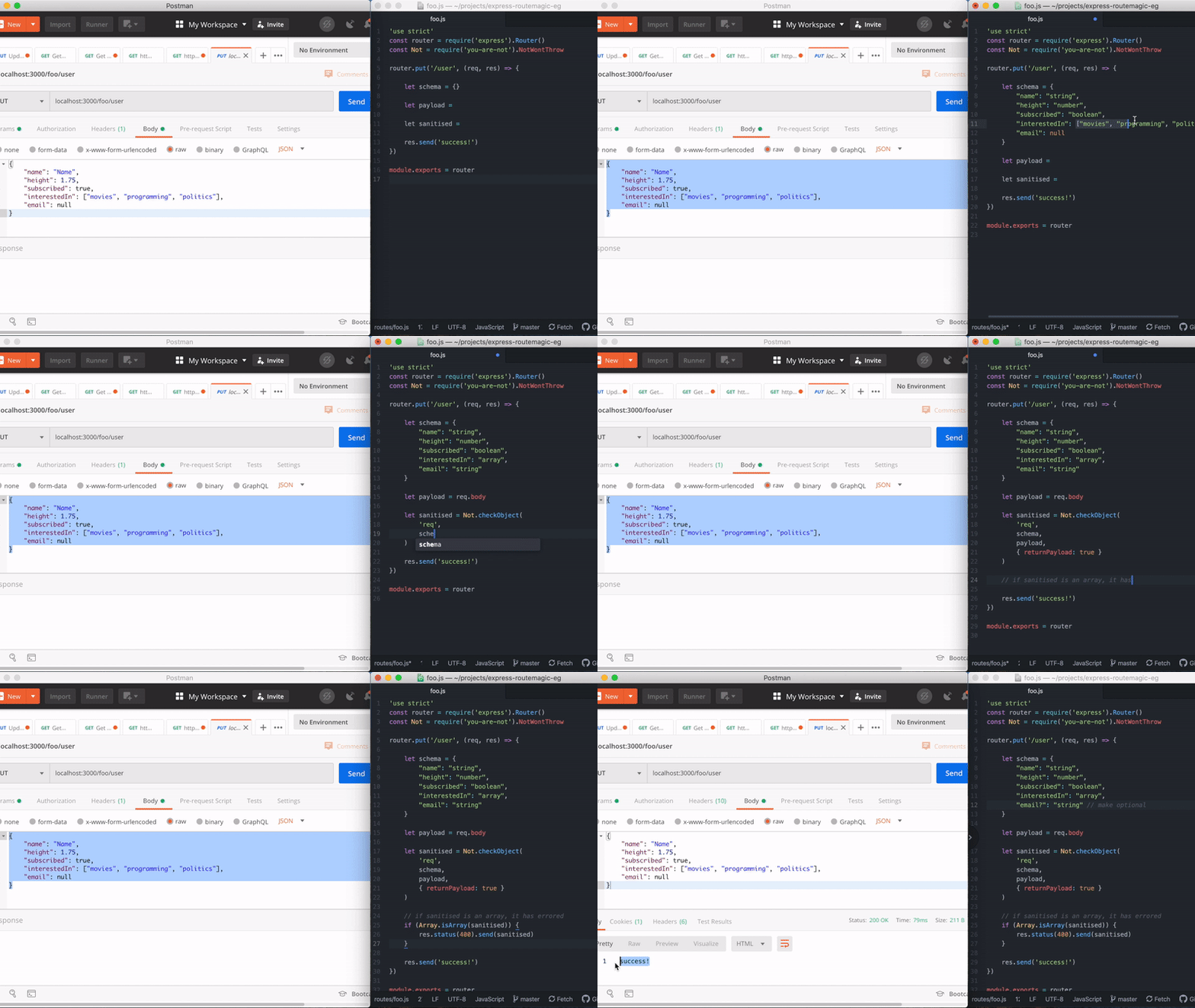
1. For API input type-checking, validation, sanitisation and error messaging:
User makes a request with the following payload:
const payload = {
    id: 1,
    name: 2 // error made by requestor
}
API receiving payload defines a schema, followed by scrubbing the payload:
const schema = {
    id: 'number',
    name: 'string' // note that name is expected to be in `string`
}

let sanitised = Not.scrub(
    'payloadWithTypeError', // give your payload a name
    schema,
    payload,
    { exact: true } // use exact: true if you need the payload to match the schema 100%, else, additional properties will be removed without throwing errors.
)
Not throws an actionable error message ready for sending back to the requestor:
TypeError (NotTS): Wrong types provided. See `trace`.
    ... stack trace ...
{
  statusCode: 400,
  trace: [
    'Wrong Type (payloadWithTypeError.id): Expecting type `number` but got `string` with value of `1`.'
  ]
}
If you are using express or fastify, thrown errors can be seamlessly used for production:
//express
res.status(sanitised.statusCode)
res.send({
    message: `You have provided erroneous inputs. \n\nMore info:\n${sanitised.trace.join('\n')}`
})

//fastify
reply.code(sanitised.statusCode)
reply.send({
    message: `You have provided erroneous inputs. \n\nMore info:\n${sanitised.trace.join('\n')}`
})
This will produce a 400 error with the following message property in response body:
You have provided erroneous inputs.

More info:
Wrong Type (payloadWithTypeError.id): Expecting type `number` but got `string` with value of `1`.
Suppose additional properties are provided in possibly malicious payloads, they can be sanitised:
let payloadWithMaliciousPayload = {
    id: 1,
    name: "foo",
    role: "admin" // simulating malicious payload. this will be sanitised
}

var sanitised = Not.scrub(
    'payloadWithMaliciousPayload',
    schema,
    payloadWithTypeError
)

console.log(sanitised)
// outputs:
// {
//     id: 1,
//     name: "foo"
// }
role: "admin" is removed. Payload sanitised.
2. Lightweight type-checking
Besides being a payload sanitiser, Not is a type-checker under-the-hood.
import NotProto from 'you-are-not'
const Not = Not.create() // this creates another instance of Not
const not = Not.createNot() // this exposes a simplified #not with no overloads
const is = Not.createIs()
const notNerfed = Not.create({ throw: false }) // creates an instance that will not throw errors.
Use Not to cut down runtime type-checking verbiage. Instead of:
if (typeof foo !== 'string' ||
    typeof foo !== 'number' ||
    (typeof foo === 'number' && !isNaN(foo)) ||
    !Array.isArray(foo)
) {  throw Error("Not valid, but I don't know why.") }
You write:
not(['string', 'number', 'array'], foo)
// or
is(['string', 'number', 'array'], foo)

// code will reach here if the above don't error
startMyFunction()
When Not fails, it throws an error by default. You can pass throw: false to prevent throwing errors and handle them yourself:
const not = Not.createNot({ throw: false })
// instead of throwing, `not` will return string

let input  = ['a', 'sentence']
let result = not('string', input) // returns a string, which can evaluate `true`

if (result) input = input.join(' ')
// so you can do your own error handling, or transformation

// code below can safely use `input` as string :)
input.toLowerCase()
Full Usage
1. Valid types
The valid types you can check for are:
Primitives:
'string'
'number'
'array'
'object'
'function'
'boolean'
'null'
'undefined'
'symbol'
'nan' // this is an opinion. NaN should not be of type number in the literal sense.

Aggregated:
'optional' // which means 'null' and 'undefined'

Other custom types:
'integer'
2. #scrub/#checkObject
#checkObject is #scrub under the hood. Use #scrub for simplified usage (example above), and #checkObject when you want more control.
Not.scrub(objectName, schema, payload, options)

Not.checkObject(objectName, schema, payload, callback/options)
objectName: (string) Name of object.
schema: (object) An object depicting your schema.
payload: (object) The payload to check for.
options (#scrub): (object | optional). Define exact: true if you want to throw an error if there are additional properties.
callback/options (#checkObject): (object | optional). See example below:
// callback
Not.checkObject(objectName, schema, payload, (errors, payload) => { /* handle errors yourself*/ })

// options
Not.checkObject(objectName, schema, payload, {
    callback: (errors, payload) => { /* handle errors yourself*/ },
    returnPayload: true/false, // define if you need the payload returned. if not requires, switch to false for better performance
    exact: true/false // if true, will throw errors if there are additiona properties
})
Defining Schema
// you can use optional notations like this:
"info?": {
    gender: 'string',
    "age?": 'number'
}
//is same as
info__optional: {
    gender: 'string',
    age__optional: 'number'
}
//is same as
info__optional: {
    gender: 'string',
    age: ['number', 'optional']
}
Check for multiple type by passing an array:
info: {
    age: ['number', 'string'], // age can be of type number or string
    email: ['email'] // suppose you have created your own email validation checking. To create your own types, check examples below.
}
#checkObject advanced usage
- If
callback/optionsis acallbackfunction, it will run thecallback:
Not.checkObject(name, schema, payload, function(errors) {
    // do something with errors.
})
(Note: When callback is provided, Not assumes you want to handle things yourself, and will not throw errors regardless of the throw flag.)
- If
callback/optionsis{ returnPayload: true },#checkObjectreturns (a) the sanitised payload (object) when check passes, or (b) an array of errors if check fails:
let sanitised = Not.checkObject(
    name,
    schema,
    payload,
    { returnPayload: true }
)
if (Array.isArray(sanitised) {
    // do something with the errors
    return
}
// or continue using the sanitised payload.
DB.find(sanitised)
- If
callback/optionsis{ callback: function() {}, returnPayload: true }:
let callback = function(errors, payload) {
    if(errors.length > 0) {
        // do something with the errors
        return
    }

    DB.find(payload)
}

Not.checkObject(
    name,
    schema,
    payload,
    {
        returnPayload: true,
        callback: callback
    }
)
3. Not as simple type checker
You can also check for multiple types by passing an array. This is useful when you want your API to accept both string and number:
let not = Not.create()
let id        = "123"
let anotherId = 123
let emailOptional = undefined

not(['string', 'number'], id)
not(['string', 'number'], anotherId)
not(['optional', 'string'], emailOptional)

// code reaches this point when all checks passed
4. Methods Available
The Not prototype has the following methods available:
Not.scrub(objectName, schema, payload)
Not.checkObject(objectName, schema, payload, options)

Not.not(expect, got, name, note)
Not.is(expect, got, name, note)

Not.lodge(expect, got, name, note)
Not.resolve([callback]) // this is used with #lodge.

Not.defineType(options)
5. Methods: #not and #is
Not.not(expect, got, name, note)
Not.is(expect, got, name, note)
expect: (string or array of strings) The types to check for (see below on "3. Types to check for".)
got: (any) This is the the subject/candidate/payload you are checking.
name: (string | optional) You can define a name of the subject/candidate/payload, which will be included in the error message.
note: (string |
