
Sherlogjs
JavaScript error and event tracker application.
Install / Use
/learn @burakson/SherlogjsREADME
<p align="center">
<img src="https://github.com/burakson/sherlogjs/blob/images/sherlog-logo.png?raw=true" alt="Sherlogjs">
</p>
Sherlog.js
JavaScript error and event tracker application.
Features
- Tracks JavaScript errors
- Tracks faulty ajax requests
- Tracks custom events
- Reporting dashboard
- Lightweight tracking framework (~2KB Minified)
Prerequisites
- Node
- Npm
- Bower
- Gulp
- MongoDB
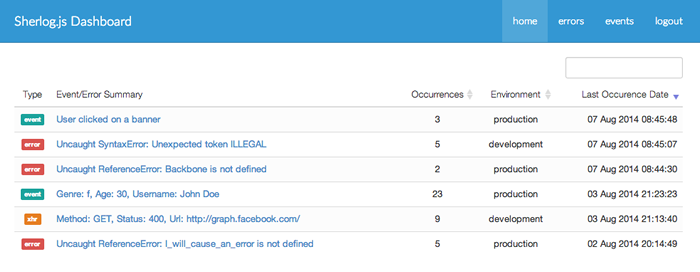
Screenshots

Installation
$ git clone git://github.com/burakson/sherlogjs.git
$ cd sherlogjs
$ npm install && bower install
Configuration & Usage
-
Copy
config/config.json.exampleinconfig/config.jsonand configure the application -
Hit
gulpto prepare the framework -
Start the server:
$ npm start -
Add the following script into your web document before any other
<script>tag
<script src="sherlog.min.js" data-environment="production"></script>
- Done! Sherlog is now tracking errors.
API
Sherlog provides a public method for event tracking as shown in the below examples.
Sherlog.push( String/Object , callback )
Example 1:
Sherlog.push({
    username: 'John Doe',
    age: 35,
    action: 'Clicked on an image'
}, function() {
    // event tracking pixel is fired.
});
Example 2:
Sherlog.push('User has clicked to the button', function() {
    // event tracking pixel is fired.
});
