
Microlink
An open source EchoLink/AllStarLink implementation that runs on a simple microcontroller.
Install / Use
/learn @brucemack/MicrolinkREADME
Overview
Is it possible to build a full EchoLink® node using a $6 microcontroller? I'm not completely sure, but let's find out. The goal of this project is to create the smallest, cheapest way to put a radio onto the EchoLink network. If you are new to the world of EchoLink please see the official website for complete information. EchoLink is a peer-to-peer VoIP (voice over IP) network used to link amateur radio stations across the Internet.
There are much easier ways to get onto EchoLink. The MicroLink project will only be interesting to someone who wants to get deep into the nuts-and-bolts of EchoLink/VoIP technology. In fact, you should start to question the sanity of anyone who spends this much time building their own EchoLink station. I am a homebrew enthusiast and I try to avoid off-the-shelf software/components where possible. This has been a huge learning opportunity.
The system currently runs on a Pi Pico W (RP204, ARM Cortex M0) board. I'm pretty sure it could also run on an ESP-32, or possibly an Arduino of sufficient caliber. More experimentation is needed here.
The software is fully open source. Now that EchoLink is "open," others can experiment with this important amateur radio technology. I am currently working on adding support for AllStarLink. More to follow ...
Here's my production setup at the moment. This station provides EchoLink access to the Wellesley Amateur Radio Society repeater (W1TKZ-L) using a Yaesu FT-1900:

The green case contains the MicroLink system. The DB9 connector on the side of the case connects to microphone and audio plugs on the FT-1900. A 12V supply powers the radio and the MicroLink interface. Note that there are no other computers required. The only things not shown in this picture are the antenna (on the roof), and the home WIFI network that the Pico W is connected to. The red LED is the 12V power indicator and the blue LED is the internet connection status.
Here's a demo video I made of the first bench test:
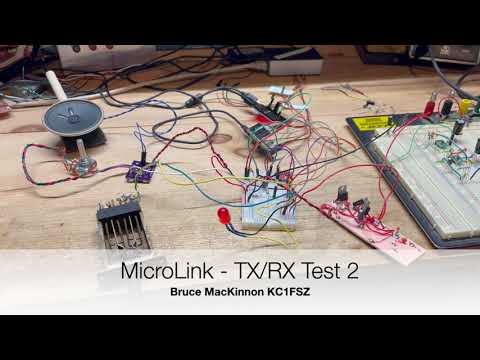
The microphone/analog section still needs some work.
Here's what it sounds like over the air:
The official PC-based EchoLink client written by Jonathan Taylor (K1RFD) is excellent and is the quickest/easiest way to get on EchoLink. Download it here. There are also versions that run on mobile phones. MicroLink is not a supported part of the EchoLink family of products.
I've learned many things about EchoLink during this project. One thing is for sure: Jonathan (K1RFD) who created the EchoLink system is an outstanding engineer and we should all be greatly appreciative of the work that he and the rest of the EchoLink team do on behalf of the amateur radio community. Thanks to Jonathan for his suggestions/advice along the way.
Huge thanks go to Steve Kondo (K1STK) for providing the mechanical design work for this project.
Thanks also to Julius Jones (W2IHY), creator of the world-famous EQPlus and other sophisticated audio gear, for his advice on the audio circuit.
I have a few extra boards which I would be willing to sell for a reasonable price if someone wanted to try to build a station of their own.
I am good in QRZ at KC1FSZ if you have any questions or suggestions. Or e-mail at bruce at mackinnon dot com.
Architecture Overview/Parts
My goal was to build a complete station from scratch, with no strings attached to PCs/servers.
I have made a PCB for ease of use with radios (link mode) and/or direct integration with repeaters. Further refinements of the PCB are in process. The latest Gerbers are here and the latest BOM is here. You can build one yourself.
This project required an in-depth examination of how the EchoLink protocol works. The notes I created during this analysis are located here. The reverse-engineering of the EchoLink protocol was the most time-consuming part of the project.
Current Parts List (HW)
- The main processor is a Pi Pico W (RP2040) development board. This includes WIFI connectivity. $6.00 on DigiKey.
- A 4G cellular data option is available using a SIM7600 module. (Not fully working yet.)
- Audio output generation uses the MicroChip MCP4725 I2C digital-to-analog converter. $1.27 on DigiKey.
- Audio input sampling uses the integrated ADC in the RP2040.
- Isolation transformers and optocouplers are used to eliminate the need for a common ground between the radio and the MicroLink system. The radio and the MicroLink circuitry are completely isolated from each other. This helps to reduce digital noise.
- The radio link is an ~~AZDEN PCS-6000H~~ Yaesu FT-1900 mobile rig.
- When not using the radio:
- Audio amplification uses the LM4862M 825mW amplifier. $2.23 on DigiKey.
- The local T/R key is from Federal Telephone and Telegraph Company (Buffalo, NY), made in 1920. Priceless.
- The microphone is an electret condenser with a LVM321 pre-amp and low-pass anti-aliasing filter. The microphone part needs work. The next revision will use a TLV9161 op amp for the microphone pre-amp to reduce noise.
Here's a picture of the the current version of the PCB.

This is a picture of the cellular module. This has passed some initial tests, but is not ready for production yet.

Current Parts List (SW)
- The main station firmware is completely homebrew (C++, see GitHub repo).
- The LwIP embedded TCP/IP stack is used for IP connectivity on the Pi Pico W.
- Importantly, audio compression/decompression uses a GSM 06-10 Full Rate CODEC which is homebrew in C++. Getting that to work required studying the European Telecommunications Standards Institute specification for GSM and a lot of testing, but this was extremely interesting.
- I'm not using the Arduino development environment for this project. The toolchain is CMake/GCC/GDB using the Pico W SDK. I like this environment a lot. The firmware is flashed via SWD using openocd.
MicroLink identifies itself using a version string of 0.02MLZ.
Analog Schematics
Microphone Pre-Amp
Performance audio circuits are not my forte. The quality is improving with each iteration. This is what I built originally, but a new version using parts with better noise specs is in the works.

The microphone part will not be used when the radio is integrated. I will probably leave the speaker/amplifier in for monitoring purposes.
Audio Input
This is the circuit used when connecting directly to a radio's AF output (i.e. no microphone). This repeats some of the circuit shown above (but minus the high gain). This also shows the circuit used for carrier detect (COS). The idea is to boost up the rig's audio output (U6) and then compare it to an adjustable threshold (U8). There is no debounce in the analog part of the COS circuit - that is all done in software.

Audio Output
This is a work in process. The performance on the low end of the audio spectrum is not good yet.

Cellular Data Interface
I have a working version of the MicroLink system using 4G cellular internet
connectivity using an SIM7600A cellular module. The $70 USD breakout
board for this module comes from Waveshare and is linked here.
The Waveshare module was originally designed to plug into a full Raspberry Pi (NOT A PICO!), hence the
use of the term "hat," but it is possible to use the module directly via a serial
interface and there is no technical requirement to connect it to a Raspberry Pi.
I am communicating with the module using their AT command set across a 115,200 baud serial link. This requires a pretty elaborate state machine to allow bi-directional UDP traffic across a protocol that was originally designed so support auto-dialing modems. The Hayes people would be shocked if they saw what people were doing with AT commands. I've had good luck getting the SIM7600 to maintain the UDP data rate needed to support EchoLink.
I am using a pre-paid SIM card from Mint Mobile. It turns out that not all cellular providers support the "raw" SIM7600 module. In fact, it took a few conversations with their help desk to get them to activate my SIM card. The Mint Mobile activation website wants you to select what kind of phone you have (i.e. iPhone, Android, etc.) and apparently "homebrew EchoLink station" isn't a valid choice in their system yet. Someday ... But after some back-and-forth, they activated my SIM and within 30 seconds the "link" LED started flashing and I was on the Internet!
The only bad thing about Mint Mobile is that they don't appear to allow inbound UDP traffic into this module. Or at least I've not figured that out yet. ARRGG! This required the use of a TCP proxy to handle the traffic in/out of the cellular module. I've not documented this part yet because I am still hoping to eliminate this component.
Notes on MVNOs
Mint Mobile is an example of what is called a "Mobile Virtual Network Operator," or MVNO for short. The real mobile cellular infrastructure is built/run by Verizon, T-Mobile (including the remnants of Sprint), AT&T, and US Cellular. All of the other low-cost "providers" are essentially renting bandwidth from the big f
