
Ciao
HTTP checks & tests (private & public) monitoring - check the status of your URL
Install / Use
/learn @brotandgames/CiaoREADME
ciao




ciao checks HTTP(S) URL endpoints for a HTTP status code (or errors on the lower TCP stack) and sends a notification on status change via E-Mail or Webhooks.
It uses Cron syntax to schedule the checks and comes along with a Web UI and a RESTful JSON API.
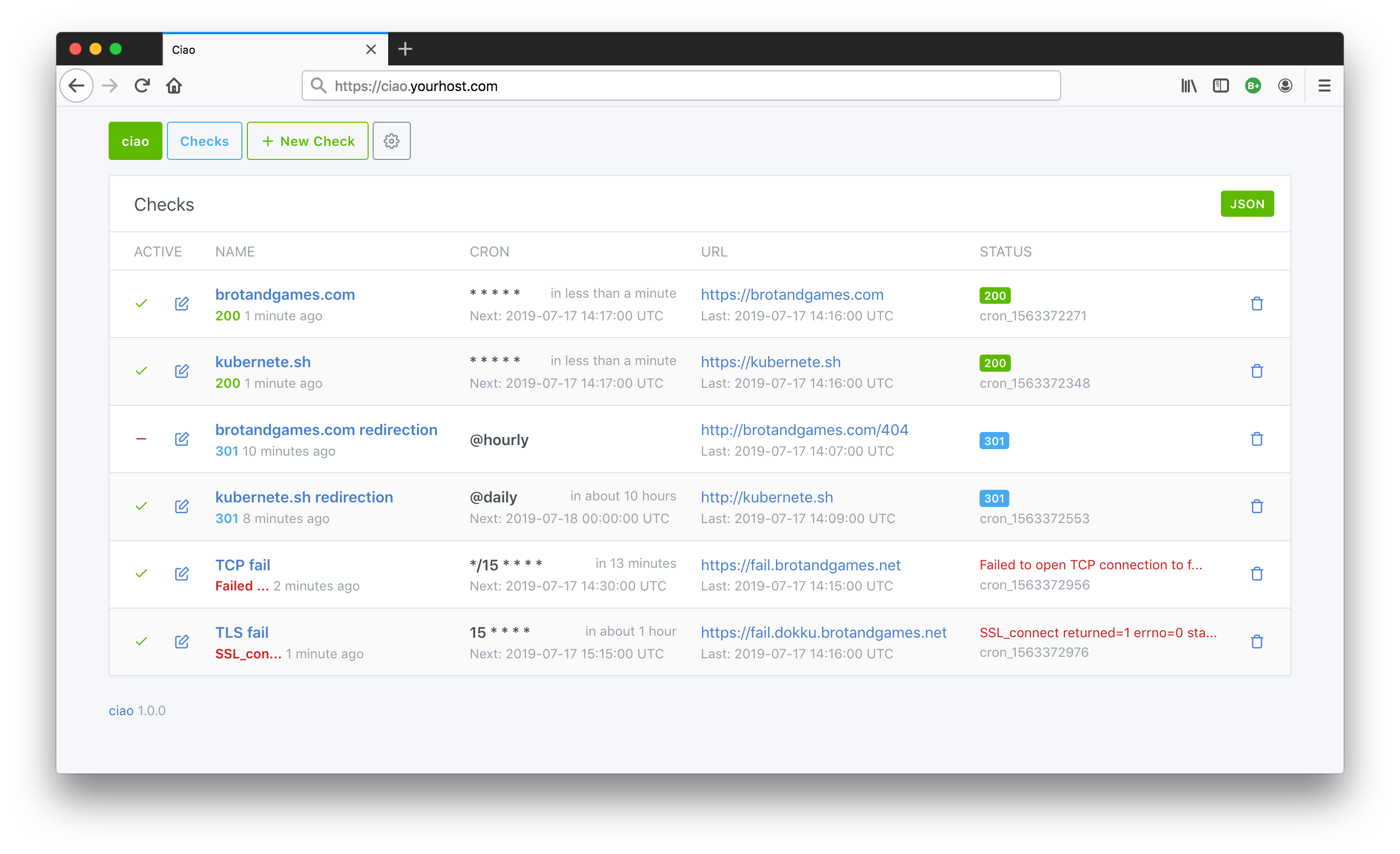 You can find more screenshots on the Homepage.
ciao (/tʃaʊ/) - check in and out - borrowed from Italian ciao for greeting someone.
Motivation: create an open source web application for checking URL statuses with an UI and a REST API which is easy to install and maintain (no external dependencies like Databases, Caches etc.) in public and private environments.
Follow @brotandgames on Twitter to get the latest News like Releases. Use #ciaohttp Hashtag for ciao related stuff.
Quickstart
docker run --name ciao -p 8090:3000 brotandgames/ciao
Open http://localhost:8090 in your webbrowser.
Features
- Check HTTP/S endpoints in an interval
- Use Cron syntax like
* * * * *(every minute),*/15 * * * *(every 15 minutes),@hourlyor@dailyetc. - Keep track of status changes (since version 1.8.0)
- Check TLS certificate expiration once a day and get a notification if it expires in less than 30 days (since version 1.9.0)
- Web UI
- RESTful JSON API
- Get a notification on status change via E-Mail eg. Gmail, Sendgrid, MailChimp etc. (optional)
- Get a notification on status change via Webhooks eg. Rocket.Chat, Slack etc. (optional)
- Configuration via ENVIRONMENT variables (suitable for most runtimes)
- Expose Prometheus Metrics endpoint
/metricswith information to digest by tools like Grafana (optional) - Protect with HTTP Basic auth on application basis (optional, only recommended in combination with TLS)
- Instructions for installing/deploying in/to different Platforms
- Docker Image
- Helm Chart
- Terraform Provider (Maintainer: @autonubil)
Configuration
ciao is configured via ENVIRONMENT variables following the 12-factor app methodology.
SECRET_KEY_BASEwill be auto-generated if you omit it- Time zone is configurable per
TIME_ZONEvariable (default:UTC) eg.TIME_ZONE="Vienna"- you can find all possible values by executingdocker run --rm brotandgames/ciao rake time:zones(since version 1.2.0) - Check SMTP Configuration for all possible configuration variables, notes and example configurations for Gmail, Sendgrid etc.
- Check Webhook Configuration for instructions how to send (webhook) notifications to RocketChat, Slack etc. (since version 1.4.0)
- You can enable HTTP Basic auth for ciao by defining
BASIC_AUTH_USERNAMEandBASIC_AUTH_PASSWORDeg.BASIC_AUTH_USERNAME="ciao-admin"andBASIC_AUTH_PASSWORD="sensitive_password"(since version 1.3.0) - You can enable a Prometheus Metrics endpoint served under
/metricsby settingPROMETHEUS_ENABLED=true- furthermore you can enable HTTP Basic auth for this endpoint by definingPROMETHEUS_BASIC_AUTH_USERNAME="ciao-metrics"andPROMETHEUS_BASIC_AUTH_PASSWORD="sensitive_password"(since version 1.5.0) - Log level is configurable via
CIAO_LOG_LEVELvariable (default:WARN) - levels: DEBUG, INFO, WARN, ERROR, FATAL (since version 1.7.0)
Install
You can install ciao via the official Docker image brotandgames/ciao or using Git and installing the dependencies manually.
By mounting a Docker volume you can avoid loosing data on restart or upgrade.
IMPORTANT: Be sure to enable authentication (eg. HTTP Basic auth) and TLS certificates if you serve ciao publicly.
Via Docker image
docker run \
  --name ciao \
  -p 8090:3000 \
  -e SECRET_KEY_BASE="sensitive_secret_key_base" \
  -e SMTP_ADDRESS=smtp.yourhost.com \
  -e SMTP_EMAIL_FROM="ciao@yourhost.com" \
  -e SMTP_EMAIL_TO="you@yourhost.com" \
  -e SMTP_PORT=587 \
  -e SMTP_DOMAIN=smtp.yourhost.com \
  -e SMTP_AUTHENTICATION=plain \
  -e SMTP_ENABLE_STARTTLS_AUTO=true \
  -e SMTP_USERNAME=ciao \
  -e SMTP_PASSWORD="sensitive_password" \
  -v /opt/ciao/data:/app/db/sqlite \
  brotandgames/ciao
Open localhost:8090 in your webbrowser.
Via Docker-compose
Create docker-compose.yml file
version: "3"
services:
  ciao:
    image: brotandgames/ciao
    container_name: ciao
    ports:
      - '8090:3000'
    environment:
      - SECRET_KEY_BASE=sensitive_secret_key_base
      - SMTP_ADDRESS=smtp.yourhost.com
      - SMTP_EMAIL_FROM=ciao@yourhost.com
      - SMTP_EMAIL_TO=you@yourhost.com
      - SMTP_PORT=587
      - SMTP_AUTHENTICATION=plain
      - SMTP_DOMAIN=smtp.yourhost.com
      - SMTP_ENABLE_STARTTLS_AUTO=true
      - SMTP_USERNAME=ciao
      - SMTP_PASSWORD=sensitive_password
    volumes:
      - /opt/ciao/data:/app/db/sqlite/
Pull and run
docker-compose pull
docker-compose up -d
Open localhost:8090 in the webbrowser.
Note: if you have problems with environment variables (quoting, spaces etc), take a look at these GitHub issues (1, 2) and these Stack Overflow questions (1, 2).
Via Git clone
# Clone repo
git clone https://github.com/brotandgames/ciao

cd ciao

# Install all dependencies (rubygems)
RAILS_ENV=production bundle install

# Configure
export SECRET_KEY_BASE="sensitive_secret_key_base" \
  SMTP_ADDRESS=smtp.yourhost.com \
  SMTP_EMAIL_FROM="ciao@yourhost.com" \
  SMTP_EMAIL_TO="you@yourhost.com" \
  SMTP_PORT=587 \
  SMTP_DOMAIN=smtp.yourhost.com \
  SMTP_AUTHENTICATION=plain \
  SMTP_ENABLE_STARTTLS_AUTO=true \
  SMTP_USERNAME=ciao \
  SMTP_PASSWORD="sensitive_password"

# Precompile assets
rails assets:precompile

# Run start script - basically this is check SECRET_KEY_BASE, database init/migrate and rails server
RAILS_ENV=production ./start.sh
Open localhost:3000 in the webbrowser.
REST API
GET /checks.json
Show collection (array) of all checks
curl -X GET -H "Content-type: application/json" /checks.json
GET /checks/<:id>.json
Show a specific check
curl -X GET -H "Content-type: application/json" /checks/<:id>.json
POST /checks.json
Create a check
curl -X POST -H "Content-type: application/json" /checks.json \
  -d '{ "name": "brotandgames.com", "active": true, "url": "https://brotandgames.com", "cron": "* * * *"}'
PATCH/PUT /checks/<:id>.json
Update a check
curl -X PUT -H "Content-type: application/json" /checks/<:id>.json \
  -d '{ "name": "brotandgames.com", "active": false, "url": "https://brotandgames.com", "cron": "* * * *"}'
DELETE /checks/<:id>.json
Delete a check
curl -X DELETE -H "Content-type: application/json" /checks/<:id>.json
Backup & Restore
State is stored in an internal SQLite database located in db/sqlite/production.sqlite3.
Note: Prior to version 1.1.0 the database was located in db/ (missing sqlite subfolder). From 1.1.0 onwards the location is db/sqlite/ to enable docker to use a volume.
Backup
docker cp ciao:/app/db/sqlite/production.sqlite3 production.sqlite3.backup
Restore
docker cp production.sqlite3.backup ciao:/app/db/sqlite/production.sqlite3
docker restart ciao
Prior to version 1.2.0: visit /checks/admin and recreate the background jobs for active checks.
Upgrade
Deploy
Here you'll find instructions for deploying ciao to different platforms like Kubernetes or Dokku.
By mounting a Docker or Kubernetes volume you can avoid loosing data on restart or upgrade.
IMPORTANT: Be sure to enable authentication (eg. HTTP Basic auth) and TLS certificates if you serve ciao publicly.
Kubernetes
Via Helm
- Install ciao via
helm upgrade --install
Quickstart (without configuring)
helm upgrade --install --namespace ciao ciao https://github.com/brotandgames/ciao/raw/master/helm-chart/ciao-0.5.0.tgz
With configuration
helm upgrade --install --namespace ciao ciao https://github.com/brotandgames/ciao/raw/master/helm-chart/ciao-0.5.0.tgz \
  --set env.SECRET_KEY_BASE="sensitive_secret_key_base" \
  --set env.SMTP_ADDRESS=smtp.yourhost.com \
  --set env.SMTP_EMAIL_FROM="ciao@yourhost.com" \
  --set env.SMTP_EMAIL_TO="you@yourhost.com" \
  --set env.SMTP_PORT=587 \
  --set env.SMTP_DOMAIN=smtp.yourhost.com \
  --set env.SMTP_AUTHENTICATION=plain \
  --set env.SMTP_ENABLE_STARTTLS_AUTO=true \
  --set env.SMTP_USERNAME=ciao \
  --set env.SMTP_PASSWORD="sensitive_password"
Via kubectl
The following code snippet will c
