
Checkov
Prevent cloud misconfigurations and find vulnerabilities during build-time in infrastructure as code, container images and open source packages with Checkov by Bridgecrew.
Install / Use
/learn @bridgecrewio/CheckovREADME











Checkov is a static code analysis tool for infrastructure as code (IaC) and also a software composition analysis (SCA) tool for images and open source packages.
It scans cloud infrastructure provisioned using Terraform, Terraform plan, Cloudformation, AWS SAM, Kubernetes, Helm charts, Kustomize, Dockerfile, Serverless, Bicep, OpenAPI, ARM Templates, or OpenTofu and detects security and compliance misconfigurations using graph-based scanning.
It performs Software Composition Analysis (SCA) scanning which is a scan of open source packages and images for Common Vulnerabilities and Exposures (CVEs).
Checkov also powers Prisma Cloud Application Security, the developer-first platform that codifies and streamlines cloud security throughout the development lifecycle. Prisma Cloud identifies, fixes, and prevents misconfigurations in cloud resources and infrastructure-as-code files.
<a href="https://www.prismacloud.io/prisma/request-a-prisma-cloud-trial/?utm_campaign=checkov-github-repo&utm_source=github.com&utm_medium=get-started-button" title="Try_Prisma_Cloud"> <img src="https://dabuttonfactory.com/button.png?t=Try+Prisma+Cloud&f=Open+Sans-Bold&ts=26&tc=fff&hp=45&vp=20&c=round&bgt=unicolored&bgc=00c0e8" align="right" width="120"> </a> <a href="https://docs.prismacloud.io/en/enterprise-edition/use-cases/secure-the-source/secure-the-source" title="Docs"> <img src="https://dabuttonfactory.com/button.png?t=Read+the+Docs&f=Open+Sans-Bold&ts=26&tc=fff&hp=45&vp=20&c=round&bgt=unicolored&bgc=00c0e8" align="right" width="120"> </a>Table of contents
Features
- Over 1000 built-in policies cover security and compliance best practices for AWS, Azure and Google Cloud.
- Scans Terraform, Terraform Plan, Terraform JSON, CloudFormation, AWS SAM, Kubernetes, Helm, Kustomize, Dockerfile, Serverless framework, Ansible, Bicep, ARM, and OpenTofu template files.
- Scans Argo Workflows, Azure Pipelines, BitBucket Pipelines, Circle CI Pipelines, GitHub Actions and GitLab CI workflow files
- Supports Context-awareness policies based on in-memory graph-based scanning.
- Supports Python format for attribute policies and YAML format for both attribute and composite policies.
- Detects AWS credentials in EC2 Userdata, Lambda environment variables and Terraform providers.
- Identifies secrets using regular expressions, keywords, and entropy based detection.
- Evaluates Terraform Provider settings to regulate the creation, management, and updates of IaaS, PaaS or SaaS managed through Terraform.
- Policies support evaluation of variables to their optional default value.
- Supports in-line suppression of accepted risks or false-positives to reduce recurring scan failures. Also supports global skip from using CLI.
- Output currently available as CLI, CycloneDX, JSON, JUnit XML, CSV, SARIF and github markdown and link to remediation guides.
Screenshots
Scan results in CLI

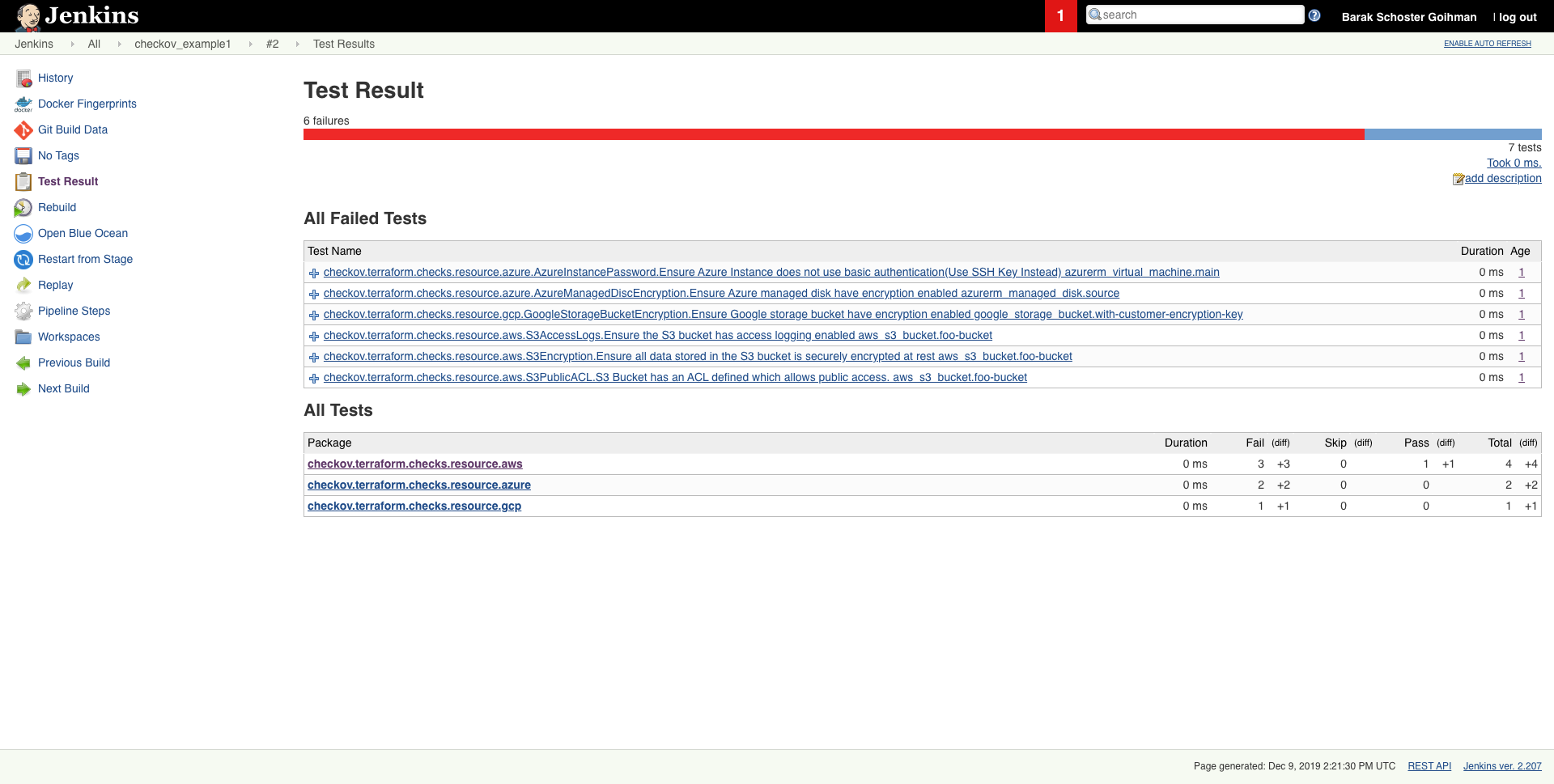
Scheduled scan result in Jenkins
Getting started
Requirements
- Python >= 3.9, <=3.12
- Terraform >= 0.12
Installation
To install pip follow the official docs
pip3 install checkov
Certain environments (e.g., Debian 12) may require you to install Checkov in a virtual environment
# Create and activate a virtual environment
python3 -m venv /path/to/venv/checkov
cd /path/to/venv/checkov
source ./bin/activate

# Install Checkov with pip
pip install checkov

# Optional: Create a symlink for easy access
sudo ln -s /path/to/venv/checkov/bin/checkov /usr/local/bin/checkov
or with Homebrew (macOS or Linux)
brew install checkov
Enabling bash autocomplete
source <(register-python-argcomplete checkov)
Upgrade
if you installed checkov with pip3
pip3 install -U checkov
or with Homebrew
brew upgrade checkov
Configure an input folder or file
checkov --directory /user/path/to/iac/code
Or a specific file or files
checkov --file /user/tf/example.tf
Or
checkov -f /user/cloudformation/example1.yml -f /user/cloudformation/example2.yml
Or a terraform plan file in json format
terraform init
terraform plan -out tf.plan
terraform show -json tf.plan  > tf.json
checkov -f tf.json
Note: terraform show output file tf.json will be a single line.
For that reason all findings will be reported line number 0 by Checkov
check: CKV_AWS_21: "Ensure all data stored in the S3 bucket have versioning enabled"
	FAILED for resource: aws_s3_bucket.customer
	File: /tf/tf.json:0-0
	Guide: https://docs.prismacloud.io/en/enterprise-edition/policy-reference/aws-policies/s3-policies/s3-16-enable-versioning
If you have installed jq you can convert json file into multiple lines with the following command:
terraform show -json tf.plan | jq '.' > tf.json
Scan result would be much user friendly.
checkov -f tf.json
Check: CKV_AWS_21: "Ensure all data stored in the S3 bucket have versioning enabled"
	FAILED for resource: aws_s3_bucket.customer
	File: /tf/tf1.json:224-268
	Guide: https://docs.prismacloud.io/en/enterprise-edition/policy-reference/aws-policies/s3-policies/s3-16-enable-versioning

		225 |               "values": {
		226 |                 "acceleration_status": "",
		227 |                 "acl": "private",
		228 |                 "arn": "arn:aws:s3:::mybucket",
Alternatively, specify the repo root of the hcl files used to generate the plan file, using the --repo-root-for-plan-enrichment flag, to enrich the output with the appropriate file path, line numbers, and codeblock of the resource(s). An added benefit is that check suppressions will be handled accordingly.
checkov -f tf.json --repo-root-for-plan-enrichment /user/path/to/iac/code
Scan result sample (CLI)
Passed Checks: 1, Failed Checks: 1, Suppressed Checks: 0
Check: "Ensure all data stor
Related Skills
node-connect
325.6kDiagnose OpenClaw node connection and pairing failures for Android, iOS, and macOS companion apps
claude-opus-4-5-migration
80.2kMigrate prompts and code from Claude Sonnet 4.0, Sonnet 4.5, or Opus 4.1 to Opus 4.5
frontend-design
80.2kCreate distinctive, production-grade frontend interfaces with high design quality. Use this skill when the user asks to build web components, pages, or applications. Generates creative, polished code that avoids generic AI aesthetics.
openai-whisper-api
325.6kTranscribe audio via OpenAI Audio Transcriptions API (Whisper).
