
Wordpress Plugin Boilerplate
An organized and object-oriented boilerplate for WordPress plugin development and testing. Includes Composer, Codeception (unit/acceptance testing), PHPCodeSniffer with WordPress Coding Standards to validate your code, TravisCI configuration for automatic testing & continuous integration, Webpack 5 for front-end development incl. BabelJS v7, BrowserSync v2, PostCSS v8, PurgeCSS v3, Autoprefixer, Eslint, Stylelint, SCSS processor, WPPot, and more.
Install / Use
npx skills add brandonkramer/wordpress-plugin-boilerplateInstalls into whichever agent you are using.
README
WordPress Plugin Boilerplate


- The Boilerplate is based on the Plugin API , Coding Standards, and Documentation Standards.
- Includes Composer, Requirements micropackage to test environment requirements for your plugin, Codeception to do unit/acceptance testing, PHPCodeSniffer with WordPress Coding Standards to validate your code, TravisCI configuration for automatic testing & continuous integration, object-oriented code structure for better overview, an automatic class loader that automatically instantiate classes based on type of request.
- This can be combined with the Webpack 5 workflow for front-end development using the npx quickstart script that includes the Webpack v5 bundler, BabelJS v7, BrowserSync v2, PostCSS v8, PurgeCSS v3, Autoprefixer, Eslint, Stylelint, SCSS processor, WPPot, and more.
Quickstart
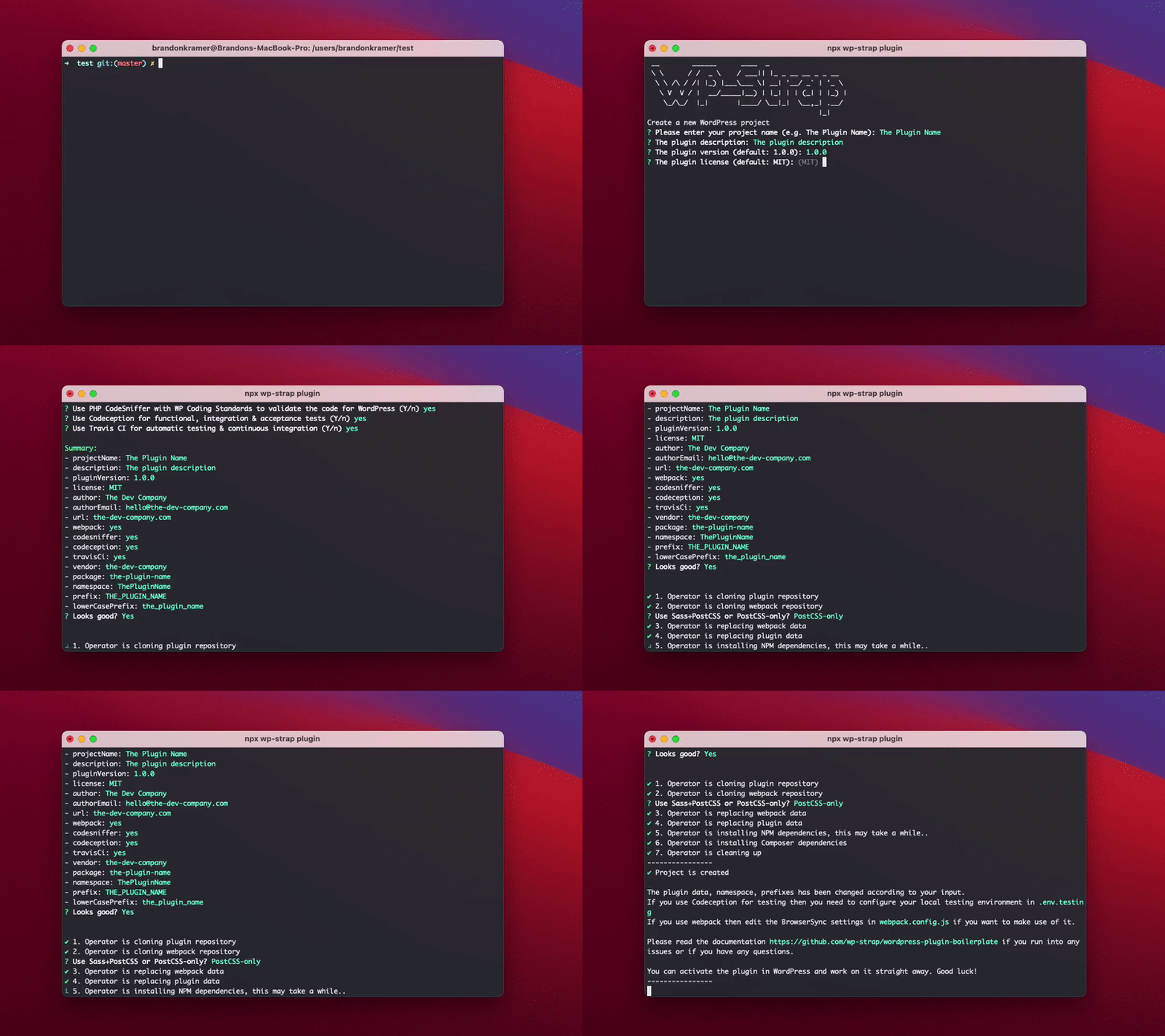
Should be run inside your plugins folder (wp-content/plugins).
npx wp-strap plugin
You can also use the npx script with predefined answers to get a quicker start
npx wp-strap plugin "projectName:Your plugin name" "description:Test the plugin" "pluginVersion:1.0.0" license:MIT "author:The Dev Company" authorEmail:hello@the-dev-company.com url:the-dev-company.com webpack:Y codesniffer:Y codeception:Y travisCi:Y css:Sass+PostCSS
It will take a couple of minutes to install after your terminal input; it will clone the git repo's, search and replace
all the plugin data, do a composer install, and when it's combined with the Webpack workflow then it wil also do
a npm install
<a href="#what-to-configure">Read more about the configuration & build scripts</a>
Features & benefits
Backend
Composer (Namespaces + PSR4 autoloader + Dependency manager)
- Namespace support to group all of your code under a custom name. That way, your classes, functions, and so on don’t clash with other people’s code running on the site at the same time
- PSR-4 Autoloader to autoload files and directories in connection with namespaces
- Includes a dependency manager to easily load in 3rd party libraries from packagist, locked onto specific versions
Object-oriented & classes autoloader
- Includes a OOP-style structure for building a high-quality PHP development
- Classes are being auto-instantiated by extending the PSR-4 Autoloader from Composer and based on type of request and folder structure for which you can add the types of request here. So you can add your own new class files by naming them correctly and putting the files in the most appropriate location and work in it straight away without having to include them or instantiate them manually. Composer's Autoloader and the Bootstrap class will auto include your file and instantiate the class.
- The structure follows the the Plugin API , Coding Standards, and Documentation Standards
PHPCodeSniffer + WordPress Coding Standards + Automattic's phpcs-neutron-ruleset
- PHP CodeSniffer is built in with predefined configuration for proper linting. PHP_CodeSniffer is an essential development tool that ensures your code remains clean and consistent.
- PHPCS is extended with the WordPress Coding Standards & PHPCompatibilityWP for PHP_CodeSniffer which is a collection of PHP_CodeSniffer rules (sniffs) to validate code developed for WordPress. It ensures code quality and adherence to coding conventions, especially the official WordPress Coding Standards.
- PHPCS is also extented with Automattic's phpcs-neutron-ruleset which is a set of modern (PHP >7) linting guidelines for WordPress development.
Codeception (unit/acceptance testing)
- Codeception is built in which combines all testing levels (acceptance, functional, integration, unit) with WordPress defined functions, constants, classes and methods in any test.
- With a flexible set of included modules, tests are easy to write, easy to use, and easy to maintain.
Plugin requirements
- Requirements micropackage is built in that allows you to test environment requirements to run your plugin. It can test: PHP version, PHP Extensions, WordPress version, Active plugins, Current theme, DocHooks support
- Easily to configure using a simple array
- If the plugin doesn't pass the test then it will disable the plugin automatically for the user in WordPress and show a notification in the back-end
TravisCI
- Ready to use TravisCI configuration for automatic testing & continuous integration which currently only validates the plugin code with PHPCodeSniffer during automated testing when being deployed, but can also be extended to test unit/acceptance cases from Codeception
Prettified errors & Classes debug array
- Includes a function called
Errors::wpDieto show a prettified WP_DEBUG error with the plugin information and file source- Includes a function called
Errors::pluginDieto kill the plugin and show a prettified admin notification with the plugin information and file source- Includes a function if set true to debug the bootstrap's class loader and see which classes are loaded, if they load on the requested page, in which order and to check the execution time of the code run in each class
Frontend (Webpack)
For front-end tooling the webpack workflow is being cloned. Read more about this workflow here: https://github.com/wp-strap/wordpress-webpack-workflow
Styling (CSS)
- Minification in production mode handled by Webpack
- PostCSS for handy tools during post CSS transformation using Webpack's PostCSS-loader
- Auto-prefixing using PostCSS's autoprefixer to parse CSS and add vendor prefixes to CSS rules using values from Can I Use. It is recommended by Google and used in Twitter and Alibaba.
- PurgeCSS which scans your php (template) files to remove unused selectors from your css when in production mode, resulting in smaller css files.
- Sourcemaps generation for debugging purposes with various styles of source mapping handled by WebPack
- Stylelint that helps you avoid errors and enforce conventions in your styles. It includes a linting tool for Sass.
Styling when using PostCSS-only
- Includes postcss-import to consume local files, node modules or web_modules with the @import statement
- Includes postcss-import-ext-glob that extends postcss-import path resolver to allow glob usage as a path
- Includes postcss-nested to unwrap nested rules like how Sass does it.
- Includes postcss-nested-ancestors that introduces ^& selector which let you reference any parent ancestor selector with an easy and customizable interface
- Includes postcss-advanced-variables that lets you use Sass-like variables, conditionals, and iterators in CSS.
Styling when using Sass+PostCSS
- Sass to CSS conversion using Webpack's [sass-loader](h
Related Skills
node-connect
385.5kDiagnose OpenClaw Android, iOS, or macOS node pairing, QR/setup code, route, auth, and connection failures.
blender-python-addon
40.5kBlender Python add-on rules for operators, panels, properties, registration, testing, and API-safe scripting
flutter-development-guidelines-cursorrules-prompt-file
40.5kCursor rules for Flutter development with MVVM architecture, Riverpod state management, Material widgets, and Dart style guidelines.
commit-push-pr
140.6kCommit, push, and open a PR


