PatchOpsIII
PatchOpsIII is a Python-based application developed by boggedbrush for Call of Duty: Black Ops III
Install / Use
/learn @boggedbrush/PatchOpsIIIREADME
PatchOpsIII





PatchOpsIII is a modern, full-featured control center for Call of Duty: Black Ops III modding, maintenance, and performance tuning.
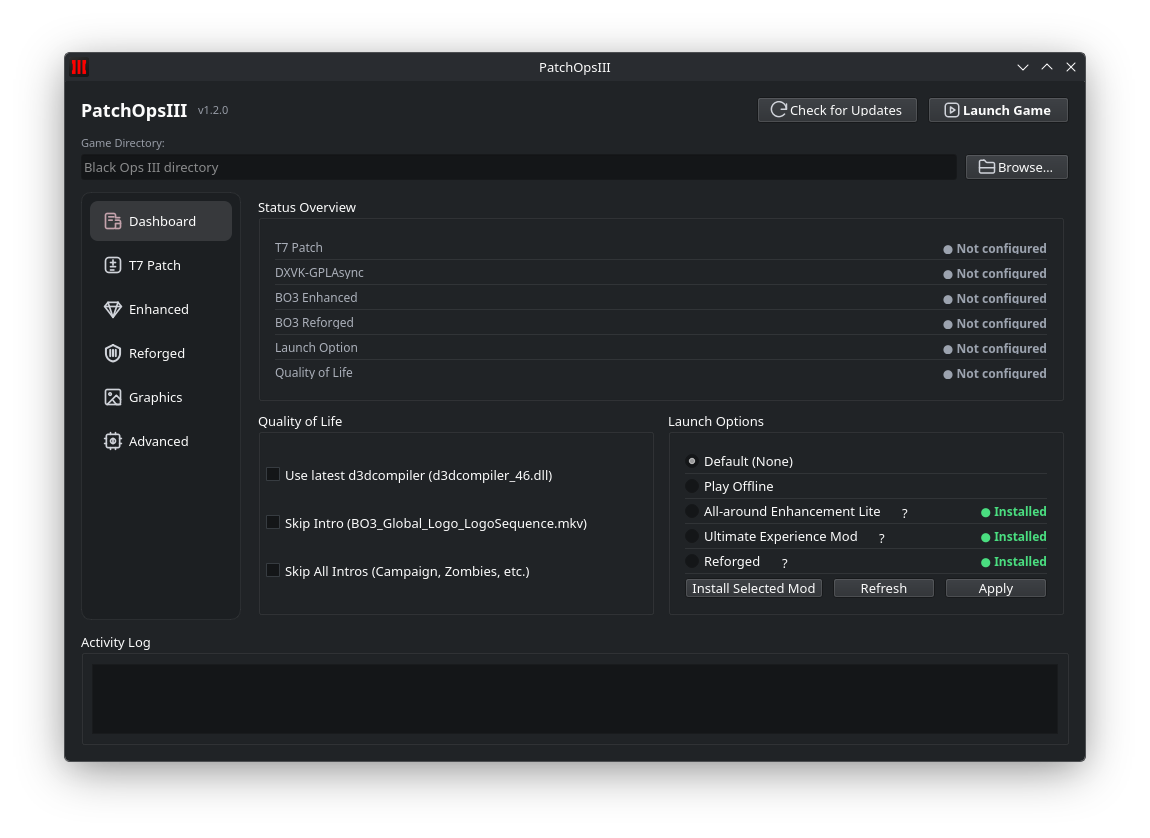
Table of Contents
- Overview
- Key Features
- Installation
- Forked Components
- Quick Start
- Screenshots
- Known Issues
- Support
- Special Thanks
- License
- Star History
Overview
PatchOpsIII streamlines the setup and upkeep of Black Ops III by surfacing popular community tools and quality-of-life tweaks in a single polished interface. The Python application ships with dark/light themes, tabbed navigation (Mods, Graphics, Advanced), and Nuitka builds for Windows and Linux. Whether you are securing your game with T7 Patch, smoothing shader compilation stutter with DXVK, or fine-tuning launch options, PatchOpsIII consolidates every workflow into one cohesive experience.
Key Features
Mods Tab
- Smart Game Directory Detection: Automatically locates your Black Ops III installation or lets you browse manually.
- T7 Patch Management: Install, update, configure gamertags and colors, apply network passwords, toggle Friends Only mode, deploy LPC fixes, and cleanly uninstall.
- DXVK-GPLAsync Integration: Deploy and remove Vulkan-based shader compilation to smooth frametimes by reducing shader cache stutter.
- Workshop Helper: One-click access to curated Steam Workshop mods and documentation.
- Launch Profiles: Preset command-line configurations for Offline play, All-around Enhancement Lite, and Ultimate Experience Mod.
Graphics Tab
- Preset Loader: Apply curated JSON presets to instantly switch between visual configurations.
- Convenience Sliders: Tweak FOV, display mode, resolution, refresh rate, render resolution %, V-Sync, and FPS counters.
- Intro Skip & FPS Limiter: Automate
.mkvrenames and adjust FPS limits from 0–1000 for faster load times and smoother gameplay.
Advanced Tab
- Power Tweaks: Toggle SmoothFramerate, unlock full VRAM usage, reduce CPU pressure, manage frame latency, and expose hidden graphics options by editing
config.inisafely. - Stutter Fixes: Automate DirectX DLL renaming to keep shader compilation modern and responsive.
- Config Safeguards: Set configuration files read-only to preserve your optimized setup.
Terminal & Logging
- Embedded console view provides live feedback on every action.
- Automatic
PatchOpsIII.loggeneration captures a detailed audit trail for troubleshooting and support.
Installation
- Download: Grab the latest release from the Releases page.
- Extract: Unzip the package to a preferred folder outside of your game directory.
- Run: Launch
PatchOpsIII.exeon Windows (or the corresponding binary for other platforms as they become available). - Dependencies: The packaged build bundles all required Python dependencies; no additional setup is needed.
Developer Setup
# clone the repository
 git clone https://github.com/boggedbrush/PatchOpsIII.git
 cd PatchOpsIII

# create a virtual environment
 python -m venv .venv
 source .venv/bin/activate  # On Windows use: .venv\Scripts\activate

# install dependencies
 pip install -r requirements.txt

# run the application
 python main.py
Forked Components
- BO3 Enhanced Proton fork metadata: bo3-enhanced-proton/README.md
- Upstream source: https://github.com/Weather-OS/GDK-Proton
- Current base release:
release10-32 - Local
bo3-enhanced-proton/BO3 Enhancedcontent is optional for development/offline workflow and is intentionally gitignored. - Normal Linux installs do not require this local bundle; PatchOpsIII downloads and caches the upstream release on demand.
Quick Start
- Launch PatchOpsIII and verify your Black Ops III directory.
- Apply the T7 Patch to secure multiplayer connectivity and remove RCE vulnerabilities.
- Enable DXVK-GPLAsync for async shader compilation and smoother frametimes.
- Choose a graphics preset or dial in custom display options.
- Visit the Advanced tab to unlock VRAM, tweak frame latency, and set your config to read-only once satisfied.
Screenshots
<table> <tr> <td align="center"><img src="https://raw.githubusercontent.com/boggedbrush/PatchOpsIII/main/website/assets/img/screenshots/dashboard.png" alt="Dashboard" /><br/><sub>Dashboard</sub></td> <td align="center"><img src="https://raw.githubusercontent.com/boggedbrush/PatchOpsIII/main/website/assets/img/screenshots/t7patch.png" alt="T7 Patch" /><br/><sub>T7 Patch</sub></td> </tr> <tr> <td align="center"><img src="https://raw.githubusercontent.com/boggedbrush/PatchOpsIII/main/website/assets/img/screenshots/enhanced.png" alt="BO3 Enhanced" /><br/><sub>Enhanced</sub></td> <td align="center"><img src="https://raw.githubusercontent.com/boggedbrush/PatchOpsIII/main/website/assets/img/screenshots/reforged.png" alt="BO3 Reforged" /><br/><sub>Reforged</sub></td> </tr> <tr> <td align="center"><img src="https://raw.githubusercontent.com/boggedbrush/PatchOpsIII/main/website/assets/img/screenshots/graphics.png" alt="Graphics" /><br/><sub>Graphics</sub></td> <td align="center"><img src="https://raw.githubusercontent.com/boggedbrush/PatchOpsIII/main/website/assets/img/screenshots/dxvk.png" alt="DXVK" /><br/><sub>DXVK</sub></td> </tr> <tr> <td align="center" colspan="2"><img src="https://raw.githubusercontent.com/boggedbrush/PatchOpsIII/main/website/assets/img/screenshots/advanced.png" alt="Advanced" /><br/><sub>Advanced</sub></td> </tr> </table>Known Issues
- Full version of the All-around Enhancement Mod currently crashes before the game finishes launching, so it is not exposed as a launch option in PatchOpsIII.
- Launch option stability can vary between systems; experiment to find a stable configuration.
- A few advanced toggles remain in beta testing—report issues via GitHub.
Support
- 📚 Explore detailed usage notes in the project wiki.
- 🐛 Report bugs or request features through GitHub Issues.
- 💬 Join the community discussion on Discord (coming soon).
Special Thanks
This project would not be possible without the incredible work of the broader community:
- t7patch – Security and stability backbone for Black Ops III multiplayer.
https://github.com/shiversoftdev/t7patch - dxvk-gplasync – Vulkan translation layer with async shader compilation.
https://gitlab.com/Ph42oN/dxvk-gplasync - ValvePython/vdf – Reliable Steam VDF parsing utilities used throughout PatchOpsIII.
https://github.com/ValvePython/vdf
License
PatchOpsIII is released under the MIT License.