
Falcraft
3D structure generation in Minecraft, powered by fal.ai
Install / Use
/learn @blendi-remade/FalcraftREADME
🎨 falcraft - AI-Powered 3D Generation for Minecraft
A Fabric mod for Minecraft 1.21.1 that brings 3D model generation directly into your game. Powered by fal.ai.



📺 Quick Demo
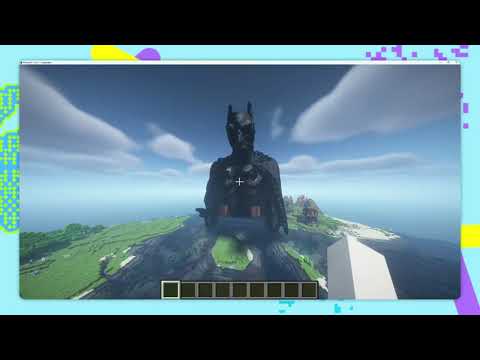
▶️ Watch on YouTube - See falcraft in action!
🚀 Quick Start
- ⬇️ Download Falcraft
- ⬇️ Download Fabric API
- Drop both JARs in
.minecraft/mods/ - Run
/fal setkey "YOUR_KEY"(get key here)
📖 Full installation guide | Requires Minecraft 1.21.1 + Fabric Loader
🎮 Commands
Generate 3D Structures
/fal generate <size> <prompt>
Examples:
/fal generate 48 medieval castle
/fal generate 64 spongebob squarepants
/fal generate 96 ancient temple
Size guide: 16-32 (small), 48-64 (recommended), 96-128 (large/detailed)
Generation takes ~30 seconds using Z-Image + SAM-3D pipeline.
Craft Mode (Hunyuan 3D)
High-quality UV-textured 3D generation using Nano Banana Pro + Hunyuan 3D v3.1 Pro.
/fal craft <size> <prompt>
Examples:
/fal craft 80 spongebob squarepants
/fal craft 112 epic fire dragon
/fal craft 64 medieval castle
Craft mode produces detailed, properly textured models. Generation takes about 2-3 minutes. Best for characters, creatures, and objects where texture quality matters.
Stream Mode (Live Preview)
Watch structures emerge from noise in real-time!
/fal stream <size> <prompt>
Examples:
/fal stream 64 dragon statue
/fal stream 96 futuristic mech
/fal stream 80 medieval castle
Stream mode shows the SAM-3D diffusion process live - you'll see the shape form first (geometry phase), then colors appear (appearance phase). Powered by Manifold, a real-time 3D streaming pipeline built on fal Serverless.
Use /fal stream cancel to stop a generation in progress.
Legacy Mode (Meshy-6)
For UV-textured models (~7 minutes):
/fal generate legacy <size> <prompt>
🕹️ Placement Controls
All generation modes share the same placement preview. A ghost block preview appears after generation, and you can adjust it before placing.
| Key | Action | |-----|--------| | Right-click | Place the structure | | G | Rotate (yaw, around Y axis) | | V | Pitch (tilt forward/back, around X axis) | | B | Roll (tilt sideways, around Z axis) | | H | Move up | | N | Move down |
Each rotation key cycles through 0, 90, 180, and 270 degrees. The ghost preview updates in real time so you can see the result before placing.
Tip: Craft mode generates models with the image's vertical axis mapped to Minecraft's Y axis. For characters and buildings this is usually correct. For creatures, dragons, or vehicles that should be horizontal, press V to pitch the model forward until it looks right.
⚙️ Setup Details
-
Install Fabric Loader + Fabric API for MC 1.21.1
-
Drop the mod JAR in
.minecraft/mods/ -
Launch Minecraft and run:
/fal setkey "YOUR_API_KEY"Get your API key at fal.ai/dashboard/keys
Note: Wrap your API key in quotes to handle the special characters.
That's it! Your key is saved to config/falcraft/api-key.txt.
Check Status
/fal status
Shows if your API key is configured.
💰 API Cost
This mod uses fal.ai's cloud APIs. You'll need to add credits to your account.
Cost Breakdown (Per Structure)
Generate/Stream mode (Z-Image + SAM-3D):
| Step | Model | Cost | |------|-------|------| | 1. Text to Image | Z-Image Turbo | ~$0.005-0.008 | | 2. Image to 3D | SAM-3D Objects | $0.02 (flat) | | 3. Prompt fix* | OpenRouter Vision | ~$0.001 |
Total: ~$0.025-0.03 per generation.
*Only triggered when 3D segmentation fails on complex/abstract prompts.
Craft mode (Nano Banana Pro + Hunyuan 3D):
| Step | Model | Cost | |------|-------|------| | 1. Text to Image | Nano Banana Pro | ~$0.01 | | 2. Image to 3D | Hunyuan 3D v3.1 Pro | ~$0.015 |
Total: ~$0.025 per generation.
🧠 How It Works
Generate/Stream mode:
- Z-Image Turbo generates a 2D image from your prompt
- SAM-3D converts the image to a 3D GLB model with vertex colors
Craft mode:
- Nano Banana Pro generates a 2D image from your prompt
- Hunyuan 3D v3.1 Pro converts the image to a UV-textured 3D GLB model
Shared pipeline (all modes): 3. Voxelizer converts the mesh to Minecraft blocks using triangle-voxel intersection 4. Block Mapper matches colors using CIE-LAB perceptual color space (100+ block palette) 5. Ghost Preview shows the structure with full rotation and translation controls 6. Animated Build places blocks layer-by-layer
🐛 Troubleshooting
- "API key not configured" - Run
/fal setkey "YOUR_KEY"(with quotes) or check with/fal status - 403 error - Your fal.ai account needs credits. Add billing here
- Structure not visible - Look where you want to place (up to 200 blocks away)
- Colors look off - The 100+ block palette maps colors as close as Minecraft allows
📜 License
CC0 1.0 - Public domain. Use freely!
