
IRS
IRS: A Large Synthetic Indoor Robotics Stereo Dataset for Disparity and Surface Normal Estimation
Install / Use
/learn @blackjack2015/IRSREADME
IRS
IRS: A Large Synthetic Indoor Robotics Stereo Dataset for Disparity and Surface Normal Estimation
Introduction
IRS is an open dataset for indoor robotics vision tasks, especially disparity and surface normal estimation. It contains totally 103,316 samples covering a wide range of indoor scenes, such as home, office, store and restaurant.
|<img src="/imgs/left.png" width="100%" > | <img src="/imgs/right.png" width="100%" > | |:--:|:--:| |Left image|Right image| |<img src="/imgs/disparity.png" width="100%" > | <img src="/imgs/normal.png" width="100%" > | |Disparity map|Surface normal map|
Overview of IRS
Rendering Characteristic|Options :--|:--: indoor scene class|home(31145), office(43417), restaurant(22058), store(6696) object class|desk, chair, sofa, glass, mirror, bed, bedside table, lamp, wardrobe, etc. brightness|over-exposure(>1300), darkness(>1700) light behavior|bloom(>1700), lens flare(>1700), glass transmission(>3600), mirror reflection(>3600)
We give some sample of different indoor scene characteristics as follows.
|<img src="/imgs/home.png" width="100%" > | <img src="/imgs/office.png" width="100%"> | <img src="/imgs/restaurant.png" width="100%" >| |:--:|:--:|:--:| |Home|Office|Restaurant| |<img src="/imgs/normal_light.png" width="100%" > | <img src="/imgs/over_exposure.png" width="100%" > | <img src="/imgs/dark.png" width="100%" >| |Normal light|Over exposure|Darkness| |<img src="/imgs/glass.png" width="100%" > | <img src="/imgs/mirror.png" width="100%" > | <img src="/imgs/metal.png" width="100%" >| |Glass|Mirror|Metal|
Network Structure of DispNormNet
We design a novel network, namely DispNormNet, to estimate the disparity map and surface normal map together of the input stereo images. DispNormNet is comprised of two modules, DispNetC and NormNetDF. DispNetC is identical to that in this paper and produces the disparity map. NormNetDF produces the normal map and is similar to DispNetS. "DF" indicates disparity feature fusion, which we found important to produce accurate surface normal maps.
<div align="center"> <img src="/imgs/DispNormNet.png" width="100%" > DispNormNet </div>Paper
Q. Wang<sup>*,1</sup>, S. Zheng<sup>*,1</sup>, Q. Yan<sup>*,2</sup>, F. Deng<sup>2</sup>, K. Zhao<sup>†,1</sup>, X. Chu<sup>†,1</sup>.
IRS : A Large Synthetic Indoor Robotics Stereo Dataset for Disparity and Surface Normal Estimation. [preprint]
<font size=2> * indicates equal contribution. † indicates corresponding authors.<br> <sup>1</sup>Department of Computer Science, Hong Kong Baptist University. <sup>2</sup>School of Geodesy and Geomatics, Wuhan University. </font> <!-- Q. Wang<sup>*,1</sup>, S. Zheng<sup>*,1</sup>, Q. Yan<sup>*,2</sup>, F. Deng<sup>2</sup>, K. Zhao<sup>†,1</sup>, X. Chu<sup>†,1</sup>.[preprint](/pdfs/IRS_indoor_robotics_stereo_dataset.pdf) [IRS : A Large Synthetic Indoor Robotics Stereo Dataset for Disparity and Surface Normal Estimation](https://www.github.com) <font size=2> * indicates equal contribution. † indicates corresponding authors.<br> <sup>1</sup>Department of Computer Science, Hong Kong Baptist University. <sup>2</sup>School of Geodesy and Geomatics, Wuhan University. </font> -->Download
You can use the OneDrive link to download our dataset.
Video Demonstration
<!-- <iframe width="560" height="315" src="https://www.youtube.com/embed/jThNQFHNU_s" frameborder="0" allow="accelerometer; autoplay; encrypted-media; gyroscope; picture-in-picture" allowfullscreen></iframe> -->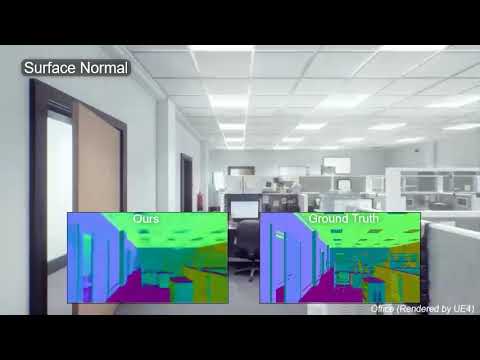
Usage
Dependencies
- Python2.7
- PyTorch(1.2.0)
- torchvision 0.2.0 (higher version may cause issues)
- Cuda 10 (https://developer.nvidia.com/cuda-downloads)
Install
Use the following commands to install the environment in Linux
cd layers_package
./install.sh

# install OpenEXR (https://www.openexr.com/)
sudo apt-get update
sudo apt-get install openexr
Dataset
Download IRS dataset from https://1drv.ms/f/s!AmN7U9URpGVGem0coY8PJMHYg0g?e=nvH5oB (OneDrive).
Check the following MD5 of all files to ensure their correctness.
|MD5SUM|File Name|
|:--:|:--:|
| e5e2ca49f02e1fea3c7c5c8b29d31683 | Store.tar.gz |
| d62b62c3b6badcef0d348788bdf4f319 | IRS_small.tar.gz |
| ac569053a8dbd76bb82f1c729e77efa4 | Home-1.tar.gz |
| 65aad05ae341750911c3da345d0aabb2 | Home-2.tar.gz |
| de77ab28d9aaec37373a340a58889840 | Office-1.tar.gz |
| 2a5cb91fb2790d92977c8d0909539543 | Office-2.tar.gz |
| d68dd6014c0c8d6ae24b27cc2fce6423 | Restaurant.tar.gz |
Extract zip files and put them in correct folder:
---- pytorch-dispnet ---- data ---- IRSDataset ---- Home
                                                |-- Office
                                                |-- Restaurant
                                                |-- Store
Train
There are configurations for train in "exp_configs" folder. You can create your own configuration file as samples.
As an example, following configuration can be used to train a DispNormNet on IRS dataset:
/exp_configs/dispnormnet.conf
net=dispnormnet
loss=loss_configs/dispnetcres_irs.json
outf_model=models/${net}-irs
logf=logs/${net}-irs.log

lr=1e-4
devices=0,1,2,3

dataset=irs #sceneflow, irs, sintel
trainlist=lists/IRSDataset_TRAIN.list
vallist=lists/IRSDataset_TEST.list

startR=0
startE=0
endE=10
batchSize=16
maxdisp=-1
model=none
Then, the configuration should be specified in the "train.sh"
/train.sh
dnn="${dnn:-dispnormnet}"
source exp_configs/$dnn.conf

python main.py --cuda --net $net --loss $loss --lr $lr \
               --outf $outf_model --logFile $logf \
               --devices $devices --batch_size $batchSize \
               --dataset $dataset --trainlist $trainlist --vallist $vallist \
               --startRound $startR --startEpoch $startE --endEpoch $endE \
               --model $model \
               --maxdisp $maxdisp \
               --manualSeed 1024 \
Lastly, use the following command to start a train
./train.sh
Evaluation
There is a script for evaluation with a model from a train
/detech.sh
dataset=irs
net=dispnormnet

model=models/dispnormnet-irs/model_best.pth
outf=detect_results/${net}-${dataset}/

filelist=lists/IRSDataset_TEST.list
filepath=data

CUDA_VISIBLE_DEVICES=0 python detecter.py --model $model --rp $outf --filelist $filelist --filepath $filepath --devices 0 --net ${net} --disp-on --norm-on
Use the script in your configuration, and then get result in detect_result folder.
Disparity results are saved in png format as default.
Normal results are saved in exr format as default.
If you want to change the output format, you need to modify "detecter.py" and use save function as follow
# png
skimage.io.imsave(filepath, image)

# pfm
save_pfm(filepath, data)

# exr
save_exr(data, filepath)
EXR Viewer
For viewing files in exr format, we recommand a free software
Contact
Please contact us at qiangwang@comp.hkbu.edu.hk if you have any question.
