
BioAgents
BioAgents: An AI scientist framework for autonomous deep research in biological sciences. Multi-agent system combining literature analysis agents with data scientist agents to enable deep research automation through user feedback integration and iterative scientific discovery. Inspired by advances in Edison Kosmos, Sakana AI, K-Dense and others.
Install / Use
/learn @bio-xyz/BioAgentsREADME
BioAgents AgentKit
An advanced AI agent framework for biological and scientific research. BioAgents provides powerful conversational AI capabilities with specialized knowledge in biology, life sciences, and scientific research methodologies.
State-of-the-Art Analysis Agent
The BioAgents analysis agent achieves state-of-the-art performance on the BixBench benchmark, outperforming all existing solutions:
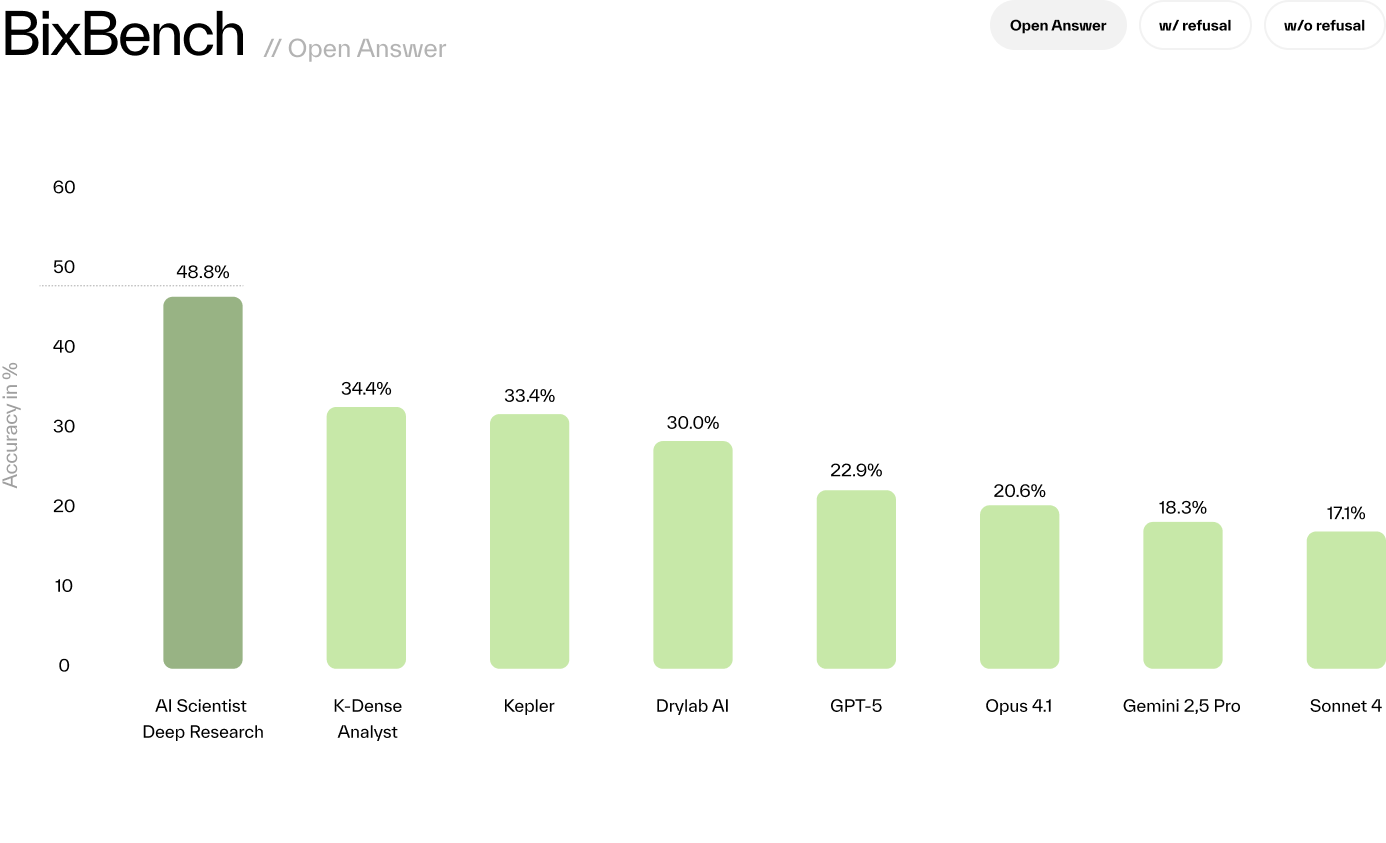
| Evaluation Mode | Score | |-----------------|-------| | Open-Answer | 48.78% | | Multiple-Choice (with refusal) | 55.12% | | Multiple-Choice (without refusal) | 64.39% |
These results outperform Kepler, GPT-5, and others across all evaluation modes.
Learn more:
- Introducing BioAgents - Detailed blog post about our literature and analysis agents
- Scientific Paper (arXiv) - Full technical details and methodology
Configurable Research Agents
BioAgents allows you to choose your primary literature and analysis agents. While multiple backends are supported, BIO is the recommended default:
| Agent Type | Primary (BIO) | Alternative | |------------|---------------|-------------| | Literature | BioAgents Literature API - semantic search with LLM reranking | OpenScholar, Edison | | Analysis | BioAgents Data Analysis - state-of-the-art benchmark performance | Edison |
Configure your preferred agents in .env:
PRIMARY_LITERATURE_AGENT=bio    # or openscholar, edison
PRIMARY_ANALYSIS_AGENT=bio      # or edison
Setup
Check out SETUP.md
Agent Backend
Routes
The system operates through two main routes:
- /api/chat - Agent-based chat for general research questions with automatic literature search
- /api/deep-research - Deep research mode with iterative hypothesis-driven investigation
Chat diagram <img width="880" height="141" alt="image" src="https://github.com/user-attachments/assets/21493a0a-4401-4bb5-b1e7-55f9ae5e6db4" />
Deep research diagram <img width="1999" height="878" alt="image" src="https://github.com/user-attachments/assets/87afd02c-9476-45d0-8ac0-66ac8b590e35" />
Both routes use the same agent architecture but differ in their orchestration and iteration patterns.
Agents
Agents are the core concept in this repository. Each agent is a self-contained, independent function that performs a specific task in the research workflow. Agents are designed to be modular and reusable across different routes and contexts.
Available Agents
-
File Upload Agent - Handles file parsing, storage, and automatic description generation
- Supports PDF, Excel, CSV, MD, JSON, TXT files
- Generates AI-powered descriptions for each dataset
- Stores files in cloud storage with metadata
-
Planning Agent - Creates research plans based on user questions
- Analyzes available datasets and research context
- Generates task sequences (LITERATURE or ANALYSIS)
- Updates current research objectives
-
Literature Agent - Searches and synthesizes scientific literature
- OPENSCHOLAR: General scientific literature search with citations
- EDISON: Edison AI literature search (deep research mode only)
- KNOWLEDGE: Searches your custom knowledge base with semantic search and reranking
- Returns synthesized findings with inline citations in format:
(claim)[DOI or URL]
-
Analysis Agent - Performs data analysis on uploaded datasets
- EDISON: Deep analysis via Edison AI agent with file upload to Edison storage
- BIO: Basic analysis via BioAgents Data Analysis Agent
- Uploads datasets to analysis service and retrieves results
-
Hypothesis Agent - Generates research hypotheses
- Synthesizes findings from literature and analysis
- Creates testable hypotheses with inline citations
- Considers current research context and objectives
-
Reflection Agent - Reflects on research progress
- Extracts key insights and discoveries
- Updates research methodology
- Maintains conversation-level understanding
-
Reply Agent - Generates user-facing responses
- Deep Research Mode: Includes current objective, next steps, and asks for feedback
- Chat Mode: Concise answers without next steps
- Preserves inline citations throughout
Adding New Agents
To add a new agent:
- Create a folder in
src/agents/ - Implement the main agent function in
index.ts - Add supporting logic in separate files within the folder
- Export the agent function for use in routes
- Shared utilities go in src/utils
State Management
State is separated into two types:
Message State (State):
- Ephemeral, tied to a single message
- Contains processing details for that message only
- Automatically cleared after processing
- Used for temporary data like raw file buffers
Conversation State (ConversationState):
- Persistent across the entire conversation
- Contains cumulative research data:
- Uploaded datasets with descriptions
- Current plan and completed tasks
- Key insights and discoveries
- Current hypothesis and methodology
- Research objectives
- Stored in database and maintained across requests
- This is the primary state that drives the research workflow
LLM Library
The LLM library provides a unified interface for multiple LLM providers. It allows you to use any Anthropic/OpenAI/Google or OpenRouter LLM via the same interface. Examples of calling the LLM library can be found in all agents.
Key Features:
- Unified API across providers (Anthropic, OpenAI, Google, OpenRouter)
- Extended thinking support for Anthropic models
- System instruction support
- Streaming and non-streaming responses
- Examples in every agent implementation
Literature Agent & Knowledge Base
The Literature Agent includes multiple search backends:
OPENSCHOLAR (Optional):
- General scientific literature search with high-quality citations
- Requires custom deployment and configuration
- Set
OPENSCHOLAR_API_URLandOPENSCHOLAR_API_KEYto enable - Paper: https://arxiv.org/abs/2411.14199
- Deployment: https://github.com/bio-xyz/bio-openscholar
EDISON (Optional):
- Edison AI literature search (deep research mode only)
- Requires custom deployment and configuration
- Set
EDISON_API_URLandEDISON_API_KEYto enable - Deployment: https://github.com/bio-xyz/bio-edison-api
KNOWLEDGE (Customizable):
- Vector database with semantic search (embeddings)
- Cohere reranker for improved results (requires
COHERE_API_KEY) - Document processing from docs directory
- Documents are processed once per filename and stored in vector DB
To add custom knowledge:
- Place documents in the
docs/directory- Supported formats: PDF, Markdown (.md), DOCX, TXT
- Documents are automatically processed on startup
- Vector embeddings are generated and stored
- Available to Literature Agent via KNOWLEDGE tasks
Docker Deployment Note: When deploying with Docker, agent-specific documentation in docs/ and branding images in client/public/images/ are persisted using Docker volumes. These directories are excluded from git (see .gitignore) but automatically mounted in your Docker containers via volume mounts defined in docker-compose.yml. This allows you to customize your agent with private documentation without committing it to the repository.
Analysis Agent Configuration
The Analysis Agent supports two backends for data analysis:
EDISON (Default):
- Deep analysis via Edison AI agent
- Automatic file upload to Edison storage service
- Requires
EDISON_API_URLandEDISON_API_KEY - https://github.com/bio-xyz/bio-edison-api
BIO (Alternative):
- Basic analysis via BioAgents Data Analysis Agent
- Set
PRIMARY_ANALYSIS_AGENT=bioin.env - Requires
DATA_ANALYSIS_API_URLandDATA_ANALYSIS_API_KEY - https://github.com/bio-xyz/bio-data-analysis
Both backends receive datasets and analysis objectives, execute analysis code, and return results.
Character File
The character file defines your agent's identity and system instructions. It's now simplified to focus on core behavior:
- name: Your agent's name
- system: System prompt that guides agent behavior across all interactions
The character's system instruction is automatically included in LLM calls for planning, hypothesis generation, and replies, ensuring consistent behavior throughout the research workflow. You can enable the system prompt in any LLM call by setting the 'systemInstruction' parameter.
UI
Component system:
- Custom hooks in
client/src/hooks/ - UI components in
client/src/components/ui/ - Lucide icons via
client/src/components/icons/
Styling:
- Main styles:
client/src/styles/global.css - Button styles:
client/src/styles/buttons.css - Mobile-first responsive design
Payment Integration:
The UI includes integrated support for x402 micropayments using Coinbase embedded wallets:
- Embedded wallet authentication via
client/src/components/EmbeddedWalletAuth.tsx - x402 payment hooks in
client/src/hooks/useX402Payment.ts - Seamless USDC payment flow for paid API requests
- Toast notifications for payment status
Authentication
BioAgents supports two independent auth systems:
| Setting | Options | Purpose |
| ------- | ------- | ------- |
| AUTH_MODE | none / jwt | JWT authentication for external frontends |
| X402_ENABLED | true / false | x402 USDC micropayments |
