
lexware-office-mcp
Unofficial MCP server for the Lexware Office accounting API — runs over stdio or HTTP.
Install / Use
claude mcp add benethos-hub -- npx -y github:benethos-hub/lexware-office-mcpIf the server publishes to npm under a different name, use that package instead — check the repo README.
MCP Server
Model Context Protocol server
Quality Score
Category
Finance & AccountingSupported Platforms
Our assessment of lexware-office-mcp
lexware-office-mcp scores 71/100 on our quality scale, 101st of 107 Finance & Accounting skills we index.
Its MCP Server is 71 KB long, well organised into 29 sections with 22 code examples: long enough that it reads more like full documentation than a focused instruction file, which agents can find harder to follow.
It has 3 GitHub stars, so there is little community track record yet; judge it on its content.
Maintenance, license and trust
- The repository was last updated today, so lexware-office-mcp is actively maintained.
- It is released under the MIT license, a permissive license that allows use, modification and commercial use with attribution.
- Its trust signals score 87/100, with 2 cautions from licensing, adoption, age or documentation. These come from repository metadata, not a code audit — read the skill file before letting an agent act on it.
lexware-office-mcp compared with similar skills
All 4 of these similar skills score higher than lexware-office-mcp; compare them before choosing.
| Skill | Score | Stars | Updated | Format |
|---|---|---|---|---|
| lexware-office-mcp (this skill)by benethos-hub | 71 | 3 | today | MCP Server |
| Agent-Reachby Panniantong | 100 | 112.8k | 10d ago | CLAUDE.md |
| rufloby ruvnet | 100 | 82.0k | today | CLAUDE.md |
| headroomby headroomlabs-ai | 100 | 79.9k | today | CLAUDE.md |
| CowAgentby zhayujie | 100 | 48.0k | today | CLAUDE.md |
Frequently asked questions
- How do I install lexware-office-mcp?
- Run
claude mcp add benethos-hub -- npx -y github:benethos-hub/lexware-office-mcp. The install tabs above show the steps for each supported agent. - Which AI agents does lexware-office-mcp work with?
- It is written for Claude Code and Claude Desktop, as a MCP Server file. Other agents that read the same format can often use it too.
- Is lexware-office-mcp safe to use?
- It is MIT-licensed and scores 87/100 on trust signals. Skills are instructions an agent will follow, so read the file before installing it and do not approve commands you do not understand.
- Is lexware-office-mcp still maintained?
- The repository was last updated today, so lexware-office-mcp is actively maintained.
Skill content
View source on GitHub<img src="https://raw.githubusercontent.com/benethos-hub/lexware-office-mcp/main/assets/brand/icon.svg" alt="" width="40" height="40"> Unofficial Lexware Office MCP Server









Disclaimer
- This project is not affiliated with, endorsed by, or sponsored by Lexware or Haufe-Lexware GmbH & Co. KG. "Lexware" and "Lexware Office" are trademarks of their respective owners.
- It uses the documented public API with an API key you generate and can revoke yourself. Use of that API is governed by Lexware's own terms, which you accept independently of this project. The API can change at any time, and requests may be rate limited or blocked.
- It reaches real accounting records. Write access is off by default. If you enable it, anything created through the API is a real and legally relevant record — a finalized document cannot be withdrawn through the API.
- Data may be incomplete or out of date. Nothing here is tax, accounting or legal advice. Do not rely on it for filings, audits, or your bookkeeping obligations.
- Provided "as is", without warranty. Intended for personal and professional use at your own risk. See LICENSE.
- For commercial use, review Lexware's API terms and your own retention and documentation duties.
Contents
- Why this exists
- Safety first
- How it works
- Tools
- Prompts
- Requirements
- Getting an API key
- Installation
- Configuring it in a browser
- Switching individual tools off
- Configuration
- Transport
- In a container
- Logs
- Example prompts
- Rate limits
- Development
- License
- Trademarks and affiliation
An MCP server that connects an MCP client such as Claude Desktop to a Lexware Office account through the official public REST API. Ask about invoices, contacts, articles and vouchers in plain language, and let the client fetch them for you.
Status: 0.10.2. The server handles contacts, vouchers and documents: find them, read them, create them, change them, see what is still unpaid, download a PDF and upload a receipt and book it.
get_profileanswers which account is connected. Every tool in the table below is built, and each was exercised against a live account. It speaks stdio to a client that starts it, as a Claude Desktop extension or from PyPI, and streamable HTTP behind a bearer token where something else has to reach it - as a published container image, with Compose files for running it and for building it from a checkout. See SPECS.md for the full technical specification and the roadmap.
Why this exists
Lexware Office holds the day-to-day accounting of a small business. Most questions about it are read questions — what is still unpaid, what did this customer order, which receipt belongs to that expense — and those are exactly the questions an assistant answers well once it can see the data. This server makes that possible without exporting anything, using an API key the account owner generates and can revoke. For the questions that come back every month, three built-in prompts ask them the same careful way each time: what is still open, which receipt is missing, where a customer stands.
Safety first
The server points at a real accounting system, so the defaults are cautious.
Run it read-only unless you have a reason not to. This server can change
real accounting records - create a contact, record a voucher, issue an invoice,
attach a receipt - and it is the assistant that decides when to call such a
tool, not you. --tools read-only gives it everything it needs to answer
questions about the books, which is what most people want it for: search,
read, and download. Nothing in that set writes.
Turn a write tool on when you have a job for it, and know what it leaves
behind. This API cannot delete a bookkeeping voucher at all, so a wrong one
is corrected in the web app rather than withdrawn here, and a finalized
invoice is a real document with a number that has been used. If you are not
sure which tools you need, read-only is the honest starting point - the
permissions page adds one later in a click, and a client that honours
notifications/tools/list_changed, as Claude Desktop does, picks it up
without a restart.
- Nothing is enabled until you say so. A fresh installation has no
policy file, and a server without one offers no tool but
server_status, which says what is running and reads nothing in the account. What this server may do is a decision somebody made, never a default that happened. - One flag per tool, in a JSON file you write with
--tools, tick throughsetup, or edit by hand. Not a level, not a group:create_contacton andupload_fileoff is an ordinary thing to want, and there is no combination the file cannot express. - What a tool costs you is visible while you decide. Every enabled tool is sent to the assistant on every request, and the permissions page puts that number on each row.
- The file is checked twice, once when the tool list is built and again when a call arrives, so a stale tool list on the client cannot slip past it.
- The API key is never logged, never returned in a tool result, and redacted
from error messages. It belongs in the
.envand nowhere else — not in your client's configuration file, which another program owns and rewrites, and which is the one people screenshot when they ask for help. Nor does any path from your machine reach the assistant.
How it works
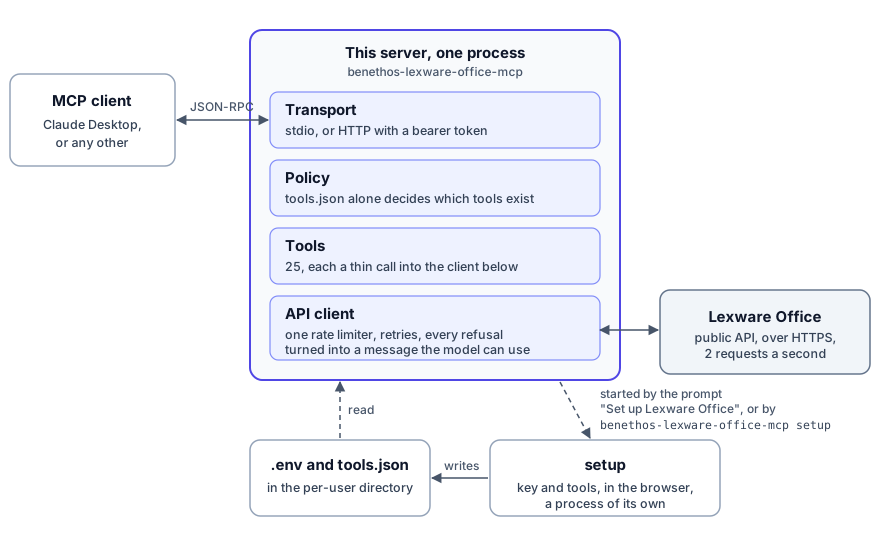
The client starts the server, or reaches it over HTTP, and speaks MCP with
it. What a model can do is settled before anything reaches Lexware: a tool
the policy file does not name does not exist for the client, server_status
aside, which only says what is running, and every call that is left goes
through one API client with one rate limiter. The key and
the permissions live in two files that setup writes, a process of its own
that the client's prompt Set up Lexware Office starts, and so does
benethos-lexware-office-mcp setup in a terminal.
Tools
Every tool below is built and was exercised against a live account. None of them is enabled until the policy file names it, except one, which is there whatever the file says. It reads no record and writes nothing:
| Tool | What it does |
|---|---|
| server_status | Which server is running, its version, transport and uptime, without an API call. With details, whether Lexware answers and takes the key, and whether the policy file is loaded |
Read tools:
| Tool | What it does |
|---|---|
| get_profile | Company profile and connection check |
| search_contacts | Find customers and vendors by name, email, number or role |
| get_contact | One contact with addresses, roles and version |
| search_articles | List articles, filtered by number, barcode or kind. The API offers no search by title |
| get_article | One article with its price block and version |
| search_vouchers | The central query — filter the voucher list by type, status, contact, document number, date range and what is still open |
| get_sales_document | Read an invoice, quotation, credit note, order confirmation, delivery note, dunning or down payment invoice in full |
| get_voucher | Read a bookkeeping voucher, by id or by its document number |
| get_payments | Payment status and open amount of a voucher |
| get_recurring_templates | Templates that issue invoices on a schedule, one or a page of them |
| get_master_data | Countries, payment conditions, posting categories and print layouts, with a search to narrow them |
| download_document | Save the rendered PDF or XML of a sales document |
| download_file | Save a stored file, such as an uploaded receipt |
| read_download | Put a downloaded file into the answer, for clients that cannot follow a resource link |
| get_deeplink | Build a permalink to a sales document, contact or voucher in the web app, without an API call |
Write tools. These change real accounting records, so enable them one at a time and against an account you are willing to have changed:
| Tool | What it does |
|---|---|
| create_contact | Create a customer or vendor |
| update_contact | Change one, without touching what you did not name |
| create_article | Add an article to the catalogue |
| update_article | Change
Truncated for display — read the full file on GitHub.
Related Skills
Agent-Reach
112.8kGive your AI agent eyes to see the entire internet. Read & search Twitter, Reddit, YouTube, GitHub, Bilibili, XiaoHongShu — one CLI, zero API fees.
ruflo
82.0k🌊 The original agent harness. Deploy intelligent multi-player swarms, coordinate autonomous workflows, and build conversational AI systems. Features adaptive memory, self-learning intelligence, federation, vector RAG integration, and native Claude Code / Codex / Hermes and many more Integrated
headroom
79.9kCompress tool outputs, logs, files, and RAG chunks before they reach the LLM. 20% fewer tokens for coding agents, 60-95% fewer tokens for JSON, same answers. Library, proxy, MCP server.
CowAgent
48.0kOpen-source personal AI assistant & Agent Harness. Plans tasks, runs tools and skills, self-evolves with memory and knowledge. Multi-agent, multi-model, multi-channel. Lightweight, extensible, one-line install.

Languages
Trust signals
From repository metadata: license, adoption, age and documentation. Not a code audit — see the Safety scan above for what the skill file itself contains.