
moemail
A cute temporary email service built with NextJS + Cloudflare technology stack 🎉 | 一个基于 NextJS + Cloudflare 技术栈构建的可爱临时邮箱服务🎉
Install / Use
claude mcp add beilunyang -- npx -y github:beilunyang/moemailIf the server publishes to npm under a different name, use that package instead — check the repo README.
MCP Server
Model Context Protocol server
Quality Score
Category
CommunicationSupported Platforms
Our assessment of moemail
moemail scores 95/100 on our quality scale, 46th of 399 Communication skills we index (top 12%).
Its MCP Server is 21 KB long, well organised into 82 sections with 35 code examples: a thorough specification that gives an agent plenty to work with.
With 2,833 GitHub stars, it is one of the more widely adopted skills in the catalogue.
Maintenance, license and trust
- The repository was last updated about 3 months ago, so moemail is actively maintained.
- It is released under the MIT license, a permissive license that allows use, modification and commercial use with attribution.
- Its trust signals score 100/100, with no cautions. These come from repository metadata, not a code audit — read the skill file before letting an agent act on it.
Safety scan
No issues foundOur scan of the whole file found no instruction hijacking, hidden characters, credential access, data exfiltration or destructive commands.
Automated pattern scan on 2026-11-23. It catches known dangerous patterns, not every risk — read a skill before letting an agent act on it.
moemail compared with similar skills
All 4 of these similar skills score higher than moemail; compare them before choosing.
| Skill | Score | Stars | Updated | Format |
|---|---|---|---|---|
| moemail (this skill)by beilunyang | 95 | 2.8k | 3mo ago | MCP Server |
| Agent-Reachby Panniantong | 100 | 114.1k | 1d ago | CLAUDE.md |
| hyperframesby heygen-com | 100 | 88.6k | today | CLAUDE.md |
| rufloby ruvnet | 100 | 82.3k | today | CLAUDE.md |
| headroomby headroomlabs-ai | 100 | 80.6k | today | CLAUDE.md |
Frequently asked questions
- How do I install moemail?
- Run
claude mcp add beilunyang -- npx -y github:beilunyang/moemail. The install tabs above show the steps for each supported agent. - Which AI agents does moemail work with?
- It is written for Claude Code and Claude Desktop, as a MCP Server file. Other agents that read the same format can often use it too.
- Is moemail safe to use?
- Our scan of the whole file found no instruction hijacking, hidden characters, credential access, data exfiltration or destructive commands. It is MIT-licensed and scores 100/100 on trust signals. Skills are instructions an agent will follow, so read the file before installing it and do not approve commands you do not understand.
- Is moemail still maintained?
- The repository was last updated about 3 months ago, so moemail is actively maintained.
Skill content
View source on GitHubLive Demo
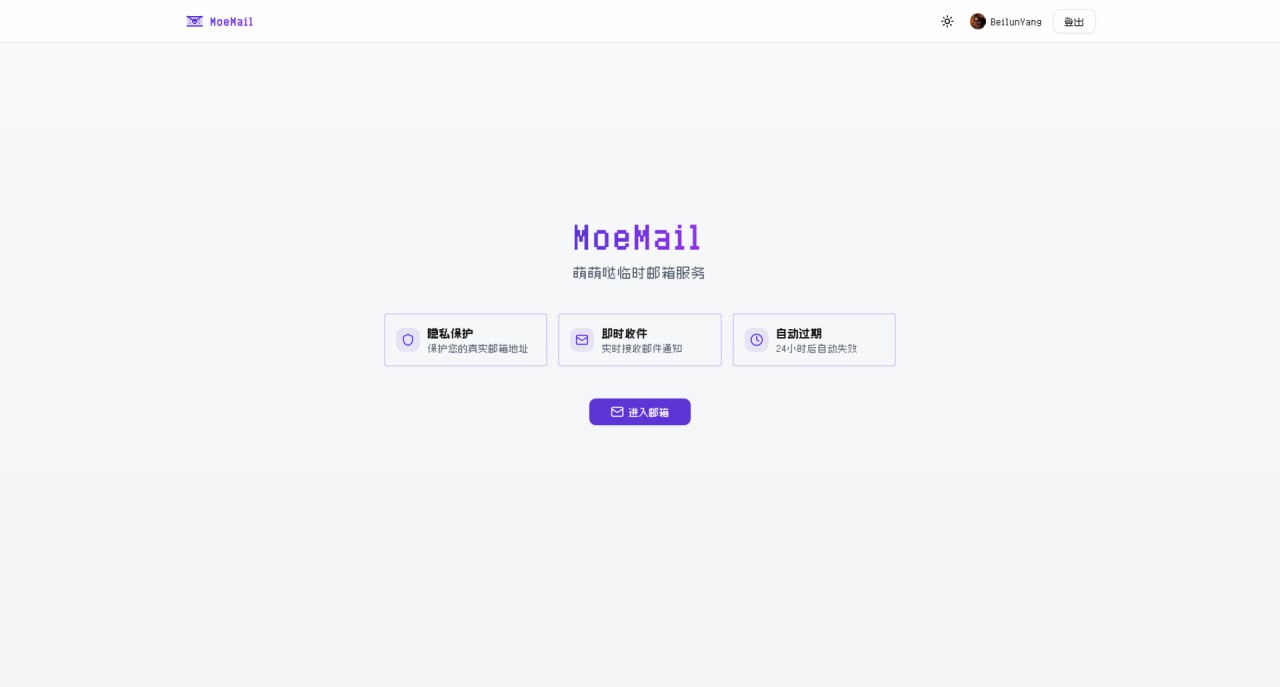
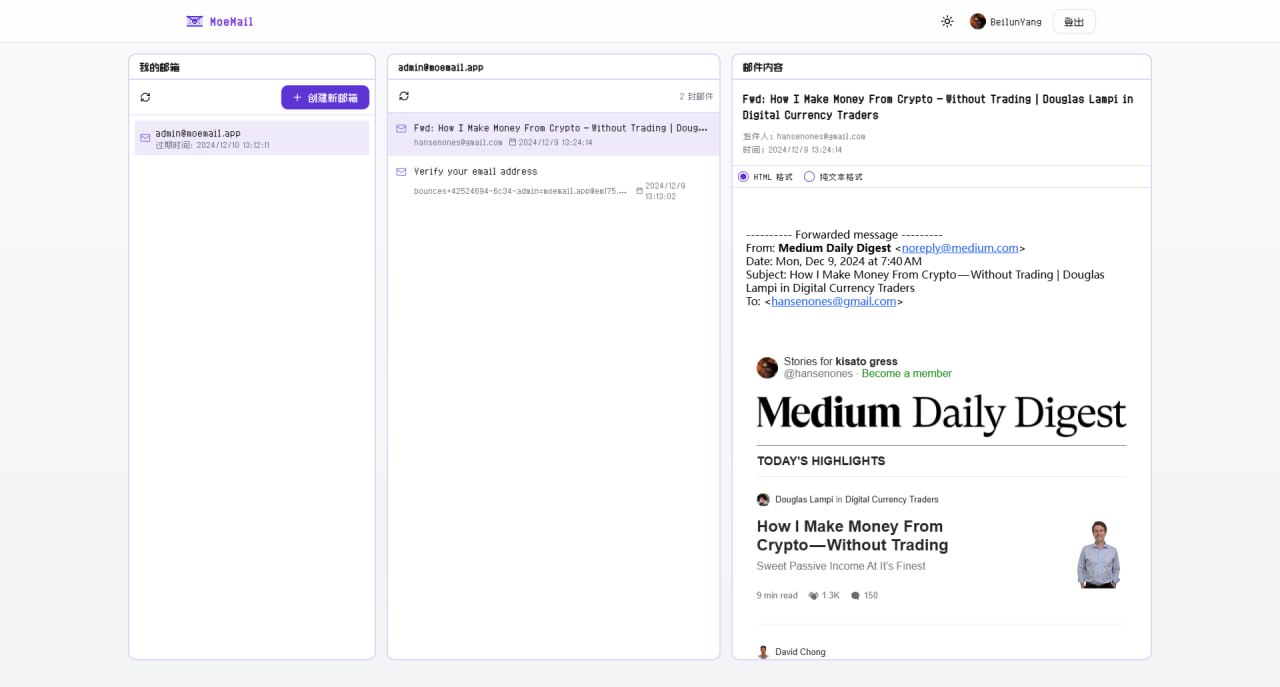
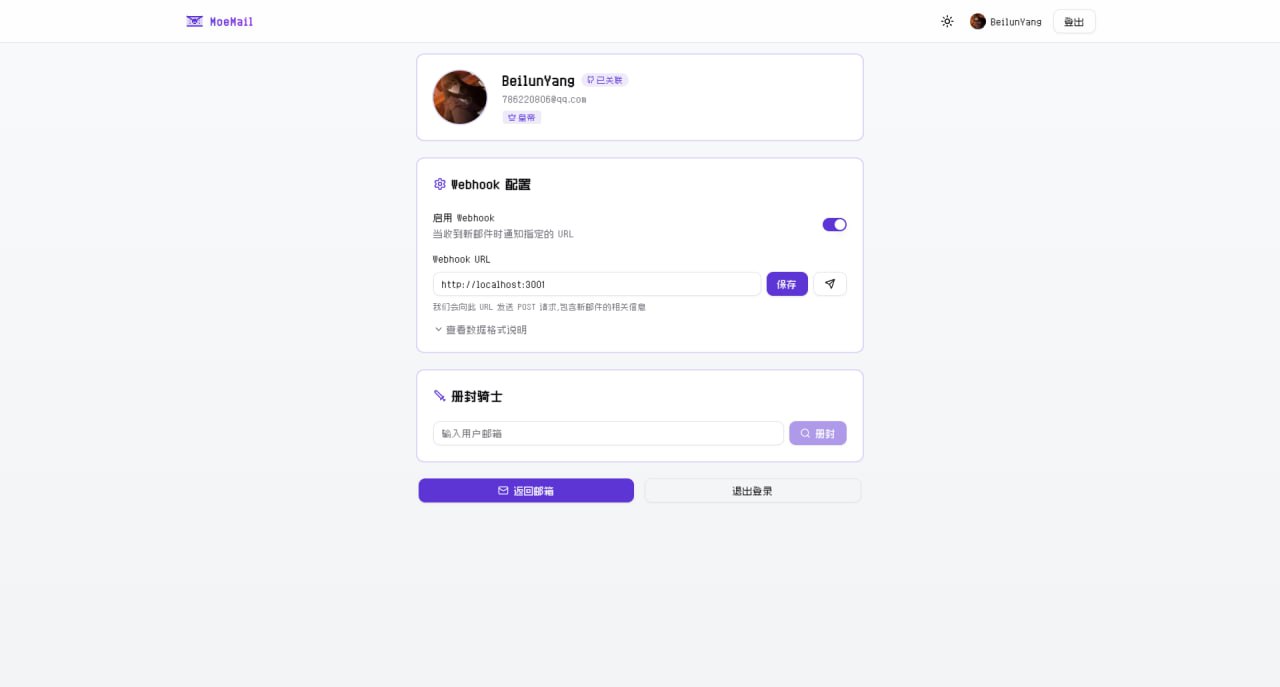
Documentation
Full Documentation: https://docs.moemail.app
The documentation site contains detailed usage guides, API documentation, deployment tutorials, and other complete information.
Features
- 🔒 Privacy Protection: Protect your real email address from spam and unnecessary subscriptions
- ⚡ Real-time Receipt: Automatic polling, receive email notifications instantly
- ⏱️ Flexible Validity: Supports 1 hour, 24 hours, 3 days, or permanent validity
- 🎨 Theme Switching: Supports light and dark modes
- 📱 Responsive Design: Perfectly adapted for desktop and mobile devices
- 🔄 Auto Cleanup: Automatically cleans up expired mailboxes and emails
- 📱 PWA Support: Support PWA installation
- 💸 Free Self-hosting: Built on Cloudflare, capable of free self-hosting without any cost
- 🎉 Cute UI: Simple and cute UI interface
- 📤 Sending Function: Support sending emails using temporary addresses, based on Resend service
- 🔔 Webhook Notification: Support receiving new email notifications via webhook
- 🛡️ Permission System: Role-based access control system
- 🔑 OpenAPI: Support accessing OpenAPI via API Key
- 🤖 Agent-first CLI: CLI tool designed for AI agents to automate email workflows
- 🌍 Multi-language Support: Supports Chinese and English interfaces, freely switchable
Tech Stack
- Framework: Next.js (App Router)
- Platform: Cloudflare Pages
- Database: Cloudflare D1 (SQLite)
- Authentication: NextAuth with GitHub/Google Login
- Styling: Tailwind CSS
- UI Components: Custom components based on Radix UI
- Email Handling: Cloudflare Email Workers
- Type Safety: TypeScript
- ORM: Drizzle ORM
- Internationalization: next-intl
Local Run
Prerequisites
- Node.js 18+
- Pnpm
- Wrangler CLI
- Cloudflare Account
Installation
- Clone the repository:
git clone https://github.com/beilunyang/moemail.git
cd moemail
- Install dependencies:
pnpm install
- Setup Wrangler:
cp wrangler.example.json wrangler.json
cp wrangler.email.example.json wrangler.email.json
cp wrangler.cleanup.example.json wrangler.cleanup.json
Set Cloudflare D1 database name and database ID.
- Setup Environment Variables:
cp .env.example .env.local
Set AUTH_GITHUB_ID, AUTH_GITHUB_SECRET, AUTH_SECRET.
- Create local database schema:
pnpm db:migrate-local
Development
- Start development server:
pnpm dev
- Test Email Worker: Currently cannot run and test locally, please use Wrangler to deploy the email worker and test.
pnpm deploy:email
- Test Cleanup Worker:
pnpm dev:cleanup
pnpm test:cleanup
- Generate Mock Data (Mailboxes and Messages):
pnpm generate-test-data
Deployment
Video Tutorial
https://www.youtube.com/watch?v=Vcw3nqsq2-E
Local Wrangler Deployment
- Create .env file
cp .env.example .env
-
Set Environment Variables in the .env file.
-
Run deployment script
pnpm dlx tsx ./scripts/deploy/index.ts
Github Actions Deployment
This project supports automated deployment using GitHub Actions. It supports the following triggers:
- Auto Trigger: Automatically triggers deployment flow when a new tag is pushed.
- Manual Trigger: Manually trigger in the GitHub Actions page.
Deployment Steps
-
Add the following Secrets in GitHub repository settings:
CLOUDFLARE_API_TOKEN: Cloudflare API TokenCLOUDFLARE_ACCOUNT_ID: Cloudflare Account IDAUTH_GITHUB_ID: GitHub OAuth App IDAUTH_GITHUB_SECRET: GitHub OAuth App SecretAUTH_SECRET: NextAuth Secret, used to encrypt session, please set a random stringCUSTOM_DOMAIN: Custom domain for the website (Optional, if empty, uses Cloudflare Pages default domain)PROJECT_NAME: Pages project name (Optional, if empty, defaults to moemail)DATABASE_NAME: D1 database name (Optional, if empty, defaults to moemail-db)KV_NAMESPACE_NAME: Cloudflare KV namespace name, used for site settings (Optional, if empty, defaults to moemail-kv)
-
Choose trigger method:
Method 1: Push Tag Trigger
# Create a new tag
git tag v1.0.0

# Push tag to remote repository
git push origin v1.0.0
Method 2: Manual Trigger
- Go to the Actions page of the repository
- Select "Deploy" workflow
- Click "Run workflow"
-
Deployment progress can be viewed in the Actions tab of the repository.
Notes
- Ensure all Secrets are set correctly.
- When using tag trigger, the tag must start with
v(e.g., v1.0.0).
Email Domain Configuration
In the MoeMail User Profile page, you can configure the site's email domains. Supports multiple domain configurations, separated by commas.
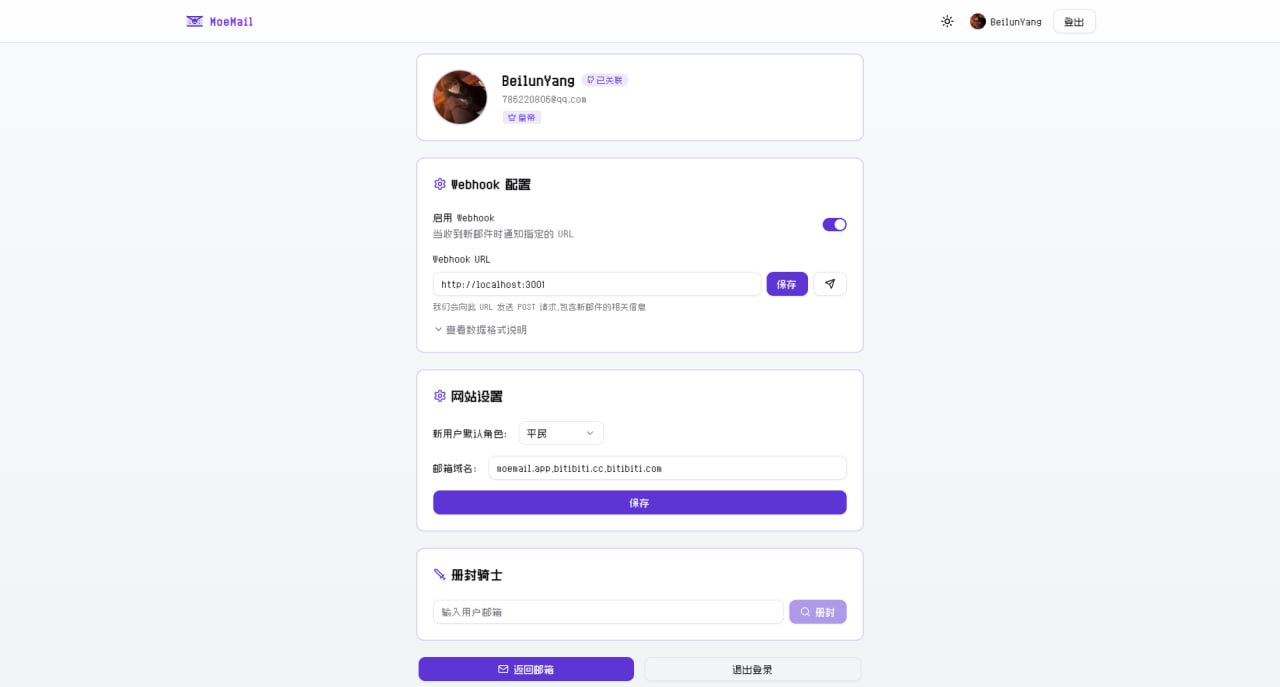
Cloudflare Email Routing Configuration
To make email domains effective, you also need to configure email routing in the Cloudflare console to forward received emails to the Email Worker.
- Login to Cloudflare Console
- Select your domain
- Click "Email" -> "Email Routing" in the left menu
- If it shows "Email Routing is currently disabled", please click "Enable Email Routing"
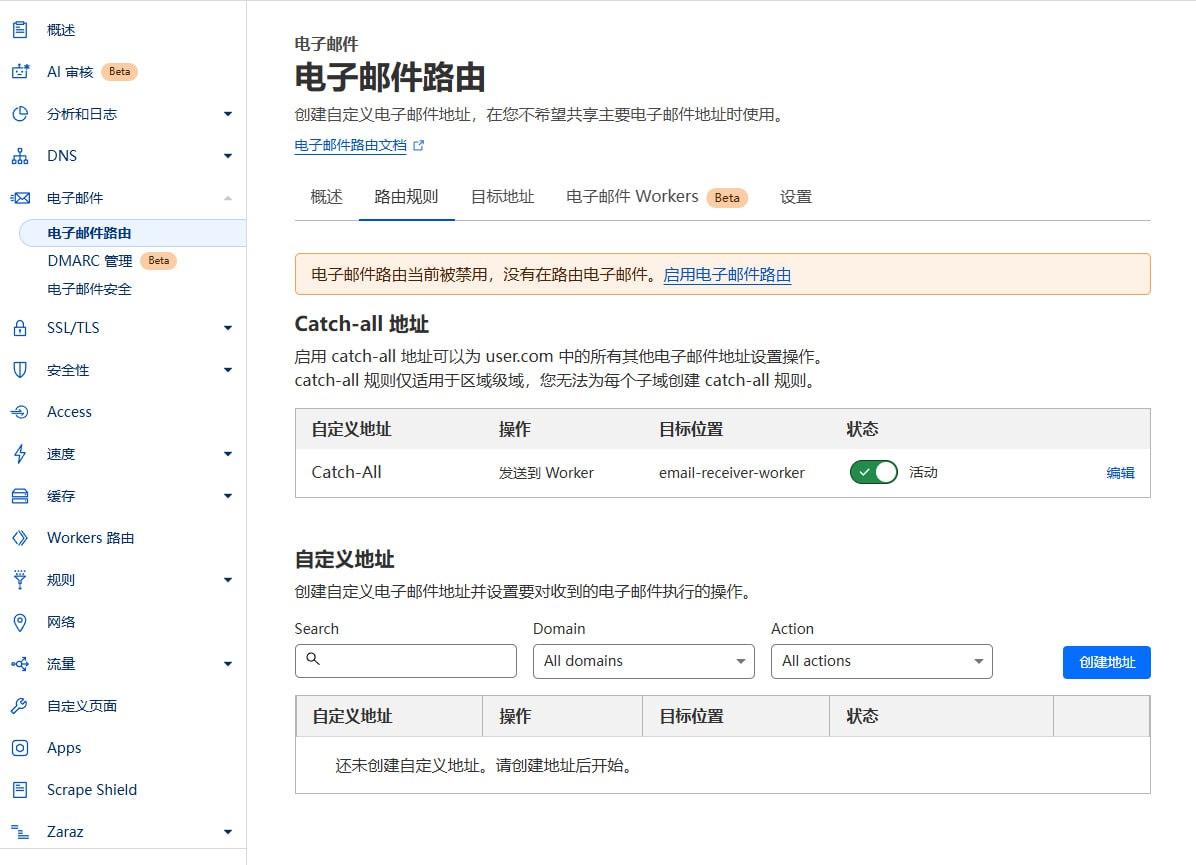
- After clicking, it will prompt you to add Email Routing DNS records, click "Add records and enable"
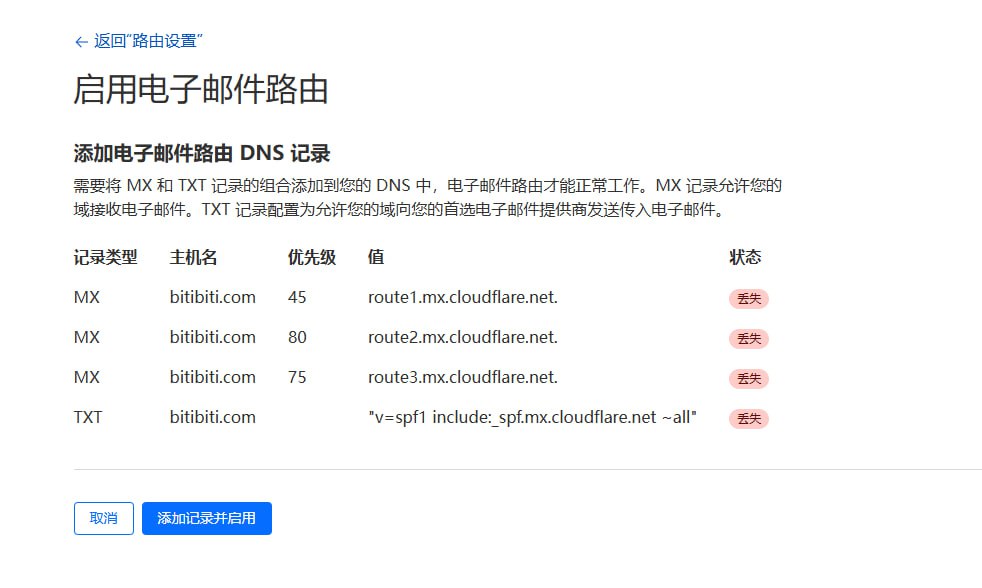
- Configure Routing Rules:
- Catch-all address: Enable "Catch-all"
- Edit Catch-all address
- Action: Select "Send to Worker"
- Destination: Select the "email-receiver-worker" you just deployed
- Save
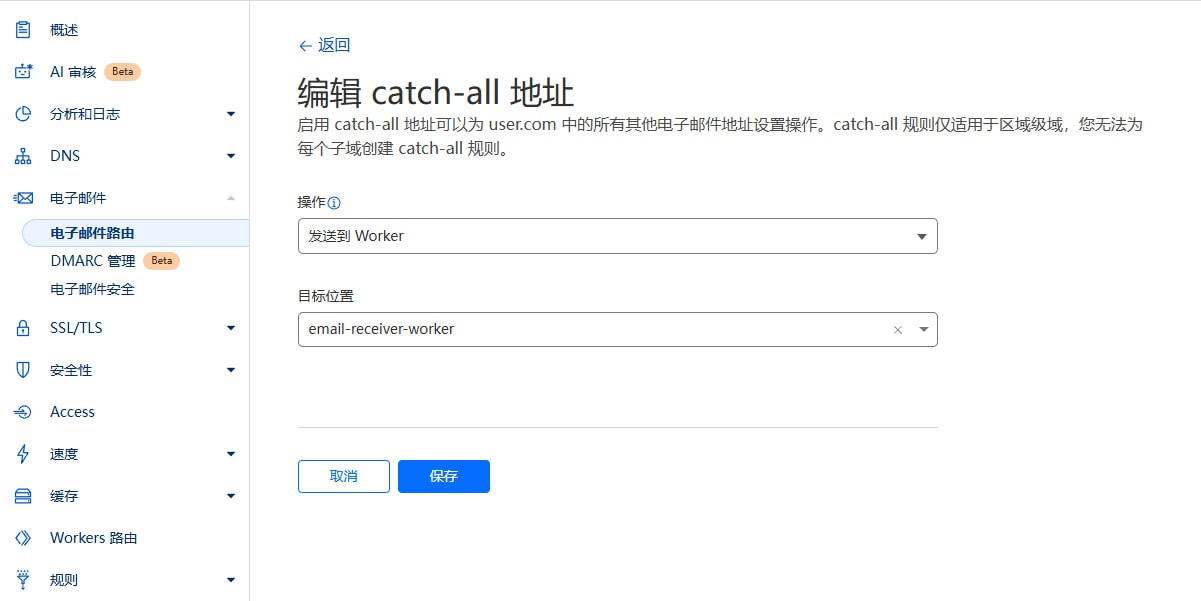
Notes
- Ensure domain DNS is hosted on Cloudflare.
- Email Worker must be successfully deployed.
- If Catch-All status is unavailable (stuck loading), please click
Destination addressesnext toRouting rules, and bind an email address there.
Permission System
The project uses a Role-Based Access Control (RBAC) system.
Role Configuration
New user default roles are configured by the Emperor in the site settings in the User Profile:
- Duke: New users get temporary email, Webhook config permissions, and API Key management permissions.
- Knight: New users get temporary email and Webhook config permissions.
- Civilian: New users have no permissions, need to wait for Emperor to promote to Knight or Duke.
Role Levels
The system includes four role levels:
-
Emperor
- Website Owner
- Has all permissions
- Only one Emperor per site
-
Duke
- Super User
- Can use temporary email features
- Can configure Webhook
- Can create API Key to call OpenAPI
- Can be demoted to Knight or Civilian by Emperor
-
Knight
- Advanced User
- Can use temporary email features
- Can configure Webhook
- Can be demoted to Civilian or promoted to Duke by Emperor
-
Civilian
- Regular User
- No permissions
- Can be promoted to Knight or Duke by Emperor
Role Upgrade
-
Become Emperor
- The first user to visit
/api/roles/init-emperorinterface will become the Emperor (Website Owner). - Once an Emperor exists, no other user can be promoted to Emperor.
- The first user to visit
-
Role Changes
- The Emperor can set other users as Duke, Knight, or Civilian in the User Profile page.
Permission Details
- Email Management: Create and manage temporary emails
- Webhook Management: Configure Webhooks for email notifications
- API Key Management: Create and manage API access keys
- User Management: Promote/Demote user roles
- System Settings: Manage global system settings
System Settings
System settings are stored in Cloudflare KV, including:
DEFAULT_ROLE: Default role for new users, values:CIVILIAN,KNIGHT,DUKEEMAIL_DOMAINS: Supported email domains, comma-separatedADMIN_CONTACT: Administrator contact infoMAX_EMAILS: Maximum number of emails per user
Emperor role can configure these in the User Profile page.
Sending Emails
MoeMail supports sending emails using temporary addresses, based on Resend service.
Features
- 📨 Send from Temp Email: Use created temporary emails as sender
- 🎯 Role Limits: Different roles have different daily sending limits
- 💌 HTML Support: Supports rich text email format
Role Sending Limits
| Role | Daily Limit | Description | |------|-------------|-------------| | Emperor | Unlimited | Admin has no limits | | Duke | 5/day | Default 5 emails per day | | Knight | 2/day | Default 2 emails per day | | Civilian | Forbidden | No sending permission |
💡 Tip: The Emperor can customize the daily limits for Dukes and Knights in the Mail Service Configuration.
Configure Sending Service
-
Get Resend API Key
- Register at Resend
- Create API Key in console
- Copy API Key for later use
-
Configure Service
- Login a
Truncated for display — read the full file on GitHub.
Related Skills
Agent-Reach
114.1kGive your AI agent eyes to see the entire internet. Read & search Twitter, Reddit, YouTube, GitHub, Bilibili, XiaoHongShu — one CLI, zero API fees.
hyperframes
88.6kOpen-source AI video editor: edit your own footage, or create and remake any video with Claude Code, Codex or the free Studio app. Write HTML, render MP4. By HeyGen.
ruflo
82.3k🌊 The original agent harness. Deploy intelligent multi-player swarms, coordinate autonomous workflows, and build conversational AI systems. Features adaptive memory, self-learning intelligence, federation, vector RAG integration, and native Claude Code / Codex / Hermes and many more Integrated
headroom
80.6kCompress tool outputs, logs, files, and RAG chunks before they reach the LLM. 20% fewer tokens for coding agents, 60-95% fewer tokens for JSON, same answers. Library, proxy, MCP server.

Languages
Trust signals
From repository metadata: license, adoption, age and documentation. Not a code audit — see the Safety scan above for what the skill file itself contains.