
Kodeagent
The minimal AI agent engine
Install / Use
/learn @barun-saha/KodeagentREADME

KodeAgent: The Minimal Agent Engine







KodeAgent is a frameworkless, minimalistic approach to building AI agents. KodeAgent is designed to be the robust reasoning core inside your larger system, not the entire platform.
✅ Why KodeAgent?
KodeAgent adheres to the Unix Philosophy: do one thing well and integrate seamlessly.
Use KodeAgent because it offers:
- ReAct, CodeAct, and Function Calling: KodeAgent supports ReAct, CodeAct, and native Function Calling paradigms out-of-the-box. This allows agents to reason, generate/execute code, or use a model's native tool-calling capabilities.
- Guidance and Auto-Correction: Includes a "Planner" to plan the steps and an internal "Observer" to monitor progress, detect loops or stalled plans, and provide corrective feedback to stay on track.
- Optimized for SLMs: The
FunctionCallingAgentis specifically designed for Small Language Models (SLMs) and models with efficient function-calling support. - Scalable: With only a few dependencies, KodeAgent perfectly integrates into serverless environments, standalone applications, or existing platforms.
- LLM Agnostic: Built on LiteLLM, KodeAgent easily swaps between models (e.g., Gemini, GPT, and Claude) and providers (e.g., Ollama) without changing your core logic.
✋ Why Not?
Also, here are a few reasons why you shouldn't use KodeAgent:
- KodeAgent is actively evolving, meaning some aspects may change.
- You want to use some of the well-known frameworks.
- You need a full-fledged platform with built-in long-term, persistent memory management.
🚀 Quick Start
<a target="_blank" href="https://colab.research.google.com/drive/1D9ly3qi9sPZn_sUFdfC1XCFehldCVPXM?usp=sharing"> <img src="https://colab.research.google.com/assets/colab-badge.svg" alt="Open In Colab"/> </a>Install KodeAgent via pip:
pip install -U kodeagent # Upgrade existing installation
Or if you want to clone the KodeAgent GitHub repository locally and run from there, use:
git clone https://github.com/barun-saha/kodeagent.git

python -m venv venv
source venv/bin/activate
# venv\Scripts\activate.bat  # Windows

pip install -r requirements.txt
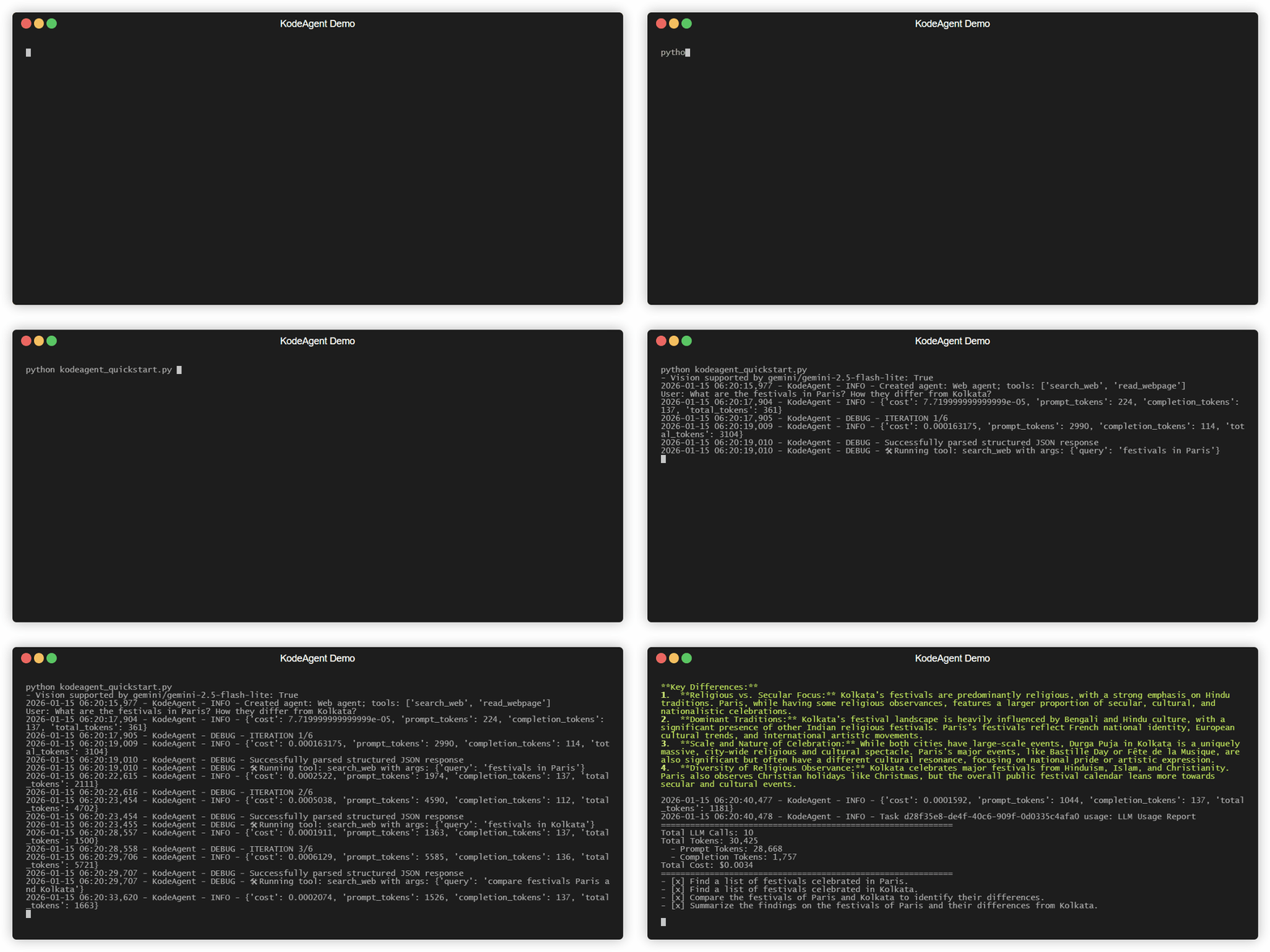
Now, in your application code, create a ReAct agent and run a task like this (see examples/_quickstart/kodeagent_quickstart.py):
from kodeagent import ReActAgent, print_response
from kodeagent.tools import read_webpage, search_web

agent = ReActAgent(
    name='Web agent',
    model_name='gemini/gemini-2.5-flash-lite',
    tools=[search_web, read_webpage],
    max_iterations=5,
)

for task in [
    'What are the festivals in Paris? How they differ from Kolkata?',
]:
    print(f'User: {task}')

    async for response in agent.run(task):
        print_response(response, only_final=True)
That's it! Your agent should start solving the task and keep streaming the updates. After the loop is done, you can access the final result of the task using agent.task.result.
You can also create a CodeActAgent, which leverages the core CodeAct pattern to generate and execute Python code on the fly for complex tasks. For example:
from kodeagent import CodeActAgent
from kodeagent.tools import read_webpage, search_web, extract_as_markdown

agent = CodeActAgent(
    name='Web agent',
    model_name='gemini/gemini-2.0-flash-lite',
    tools=[search_web, read_webpage, extract_as_markdown],
    run_env='host',
    max_iterations=7,
    allowed_imports=[
        're', 'requests', 'ddgs', 'urllib', 'requests', 'bs4',
        'pathlib', 'urllib.parse', 'markitdown'
    ],
    pip_packages='ddgs~=9.5.2;beautifulsoup4~=4.14.2;"markitdown[all]";',
)
Native Function Calling (Optimized for SLMs)
For models that natively support function calling (like Gemini, OpenAI, or specialized SLMs), you can use the FunctionCallingAgent. It includes built-in retry logic for transient SLM failures and robust error detection:
from kodeagent import FunctionCallingAgent, print_response
from kodeagent.tools import calculator

agent = FunctionCallingAgent(
    # Try with your SLMs here, e.g., 'ollama/granite4:7b-a1b-h' or 'ollama/qwen3:4b-instruct-2507-fp16'
    model_name='gemini/gemini-2.0-flash-lite',
    tools=[calculator],
    litellm_params={'temperature': 0, 'timeout': 90},
)

async for response in agent.run('What is 123 * 456?'):
    print_response(response, only_final=True)
Use this Colab notebook to run function-calling agent with several SLMs (uses T4 GPU).
Task-Specific Agents
KodeAgent provides specialized agent classes for common tasks, such as CSVAnalysisAgent for automated data exploration:
from kodeagent.agents import CSVAnalysisAgent

agent = CSVAnalysisAgent(model_name='gemini/gemini-2.0-flash-lite')
# Auto-loads CSV from URL/path and performs automated analysis
async for response in agent.run(
    'Analyze the trends',
    files=['https://raw.githubusercontent.com/mwaskom/seaborn-data/master/penguins.csv']
):
    pass
Check out the CSVAnalysisAgent documentation for more details.
Memory(less)
By default, any agent in KodeAgent is memoryless across tasks—each task begins with no prior context, a clean slate. To enable context from the previous task (only), use Recurrent Mode:
# Enable recurrent mode to leverage context from the previous run
async for response in agent.run('Double the previous result', recurrent_mode=True):
    print_response(response)
This will copy the previous task's description & result into the current task's context.
For more examples, including how to provide files as inputs, see the examples.py module and API documentation.
API Configuration
KodeAgent uses LiteLLM for model access and Langfuse or LangSmith for observability. Set your API keys as environment variables or in a .env file:
| Service | Environment Variable |
| :--- | :--- |
| Gemini | GOOGLE_API_KEY |
| OpenAI | OPENAI_API_KEY |
| Anthropic | ANTHROPIC_API_KEY |
| E2B Sandbox | E2B_API_KEY |
| Langfuse | LANGFUSE_PUBLIC_KEY, LANGFUSE_SECRET_KEY |
| LangSmith | LANGCHAIN_API_KEY, LANGCHAIN_TRACING_V2 |
Detailed configuration for various providers can be found in the LiteLLM documentation.
Code Execution
CodeActAgent executes LLM-generated code to leverage the tools. KodeAgent currently supports two different code run environments:
host: The Python code will be run on the system where you created this agent. In other words, where the application is running.e2b: The Python code will be run on an E2B sandbox. You will need to set theE2B_API_KEYenvironment variable.
With host as the code running environment, no special steps are required, since it uses the current Python installation. However, with e2b, code (and tools) are copied to a different environment and are executed there. Therefore, some additional setup may be required.
You can also specify a work_dir to serve as a local workspace. For the e2b environment, any files generated by the agent in the sandbox will be automatically downloaded to this local work_dir. If specified, work_dir could be relative or absolute path, but it must exist; otherwise, a temporary directory will be created and used for each run.
from kodeagent import CodeActAgent

agent = CodeActAgent(
    name='Data Agent',
    model_name='gemini/gemini-2.0-flash-lite',
    run_env='e2b',
    work_dir='/home/user/agent_workspace',  # Local workspace directory to copy files to/from E2B
    # ... other parameters
)
For example, the Python modules that are allowed to be used in code should be explicitly specified using allowed_imports. In addition, any additional Python package that may need to be installed should be specified as a comma-separated list via pip_packages.
KodeAgent is under active development. Capabilities are limited. Use with caution.
🛠️ Tools
A tool in KodeAgent is just a regular (synchronous) Python function. KodeAgent comes with the following built-in [tools](src/kodeagent/too
Related Skills
node-connect
340.5kDiagnose OpenClaw node connection and pairing failures for Android, iOS, and macOS companion apps
claude-opus-4-5-migration
84.2kMigrate prompts and code from Claude Sonnet 4.0, Sonnet 4.5, or Opus 4.1 to Opus 4.5
frontend-design
84.2kCreate distinctive, production-grade frontend interfaces with high design quality. Use this skill when the user asks to build web components, pages, or applications. Generates creative, polished code that avoids generic AI aesthetics.
model-usage
340.5kUse CodexBar CLI local cost usage to summarize per-model usage for Codex or Claude, including the current (most recent) model or a full model breakdown. Trigger when asked for model-level usage/cost data from codexbar, or when you need a scriptable per-model summary from codexbar cost JSON.
