
Obsidian Charted Roots
Professional genealogical tools for Obsidian. Interactive family charts, geographic maps, PDF reports, GEDCOM/Gramps import-export, evidence tracking, and fictional calendar support. Built for genealogists, historians, and worldbuilders.
Install / Use
npx skills add banisterious/obsidian-charted-rootsInstalls into whichever agent you are using.
README
Charted Roots: Genealogical Family Tree Plugin for Obsidian



Charted Roots brings professional genealogical tools to Obsidian. Import, organize, visualize, and share family histories and fictional worlds without leaving your vault. From GEDCOM imports to PDF reports, interactive charts to map views, manage your research with the power of linked Markdown notes. Built for genealogists, historians, writers, and worldbuilders.
Demo
| Quick tour (~2 min) | Full feature tour (~15 min) |
|:-------------------:|:---------------------------:|
| 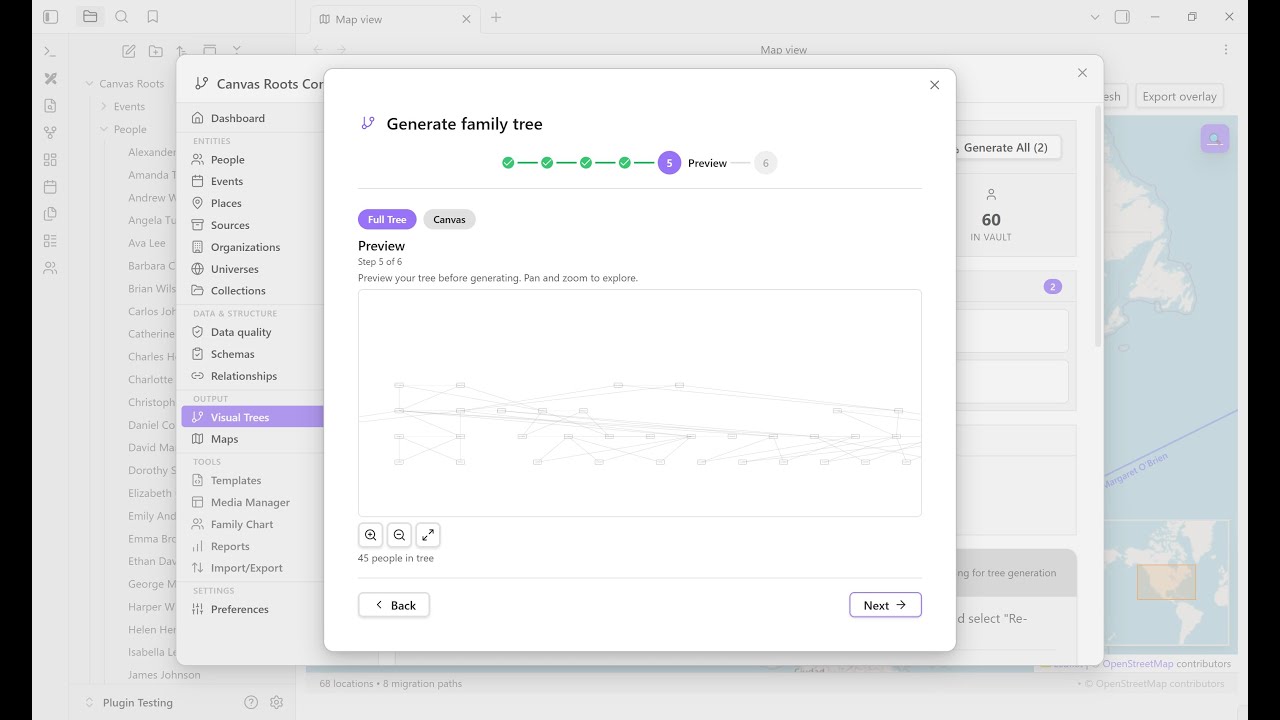 |
| 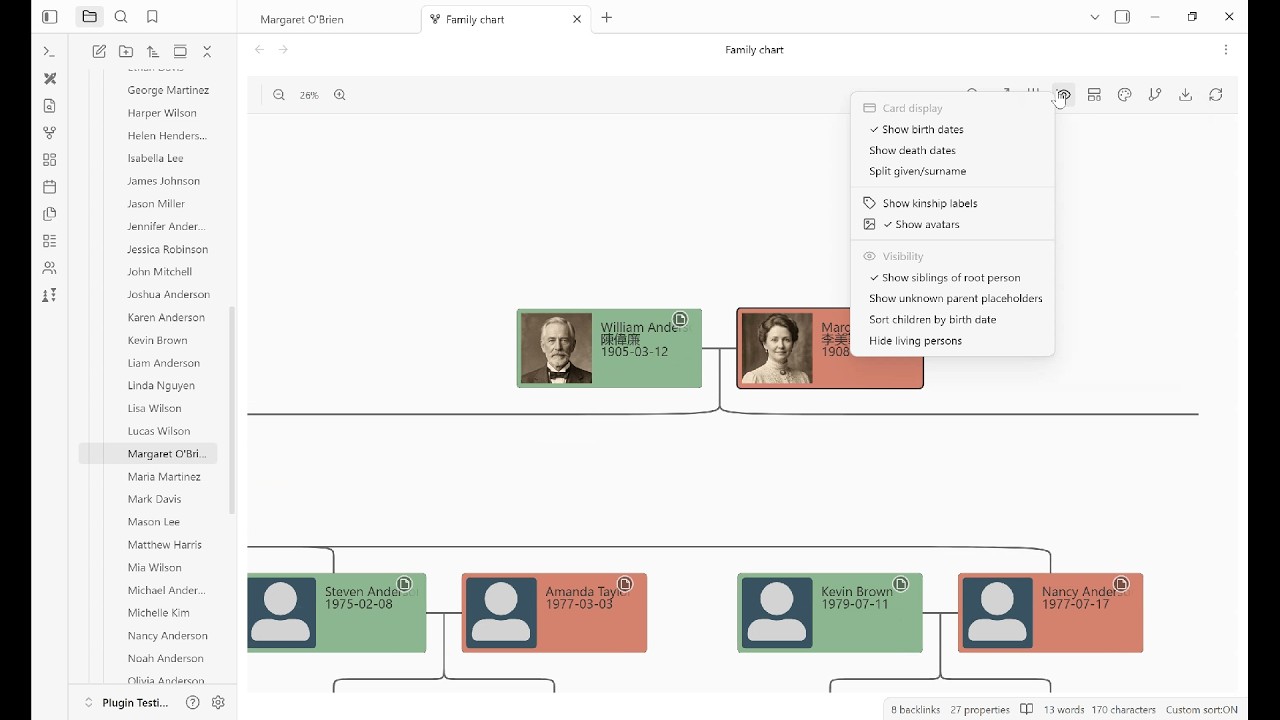 |
| Import GEDCOM → family tree → interactive chart → map view | Dynamic notes, highlight groups, custom-relationship overlay, maps, reports, worldbuilding |
|
| Import GEDCOM → family tree → interactive chart → map view | Dynamic notes, highlight groups, custom-relationship overlay, maps, reports, worldbuilding |
Screenshots
| Interactive Family Chart | Canvas Trees |
|:------------------------:|:------------:|
|  |
|  |
|
| Geographic Map View | Worldbuilding & Universes |
|:-------------------:|:-------------------------:|
|  |
|  |
|
| Evidence & Sources | Control Center |
|:------------------:|:--------------:|
|  |
|  |
|
Features
Visualize
- Interactive family chart with pan/zoom, direct relationship editing, bidirectional sync, multiple color schemes, and export to PNG, SVG, PDF, or ODT
- Canvas trees with 4 layout algorithms (Standard, Compact, Timeline, Hourglass), multi-family detection, and PNG/SVG/PDF export
- Visual tree charts — printable pedigree, descendant, hourglass, and fan charts as PDF, Canvas, Excalidraw, or ODT
- Entity profile view — auto-syncing sidebar with collapsible sections for all five entity types (person, place, event, source, organization)
Import & Export
- GEDCOM 5.5.1 with comprehensive field coverage and near-lossless roundtrips (name components, person attributes, family events, date ranges, burial data, cause of death, age at event)
- GEDCOM X, Gramps XML (with
.gpkgmedia extraction), CSV/TSV, and Excalidraw export - Selective branch export, privacy-aware anonymization, staging workflow for review before commit
Research & Reports
- 17 report types — family group sheets, Ahnentafel, kinship, brick wall, gaps, timeline, and more — export as PDF, ODT, or markdown
- Book builder — compile reports, trees, and vault notes into a single PDF or ODT with cover page, TOC, bibliography, and name index
- Statistics dashboard with record superlatives, longevity analysis, family size patterns, migration flows, and data quality alerts
- Calendar view — monthly grid of birthdays, death anniversaries, and marriage dates with filtering, text labels, and date navigation
- Evidence tracking with GPS methodology — source quality classification, fact-level citations, proof summaries, conflict detection, citation generation, and source hierarchies for multi-document record groups
Geographic
- Interactive map view with marker clustering, migration paths, heat maps, time slider animation, journey mode, and geocoding lookup
- Custom image maps for fictional worlds with pixel or geographic coordinate systems
- Place hierarchies (city -> state -> country) with six categories (real, historical, disputed, legendary, mythological, fictional)
Data Management
- Bidirectional relationship sync with dual storage (wikilinks +
cr_idreferences) - Smart duplicate detection, merge wizard, and post-import cleanup wizard
- Dynamic note content — live-rendered timelines with historical context overlays and age annotations, relationship blocks, media galleries, research timelines, negative findings, and source lists
- Schema validation, data quality tools, and family creation wizard
For Worldbuilders
- Fictional date systems — custom calendars and eras (Middle-earth, Westeros, Star Wars, or your own)
- Universe notes — first-class entities for organizing fictional worlds with linked calendars, maps, and validation schemas
- Organization notes — noble houses, guilds, military units, corporations, religious orders
- Custom image maps, place categories for legendary/mythological/fictional locations
Integration
- Obsidian Bases templates for all entity types
- Property aliases and value aliases — use your own frontmatter names without renaming
- Calendarium integration, Style Settings support, context menu actions
- YAML-first data model — compatible with Dataview, Bases, and other Obsidian tools
Quick Start
1. Enter your data
Import existing data: Control Center -> Import/Export tab
- Supports GEDCOM 5.5.1, GEDCOM X, Gramps XML, and CSV
Or create notes manually:
---
cr_id: abc-123-def-456
name: John Robert Smith
father: "[[John Smith Sr]]"
mother: "[[Jane Doe]]"
spouse: "[[Mary Jones]]"
born: 1888-05-15
died: 1952-08-20
---
Or use Obsidian Bases: Control Center -> Guide -> "Create all bases"
2. Visualize your tree
Interactive Family Chart: Right-click a person note -> "Open family chart"
- Pan, zoom, and click to explore
- Edit relationships directly in the chart
Or generate a canvas: Control Center -> Canvas Trees tab
- Creates a static, shareable family tree document
- Right-click canvas -> "Regenerate canvas" to update
3. Explore further
- Map view: Visualize birth/death locations geographically
- Statistics: Open the Statistics Dashboard for vault health, metrics, and data quality
- Reports: Generate 17 report types — export as PDF, ODT, or Markdown
- Book builder: Compile multiple reports and trees into a single document
See the Wiki for complete documentation.
Installation
From Community Plugins (Recommended)
Click Install in Obsidian on the plugin's Community page, or search for "Charted Roots" in Obsidian Settings → Community plugins.
Using BRAT (Beta access)
For early access to releases before they reach the Community Plugins directory:
- Install BRAT from Community Plugins
- Run command:
BRAT: Add a beta plugin for testing - Enter:
https://github.com/banisterious/obsidian-charted-roots - Enable Charted Roots in Settings → Community Plugins
Manual Installation
- Download from Releases
- Extract to
<vault>/.obsidian/plugins/charted-roots/ - Reload Obsidian and enable the plugin
From Source
git clone https://github.com/banisterious/obsidian-charted-roots
cd obsidian-charted-roots
npm install && npm run build
Copy main.js, styles.css, and manifest.json to your vault's plugins folder.
Documentation
🌐 Website — feature tour, guides, changelog 📖 **[Wiki](https://github.com/banis
Related Skills
gortex
1.1kHigh-performance code-intelligence engine for AI agents and IDE, supports 257 languages, multi repositories, based on graph, with access via CLI, MCP Server, and API. AI coding agents teammate - expose only needed information, cutting token usage up to 50x. 100% local.
techrogue
TechRogue – Roguelike technical quiz for engineers. Usage: /techrogue | /techrogue build | /techrogue settings
cc-switch
125.6kA cross-platform desktop All-in-One assistant for Claude Code, Codex, OpenCode, OpenClaw, Grok Build & Hermes Agent. Only official website: ccswitch.io
cc-switch
125.6kA cross-platform desktop All-in-One assistant for Claude Code, Codex, OpenCode, OpenClaw, Grok Build & Hermes Agent. Only official website: ccswitch.io
