
WeatherForecast
MVVM + Clean : Android Weather App to fetch current and 5 days / 3 hours data from https://openweathermap.org/appid with latest tech stack in android development
Install / Use
/learn @balwinderSingh1989/WeatherForecastREADME
WeatherForecast
Weather App to fetch current and 5 days / 3 hours data from https://openweathermap.org/appid
App Walk-through
Video : https://www.youtube.com/watch?v=JRDAzqniCNE
<p><img src="https://github.com/balwinderSingh1989/WeatherForecast/blob/master/screenshots/currentWeather.png" width="250" height="450"/><img src="https://github.com/balwinderSingh1989/WeatherForecast/blob/master/screenshots/hoursData.png" width="250" height="450"/> <img src="https://github.com/balwinderSingh1989/WeatherForecast/blob/master/screenshots/searchCities.png" width="250" height="450"/> </p>WeatherForecast is a an android app , which uses APIs to fetch 5 day / 3 hour forecast weather data from the OpenWeatherMap App has been developed using latest tech stack available at android as on 14-April-2020.
Libraries and tools 🛠
<li><a href="https://developer.android.com/topic/libraries/architecture/navigation/">Navigation</a></li> <li><a href="https://developer.android.com/training/data-storage/shared-preferences">Shared Preferences</a></li> <li><a href="https://developer.android.com/topic/libraries/architecture/viewmodel">ViewModel</a></li> <li><a href="https://developer.android.com/training/transitions/start-activity">Shared Transition</a></li> <li><a href="https://developer.android.com/topic/libraries/architecture/livedata">LiveData</a></li> <li><a href="https://developer.android.com/topic/libraries/data-binding">Data Binding</a></li> <li><a href="https://github.com/ReactiveX/RxJava">RxJava</a></li> <li><a href="https://github.com/ReactiveX/RxAndroid">RxAndroid</a></li> <li><a href="https://github.com/ReactiveX/RxKotlin">RxKotlin</a></li> <li><a href="https://github.com/google/dagger">Dagger 2</a></li> <li><a href="https://square.github.io/retrofit/">Retrofit</a></li> <li><a href="https://material.io/develop/android/docs/getting-started/">Material Design</a></li>Architecture
The app uses MVVM [Model-View-ViewModel] with [Clean] architecture to have a unidirectional flow of data, separation of concern, testability, and a lot more. app has module [core] that take contains aof data, domain and use cases layer. App modules is seperated to have only UI/presentation layer.
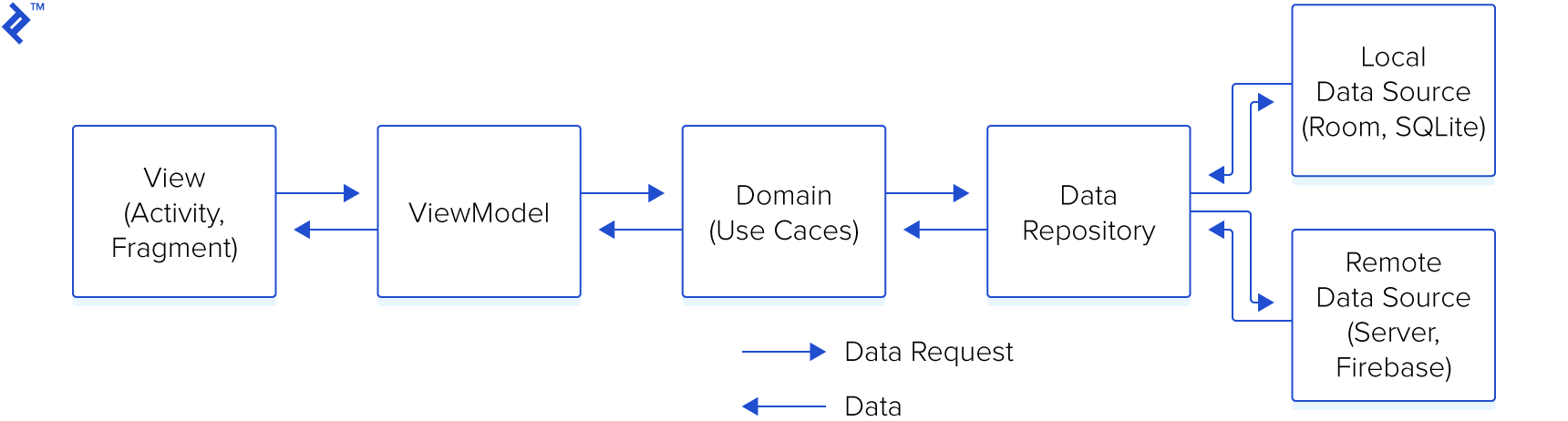
IMPORTANT POINTS
<li>App always remebers your last known locaiton and would use the same is location services are disabled</li> <li>AppId for openweather API is located within APPconstant.kt file. You can use your's if required.</li>APP Flavors
flavors UAT,SIT, PROD and MOCK for demonstration.
with mock you can run the app offline and app would display data using test data from datafactory.
