
Crt.sh
Crtsh Subdomain Enumeration | This bash script makes it easy to quickly save and parse the output from https://crt.sh website.
Install / Use
/learn @az7rb/Crt.shREADME
Updated Documentation for crt.sh v2.0
The v2.0 version of the script, now named crt_v2.sh, introduces significant improvements in performance, reliability, and documentation. Below are the updated instructions for setting up and using both the original script crt.sh and the new crt_v2.sh:
crt.sh and crt_v2.sh
These bash scripts are designed to simplify saving and parsing output from the crt.sh website, allowing for easy integration with tools like httpx for further analysis.
Usage Overview
crt.sh: The original version of the script with basic functionality.
crt_v2.sh: The enhanced version (v2.0) with improved performance, better error handling, and comprehensive documentation.
Installation and Setup
Step 1: Clone the Repository and Set Permissions
To install the scripts, clone the repository from GitHub and set the appropriate execution permissions.
git clone https://github.com/az7rb/crt.sh.git && cd crt.sh/
chmod +x crt.sh crt_v2.sh
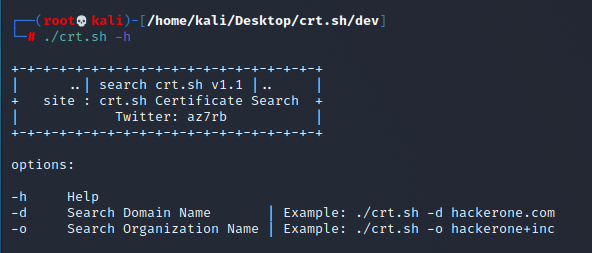
Step 2: Display Help and Options
To view the usage options and get started with either script:
For the original script:
./crt.sh -h
For the updated script:
./crt_v2.sh -h
Example Usage
Original Script:
./crt.sh -d hackerone.com | httpx
Updated Script (v2.0):
./crt_v2.sh -d hackerone.com | httpx
Both commands will enumerate subdomains for hackerone.com and output them in a format ready to be piped into other tools like httpx.
Notes:
- crt_v2.sh is the recommended version due to its enhanced features and reliability.
- Output: Both scripts will save the enumerated subdomains to a specified output file, making the data ready for further processing or use with other tools.
Screenshot
For a quick visual guide, refer to the screenshot below:
Additional Resources
Don't forget to visit BugBountyzip for more tools and resources.
Happy hunting! 🎯
