
Prejss
Get the power of PostCSS with plugins in your JSS styles. 🎨 Just put CSS into JS and get it as JSS object.
Install / Use
/learn @axept/PrejssREADME
PreJSS 🎨




Fast, component-friendly, fully customizable, universal СSS-to-JSS adapter. Use the best bits of PostCSS, syntax and plugins (1, 2, 3) to get result as JSS objects from Tagged Template literals (a recent addition to JavaScript/ES6).
PostCSS is a tool for transforming styles with JS plugins. These plugins can lint your CSS, support variables and mixins, transpile future CSS syntax, inline images, and more.
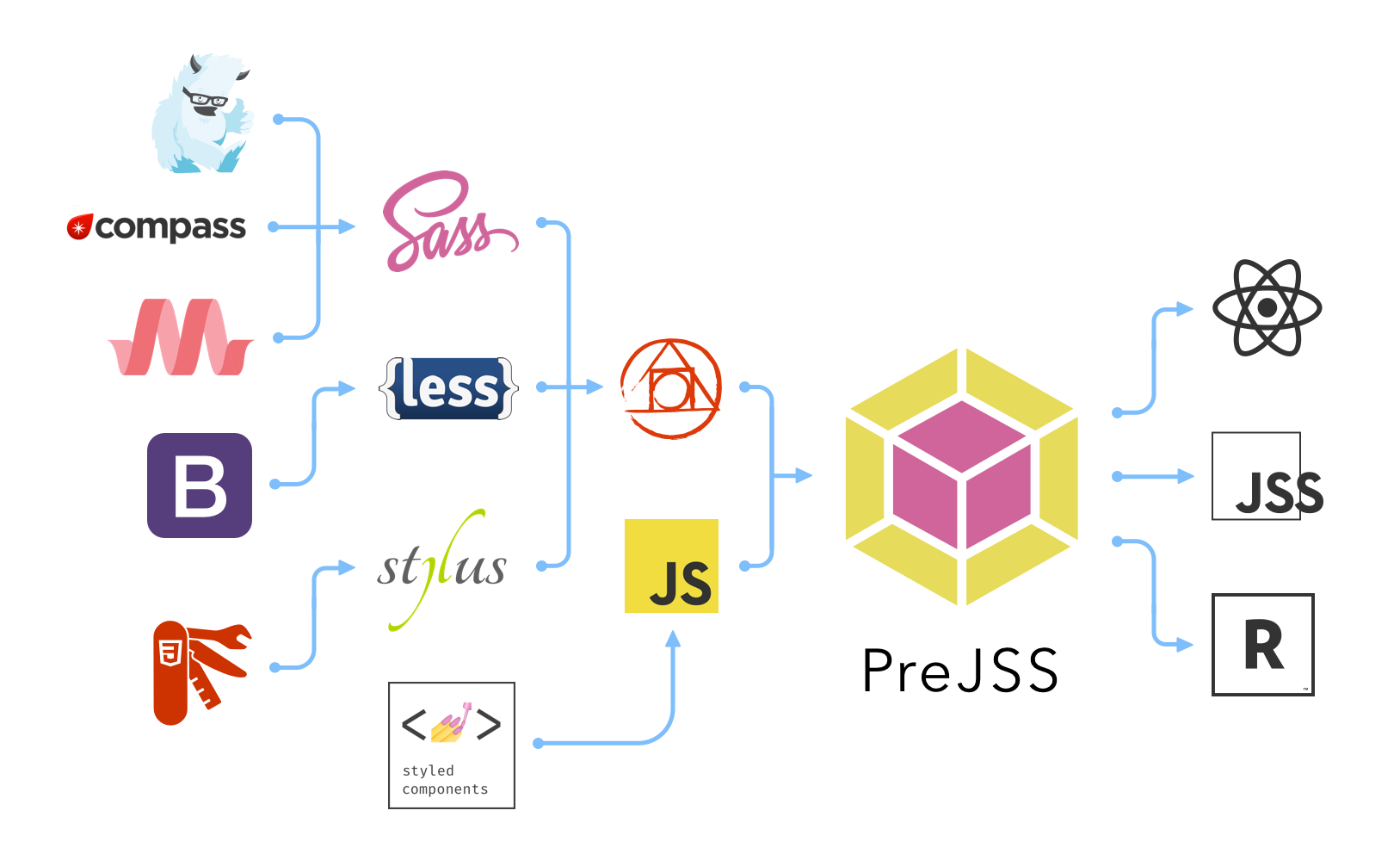
PreJSS allows you to get JSS objects "on-the-fly" from plain CSS, PostCSS, SCSS, CSS Modules, Stylus and LESS styles. Just put your CSS and get it as JSS.
Beside of that, PreJSS is the shortest way to get high-optimized Critical CSS for Isomorphic Applications while it still fits good for Single Page Applications.
Are you new to JSS? It will save your time, improve your productivity and reduce cognitive loading by allowing you to use CSS and JSS notation together. It means sometimes you can write CSS, sometimes - JSS. That all according to your choice.
- See PreJSS Example Application with using React.js, isomorphic architecture, Server-Side Rendering (SSR), Hot Module Replacement (HMR), JSS and PreJSS 🎨 with run-time and pre-compilation
Supports:
- React.js for Web
- React Native (WIP)
- Vanilla JS and any kind of Template Engines
- SSR (Server-side Rendering)
- Disabled JavaScript in Web Browser
- Fast Run-time execution by Babel plugin
- Hot Module Replacement with webpack
- Linting
- CLI tool for converting
- Syntax Highlighting (WIP)
Content
- Motivation
- Getting Started
- Installation
- Example
- Adapters
- Pre-compilation
- Ecosystem
- Inspiration
- Thanks
Motivation
CSS is good enough solution when you develop web-sites and simple UIs.
But when you develop Web Applications and complex UIs, CSS is something like legacy.
Since 2015 we use React Native where styles are defined by JavaScript objects and we found it extremely useful.
But how to migrate from CSS/SCSS to JSS "smoothly and on-time"?
At first we developed jss-from-css for process SCSS-to-JSS migration in cheapest and fastest way.
Lately we have found that it could be just very nice to define JSS styles in the format which we already used to and even extend it to use some JavaScript injections and so on. We introduced Adapters which provides mechanism to use this package also with any CSS-in-JS library.
So out-of-the-box PreJSS allows you to use PostCSS features and plugins which enable you to use:
- plain CSS
- SCSS
- SASS
- LESS
- Stylus
- SugarSS
It could help your to migrate "smoothly" from any format above to JSS. That's how we solved this issue.
You can use any of PostCSS plugins like Autoprefixer, postcss-next and so on.
Finally, think about it like:
- PostCSS + Template Strings + JSS + ❤️ = PreJSS
Getting Started
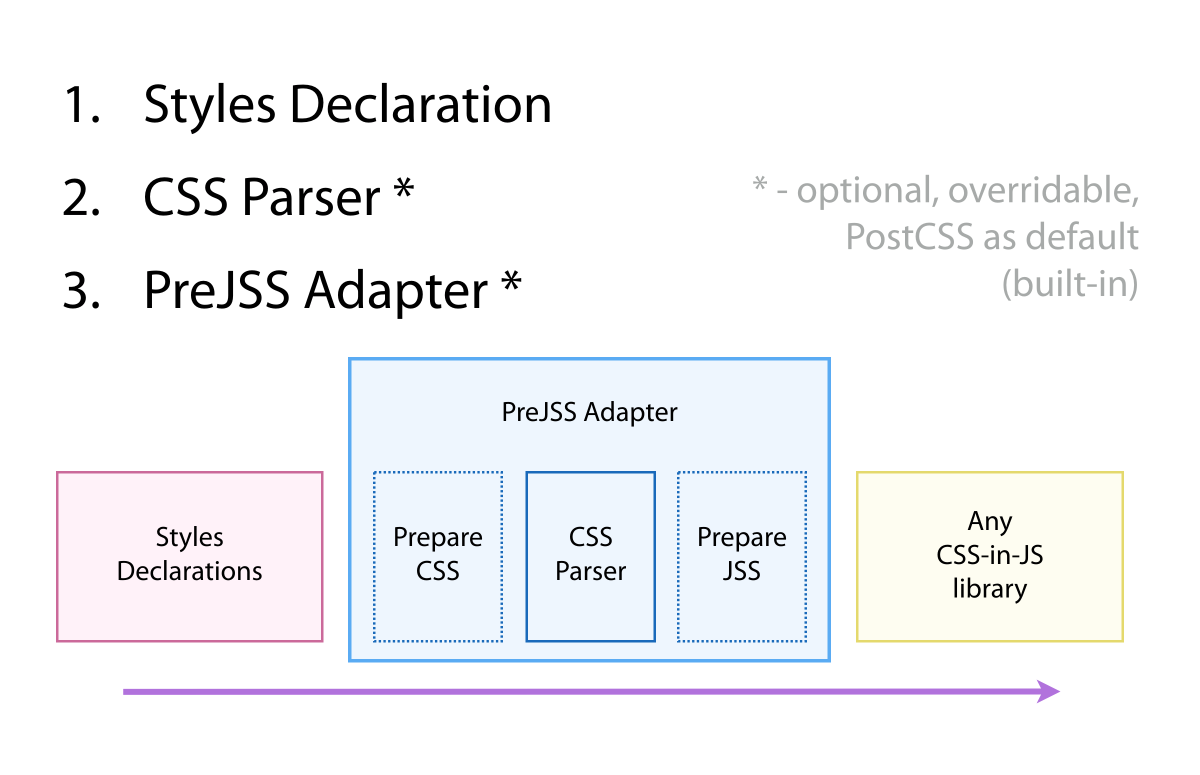
To get started using PreJSS in your applications, it would be great to know three things:
-
PreJSS Styles Declaration is top-level definition which is processing by PreJSS. In other words, CSS Code with Expressions as Tagged Template String which is converting to string and using as input for Parser in Adapters.
-
Parser is core thing in PreJSS. Usually it's a package with pure function which is using by Adapters. PreJSS Parser can be sync (by default) and async. PreJSS uses prejss-postcss-parser by default (as built-in).
-
Adapters is core thing and the point for customization your PreJSS. PreJSS Adapter is pure function which handle Tagged Template String, prepare specified CSS, parse it to JSS and finalize JSS when we have to adopt it to other CSS-in-JS platforms (Aphrodite, React Native, etc). There is two kinds of Adapters - sync for basic usage and async – for improving performance of Server-Side Rendering.
The best way to get started right now is to take a look at how these three parts come together to example below.
Installation
npm install prejss --save
Example
import color from 'color'
import preJSS from 'prejss'

const styles = preJSS`
  $bg-default: #ccc;

  button {
    color: ${props => props.isPrimary ? 'palevioletred' : 'green'};
    display: block;
    margin: 0.5em 0;
    font-family: Helvetica, Arial, sans-serif;

    &:hover {
      text-decoration: underline;
      animation: ${rotate360} 2s linear infinite;
    }
  }

  ctaButton {
    @include button;

    &:hover {
      background: ${color('blue').darken(0.3).hex()}
    }
  }

  @media (min-width: 1024px) {
    button {
      width: 200px;
    }
  }

  @keyframes rotate360 {
    from {
      transform: rotate(0deg);
    }

    to {
      transform: rotate(360deg);
    }
  }

  @global {
    body {
      color: $bg-default;
    }
    button {
      color: #888888;
    }
  }
`
Result
The example above transform styles to the following object:
// ...
const styles = {
  button: {
    color: props => props.isPrimary ? 'palevioletred' : 'green',
    display: 'block',
    margin: '0.5em 0',
    fontFamily: 'Helvetica, Arial, sans-serif',

    '&:hover' {
      textDecoration: 'underline',
      animation: 'rotate360 2s linear infinite'
    }
  },

  ctaButton: {
    color: () => 'palevioletred',
    display: 'block',
    margin: '0.5em 0',
    fontFamily: 'Helvetica, Arial, sans-serif',

    '&:hover' {
      textDecoration: 'underline',
      animation: 'rotate360 2s linear infinite',
      background: color('blue').darken(0.3).hex()
    }
  },

  '@media (min-width: 1024px)': {
    button: {
      width: 200,
    }
  },

  '@keyframes rotate360': {
    from: {
      transform: 'rotate(0deg)'
    },
    to: {
      transform: 'rotate(360deg)'
    }
  },

  '@global': {
    body: {
      color: '#ccc'
    },
    button: {
      color: '#888888'
    }
  }
}
Render with Vanilla JS
import jss from 'jss'
import preset from 'jss-preset-default'
import styles from './styles'

// One time setup with default plugins and settings.
jss.setup(preset())

const { classes } = jss.createStyleSheet(styles).attach()

document.body.innerHTML = `
  <div>
    <button class="${classes.button}">Button</button>
    <button class="${classes.ctaButton}">CTA Button</button>
  </div>
`
Render with React.js
import jss from 'jss'
import preset from 'jss-preset-default'
import injectSheet from 'react-jss'
import styles from './styles'

// One time setup with default plugins and settings.
jss.setup(preset())

const Buttons = ({ button, ctaButton }) => (
  <div>
    <button className={button}>Button</button>
    <button className={ctaButton}>CTA Button</button>
  </div>
)

export default injectSheet(styles)(Buttons)
Server-Side Rendering
As you well know, React.js and JSS are both support Server-Side Rendering (SSR).
You can use it with prejss without any limitations:
import express from 'express'
import jss from 'jss'
import preset from 'jss-preset-default'
import React from 'react'
import { renderToString } from 'react-dom/server'
import { SheetsRegistryProvider, SheetsRegistry } from 'react-jss'
// this module is defined in the previous example
import Buttons from './buttons'

// One time setup with default plugins and settings.
jss.setup(preset())
const app = express()

app.use('/', () => {
  const sheets = new SheetsRegistry()
  const content = renderToString(
    <SheetsRegistryProvider registry={sheets}>
      <Buttons />
    </SheetsRegistryProvider>
  )
  const criticalCSS = sheets.toString()
  res.send(`
    <html>
    <head>
      <style id="critical-css" type="text/css">
      ${criticalCSS}
      </style>
    </head>
    <body>
      ${content}
    </body>
    </html>
  `)
})

app.listen(process.env['PORT'] || 3000)
Performance Matters
PostCSS parser is using by default in PreJSS. Sin
Related Skills
bluebubbles
334.1kUse when you need to send or manage iMessages via BlueBubbles (recommended iMessage integration). Calls go through the generic message tool with channel="bluebubbles".
node-connect
334.1kDiagnose OpenClaw node connection and pairing failures for Android, iOS, and macOS companion apps
slack
334.1kUse when you need to control Slack from OpenClaw via the slack tool, including reacting to messages or pinning/unpinning items in Slack channels or DMs.
frontend-design
82.1kCreate distinctive, production-grade frontend interfaces with high design quality. Use this skill when the user asks to build web components, pages, or applications. Generates creative, polished code that avoids generic AI aesthetics.
