
Harbor
One command brings a complete pre-wired LLM stack with hundreds of services to explore.
Install / Use
/learn @av/HarborQuality Score
Category
Development & EngineeringSupported Platforms
README
https://github.com/user-attachments/assets/8a7705e1-6f0e-4374-8784-62b95816aebc








Setup your local LLM stack effortlessly.
# Starts fully configured Open WebUI and Ollama
harbor up

# Now, Open WebUI can do Web RAG and TTS/STT
harbor up searxng speaches
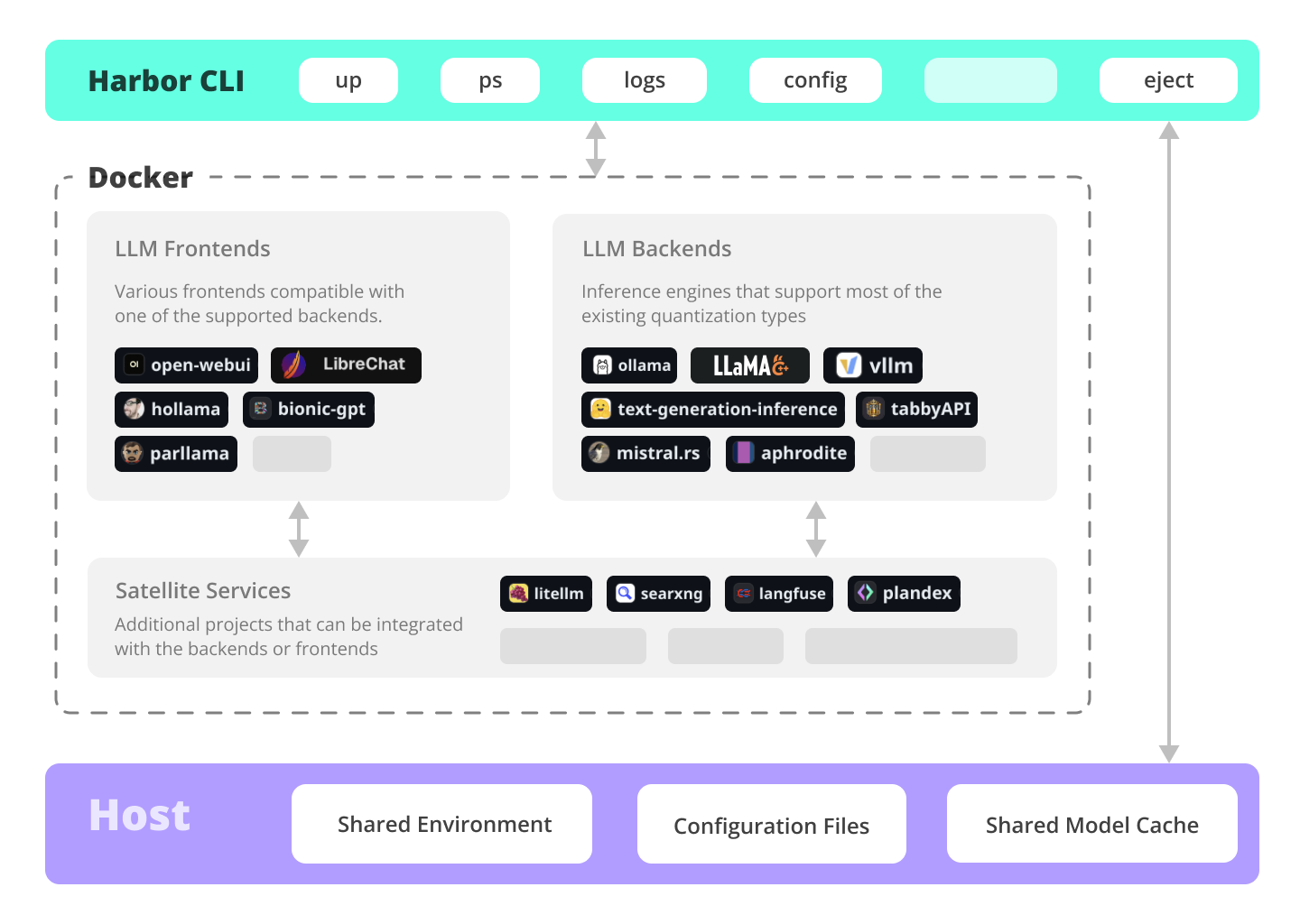
Harbor is a CLI and companion app that lets you spin up a complete local LLM stack—backends like Ollama, llama.cpp, or vLLM, frontends like Open WebUI, plus supporting services like SearXNG for web search, Speaches for voice chat, and ComfyUI for image generation—all pre-wired to work together with a single harbor up command. No manual setup: just pick the services you want and Harbor handles the Docker Compose orchestration, configuration, and cross-service connectivity so you can focus on actually using your models.

🔄 Migrating to Harbor 0.4.0?
Harbor 0.4.0 introduces a new directory structure where all service files are organized in a
services/directory for better maintainability and a cleaner root directory.Existing users: Run
harbor migrate --dry-runto preview changes, thenharbor migrateto upgrade. See the Migration Guide for details.New users: No action needed—everything is already organized!
Documentation
- Installing Harbor<br/> Guides to install Harbor CLI and App
- Migration Guide (v0.4.0)<br/> Important: Guide for upgrading to Harbor 0.4.0 with the new directory structure
- Harbor User Guide<br/> High-level overview of working with Harbor
- Harbor App<br/> Overview and manual for the Harbor companion application
- Harbor Services<br/> Catalog of services available in Harbor
- Harbor CLI Reference<br/> Read more about Harbor CLI commands and options. Read about supported services and the ways to configure them.
- Join our Discord<br/> Get help, share your experience, and contribute to the project.
What can Harbor do?
✦ Local LLMs
Run LLMs and related services locally, with no or minimal configuration, typically in a single command or click.
# All backends are pre-connected to Open WebUI
harbor up ollama
harbor up llamacpp
harbor up vllm

# Set and remember args for llama.cpp
harbor llamacpp args -ngl 32
Cutting Edge Inference
Harbor supports most of the major inference engines as well as a few of the lesser-known ones.
# We sincerely hope you'll never try to run all of them at once
harbor up vllm llamacpp tgi litellm tabbyapi aphrodite sglang ktransformers mistralrs airllm
Tool Use
Enjoy the benefits of MCP ecosystem, extend it to your use-cases.
# Manage MCPs with a convenient Web UI
harbor up metamcp

# Connect MCPs to Open WebUI
harbor up metamcp mcpo
Generate Images
Harbor includes ComfyUI + Flux + Open WebUI integration.
# Use FLUX in Open WebUI in one command
harbor up comfyui
Local Web RAG / Deep Research
Harbor includes SearXNG that is pre-connected to a lot of services out of the box: Perplexica, ChatUI, Morphic, Local Deep Research and more.
# SearXNG is pre-connected to Open WebUI
harbor up searxng

# And to many other services
harbor up searxng chatui
harbor up searxng morphic
harbor up searxng perplexica
harbor up searxng ldr
LLM Workflows
Harbor includes multiple services for build LLM-based data and chat workflows: Dify, [LitLytics](.
