
Forte
Forte is a flexible and powerful ML workflow builder. This is part of the CASL project: http://casl-project.ai/
Install / Use
/learn @asyml/ForteREADME
<p align="center"> <a href="https://github.com/asyml/forte/actions/workflows/main.yml"><img src="https://github.com/asyml/forte/actions/workflows/main.yml/badge.svg" alt="build"></a> <a href="https://codecov.io/gh/asyml/forte"><img src="https://codecov.io/gh/asyml/forte/branch/master/graph/badge.svg" alt="test coverage"></a> <a href="https://asyml-forte.readthedocs.io/en/latest/"><img src="https://readthedocs.org/projects/asyml-forte/badge/?version=latest" alt="documentation"></a> <a href="https://github.com/asyml/forte/blob/master/LICENSE"><img src="https://img.shields.io/badge/license-Apache%202.0-blue.svg" alt="apache license"></a> <a href="https://gitter.im/asyml/community"><img src="http://img.shields.io/badge/gitter.im-asyml/forte-blue.svg" alt="gitter"></a> <a href="https://github.com/psf/black"><img src="https://img.shields.io/badge/code%20style-black-000000.svg" alt="code style: black"></a> </p> <p align="center"> <a href="#installation">Download</a> • <a href="#quick-start-guide">Quick Start</a> • <a href="#contributing">Contribution Guide</a> • <a href="#license">License</a> • <a href="https://asyml-forte.readthedocs.io/en/latest">Documentation</a> • <a href="https://aclanthology.org/2020.emnlp-demos.26/">Publication</a> </p>
Bring good software engineering to your ML solutions, starting from Data!
Forte is a data-centric framework designed to engineer complex ML workflows. Forte allows practitioners to build ML components in a composable and modular way. Behind the scene, it introduces DataPack, a standardized data structure for unstructured data, distilling good software engineering practices such as reusability, extensibility, and flexibility into ML solutions.
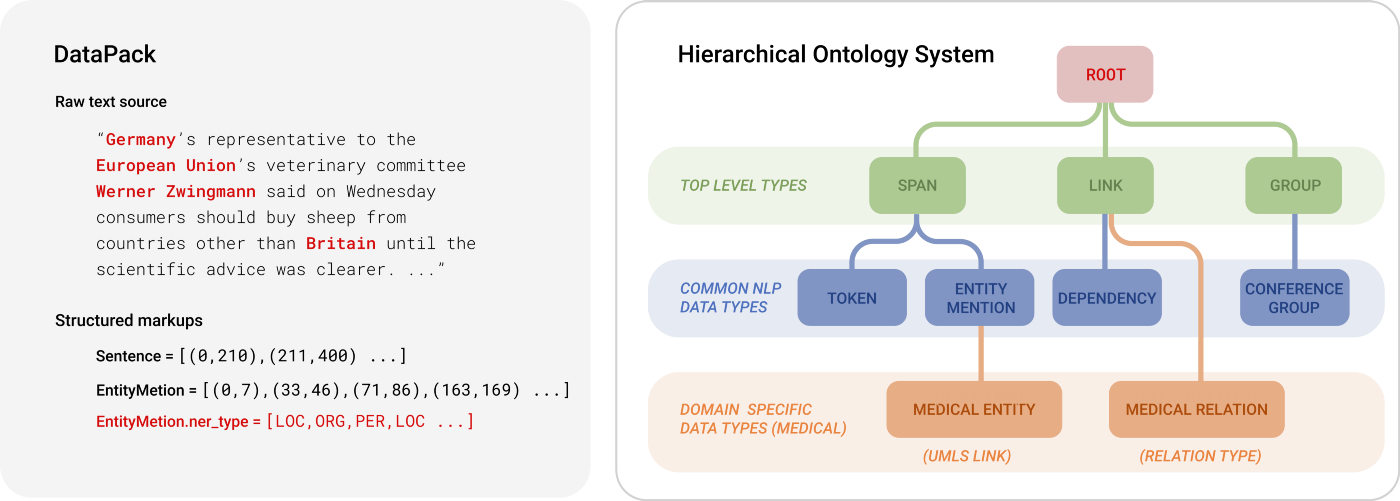
DataPacks are standard data packages in an ML workflow, that can represent the source data (e.g. text, audio, images) and additional markups (e.g. entity mentions, bounding boxes). It is powered by a customizable data schema named "Ontology", allowing domain experts to inject their knowledge into ML engineering processes easily.
Installation
To install the released version from PyPI:
pip install forte
To install from source:
git clone https://github.com/asyml/forte.git
cd forte
pip install .
To install some forte adapter for some existing libraries:
Install from PyPI:
# To install other tools. Check here https://github.com/asyml/forte-wrappers#libraries-and-tools-supported for available tools.
pip install forte.spacy
Install from source:
git clone https://github.com/asyml/forte-wrappers.git
cd forte-wrappers
# Change spacy to other tools. Check here https://github.com/asyml/forte-wrappers#libraries-and-tools-supported for available tools.
pip install src/spacy
Some components or modules in forte may require some extra requirements:
pip install forte[data_aug]: Install packages required for data augmentation modules.pip install forte[ir]: Install packages required for Information Retrieval Supportspip install forte[remote]: Install packages required for pipeline serving functionalities, such as Remote Processor.pip install forte[audio_ext]: Install packages required for Forte Audio support, such as Audio Reader.pip install forte[stave]: Install packages required for Stave integration.pip install forte[models]: Install packages required for ner training, srl, srl with new training system, and srl_predictor and ner_predictorpip install forte[test]: Install packages required for running unit tests.pip install forte[wikipedia]: Install packages required for reading wikipedia datasets.pip install forte[nlp]: Install packages required for additional NLP supports, such as subword_tokenizer and texar encoderpip install forte[extractor]: Install packages required for extractor-based training system, extractor, train_preprocessor, tagging trainer, DataPack dataset, types, and converter.pip install forte[payload]install packages required for payload.
Quick Start Guide
Writing NLP pipelines with Forte is easy. The following example creates a simple pipeline that analyzes the sentences, tokens, and named entities from a piece of text.
Before we start, make sure the SpaCy wrapper is installed.
pip install forte.spacy
Let's start by writing a simple processor that analyze POS tags to tokens using the good old NLTK library.
import nltk
from forte.processors.base import PackProcessor
from forte.data.data_pack import DataPack
from ft.onto.base_ontology import Token

class NLTKPOSTagger(PackProcessor):
    r"""A wrapper of NLTK pos tagger."""

    def initialize(self, resources, configs):
        super().initialize(resources, configs)
        # download the NLTK average perceptron tagger
        nltk.download("averaged_perceptron_tagger")

    def _process(self, input_pack: DataPack):
        # get a list of token data entries from `input_pack`
        # using `DataPack.get()`` method
        token_texts = [token.text for token in input_pack.get(Token)]

        # use nltk pos tagging module to tag token texts
        taggings = nltk.pos_tag(token_texts)

        # assign nltk taggings to token attributes
        for token, tag in zip(input_pack.get(Token), taggings):
            token.pos = tag[1]
If we break it down, we will notice there are two main functions.
In the initialize function, we download and prepare the model. And then in the _process
function, we actually process the DataPack object, take the some tokens from it, and
use the NLTK tagger to create POS tags. The results are stored as the pos attribute of
the tokens.
Before we go into the details of the implementation, let's try it in a full pipeline.
from forte import Pipeline

from forte.data.readers import StringReader
from fortex.spacy import SpacyProcessor

pipeline: Pipeline = Pipeline[DataPack]()
pipeline.set_reader(StringReader())
pipeline.add(SpacyProcessor(), {"processors": ["sentence", "tokenize"]})
pipeline.add(NLTKPOSTagger())
Here we have successfully created a pipeline with a few components:
- a
StringReaderthat reads data from a string. - a
SpacyProcessorthat calls SpaCy to split the sentences and create tokenization - and finally the brand new
NLTKPOSTaggerwe just implemented,
Let's see it run in action!
input_string = "Forte is a data-centric ML framework"
for pack in pipeline.initialize().process_dataset(input_string):
    for sentence in pack.get("ft.onto.base_ontology.Sentence"):
        print("The sentence is: ", sentence.text)
        print("The POS tags of the tokens are:")
        for token in pack.get(Token, sentence):
            print(f" {token.text}[{token.pos}]", end = " ")
        print()
It gives us output as follows:
Forte[NNP] is[VBZ] a[DT] data[NN] -[:] centric[JJ] ML[NNP] framework[NN] .[.]
We have successfully created a simple pipeline. In the nutshell, the DataPacks are
the standard packages "flowing" on the pipeline. They are created by the reader, and
then pass along the pipeline.
Each processor, such as our NLTKPOSTagger,
interfaces directly with DataPacks and do not need to worry about the
other part of the pipeline, making the engineering process more modular. In this example
pipeline, SpacyProcessor creates the Sentence and Token, and then we implemented
the NLTKPOSTagger to add Part-of-Speech tags to the tokens.
To learn more about the details, check out of documentation! The classes used in this guide can also be found in this repository or the Forte Wrappers repository
And There's More
The data-centric abstraction of Forte opens the gate to many other opportunities. Not only does Forte allow engineers to develop reusable components easily, it further provides a simple way to develop composable ML modules. For exampl
Related Skills
claude-opus-4-5-migration
92.1kMigrate prompts and code from Claude Sonnet 4.0, Sonnet 4.5, or Opus 4.1 to Opus 4.5
model-usage
343.3kUse CodexBar CLI local cost usage to summarize per-model usage for Codex or Claude, including the current (most recent) model or a full model breakdown. Trigger when asked for model-level usage/cost data from codexbar, or when you need a scriptable per-model summary from codexbar cost JSON.
TrendRadar
50.3k⭐AI-driven public opinion & trend monitor with multi-platform aggregation, RSS, and smart alerts.🎯 告别信息过载,你的 AI 舆情监控助手与热点筛选工具!聚合多平台热点 + RSS 订阅,支持关键词精准筛选。AI 智能筛选新闻 + AI 翻译 + AI 分析简报直推手机,也支持接入 MCP 架构,赋能 AI 自然语言对话分析、情感洞察与趋势预测等。支持 Docker ,数据本地/云端自持。集成微信/飞书/钉钉/Telegram/邮件/ntfy/bark/slack 等渠道智能推送。
mcp-for-beginners
15.7kThis open-source curriculum introduces the fundamentals of Model Context Protocol (MCP) through real-world, cross-language examples in .NET, Java, TypeScript, JavaScript, Rust and Python. Designed for developers, it focuses on practical techniques for building modular, scalable, and secure AI workflows from session setup to service orchestration.
