
Percheron
Organise your Docker containers with muscle and intelligence
Install / Use
/learn @ashmckenzie/PercheronREADME
Percheron






Organise your Docker containers with muscle and intelligence.
Why?
Percheron aims to address the following challenges when working with Docker images and containers:
- Managing multiple containers and mutiple sets (stacks) of containers
- Building images and containers with support for dependencies
- Versioning of images and containers
Percheron is like Vagrant but instead of managing VM's, it manages Docker images and containers. It is a very handy tool when you wish to create a basic or complex stack without the need to run multiple VMs.
It is intended to be used in a test, development or prototyping scenario.
Features
- Single, easy to write
.percheron.ymldescribes your stack(s) - Build, create and start units and their dependencies
- Build units using a Dockerfile or by pulling Docker images from Docker Hub
- Build 'bare/base' images and build new images on top of them
- Support for pre-build and post-start scripts when generating images and starting units
- Version control of images and units
- Partial template (liquid) support within
.percheron.yml - Generate Graphviz dependency graphs dynamically based purely on your
.percheron.yml - Support for userdata key/value pairs
- Support for secrets in YML format
- Written in Ruby :)
Supported platforms
- Linux
- MacOS 10.9+
Installation
Add this line to your application's Gemfile:
gem 'percheron'
And then execute:
$ bundle install
Or install it yourself as:
$ gem install percheron
Requirements
- Ruby 2.x
- Docker 1.6.x / Boot2Docker v1.6.x+
- Docker client (nice to have)
Usage
Usage:
    percheron [OPTIONS] SUBCOMMAND [ARG] ...

Parameters:
    SUBCOMMAND                    subcommand
    [ARG] ...                     subcommand arguments

Subcommands:
    list, status                  List stacks and its units
    start                         Start a stack
    stop                          Stop a stack
    restart                       Restart a stack
    build, rebuild                (Re)build image(s) for a stack
    create, recreate              (Re)build image(s) and (re)create units for a stack
    purge                         Purge a stack
    shell                         Shell into a unit
    logs                          Show logs for a unit
    graph                         Generate a stack graph

Options:
    -h, --help                    print help
    -c, --config_file CONFIG      Config file (default: ".percheron.yml")
    --version                     show versionn
Demo (using boot2docker)
- Get boot2docker up and running
Follow the directions at https://docs.docker.com/installation
boot2docker up && eval $(boot2docker shellinit) && export BOOT2DOCKER_IP=$(boot2docker ip)
- Install percheron
gem install percheron
- Create a
.percheron.ymlfile describing the stack, in this case consul:
---
stacks:
  - name: consul-stack
    description: A demo consul stack with one master and two agents
    units:
      - name: master
        version: 1.0.0
        docker_image: gliderlabs/consul-server:0.5
        start_args: [ "-bootstrap", "-client", "0.0.0.0", "-data-dir", "/data", "-ui-dir", "/ui" ]
        ports:
          - "8500:8500"
          - "8600:53/udp"
      - name: agent
        version: 1.0.0
        instances: 2
        docker_image: gliderlabs/consul-agent:0.5
        start_args: [ "-join", "master" ]
        needed_unit_names:
          - master
- Start it up!
percheron start consul-stack

I, [2015-08-06T22:36:46.536424 #45026]  INFO -- : Creating 'consul-stack:master' unit
I, [2015-08-06T22:36:46.851682 #45026]  INFO -- : Starting 'consul-stack:master' unit
I, [2015-08-06T22:36:47.861800 #45026]  INFO -- : Creating 'consul-stack:agent1' unit
I, [2015-08-06T22:36:48.221852 #45026]  INFO -- : Starting 'consul-stack:agent1' unit
I, [2015-08-06T22:36:48.929909 #45026]  INFO -- : Creating 'consul-stack:agent2' unit
I, [2015-08-06T22:36:49.378310 #45026]  INFO -- : Starting 'consul-stack:agent2' unit
- Show the status
percheron status consul-stack

+--------+--------------+----------+------------+------------------------+---------+---------+
|                                        consul-stack                                        |
+--------+--------------+----------+------------+------------------------+---------+---------+
| Unit   | ID           | Running? | IP         | Ports                  | Volumes | Version |
+--------+--------------+----------+------------+------------------------+---------+---------+
| master | 0acd1e2cfbc0 | yes      | 172.17.0.1 | 8500:8500, 8600:53/udp |         | 1.0.0   |
| agent1 | d70495c1c62b | yes      | 172.17.0.2 |                        |         | 1.0.0   |
| agent2 | 458ad3ba0890 | yes      | 172.17.0.3 |                        |         | 1.0.0   |
+--------+--------------+----------+------------+------------------------+---------+---------+
- Ensure consul is running
curl http://${BOOT2DOCKER_IP}:8500/v1/catalog/nodes

[{"Node":"agent1","Address":"172.17.0.5"},{"Node":"agent2","Address":"172.17.0.6"},{"Node":"master","Address":"172.17.0.4"}]
- Perform some DNS lookups using consul
dig @${BOOT2DOCKER_IP} -p 8600 master.node.consul agent1.node.consul agent2.node.consul +short

172.17.0.7
172.17.0.8
172.17.0.9
- Bring up the consul UI
open http://${BOOT2DOCKER_IP}:8500/ui
- Purge it!
percheron purge consul-stack

I, [2015-05-21T19:28:23.925205 #35710]  INFO -- : Stopping 'agent2' unit
I, [2015-05-21T19:28:24.269218 #35710]  INFO -- : Deleting 'agent2' unit
I, [2015-05-21T19:28:24.452320 #35710]  INFO -- : Stopping 'agent1' unit
I, [2015-05-21T19:28:24.811764 #35710]  INFO -- : Deleting 'agent1' unit
I, [2015-05-21T19:28:24.965680 #35710]  INFO -- : Stopping 'master' unit
I, [2015-05-21T19:28:25.246578 #35710]  INFO -- : Deleting 'master' unit
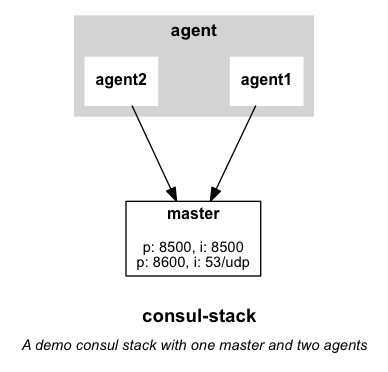
Dependency graph
Note: Requires Graphviz installed.
percheron graph consul-stack
Debugging
To perform debugging you will need to install the pry-byebug gem:
gem install pry-byebug
To debug Percheron, set the DEBUG=true environment variable.
To debug Percheron and Docker, set the DOCKER_DEBUG=true environment variable.
Examples
- consul - consul server + UI and two agents
- Rails - Rails 4.2, PostgreSQL, redis, HAProxy and postfix
- Redis - Redis cluster + sentinel, master, two slaves and tools
- Torrent - Tracker (chihaya), seeder (aria2) and three peers (aria2)
- SaltStack - SaltStack with master and two minions
Testing
All (cane, RuboCop, unit and integration):
bundle exec rake test
Style (cane and RuboCop):
bundle exec rake test:style
Contributing
- Fork it ( https://github.com/ashmckenzie/percheron/fork )
- Create your feature branch (
git checkout -b my-new-feature) - Commit your changes (
git commit -am 'Add some feature') - Run
bundle exec rake test - Push to the branch (
git push origin my-new-feature) - Create a new Pull Request
Related Skills
node-connect
346.8kDiagnose OpenClaw node connection and pairing failures for Android, iOS, and macOS companion apps
frontend-design
107.6kCreate distinctive, production-grade frontend interfaces with high design quality. Use this skill when the user asks to build web components, pages, or applications. Generates creative, polished code that avoids generic AI aesthetics.
openai-whisper-api
346.8kTranscribe audio via OpenAI Audio Transcriptions API (Whisper).
qqbot-media
346.8kQQBot 富媒体收发能力。使用 <qqmedia> 标签,系统根据文件扩展名自动识别类型(图片/语音/视频/文件)。
