
CmBacktrace
Advanced fault backtrace library for ARM Cortex-M series MCU | ARM Cortex-M 系列 MCU 错误追踪库
Install / Use
/learn @armink/CmBacktraceREADME
CmBacktrace: ARM Cortex-M series MCU error tracking library
中文页 | English



0、What is CmBacktrace
CmBacktrace (Cortex Microcontroller Backtrace) is an open source library that automatically tracks and locates error codes for ARM Cortex-M series MCUs, and automatically analyzes the causes of errors. The main features are as follows:
- Supported errors include:
- Assert
- Fault (Hard Fault, Memory Management Fault, Bus Fault, Usage Fault, Debug Fault)
- Failure reason Automatic diagnosis: When a failure occurs, the cause of the failure can be automatically analyzed, and the code location of the failure can be located, without the need to manually analyze the complicated fault registers; -Output the function call stack of the error site (need to cooperate with the addr2line tool for precise positioning), restore the field information when the error occurred, and locate the problem code location and logic more quickly and accurately. You can also use the library under normal conditions to get the current function call stack;
- Support bare metal and the following operating system platforms:
- RT-Thread
- UCOS
- FreeRTOS (source code needs to be modified)
- According to the error scene status, output the corresponding thread stack or C main stack;
- The fault diagnosis information supports multiple languages (currently: Simplified Chinese, English);
- Adapt to Cortex-M0/M3/M4/M7 MCU;
- Support IAR, KEIL, GCC compiler;
1. Why choose CmBacktrace
Beginner Newcomer: For newcomers who switch from simple microcontrollers such as C51 and MSP430 to more complex ARM, the chance of "hard falut" death from time to time makes newcomers instantly stunned. The method of locating errors is often to connect to the emulator, step by step F10/F11, locate the specific error code, and then guess, eliminate, and deliberate on the cause of the error. This process is very painful.
Skilled veteran: Slowly everyone knows that the fault cause and fault code address can be located through the fault register information. Although this can solve a small part of the problem, the repeated and tedious analysis process will also delay a lot of time. Moreover, for some complex problems, it is impossible to solve only by the code address, and the function call logic relationship of the wrong scene must be restored. Although the function call stack can be viewed by connecting to the emulator, it cannot be displayed in the fault state, so it is necessary to step by step F10/F11 to locate the error code. In addition, there are two scenarios,
- The emulator must be disconnected when debugging many products
- The problem does exist, but it is extremely difficult to reproduce
So locating such problems is even more difficult.
Use this library: All the above problems can be solved easily. The error message can be output to the console, and the error message can also be saved using the Log function of EasyFlash In Flash, the last error message can still be read after the device crashes and restarts. The information output by CmBacktrace includes function call stack, fault diagnosis result, stack, fault register and product firmware information, which greatly improves the efficiency and accuracy of error location.
As the saying goes, a worker must first sharpen his tools if he wants to do his job well. So sometimes the reason for the low efficiency may be that you will use too few types of tools.
Cooperation, Contribution: The development of open source software is inseparable from everyone's support. You are welcome to make more suggestions and hope that more people will join in and improve together. If you think this open source project is great, you can click Project Homepage (Github|OSChina|Coding) Star** in the upper right corner, At the same time recommend it to more friends in need.
2. How to use CmBacktrace
2.1 Demo
The demonstration is divided into the following steps:
- Manufacturing division by zero exception (IAR project, click to view source code)
- View error diagnosis information
- View the basic information of the function call stack
- Enter the path where the executable file is stored in the project project through the command line tool
- Use the addr2line command to view the function call stack details and locate the error code
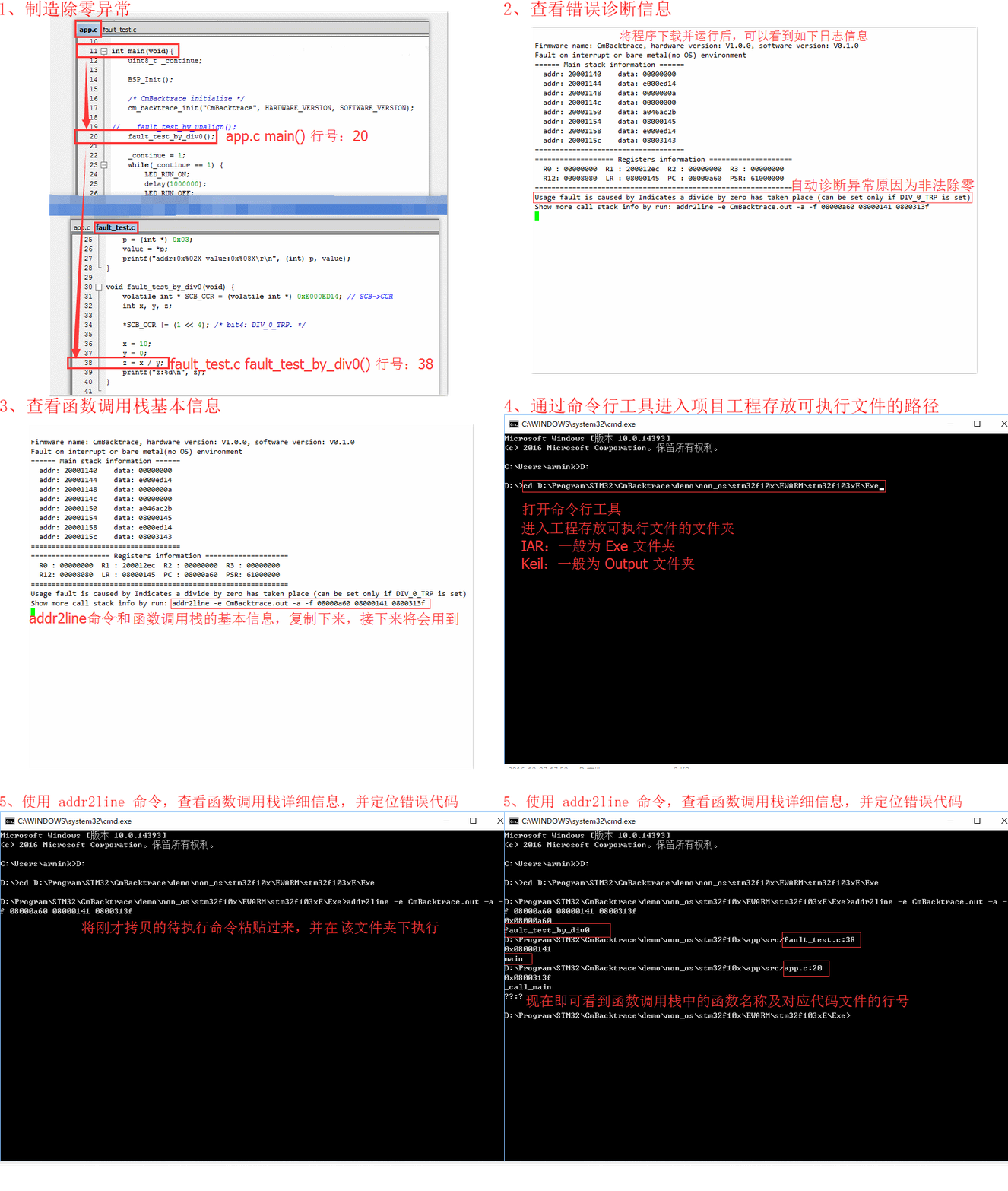
2.2 Demo
|Catalog|Platform|Link|
|:--|:--:|:--:|
| \demos\non_os\stm32f10x |bare metal STM32 Cortex-M3|click to view|
| \demos\os\rtthread\stm32f4xx|RT-Thread STM32 Cortex-M4|Click to view|
| \demos\os\ucosii\stm32f10x |UCOSII STM32 Cortex-M3|Click to view|
| \demos\os\freertos\stm32f10x |FreeRTOS STM32 Cortex-M3|Click to view|
2.3 Porting instructions
2.3.1 Preparation
- Check whether there is a suitable Demo in the
\demosdirectory, if there is a similar, it is recommended to modify it on the basis of it - Identify the operating system/bare metal platform and CPU platform
- Add all source files under
\srcto the product project, and ensure that the source code directory is added to the header file path - The cmb_fault.s assembly file (click to view) can be optionally added to the project. After adding, you need to add the original project
HardFault_Handlercomment out - Put the
cm_backtrace_initfunction in the project initialization place for execution - Put
cm_backtrace_assertin the assertion function of the project for execution. For specific usage, please refer to the API description below - If the cmb_fault.s assembly file is not enabled in step 4, you need to put
cm_backtrace_faultin the fault handling function (for example:HardFault_Handler) for execution. For details, refer to the API description below
2.3.2 Configuration Instructions
Configuration file name: cmb_cfg.h, users need to manually configure themselves for different platforms and scenarios. Common configurations are as follows:
| Configuration name | Function | Remarks | |:--|:--|:--| |cmb_println(...)|Error and diagnostic information output|Must be configured| |CMB_USING_BARE_METAL_PLATFORM|Whether it is used on a bare metal platform|Define this macro if it is used| |CMB_USING_OS_PLATFORM|Whether it is used on the operating system platform|Operating system and bare metal must choose one of two| |CMB_OS_PLATFORM_TYPE|Operating System Platform|RTT/UCOSII/UCOSIII/FREERTOS| |CMB_CPU_PLATFORM_TYPE|CPU platform|M0/M3/M4/M7| |CMB_USING_DUMP_STACK_INFO|Whether to use Dump stack function|Use to define this macro| |CMB_PRINT_LANGUAGE|Language when outputting information|CHINESE/ENGLISH|
Note: The content of the above configuration can be selected in
cmb_def.h, please read the source code for more flexible configuration
2.4 API description
2.4.1 Library initialization
void cm_backtrace_init(const char *firmware_name, const char *hardware_ver, const char *software_ver)
|Parameter |Description| |:----- |:----| |firmware_name |firmware name, which must correspond to the firmware name generated by the compiler| |hardware_ver |The hardware version number corresponding to the firmware| |software_ver |Software version number of the firmware|
Note: The above input parameters will be output in case of assertion or failure, mainly for retrospective purposes
2.4.2 Get function call stack
size_t cm_backtrace_call_stack(uint32_t *buffer, size_t size, uint32_t sp)
|Parameter |Description| |:----- |:----| |buffer |Buffer for storing function call stack| |size |Buffer size| |sp |Stack pointer to be obtained|
Example:
/* Create a function call stack buffer with a depth of 16, and the depth should not exceed CMB_CALL_STACK_MAX_DEPTH (default 16) */
uint32_t call_stack[16] = {0};
size_t i, depth = 0;
/* Get the function call stack in the current environment, each element will be stored as a 32-bit address, and depth is the actual depth of the function call stack */
depth = cm_backtrace_call_stack(call_stack, sizeof(call_stack), cmb_get_sp());
/* Output current function call stack information
 * Note: When viewing the function name and specific line number, you need to use the addr2line tool to convert
 */
for (i = 0; i <depth; i++) {
    printf("%08x ", call_stack[i]);
}
2.4.3 Tracking assertion error messages
void cm_backtrace_assert(uint32_t sp)
|Parameter |Description| |:----- |:----| |sp |Stack pointer when asserting environment|
Note: The input parameter SP should be obtained inside the assertion function as much as possible, and as close as possible to the beginning of the asse
Related Skills
node-connect
338.7kDiagnose OpenClaw node connection and pairing failures for Android, iOS, and macOS companion apps
frontend-design
83.6kCreate distinctive, production-grade frontend interfaces with high design quality. Use this skill when the user asks to build web components, pages, or applications. Generates creative, polished code that avoids generic AI aesthetics.
openai-whisper-api
338.7kTranscribe audio via OpenAI Audio Transcriptions API (Whisper).
commit-push-pr
83.6kCommit, push, and open a PR
