
Gitmux
:computer: Git in your tmux status bar
Install / Use
/learn @arl/GitmuxREADME
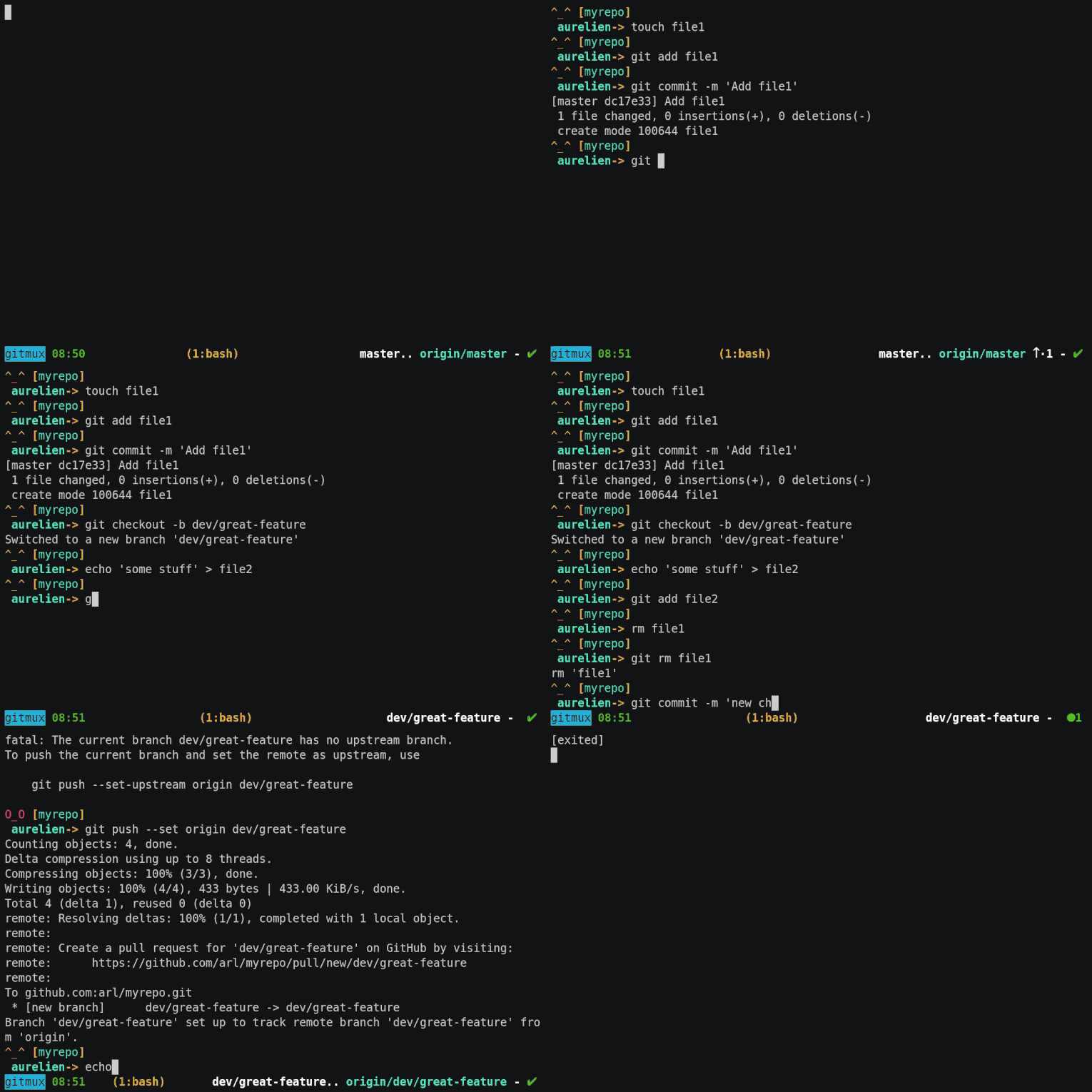
- easy: install and forget
- minimal: shows what you need, when you need it
- discrete: shows nothing when you're not in a git-managed directory
- shell-agnostic: doesn't rely on any shell-specific features, so will work with all of them
- customizable: colors, symbols and layout are all configurable
Prerequisites
Works with all reasonably recent tmux versions (2.1+)
Installing
Binary release
Download the latest binary for your platform/architecture and uncompress it.
Homebrew (macOS and linux) (amd64 and arm64)
Install the latest version with:
brew install gitmux
AUR
Arch Linux users can download the gitmux, gitmux-bin or gitmux-git AUR package.
From source
Download and install a Go compiler (Go 1.16 or later).
Run go install to build and install gitmux:
go install github.com/arl/gitmux@latest
Getting started
If your tmux version supports pane_current_path (tmux v2.1+),
just add this line to your .tmux.conf:
set -g status-right '#(gitmux "#{pane_current_path}")'
If your tmux doesn't support pane_current_path then you can use
a bash-specific solution
to achieve relatively similar behaviour: gitmux will refresh after every shell command
you run or when you switch windows, however it won't refresh automatically, nor when switching panes.
Note that tmux v2.1 was released in 2015 so you're probably better off updating to a more recent version anyway 🙂.
Command line interface
gitmux is not meant to be call directly but it still has a command line interface
that can be used to create the default configuration, troubleshoot your installation or during development:
$ gitmux -h
gitmux v0.11.5
Usage: gitmux [options] [dir]

gitmux prints the status of a Git working tree as a tmux format string.
If directory is not given, it default to the working directory.

Options:
  -cfg FILE       read gitmux config from FILE.
  -printcfg       prints default configuration file.
  -dbg            outputs Git status as JSON and print errors.
  -timeout DUR    exits if still running after given duration (ex: 2s, 500ms).
  -V              prints gitmux version and exits.
Customizing
gitmux output can be customized via a configuration file in YAML format.
This is the default gitmux configuration file, in YAML format:
tmux:
    symbols:
        branch: '⎇ '
        hashprefix: ':'
        ahead: ↑·
        behind: ↓·
        staged: '● '
        conflict: '✖ '
        modified: '✚ '
        untracked: '… '
        stashed: '⚑ '
        clean: ✔
        insertions: Σ
        deletions: Δ
    styles:
        clear: '#[fg=default]'
        state: '#[fg=red,bold]'
        branch: '#[fg=white,bold]'
        remote: '#[fg=cyan]'
        divergence: '#[fg=default]'
        staged: '#[fg=green,bold]'
        conflict: '#[fg=red,bold]'
        modified: '#[fg=red,bold]'
        untracked: '#[fg=magenta,bold]'
        stashed: '#[fg=cyan,bold]'
        clean: '#[fg=green,bold]'
        insertions: '#[fg=green]'
        deletions: '#[fg=red]'
    layout: [branch, .., remote-branch, divergence, '- ', flags]
    options:
        branch_max_len: 0
        branch_trim: right
        ellipsis: …
        hide_clean: false
        swap_divergence: false
        divergence_space: false
First, save the default configuration to a new file:
gitmux -printcfg > $HOME/.gitmux.conf
Modify the line you've added to .tmux.conf, passing the path of the configuration file as argument to gitmux via the -cfg flag
set -g status-right '#(gitmux -cfg $HOME/.gitmux.conf "#{pane_current_path}")'
Open .gitmux.conf and modify it, replacing symbols, styles and layout to suit your needs.
In tmux status bar, gitmux output immediately reflects the changes you make to the configuration.
gitmux configuration is split into 4 sections:
symbols: they're just strings of unicode charactersstyles: tmux format stringslayout: list ofgitmuxlayout components, defines the component to show and in their order.options: additional configuration options
Symbols
The symbols section defines the symbols printed before specific elements
of Git status displayed in tmux status string:
  symbols:
        branch: "⎇ "    # current branch name.
        hashprefix: ":"  # Git SHA1 hash (in 'detached' state).
        ahead: ↑·        # 'ahead count' when local and remote branch diverged.
        behind: ↓·       # 'behind count' when local and remote branch diverged.
        staged: "● "     # count of files in the staging area.
        conflict: "✖ "   # count of files in conflicts.
        modified: "✚ "   # count of modified files.
        untracked: "… "  # count of untracked files.
        stashed: "⚑ "    # count of stash entries.
        insertions: Σ    # count of inserted lines (stats section).
        deletions: Δ     # count of deleted lines (stats section).
        clean: ✔         # Shown when the working tree is clean.
Styles
Styles are tmux format strings used to specify text colors and attributes of Git
status elements.
See the STYLES section of tmux man page.
  styles:
    clear: '#[fg=default]'          # Clear previous style.
    state: '#[fg=red,bold]'         # Special tree state strings such as [rebase], [merge], etc.
    branch: '#[fg=white,bold]'      # Local branch name
    remote: '#[fg=cyan]'            # Remote branch name
    divergence: "#[fg=yellow]"      # 'divergence' counts
    staged: '#[fg=green,bold]'      # 'staged' count
    conflict: '#[fg=red,bold]'      # 'conflicts' count
    modified: '#[fg=red,bold]'      # 'modified' count
    untracked: '#[fg=magenta,bold]' # 'untracked' count
    stashed: '#[fg=cyan,bold]'      # 'stash' count
    insertions: '#[fg=green]'       # 'insertions' count
    deletions: '#[fg=red]'          # 'deletions' count
    clean: '#[fg=green,bold]'       # 'clean' symbol
Layout components
The layout section defines what components gitmux shows and the order in which
they appear on tmux status bar.
For example, the default gitmux layout shows is:
layout: [branch, .., remote-branch, divergence, " - ", flags]
It shows, in that order:
- the local branch name,
- 2 dots characters
.., - the remote branch name
- the local/remote divergence
- a
-character - and finally the flags representing the working tree state
Note that elements only appear when they make sense, for example if local and remote branch are aligned, the divergence string won't show up. Same thing for the remote branch, etc.
But you can anyway choose to never show some components if you wish, or to present them in a different order.
This is the list of the possible keywords for layout:
| Layout keywords | Description | Example |
| :--------------: | :------------------------------------------------- | :------------------: |
| branch | local branch name | main |
| remote-branch | remote branch name | origin/main |
| divergence | divergence local/remote branch, if any | ↓·2↑·1 |
| remote | alias for remote-branch followed by divergence | origin/main ↓·2↑·1 |
| flags | Symbols representing the working tree state | ✚ 1 ⚑ 1 … 2 |
| stats | Insertions/deletions (lines). Disabled by default | Σ56 Δ21 |
| any string foo | Non-keywords are shown as-is | hello gitmux |
Some example layouts:
- default layout:
layout: [branch, .., remote-branch, divergence, " - ", flags]
- some examples layouts:
layout: [branch, divergence, " - ", flags]
layout: [flags, " ", branch]
layout: [branch, "|", flags, "|", stats]
Additional options
This is the list of additional configuration options:
| Option | Description
Related Skills
apple-reminders
347.2kManage Apple Reminders via remindctl CLI (list, add, edit, complete, delete). Supports lists, date filters, and JSON/plain output.
gh-issues
347.2kFetch GitHub issues, spawn sub-agents to implement fixes and open PRs, then monitor and address PR review comments. Usage: /gh-issues [owner/repo] [--label bug] [--limit 5] [--milestone v1.0] [--assignee @me] [--fork user/repo] [--watch] [--interval 5] [--reviews-only] [--cron] [--dry-run] [--model glm-5] [--notify-channel -1002381931352]
healthcheck
347.2kHost security hardening and risk-tolerance configuration for OpenClaw deployments
node-connect
347.2kDiagnose OpenClaw node connection and pairing failures for Android, iOS, and macOS companion apps
