
Deepdrr
Code for "DeepDRR: A Catalyst for Machine Learning in Fluoroscopy-guided Procedures". https://arxiv.org/abs/1803.08606
Install / Use
/learn @arcadelab/DeepdrrREADME
DeepDRR
<a href="https://arxiv.org/abs/1803.08606"> <img src="http://img.shields.io/badge/paper-arxiv.1803.08606-B31B1B.svg" alt="Paper" /> </a> <a href="https://pepy.tech/project/deepdrr"> <img src="https://pepy.tech/badge/deepdrr/month" alt="Downloads" /> </a> <a href="https://github.com/arcadelab/deepdrr/releases/"> <img src="https://img.shields.io/github/release/arcadelab/deepdrr.svg" alt="GitHub release" /> </a> <a href="https://pypi.org/project/deepdrr/"> <img src="https://img.shields.io/pypi/v/deepdrr" alt="PyPI" /> </a> <a href="http://deepdrr.readthedocs.io/?badge=latest"> <img src="https://readthedocs.org/projects/deepdrr/badge/?version=latest" alt="Documentation Status" /> </a> <a href="https://github.com/psf/black"> <img src="https://img.shields.io/badge/code%20style-black-000000.svg" alt="Code style: black" /> </a> <a href="https://colab.research.google.com/github/arcadelab/deepdrr/blob/main/deepdrr_demo.ipynb"> <img src="https://colab.research.google.com/assets/colab-badge.svg" alt="Open in Colab" /> </a> </div>DeepDRR is a GPU-based framework for efficient simulation of X-ray images—or digitally reconstructed radiographs (DRRs)—from 3D CT images and meshes. It is intended for large-scale generation of synthetic X-ray datasets for training machine learning models.
DeepDRR has been used for a variety of applications, including:
- Voice control of robotic X-ray devices here and here.
- Sim-to-real learning in X-ray guided procedures.
- Foundation models for X-ray image segmentation.
- Virtual reality simulation of X-ray guided procedures.
- Augmented reality visualization and control of robotic C-arms
- Automated standard view acquisition in orthopedic surgery.
- Autonomous image acquisition and interpretation for AR-assisted pelvic trauma surgery
- 2D/3D X-ray Image Registration with CT images and atlases.
- Biplanar CT reconstruction
- Closed-loop control of a surgical robot using fluoroscopic navigation
- Surgical phase recognition in X-ray guided pelvic trauma surgery
- Instrument pose estimation in X-ray images.
If you have other appplications that could be highlighted here, please let us know!
DeepDRR is not a differentiable renderer, but it is fast and realistic, supporting multiple overlapping volumes and meshes with different materials. For a differentiable DRR framework, we recommend ProST or DiffDRR, which follow the same physics-based simulation principles as DeepDRR.
Usage
The following example loads a CT volume from a NifTi .nii.gz file and simulates a single X-ray projection:
from deepdrr import Volume, SimpleDevice, Projector
import killeengeo as kg

device = SimpleDevice()
ct = Volume.from_nifti('/path/to/ct_image.nii.gz')

with Projector(ct, device=device) as projector:
    device.set_view(
        point=ct.center_in_world,
        direction=ct.world_from_anatomical @ kg.vector(0, 1, 0),
        up=ct.world_from_anatomical @ kg.vector(0, 0, 1),
        source_to_point_fraction=0.5,
    )

    image = projector()
A more involved example that samples many projections from a CT volume and a tool mesh is below:
from deepdrr import Volume, SimpleDevice, Projector, Mesh
import killeengeo as kg
from PIL import Image

device = SimpleDevice(
    sensor_height=384,
    sensor_width=384,
    pixel_size=0.3, # pixel size in mm
    source_to_detector_distance=1000, # distance from source to detector in mm
)
ct = Volume.from_nifti('/path/to/ct_image.nii.gz')

# Load a tool mesh from an STL file, with homogeneous titanium material, called "tool"
tool = Mesh.from_stl("/path/to/tool_mesh.stl", material="titanium", tag="tool")

# Create a projector that combines the CT volume and the tool mesh
projector = Projector(
    [ct, tool],
    device=device,
    neglog=False, # do not apply negative log transform
)

right = ct.world_from_anatomical @ kg.vector(1, 0, 0) # right direction in world coordinates
anterior = ct.world_from_anatomical @ kg.vector(0, 1, 0) # anterior direction in world coordinates
superior = ct.world_from_anatomical @ kg.vector(0, 0, 1) # superior direction in world coordinates

# Initialize the projector (allocates GPU memory, takes the most time)
projector.initialize()

for i in range(100):
    # Sample a point in world coordinates uniformly *in* a sphere
    point = kg.random.uniform(
        center=ct.center_in_world,
        radius=100, # 100 mm radius around the CT center
    )

    # Sample a direction in world coordinates within a cone around the anterior
    direction = kg.random.spherical_uniform(
        center=anterior,
        d_phi=np.pi / 6, # 30 degrees around the anterior direction
    )

    # Sample how far the source is from the patient
    source_to_point_fraction = np.random.uniform(0.5, 0.9) # Depends on application

    # Randomly sample a pose for the C-arm
    device.set_view(
        point=point,
        direction=direction,
        up=superior,
        source_to_point_fraction=source_to_point_fraction
    )

    # Place the tool in the center of the CT volume (or any other position)
    tool.place_center(ct.center_in_world)

    # Generate the X-ray image, (float32, not normalized)
    image = projector()

    # Save out the image as a float32 numpy array, with no normalization
    Image.fromarray(image).save(f"path/to/output/{i:04d}.tiff")

    # Get the segmentation of the tool in the image
    seg = projector.project_seg(tags=["tool"]) # [H, W, 1] array with 1 for tool pixels, 0 otherwise

    # Save the segmentation as a binary image
    Image.fromarray(seg.squeeze().astype(np.uint8) * 255).save(f"path/to/output/{i:04d}_seg.png")

projector.free()
The script example_projector.py gives an alternative example. Additional tutorials are in progress at deepdrr.readthedocs.io. Contributions are welcome.
Installation
Because DeepDRR is a complex package with many dependencies, we recommend installing it from source using mamba or conda. It requires a linux machine with an NVIDIA GPU and CUDA support.
- Install the nvidia drivers for your system. ubuntu guide
- e.g. on ubuntu 22, we use
sudo ubuntu-drivers install --gpgpu nvidia:535-server
- e.g. on ubuntu 22, we use
- Install conda (we recommend mambaforge).
- Run the following commands:
git clone https://github.com/arcadelab/deepdrr.git
cd deepdrr
sudo ./scripts/setup_ubuntu.sh # installs apt dependencies and sets up the EGL driver
conda env create -f environment.yml # installs CUDA 12 and pytorch
conda activate deepdrr
pip install .[cuda11x] # this should match your CUDA version, see installation notes below
Installation Notes
Other CUDA Versions
DeepDRR depends on cupy which needs a version compiled for your CUDA version.
When installing DeepDRR, you can specify the CUDA version you want to use by appending the appropriate option to the pip install command:
pip install .[cuda102] # for CUDA 10.2
pip install .[cuda110] # for CUDA 11.0
pip install .[cuda111] # for CUDA 11.1
pip install .[cuda11x] # for CUDA 11.2 - 11.8
pip install .[cuda12x] # for CUDA 12.x
See https://docs.cupy.dev/en/stable/install.html for more information.
Installing for Development
Installing from the dev branch is risky, as it is unstable.
- Install the nvidia drivers for your system. guide
- Install conda (we recommend mambaforge).
- Run the following commands:
git clone https://github.com/arcadelab/deepdrr.git
cd deepdrr
git checkout dev
sudo ./scripts/setup_ubuntu.sh
conda env create -f environment.yml
conda activate deepdrr
pip install -e .[dev,cuda12x] # this should match your CUDA version
Documentation
Documentation is in progress at deepdrr.readthedocs.io.
To create the autodocs, run
sphinx-apidoc -f -o docs/source deepdrr
in the base directory. Then do cd docs and make html to build the static site locally.
Contributing
Contributions for bug fixes, enhancements, and other suggestions are welcome. Please make a pull request.
Method Overview
DeepDRR combines machine learning models for material decomposition and scatter estimation in 3D and 2D, respectively, with analytic models for projection, attenuation, and noise injection to achieve the required performance. The pipeline is illustrated below.
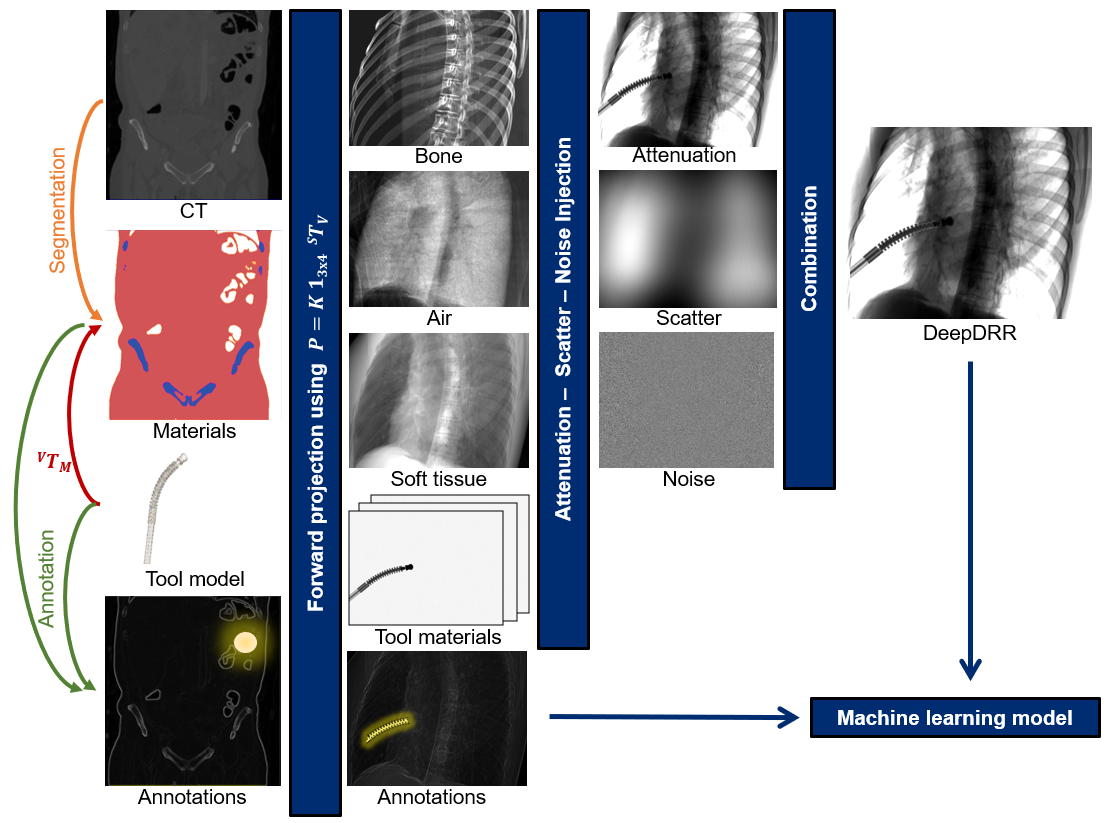
Further details can be found in our MICCAI 2018 paper "DeepDRR: A Catalyst for Machine Learning in Fluoroscopy-guided Procedures" and the subsequent Invited Journal Article in the IJCARS Special Issue of MICCAI "Enabling Machine Learning in
Related Skills
proje
Interactive vocabulary learning platform with smart flashcards and spaced repetition for effective language acquisition.
API
A learning and reflection platform designed to cultivate clarity, resilience, and antifragile thinking in an uncertain world.
openclaw-plugin-loom
Loom Learning Graph Skill This skill guides agents on how to use the Loom plugin to build and expand a learning graph over time. Purpose - Help users navigate learning paths (e.g., Nix, German)
best-practices-researcher
The most comprehensive Claude Code skills registry | Web Search: https://skills-registry-web.vercel.app
