
Shootback
a reverse TCP tunnel let you access target behind NAT or firewall
Install / Use
/learn @aploium/ShootbackREADME
shootback
shootback is a reverse TCP tunnel let you access target behind NAT or firewall
反向TCP隧道, 使得NAT或防火墙后的内网机器可以被外网访问.
Consumes less than 1% CPU and 8MB memory under 800 concurrency.
slaver is single file and only depends on python(2.7/3.4+) standard library.
How it works
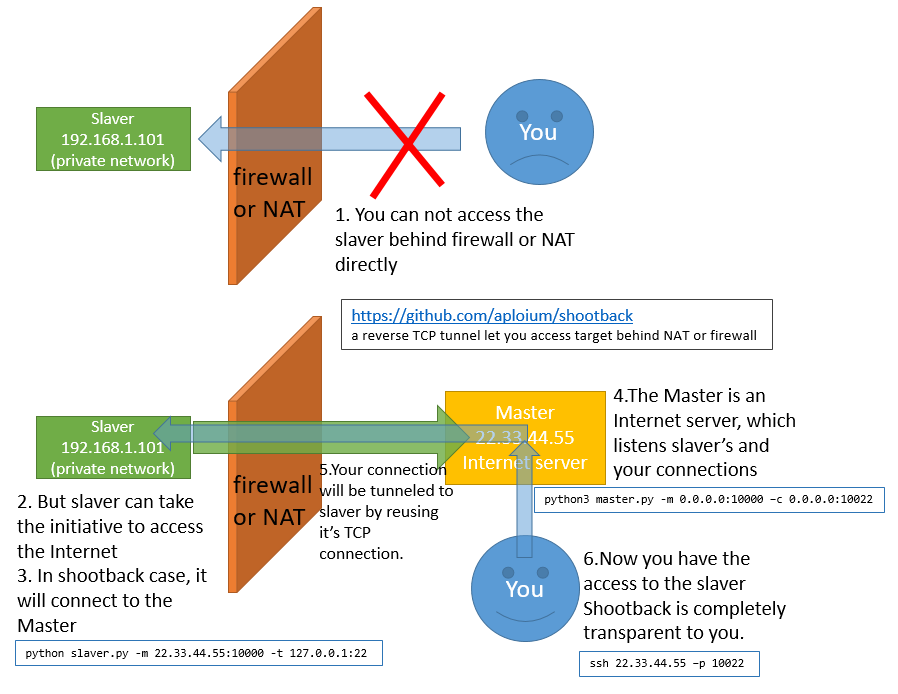
Typical Scene
- Access company/school computer(no internet IP) from home
从家里连接公司或学校里没有独立外网IP的电脑 - Make private network/site public.
使内网或内网站点能从公网访问 - Help private network penetration.
辅助内网渗透 - Help CTF offline competitions.
辅助CTF线下赛, 使场外选手也获得比赛网络环境 - Connect to device with dynamic IP, such as ADSL
连接动态IP的设备, 如ADSL - SSL encryption between slaver and master
slaver和master间支持SSL加密
Getting started
-
requirement:
- Master: Python3.4+, OS independent
- Slaver: Python2.7/3.4+, OS independent
- no external dependencies, only python std lib
-
download
git clone https://github.com/aploium/shootback -
(optional) if you need a single-file slaver.py, run
python3 build_singlefile_slaver.py -
run these command
# master listen :10000 for slaver, :10080 for you python3 master.py -m 0.0.0.0:10000 -c 127.0.0.1:10080 # slaver connect to master, and use example.com as tunnel target # ps: you can use python2 in slaver, not only py3 python3 slaver.py -m 127.0.0.1:10000 -t example.com:80 # doing request to master curl -v -H "host: example.com" 127.0.0.1:10080 # -- some HTML content from example.com -- # -- some HTML content from example.com -- # -- some HTML content from example.com -- -
a more reality example (with ssl):
assume your master is 22.33.44.55 (just like the graph above)# slaver_local_ssh <---> slaver <--[SSL]--> master(22.33.44.55) <--> You # ---- master ---- python3 master.py -m 0.0.0.0:10000 -c 0.0.0.0:10022 --ssl # ---- slaver ---- # ps: the `--ssl` option is for slaver-master encryption, not for SSH python(or python3) slaver.py -m 22.33.44.55:10000 -t 127.0.0.1:22 --ssl # ---- YOU ---- ssh 22.33.44.55 -p 10022 -
for more help, please see
python3 master.py --helpandpython3 slaver.py --help
Tips
-
run in daemon:
nohup python(or python3) slaver.py -m host:port -t host:port -q &
or:# screen is a linux command screen python(or python3) slaver.py -m host:port -t host:port # press ctrl-a d to detach screen # and if necessary, use "screen -r" to reattach -
ANY service using TCP is shootback-able. HTTP/FTP/Proxy/SSH/VNC/...
-
shootback itself just do the transmission job, do not handle encrypt or proxy.
however you can use a 3rd party proxy (eg: shadowsocks) as slaver target.
for example:
shadowsocks_server<-->shootback_slaver<-->shootback_master<-->shadowsocks_client(socks5)
Warning
- in windows, due to the limit of CPython
select.select(), shootback can NOT handle more than 512 concurrency, you may meet
ValueError: too many file descriptors in select()
If you have to handle such high concurrency in windows, Anaconda-Python3 is recommend, it's limit in windows is 2048
Performance
- in my laptop of intel I7-4710MQ, win10 x64:
- 1.6Gbits/s of loopback transfer (using iperf), with about 5% CPU occupation.
- 800 thread ApacheBench, with less than 1% CPU and 8MB memory consume
Related Skills
node-connect
335.8kDiagnose OpenClaw node connection and pairing failures for Android, iOS, and macOS companion apps
frontend-design
82.7kCreate distinctive, production-grade frontend interfaces with high design quality. Use this skill when the user asks to build web components, pages, or applications. Generates creative, polished code that avoids generic AI aesthetics.
openai-whisper-api
335.8kTranscribe audio via OpenAI Audio Transcriptions API (Whisper).
commit-push-pr
82.7kCommit, push, and open a PR
