
fusio
Self-Hosted API Management for Builders
Install / Use
claude mcp add apioo -- npx -y github:apioo/fusioIf the server publishes to npm under a different name, use that package instead — check the repo README.
MCP Server
Model Context Protocol server
Quality Score
Category
Development & EngineeringSupported Platforms
Our assessment of fusio
fusio scores 87/100 on our quality scale, 2061st of 4,617 Development & Engineering skills we index (top 45%).
Its MCP Server is 17 KB long, well organised into 22 sections with 4 code examples: a thorough specification that gives an agent plenty to work with.
With 2,128 GitHub stars, it is one of the more widely adopted skills in the catalogue.
Maintenance, license and trust
- The repository was last updated 10 days ago, so fusio is actively maintained.
- Our last check on 2026-10-21 found the source still online.
- It is released under the Apache-2.0 license, a permissive license that allows use, modification and commercial use with attribution.
- Its trust signals score 95/100, with 1 caution from licensing, adoption, age or documentation. These come from repository metadata, not a code audit — read the skill file before letting an agent act on it.
Safety scan
No issues foundOur scan of the whole file found no instruction hijacking, hidden characters, credential access, data exfiltration or destructive commands. An AI review of the same text found nothing harmful.
AI review by kimi-k2.7-code on 2026-09-24. Automated pattern scan on 2026-09-24. It catches known dangerous patterns, not every risk — read a skill before letting an agent act on it.
fusio compared with similar skills
All 4 of these similar skills score higher than fusio; compare them before choosing.
| Skill | Score | Stars | Updated | Format |
|---|---|---|---|---|
| fusio (this skill)by apioo | 87 | 2.1k | 10d ago | MCP Server |
| taste-skillby Leonxlnx | 100 | 110.6k | today | CLAUDE.md |
| Agent-Reachby Panniantong | 100 | 109.2k | today | CLAUDE.md |
| headroomby headroomlabs-ai | 100 | 78.9k | today | CLAUDE.md |
| ai-job-searchby ai-job-search-dev | 100 | 69.8k | today | CLAUDE.md |
Frequently asked questions
- How do I install fusio?
- Run
claude mcp add apioo -- npx -y github:apioo/fusio. The install tabs above show the steps for each supported agent. - Which AI agents does fusio work with?
- It is written for Claude Code and Claude Desktop, as a MCP Server file. Other agents that read the same format can often use it too.
- Is fusio safe to use?
- Our scan of the whole file found no instruction hijacking, hidden characters, credential access, data exfiltration or destructive commands. An AI review of the same text found nothing harmful. It is Apache-2.0-licensed and scores 95/100 on trust signals. Skills are instructions an agent will follow, so read the file before installing it and do not approve commands you do not understand.
- Is fusio still maintained?
- The repository was last updated 10 days ago, so fusio is actively maintained.
Skill content
View source on GitHubFusio is a self-hosted, open-source backend platform and API gateway written in PHP that bridges the gap between your internal infrastructure and the outside world. Whether you are exposing legacy databases, orchestrating microservices, or building custom business logic, Fusio handles the heavy lifting. It transforms your services into a professional API product, complete with an automated developer portal, SDK generation, and monetization tools. With native MCP support, Fusio also acts as a bridge to the AI ecosystem, allowing you to turn your backend logic into tools for autonomous agents.
🚀 Features
- Database API Gateway - Instantly expose legacy SQL/NoSQL databases (MySQL, PostgreSQL, etc.) as REST APIs.
- Microservice Gateway - Securely route, orchestrate, and load-balance traffic between your distributed services.
- Custom API Logic - Build powerful backend logic using reusable actions in PHP or Javascript.
- Agent Development - Use your custom API logic as "Tools" to build and power autonomous AI agents.
- AI-Assisted Development - Generate custom backend logic and schemas using natural language prompts.
- MCP Integration - Native support for the Model Context Protocol to expose APIs to AI ecosystems.
- API Developer Portal - A self-service portal for third-party developers with docs, testing tools, and keys.
- SDK Automation - Zero-effort generation of client SDKs for all major programming languages.
- API Monetization - Turn your API into a product with subscription plans, quotas, and automated billing.
- Analytics & Monitoring - Real-time tracking of API usage, performance metrics, and error logging.
📦 Installation
🐳 Docker
The fastest way to try Fusio locally is with Docker and docker-compose.
services:
  fusio:
    image: fusio/fusio
    restart: always
    environment:
      FUSIO_PROJECT_KEY: "42eec18ffdbffc9fda6110dcc705d6ce"
      FUSIO_CONNECTION: "pdo-mysql://fusio:61ad6c605975@mysql-fusio/fusio"
      FUSIO_BACKEND_USER: "test"
      FUSIO_BACKEND_EMAIL: "demo@fusio-project.org"
      FUSIO_BACKEND_PW: "test1234"
    ports:
      - "8080:80"

  mysql-fusio:
    image: mysql:8.0
    restart: always
    environment:
      MYSQL_RANDOM_ROOT_PASSWORD: "1"
      MYSQL_USER: "fusio"
      MYSQL_PASSWORD: "61ad6c605975"
      MYSQL_DATABASE: "fusio"
    volumes:
      - ./db:/var/lib/mysql
docker compose up -d
After startup
- Backend: http://localhost:8080/apps/fusio
- Login with the credentials you configured
- For the first steps, take a look at our Getting Started guide
🛠️ Manual Installation
-
Download artifact
You can either download the official release or clone the repository.
git clone https://github.com/apioo/fusio.git -
Configure
.envConfigure fitting database credentials at the
APP_CONNECTIONvariable, all other parameters are optional.APP_CONNECTION=pdo-mysql://root:password@localhost/fusio APP_URL=http://localhost:8080It is also recommended to provide the
APP_URLwhich contains the domain pointing to the public folder i.e.https://api.my_domain.comorhttps://my_domain.com/fusio, this is required if you host Fusio inside a sub-folder otherwise Fusio tries to detect the domain via the Host header.Supported DBs:
- MySQL:
pdo-mysql://user:pass@host/db - PostgreSQL:
pdo-pgsql://user:pass@host/db - SQLite:
pdo-sqlite:///fusio.sqlite
- MySQL:
-
Run migrations
php bin/fusio migrate -
Create administrator user
php bin/fusio adduserChoose Administrator as account type.
-
Install backend app
php bin/fusio marketplace:install fusio -
Start server (dev only)
php -S 127.0.0.1:8080 -t publicThis should be only used for testing, for production you need a classical Nginx/Apache setup or use Docker, take a look at our installation documentation for more details.
🌐 Web-Installer
Instead of manual installation you can also use the web installer script located at /install.php
to complete the installation. After installation, it is recommended to delete this "install" script.
🧭 Getting Started
Use our Getting Started guide to build your first action and configure an operation to expose the action as API endpoint.
Action
At the core of Fusio, you describe your business logic in an Action. An Action is a PHP class that receives an incoming request and returns a response.
<?php

namespace App\Action;

use Fusio\Engine;

class MyAction implements Engine\ActionInterface
{
    public function handle(Engine\RequestInterface $request, Engine\ParametersInterface $configuration, Engine\ContextInterface $context): mixed
    {
        return [
            'hello' => 'world'
        ];
    }
}
Once defined, this action can be bound to an Operation so that it executes for a specific HTTP method and path.
Configuration
Fusio allows you to build actions that are configurable directly from the backend. In the example below, we add a
message configuration parameter so a user can customize the response without changing the code.
<?php

namespace App\Action;

use Fusio\Engine;

class MyAction extends Engine\ActionAbstract
{
    public function handle(Engine\RequestInterface $request, Engine\ParametersInterface $configuration, Engine\ContextInterface $context): mixed
    {
        return [
            'hello' => $configuration->get('message'),
        ];
    }

    public function configure(Engine\Form\BuilderInterface $builder, Engine\Form\ElementFactoryInterface $elementFactory): void
    {
        $builder->add($elementFactory->newInput('message', 'Message', 'text', 'The message which should be returned'));
    }
}
In the backend, this parameter is now exposed via a generated form:
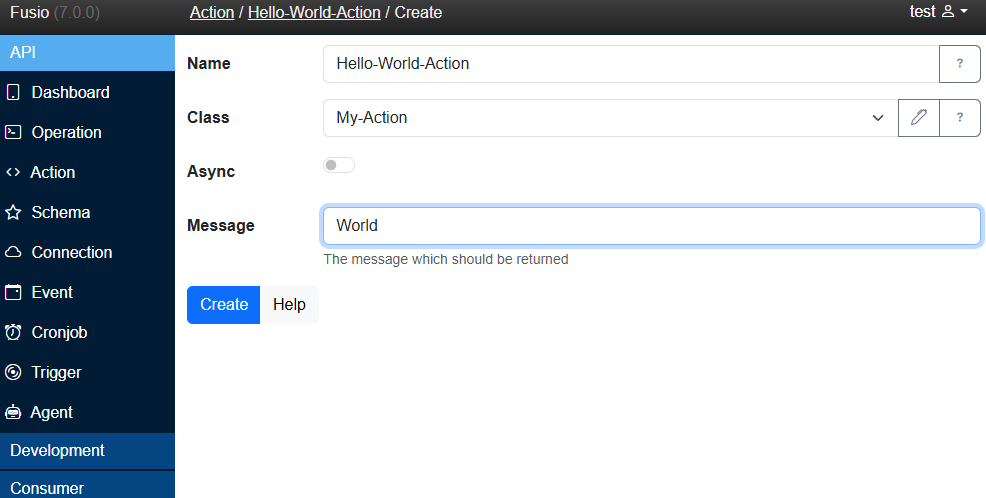
This concept makes actions highly reusable for both developers and non-technical users. We also provide a preset of actions for common tasks. If you build an action you'd like to share, check out our Adapter page. See our custom action documentation for more details.
Worker
Fusio provides Worker actions, which allow you to develop logic directly in the backend without building custom PHP classes.
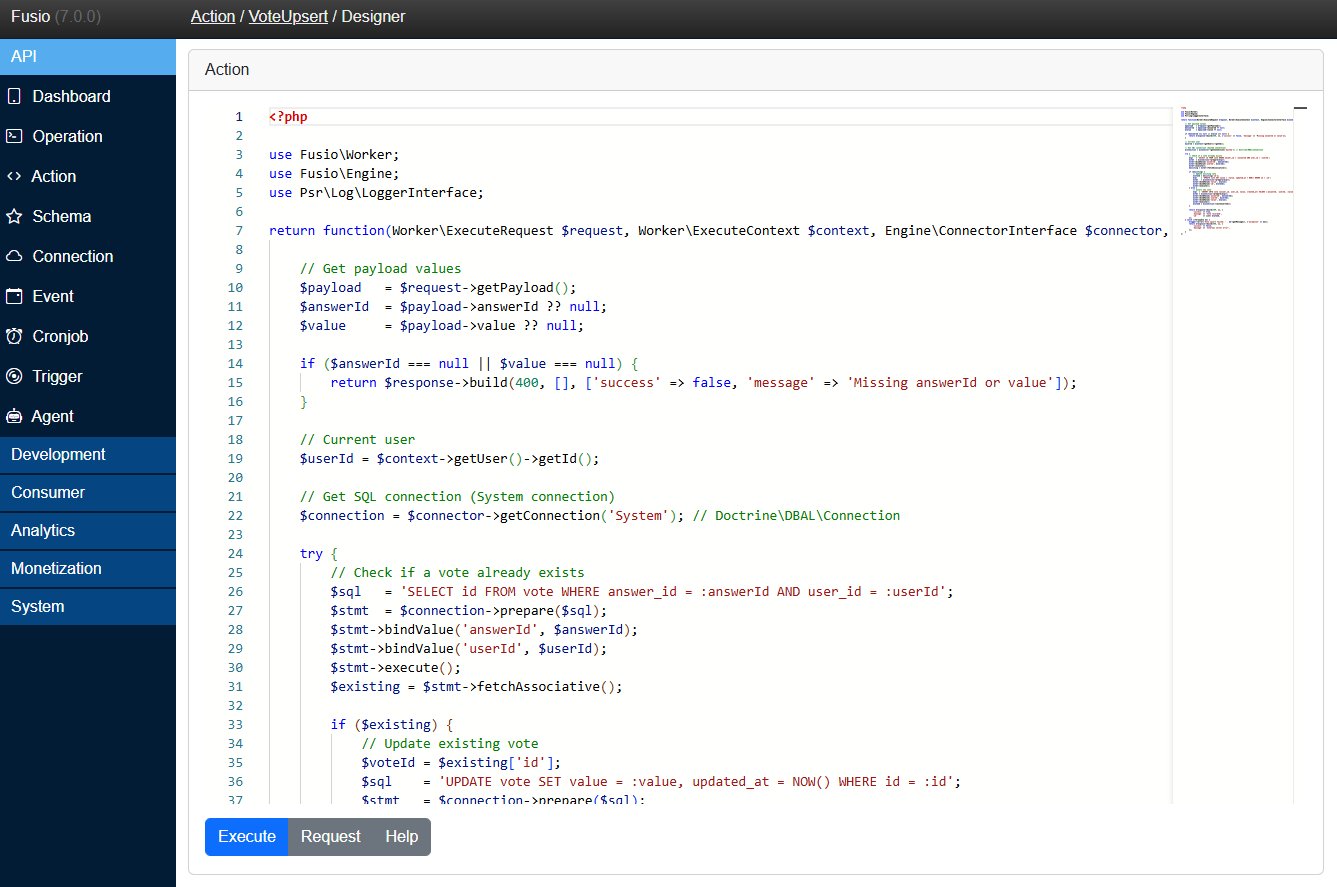
This also enables you to build actions in other languages like JavaScript or Python, which is ideal if your team is more familiar with those ecosystems. Learn more in the worker documentation.
AI
With the 7.0 release, we introduced a new Agent concept that allows you to generate worker actions using AI.
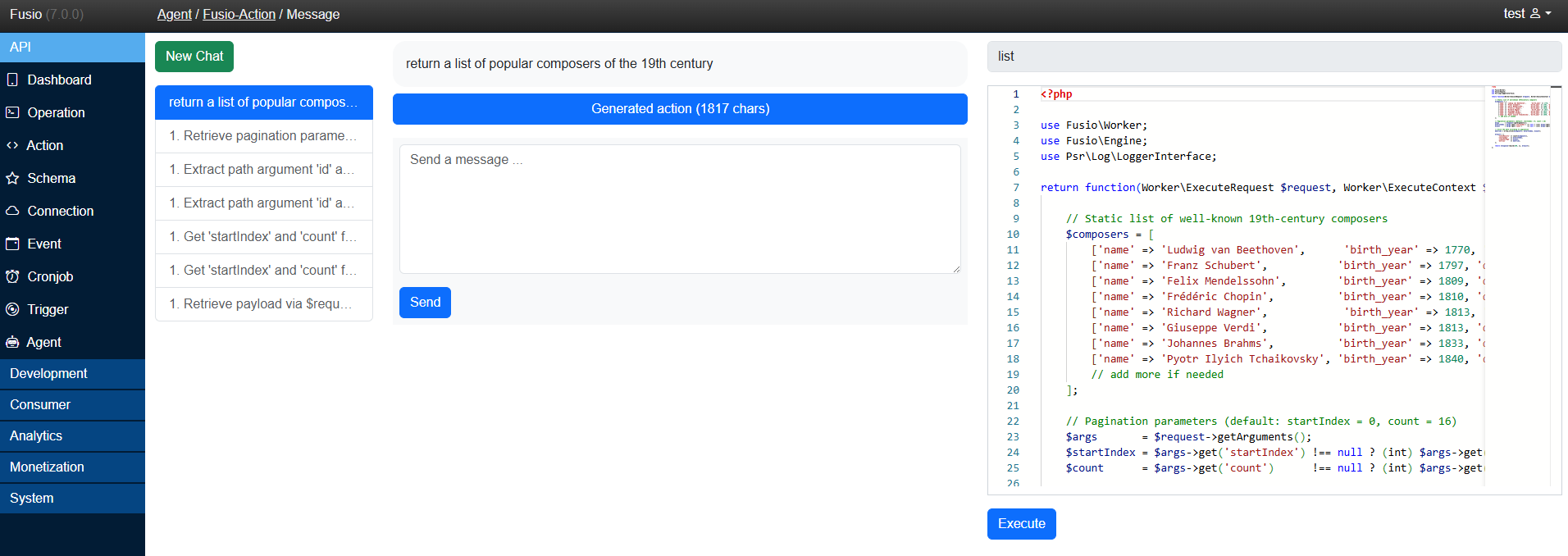
This makes developing backend logic accessible to everyone. Simply describe the logic you need:
return a list of popular composers of the 19th century
The Agent then generates the appropriate action logic automatically. Fusio supports multiple providers, including Ollama, ChatGPT, and Gemini, so you are never locked into a specific AI. Explore the AI agent documentation for more.
🧩 Apps
Fusio includes a flexible app system that lets you install various web-based apps to support different API-related use cases. These apps are typically simple JavaScript frontends that interact with Fusio's internal API.
You can browse all available apps in the Fusio Marketplace, and install them using either the CLI:
php bin/fusio marketplace:install fusio
or directly through the backend interface.
🖥️ Backend
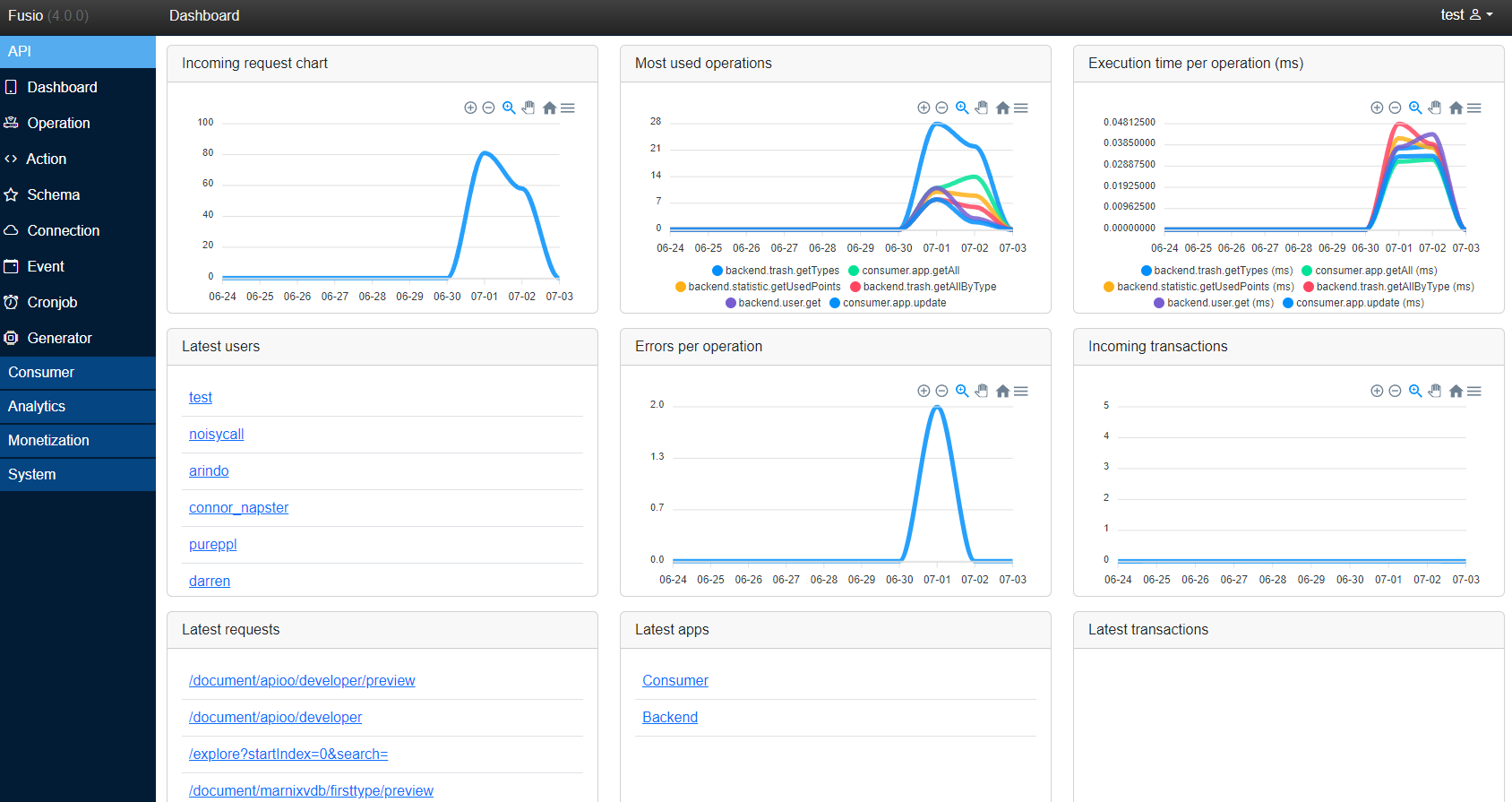
The backend app is the main app to configure and manage your API located at /apps/fusio/.
💡 VSCode
Fusio provides a VSCode extension which can be used to simplify action development.
🔗 Integration
🧰 SDK
To build and integrate applications with Fusio, you can use one of our officially supported SDKs, which simplify interaction with a Fusio instance. Alternatively, you can directly communicate with the REST API for full control and flexibility.
| Language | GitHub | Package | Example | |----------------|---------------------------------------------------------|--------------------------------------------------------------------|-------------------------------------------------------------| | C# | GitHub | NuGet | Example | | Go | GitHub | go get | Example | | Java | GitHub | Maven | Example | | Javascript | GitHub | NPM | | | PHP | GitHub | Packagist | Example | | Python | GitHub | PyPI | Example |
🖥️ Frontend
| Framework | GitHub | Package | Example | |-----------|------------------------------------------------------------------|-----------------------------------------------------|---------| | Angular | GitHub | NPM | Example |
📡 REST API
| Domain | Documentation | Specification | |----------|-----------------------------------------------------|-----------------------------------------------------------------------------------------| | Backend | [Re
Truncated for display — read the full file on GitHub.
Related Skills
taste-skill
110.6kAgent skills that give coding agents taste: art direction, reference images and a browser check instead of generic AI pages
Agent-Reach
109.2kGive your AI agent eyes to see the entire internet. Read & search Twitter, Reddit, YouTube, GitHub, Bilibili, XiaoHongShu — one CLI, zero API fees.
headroom
78.9kCompress tool outputs, logs, files, and RAG chunks before they reach the LLM. 20% fewer tokens for coding agents, 60-95% fewer tokens for JSON, same answers. Library, proxy, MCP server.
ai-job-search
69.8kThe job search that runs on your machine. AI job application framework built on Claude Code: evaluate postings, tailor CVs, write cover letters, prep interviews. Fork it and own it.

Languages
Trust signals
From repository metadata: license, adoption, age and documentation. Not a code audit — see the Safety scan above for what the skill file itself contains.