
mcpc
The most compatible MCP CLI client. Supports: tools, resources, prompts, completions, async tasks, skills, stdio and streamable HTTP (MCP 2026-07-28 and 2025-11-25), persistent sessions, OAuth 2.1 with DCR, CIMD, client credentials, and ID-JAG, OS keychain, --json for code mode, grep for tool discov…
Install / Use
claude mcp add apify -- npx -y github:apify/mcpcIf the server publishes to npm under a different name, use that package instead — check the repo README.
MCP Server
Model Context Protocol server
Quality Score
Category
Customer SupportSupported Platforms
Tags
Our assessment of mcpc
mcpc scores 84/100 on our quality scale, 252nd of 326 Customer Support skills we index.
Its MCP Server is 77 KB long, well organised into 182 sections with 46 code examples: long enough that it reads more like full documentation than a focused instruction file, which agents can find harder to follow.
With 1,089 GitHub stars, it is one of the more widely adopted skills in the catalogue.
Maintenance, license and trust
- The repository was last updated today, so mcpc is actively maintained.
- Our last check on 2026-10-18 found the source still online.
- It is released under the Apache-2.0 license, a permissive license that allows use, modification and commercial use with attribution.
- Its trust signals score 100/100, with no cautions. These come from repository metadata, not a code audit — read the skill file before letting an agent act on it.
Safety scan
No issues foundOur scan of the whole file found no instruction hijacking, hidden characters, credential access, data exfiltration or destructive commands. An AI review of the same text found nothing harmful.
AI review by kimi-k2.7-code on 2026-09-24. Automated pattern scan on 2026-09-24. It catches known dangerous patterns, not every risk — read a skill before letting an agent act on it.
mcpc compared with similar skills
All 4 of these similar skills score higher than mcpc; compare them before choosing.
| Skill | Score | Stars | Updated | Format |
|---|---|---|---|---|
| mcpc (this skill)by apify | 84 | 1.1k | today | MCP Server |
| Agent-Reachby Panniantong | 100 | 109.2k | today | CLAUDE.md |
| headroomby headroomlabs-ai | 100 | 78.9k | today | CLAUDE.md |
| CowAgentby zhayujie | 100 | 47.8k | today | CLAUDE.md |
| Scraplingby D4Vinci | 100 | 97.9k | today | MCP Server |
Frequently asked questions
- How do I install mcpc?
- Run
claude mcp add apify -- npx -y github:apify/mcpc. The install tabs above show the steps for each supported agent. - Which AI agents does mcpc work with?
- It is written for Claude Code and Claude Desktop, as a MCP Server file. Other agents that read the same format can often use it too.
- Is mcpc safe to use?
- Our scan of the whole file found no instruction hijacking, hidden characters, credential access, data exfiltration or destructive commands. An AI review of the same text found nothing harmful. It is Apache-2.0-licensed and scores 100/100 on trust signals. Skills are instructions an agent will follow, so read the file before installing it and do not approve commands you do not understand.
- Is mcpc still maintained?
- The repository was last updated today, so mcpc is actively maintained.
Skill content
View source on GitHubmcpc — a universal MCP CLI client




mcpc is a command-line client for the Model Context Protocol (MCP)
that maps every MCP operation to an intuitive shell command.
Use it to manually inspect and debug MCP servers, to script repeatable MCP workflows in plain shell, or to
give AI agents the full MCP protocol through a single Bash() tool call, so they can interact with any MCP
server and its latest capabilities using the most universal programming interface there is: the UNIX shell.
Key features:
- 🔧 Full MCP support - Tools, prompts, resources, async tasks, skills, notifications, and logging over stdio and Streamable HTTP.
- 🔄 Persistent sessions - Keep connections to multiple servers alive in parallel, whether the server protocol is stateful or stateless.
- 🗺️ Progressive tool discovery - Find relevant MCP tools on the fly to save tokens and increase accuracy.
- 🔌 Code mode - JSON output composes with
jq,xargs, and shell pipelines for MCP workflows as shell scripts. - 🔒 Secure - Full OAuth 2.1 support with CIMD and DCR, uses OS keychain for credentials storage.
- 🤖 AI sandboxing - Proxy MCP server connections to protect credentials from AI-generated code.
- 🪶 Lightweight - Minimal dependencies, works on Mac/Win/Linux, doesn't use LLMs on its own.
- 💸 Agentic payments - Experimental support for the x402 protocol on Base.

Table of contents
<!-- START doctoc generated TOC please keep comment here to allow auto update --> <!-- DON'T EDIT THIS SECTION, INSTEAD RE-RUN doctoc TO UPDATE -->- Motivation
- Install
- Quickstart
- Usage
- Sessions
- Authentication
- MCP proxy
- AI agents
- Agentic payments (x402)
- MCP support
- Configuration
- Security
- Errors
- Development
- Related work
- License
Motivation
Many AI agents misuse MCP. They treat tools as prompt-time function calls, repeatedly injecting tool definitions and results into the context. Tokens get wasted, context rots, the agent gets slower and less reliable — hence the popular conclusion: "MCP sucks, CLIs are better".
mcpc challenges that narrative. It maps every MCP operation to an intuitive CLI command that
agents pick up from --help alone. Any agent with shell access gets full MCP support without
wiring up dozens of MCP functions. Just one Bash() tool, and mcpc handles the rest:
 ┌──────────┐   Bash()   ┌────────┐    MCP    ┌────────────┐
 │ AI agent │ ─────────► │  mcpc  │ ────────► │ MCP server │
 └──────────┘            └────────┘           └────────────┘
                                     Sessions, OAuth, Tools,
                                     Resources, Prompts,
                                     Tasks, x402, ...
CLI is the perfect local interface between agents and MCP, while MCP remains the standard remote interface for server discovery, authentication, payments, and access control. The two aren't exclusive – they're complementary.
As a bonus, the same mcpc configuration, OAuth profiles, and live sessions can be shared across
many AI agents on the same machine. Authenticate once, reuse everywhere.
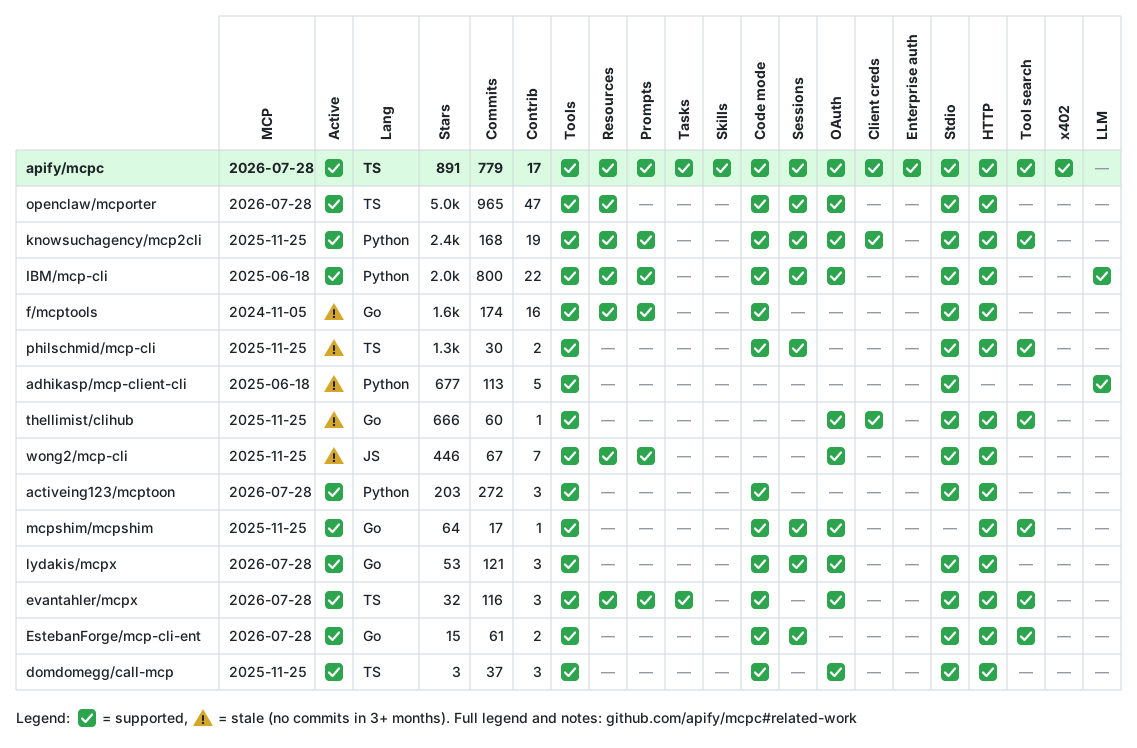
How mcpc compares to other MCP CLI clients (see Related work for details and notes):
Install
With Homebrew (macOS and Linux), which brings its own Node.js:
brew install apify/tap/mcpc
Otherwise install the latest Node.js or Bun first, then:
npm install -g @apify/mcpc

# Or with Bun
bun install -g @apify/mcpc
Linux: credentials use the OS keychain via the Secret Service API.
GNOME/KDE desktops work out of the box. On headless/CI systems, mcpc falls back to a
file-based store (~/.mcpc/credentials.json, mode 0600).
To force the keychain on headless systems, install libsecret + gnome-keyring
(via apt-get, dnf, or pacman) and run:
dbus-run-session -- bash -c "echo -n 'password' | gnome-keyring-daemon --unlock && mcpc ..."
Quickstart
# List all active sessions and saved authentication profiles
mcpc

# Log in to a remote MCP server and save OAuth credentials for future use
mcpc login mcp.apify.com

# Create a persistent session and interact with it
mcpc connect mcp.apify.com @test
mcpc @test              # show server info and capabilities
mcpc @test tools-list   # list available tools
mcpc @test tools-call search-actors keywords:="website crawler"

# Use JSON mode for scripting
mcpc --json @test tools-list

# Use a local MCP server package (stdio) referenced from a config file
mcpc connect ./.vscode/mcp.json:filesystem @fs
mcpc @fs tools-list
Usage
<!-- AUTO-GENERATED: mcpc --help -->Usage: mcpc [<@session>] [<command>] [options]
Universal command-line client for the Model Context Protocol (MCP).
Commands:
connect [<server>] [@session] Connect to an MCP server and start a new named @session
close <@session> Close a session
restart <@session> Restart a session (losing all state)
login <server> Log in to a server and save an OAuth profile
logout <server> Delete an OAuth profile for a server
clean [resources...] Clean up mcpc data (sessions, profiles, logs, all)
grep <pattern> Search tools and instructions across all active sessions
x402 [subcommand] [args...] Configure an x402 payment wallet (EXPERIMENTAL)
help [command] [subcommand] Show help for a command
Options:
--json Output in JSON format for scripting
--verbose Enable debug logging
--profile <name> OAuth profile for the server ("default" if not provided)
--timeout <seconds> Request timeout in seconds (default: 60)
--max-chars <n> Truncate output to n characters (ignored in --json mode)
--insecure Skip TLS certificate verification (for self-signed certs)
-v, --version Output the version number
-h, --help Display help
MCP session commands (after connecting):
<@session> Show MCP server info, capabilities, and tools overview
<@session> grep <pattern> Search tools and instructions
<@session> tools-list List all server tools
<@session> tools-get <name> Get tool details and schema
<@session> tools-call <name> [arg:=val ... | <json> | <stdin]
<@session> tasks-list
<@session> tasks-get <taskId>
<@session> tasks-result <taskId>
<@session> tasks-cancel <taskId>
<@session> prompts-list
<@session> prompts-get <name> [arg:=val ... | <json> | <stdin]
<@session> resources-list
<@session> resources-read <uri> [-o <file> | --raw]
<@session> resources-subscribe <uri> <file>
<@session> resources-unsubscribe <uri>
<@session> resources-templates-list
<@session> resources-directory-read <uri>
<@session> skills-list
<@session> skills-get <skill> [file] [--raw]
<@session> logging-set-level <level>
<@session> ping
<@session> server-discover
<@session> logs [-n N] [--follow] [--since 1h]
Run "mcpc" without arguments to show active sessions and OAuth profiles.
Run "mcpc --json" to get the same data as `{ sessions: [...], profiles: [...] }`.
Agent guide: mcpc help --skill
REFERENCE.md collects the full --help output of every command in one page.
In your terminal, run mcpc help <command> to see the same help for a single command.
General actions
With no arguments, mcpc lists all active sessions and saved OAuth profiles:
# List all sessions and OAuth profiles (also in JSON mode)
mcpc
mcpc --json

# Show command help or version
mcpc --help
mcpc --version

# Clean stale sessions and old log files
mcpc clean
Server formats
The connect, login, and logout commands accept a <server> argument in these formats:
- Remote URL (e.g.
mcp.apify.comorhttps://mcp.apify.com) — scheme defaults tohttps:// - Config file entry (e.g.
~/.vscode/mcp.json:filesystem) —file:entry-namesyntax
connect additionally supports two bulk forms that connect many servers at once:
- Config file without an entry (e.g.
~/.vscode/mcp.json) — connect every server in the file - No argument (
mcpc connect) — auto-discover MCP config files in the current directory and your home dir (.mcp.json,mcp.json,.cursor/mcp.json,.vscode/mcp.json,~/.claude.json, Claude Desktop, Windsurf, Kiro, …) and connect everything found (runmcpc connect --helpfor the full list).
mcpc connect                      # discover standard config files and connect all servers
mcpc connect ~/.vscode/mcp.json   # connect every server in one file
Bulk connects auto-generate session names (so they don't take an @session) and skip local
stdio servers by default — pass --stdio to include them. Each discovered config file is listed
with its servers, the names of the headers they send, and their status (● live, ✗ failed);
files that can't be used are shown as (0 servers) or (invalid) with the reason, rather than
silently ignored. The command waits for every handshake to finish (with a progress spinner in
human mode); --json reports each server's details. If every server fails to connect, the command
exits with a non-zero code.
Auto-discovery does not trust config files in the current directory to read environment
variables. A .mcp.json checked into a repository could carry
"headers": { "X": "${GITHUB_TOKEN}" } (or ${SECRET} in a hostname) pointed at an attacker's
server, and a bare mcpc connect in that checkout would send the secret on the first request.
So mcpc connect skips every project-scope entry that references a ${VAR} — in url, headers,
command, args or env, with or without --stdio — and shows which variables it would have
read; it also refuses -H, which would go to every discovered server. Files under your home
directory are your own and expand ${VAR} as usual. To connect a skipped entry, review the file
and name it explicitly (mcpc connect ./.mcp.json): naming a file is the trust step.
MCP commands
All MCP commands go through a named session created with connect:
# Connect to a remote server and create a session
mcpc connect mcp.apify.com @apify
mcpc @apify tools-list
mcpc @apify tools-call search-apify-docs query:="What are Actors?"

# Connect to a local server via config file entry
mcpc connect ~/.vscode/mcp.json:filesystem @fs
mcpc @fs tools-list
mcpc @fs tools-call list_directory path:=/
See MCP feature support for details about all supported MCP features and commands.
Comma
Truncated for display — read the full file on GitHub.
Related Skills
Agent-Reach
109.2kGive your AI agent eyes to see the entire internet. Read & search Twitter, Reddit, YouTube, GitHub, Bilibili, XiaoHongShu — one CLI, zero API fees.
headroom
78.9kCompress tool outputs, logs, files, and RAG chunks before they reach the LLM. 20% fewer tokens for coding agents, 60-95% fewer tokens for JSON, same answers. Library, proxy, MCP server.
CowAgent
47.8kOpen-source personal AI assistant & Agent Harness. Plans tasks, runs tools and skills, self-evolves with memory and knowledge. Multi-agent, multi-model, multi-channel. Lightweight, extensible, one-line install.
Scrapling
97.9k🕷️ The BEST Web Scraping framework that handles everything from a single request to a full-scale crawl! Don't be shy, join here: https://discord.gg/EMgGbDceNQ and follow here for daily tips and tricks: https://x.com/Scrapling_dev

Languages
Trust signals
From repository metadata: license, adoption, age and documentation. Not a code audit — see the Safety scan above for what the skill file itself contains.