
FrozenBiLM
[NeurIPS 2022] Zero-Shot Video Question Answering via Frozen Bidirectional Language Models
Install / Use
/learn @antoyang/FrozenBiLMREADME
Zero-Shot Video Question Answering via Frozen Bidirectional Language Models
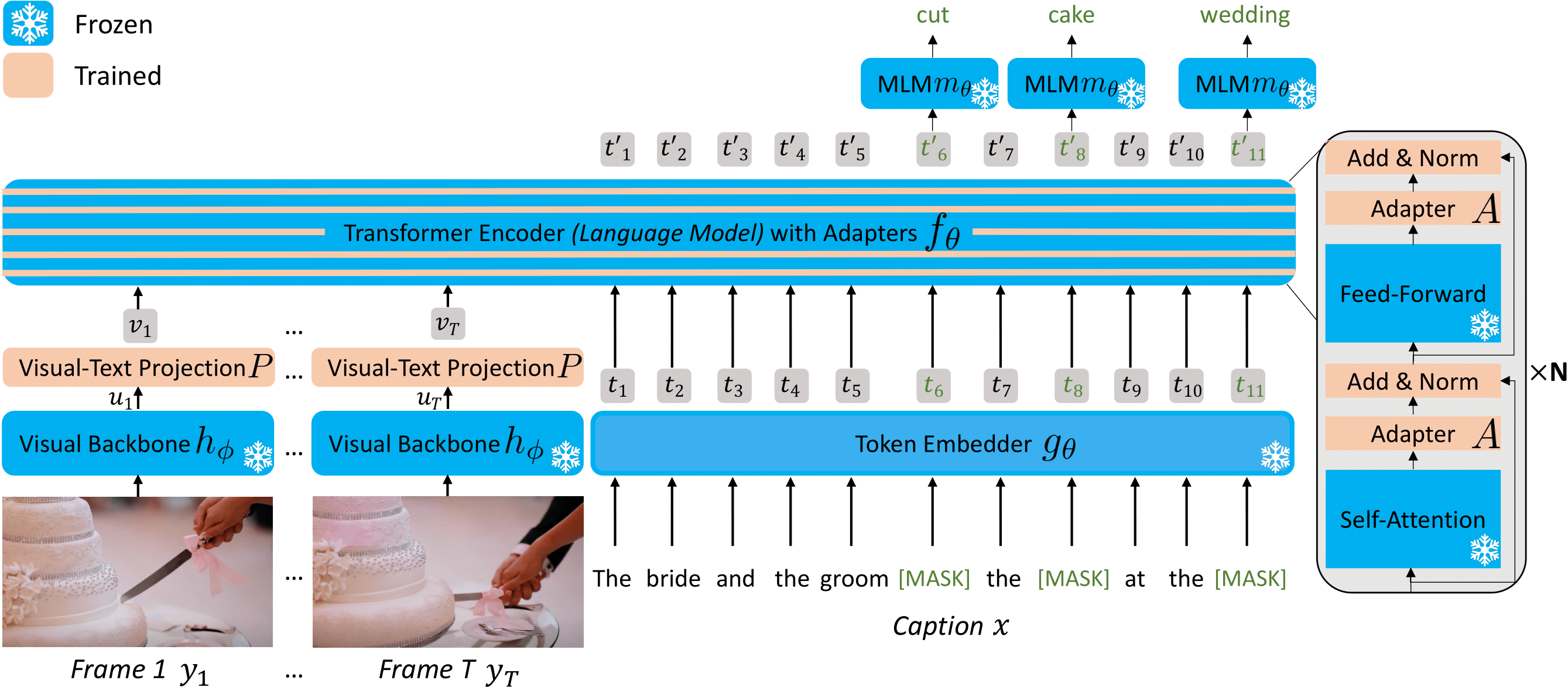
FrozenBiLM is a new model for video question answering that builds on a frozen bidirectional language model. FrozenBiLM excels in settings without any manual annotation (zero-shot) or with limited training data (few-shot), while performing competitively when trained on standard datasets (fully-supervised).
This repository provides the code for our FrozenBiLM paper (NeurIPS 2022), including:
- Environment setup
- Data downloading instructions
- Data preprocessing and visual feature extraction scripts, as well as preprocessed data and features
- Pretrained checkpoints
- Training and evaluation scripts for cross-modal training, downstream fully-supervised, few-shot and zero-shot VideoQA, including various baselines
- VideoQA demo script
Setup
To install requirements, run:
conda create -n frozenbilm_env python=3.8
conda activate frozenbilm_env
conda install pytorch==1.8.1 torchvision==0.9.1 cudatoolkit=11.1 -c pytorch -c nvidia
pip install -r requirements.txt
You may fill the global paths in args.py.
To use a given text-pretrained language model, you should download the corresponding weights from the Hugging Face Hub and put them in TRANSFORMERS_CACHE.
Quick Start
If you wish to start VideoQA training or inference quickly.
Download preprocessed data, visual features and checkpoints
To download pretrained checkpoints, pre-processed data, ASR and visual features, run:
bash download/download_checkpoints.sh <MODEL_DIR>
bash download/download_downstream.sh <DATA_DIR>
If you have issues with gshell, you can access the processed data here and the checkpoints here.
It requires about 8GB for the models, and 12GB for the data.
Note that most pretrained checkpoints only contain updated parameters due to storage limitations (and not the frozen parameters).
This means you have to make sure that you have properly downloaded weights from Hugging Face for the language model of your choice when using a provided checkpoint.
For completeness, frozenbilm.pth, frozenbilm_bertbase_noadapter.pth and frozenbilm_bertlarge_noadapter.pth contain all parameters.
Also note that due to storage issue, we do not host publicly visual features for the WebVid10M dataset.
Long Start
Data Downloading
<details> <summary>Click for details... </summary> **WebVid10M** Download the annotations and videos from [the dataset providers](https://m-bain.github.io/webvid-dataset/). The annotations should be in `<DATA_DIR>/WebVid`.LSMDC-FiB Download the annotations and videos from the dataset providers.
The annotations should be in <DATA_DIR>/LSMDC.
TGIF-FrameQA Download the annotations and GIFs from the dataset providers.
The annotations should be in <DATA_DIR>/TGIF-QA.
How2QA Download the annotations and videos from the dataset providers.
The annotations should be in <DATA_DIR>/How2QA.
TVQA Download the annotations and videos from the dataset providers.
The annotations should be in <DATA_DIR>/TVQA.
For iVQA, MSRVTT-QA, MSVD-QA and ActivityNet-QA, we use the preprocessed files from Just Ask and download them in <DATA_DIR>/iVQA, <DATA_DIR>/MSRVTT-QA, <DATA_DIR>/MSVD-QA and <DATA_DIR>/ActivityNet-QA.
To download automatic speech subtitles, we use youtube-dl, except for LSMDC, How2QA and TVQA for which the authors provide them.
We then convert the vtt files for each video from a dataset to a pickle file subtitles.pkl containing a dictionary mapping each video_id to a dictionary containing a start, end and text key, corresponding to the speech in the corresponding video_id.
Annotation Preprocessing
<details> <summary>Click for details... </summary> To preprocess annotations for the different datasets, run: ``` python preproc/preproc_webvid.py python preproc/preproc_lsmdc.py python preproc/preproc_tgifqa.py python preproc/preproc_how2qa.py python preproc/preproc_tvqa.py ``` iVQA, MSRVTT-QA, MSVD-QA, and ActivityNet-QA are already preprocessed (see Data Downloading instructions). </details>Visual Feature extraction
<details> <summary>Click for details... </summary> We provide in the `extract` folder the code to extract visual features from videos with CLIP ViT-L/14@224px. It requires downloading the pretrained weights available at [this repository](https://github.com/openai/CLIP).Extraction You should prepare for each dataset a csv with columns video_path, and feature_path. Then use (you may launch this script on multiple GPUs to fasten the extraction process):
python extract/extract.py --csv <csv_path>
Merge files To merge the extracted features into a single file for each downstream dataset, use:
python extract/merge_features.py --folder <features_path> \
--output_path <DEFAULT_DATASET_DIR>/clipvitl14.pth --dataset <dataset>
For WebVid10M, you may let the features in separate files (one per video) as the dataset is too big for the features to be stored in a single file.
You may preferably put these features on a SSD to fasten up on-the-fly reading during training.
Available checkpoints
| Training data | LSMDC | iVQA | MSRVTT-QA | MSVD-QA | ActivityNet-QA | TGIF-QA | How2QA | TVQA | url | size | |-----|-----|-----|-----|-----|-----|-----|-----|-----|-----|-----| | WebVid10M | 51.5 | 26.8 | 16.7 | 33.8 | 25.9 | 41.9 | 58.4 | 59.7 | Drive | 3.7GB (inc. frozen weights) | | WebVid10M + LSMDC | 63.5 | | | | | | | | Drive | 114MB | | WebVid10M + iVQA | | 39.6 | | | | | | | Drive | 114MB | | WebVid10M + MSRVTT-QA | | | 47.0 | | | | | | Drive | 114MB | | WebVid10M + MSVD-QA | | | | 54.8 | | | | | Drive | 114MB | | WebVid10M + ActivityNet-QA | | | | | 43.2 | | | | Drive | 114MB | | WebVid10M + TGIF-QA | | | | | | 68.6 | | | Drive | 114MB | | WebVid10M + How2QA| | | | | | | 86.3 | | Drive | 114MB | | WebVid10M + TVQA | | | | | | | | 82.0 | Drive | 114MB |
Note that checkpoints finetuned on 10% or 1% of downstream datasets (few-shot setting) are also made accessible here.
Variants using a BERT-Base or BERT-Large language model (without adapters) instead of DeBERTa are also present in this folder.
Cross-modal training
FrozenBiLM
To train FrozenBiLM on WebVid10M, run:
python -m torch.distributed.launch --nproc_per_node 8 --use_env main.py \
--combine_datasets webvid --combine_datasets_val webvid --save_dir=trainwebvid \
--lr=3e-5 --ds_factor_ff=8 --ds_factor_attn=8 \
--batch_size=16 --batch_size_val=16 --epochs=2 \
Baselines
<details> <summary>Click for details... </summary> Based on the previous command: - Variant without adapters: Pass `--lr=3e-4 --ds_factor_ff=0 --ds_factor_attn=0` - UnFrozenBiLM variant: Pass `--lr=1e-5 --ft_lm --ft_mlm --ds_factor_ff=0 --ds_factor_attn=0 --batch_size=8` - UnFrozenBiLM variant with no language initialization: Pass `-lr=1e-5 --ft_lm --ft_mlm --scratch --ds_factor_ff=0 --ds_factor_attn=0 --batch_size=8` - Other language models: Pass `--model_name=bert-large-uncased` or `--model_name=bert-base-uncased` to use BERT-Base or BERT-Large instead of Deberta-V2-XLarge - Train on a subpart of WebVid10M: Sample a random subpart of the train dataframe file and change the `--webvid_train_csv_path`. The random subsets used in the paper will be released soon. </details>Autoregressive variants
<details> <summary>Click for details... </summary> To train the GPT-J-6B-based autoregressive variant on WebVid10M, run: ``` python -m torch.distributed.launch --nproc_per_node 8 --use_env main_ar.py \ --combine_datasets webvid --combine_datasets_val webvid --save_dir=trainarwebvid \ --lr=3e-4 --model_name=gpt-j-6b \ --batch_size=4 --batch_size_val=4 --epochs=2 ``` Other language models: Pass `--model_name=gpt-neo-1p3b --batch_size=16 --batch_size_val=16` or `--model_name=gpt-neo-2p7b --batch_size=8 --batch_size_val=8` to use GPT-Neo-1.3B or GPT-Neo-2.7B instead of GPT-J-6B </details>Zero-shot VideoQA
Fill-in-the-blank and open-ended VideoQA
FrozenBiLM
To evaluate the cross-modal trained FrozenBiLM on LSMDC-FiB, iVQA, MSRVTT-QA, MSVD-QA, ActivityNet-QA or TGIF-QA FrameQA, run:
python -m torch.distributed.launch --nproc_per_node 8 --use_env videoqa.py --test --eval \
--combine_datasets <dataset> --combine_datasets_val <dataset> --save_dir=zs<dataset> \
--ds_factor_ff=8 --ds_f
