Wowa
WoW addon manager, world of warcraft, addon, lua, command line, cli
Install / Use
/learn @antiwinter/WowaREADME
WoWA



Recent Notice
WoWA dev is discontinued for several reasons. The most important one of them is that curseforge/overwolf has already developed very good clients for there addons for each platform (win/mac/even linux). Not like the moment that I decided to develop wowa, back when they only had a twitch client for only Windows.
Thank you for using WoWA. Thank you for those who have liked WoWA
WoWA stands for World of Warcraft Assistant, it is designed to help managing WoW addons, uploading WCL logs, etc.
There used to be some command line manager for WoW addons in the past, but are mostly out of maintaince at this time. A list of these projects can be found in the related prjects section.
As comparing to these projects, WoWA offers serveral advantages:
- Better CLI interface: colorful and meaningful
- Concurrency: when installing or updating, WoWA can take advantage of multi-processing
- wowaads.json file: this is the file where WoWA stores addon information. Unlike other projects, WoWA stores this file in the WTF folder. This design benifits people when they want to backup their WoW setting. Backing up one WTF folder is enough
Install
npm install -g wowa
Setup WoW path
The WoW path configuration file is located at %APPDATA%/wowa/wow_path.txt on Windows, and ~/.wowa/wow_path.txt on macOS or Linux.
Normally wowa would remind you to edit this file if it cannot find the game at its default location.
Usage
Quick reference
To install an addon
wowa add deadly-boss-mods                       # install dbm from curse
wowa add curse:deadly-boss-mods                 # install dbm from curse
wowa add mmoui:8814-DeadlyBossMods              # install dbm from wowinterface
wowa add 8814-DeadlyBossMods                    # install dbm from wowinterface
wowa add deadlybossmods/deadlybossmods          # install dbm from github
wowa add bigwigsmods/bigwigs/classic            # install bigwigs (classic branch) from github
wowa add antiwinter/dlt                         # install dlt from github
To search an addon
wowa search dbm                                 # search for dbm automatically
wowa search mmoui:dbm                           # search for dbm only from wowinterface
If an addon does not provide a classic version, but the author declares that the addon supports classic. You can:
wowa add some-addon --anyway
Note: you will need to check the Load out of date addons option in game
Installing an addon

Installing an addon from arbitrary repo
wowa add https://git.tukui.org/Azilroka/AddOnSkins.git            # install master branch
wowa add https://git.tukui.org/Azilroka/AddOnSkins.git@master     # install master branch
wowa add https://git.tukui.org/Azilroka/AddOnSkins.git@v1.88      # install tag v1.88
Search for an addon
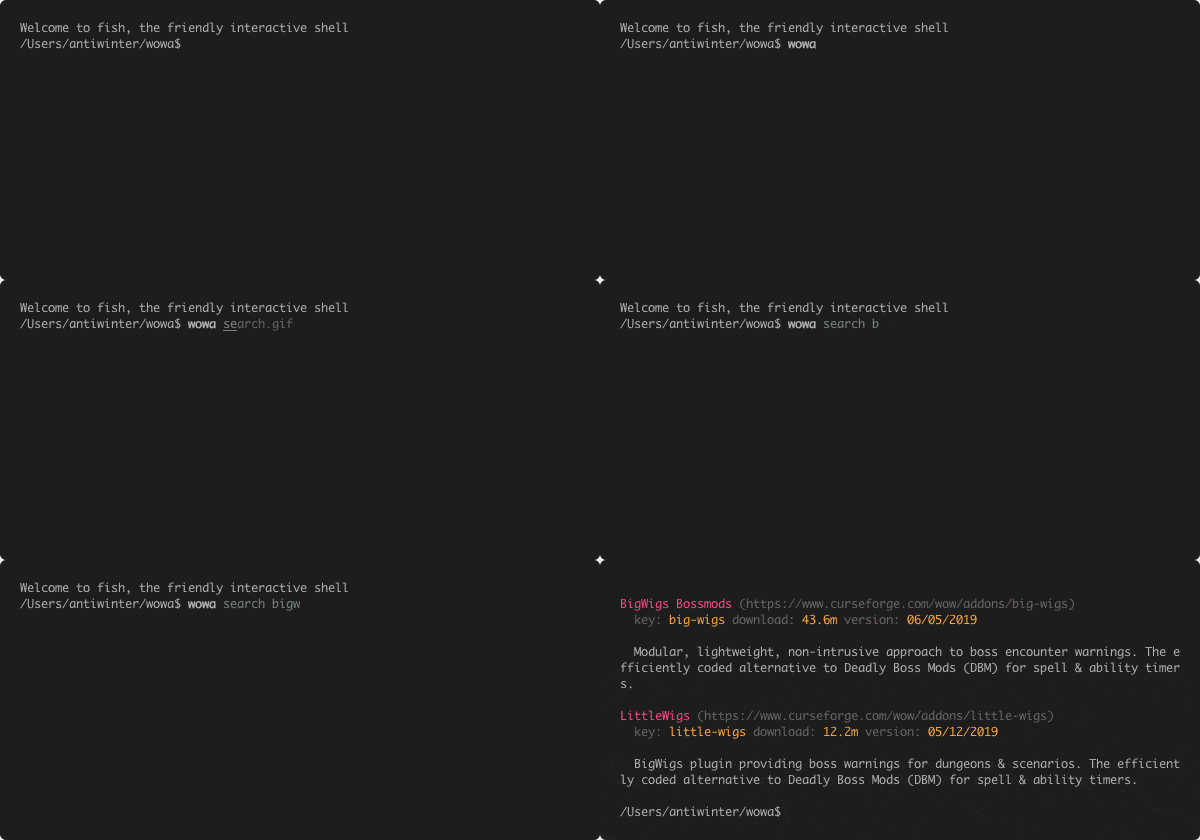
Note: that WoWA manages addons by keys (keys are provided by curse) not by addon names, sometimes they are different. If you are not sure a key for an addon, you can search that addon by some fuzzy name, and the search result provides the correct key to use.
Installing two or more addons

Removing an addon

Update all installed addons

Pin an addon, prevent it from updating
wowa pin deadly-boss-mods       # addon is pinned to it's current version
wowa unpin deadly-boss-mods     # addon is unpinned
wowa ls -l displays an exclaimation mark before version, incicating that addon is pinned.
List all installed addons

Import local addons
If use wowa for the first time, you need to import your local addon. Then wowa can manage them for you.
wowa import
Switch modes
wowa sw                 switch between _retail_ and _classic_ [TBC]
wowa sw --ptr           switch mode to: retail PTR
wowa sw --beta          switch mode to: retail BETA
wowa sw --retail        switch mode to: retail formal
wowa sw --retail-ptr    switch mode to: retail PTR
wowa sw --retail-beta   switch mode to: retail BETA
wowa sw --classic       switch mode to: classic formal [Vanilla]
wowa sw --classic-ptr   switch mode to: classic PTR
wowa sw --classic-beta  switch mode to: classic BETA
wowa sw --classic-tbc   switch mode to: classic [TBC]
Related projects
Actively maintained
- layday/instawow -
- erikabp123/ClassicAddonManager -
- AcidWeb/CurseBreaker -
- Saionaro/wow-addons-updater -
- ogri-la/wowman -
- vargen2/Addon -
- ephraim/lcurse -





















Not Actively maintained
- nazarov-tech/wowa -
- Lund259/WoW-Addon-Manager -
- OpenAddOnManager/OpenAddOnManager -
- vargen2/addonmanager -
- qwezarty/wow-addon-manager -
- [WorldofAddons/worldofaddons](https://github.com/WorldofAddons/worldofadd















Related Skills
node-connect
343.1kDiagnose OpenClaw node connection and pairing failures for Android, iOS, and macOS companion apps
frontend-design
90.0kCreate distinctive, production-grade frontend interfaces with high design quality. Use this skill when the user asks to build web components, pages, or applications. Generates creative, polished code that avoids generic AI aesthetics.
openai-whisper-api
343.1kTranscribe audio via OpenAI Audio Transcriptions API (Whisper).
qqbot-media
343.1kQQBot 富媒体收发能力。使用 <qqmedia> 标签,系统根据文件扩展名自动识别类型(图片/语音/视频/文件)。