
Belle
Belle, Bonne, Sage — music notation
Install / Use
/learn @andigamesandmusic/BelleREADME
Belle
Belle, Bonne, Sage, originally a stunning piece of ars subtilior from the 14th century, and now just Belle for short, is the “beautiful, good, wise” vector-graphics library for music notation written by Andi. The primary purpose of Belle is to engrave a graph representation of sheet music and render it to an output device such as a PDF or a screen. As Belle is a cross-platform software library, it does not have a frontend user interface. However, Belle has been used for many interactive applications: it is the sheet music renderer in MusicPal and Harmonia.
Belle has been in development now for over a decade. It has been rewritten and refactored multiple times, each iteration progressing a little bit further. (It may yet be rewritten again.) Belle is a strongly independent library: all of the data structures and algorithmic primitives are implemented from whole cloth. The code is written in an expressive subset of C++ that values literacy and consistency.
Writing a sheet music engraver is very challenging, and Belle is nowhere near finished. The long-term goal of the Belle project is not merely to produce another sheet music engraver, but to find the best possible means by which to engrave music on a computer. Here are some examples of ways in which Belle is pioneering towards that end:
- Belle is cross-platform and device-agnostic. A music engraver should be able to be used not just for printing sheet music, but interactively for music education, entertainment, publishing, and any other place where music engraving is needed.
- Belle has introduced a graph representation of sheet music that is faithful to its underlying form.
- Belle has introduced the idea of defined musical concepts that have relationships to each other. For example, that C to D is a whole-step is an inherent property of music that can be encoded in data rather than calculated every time. Each musical abstraction is defined in a global web of concepts.
- Belle generalizes where possible and avoids reductive assumptions. By typesetting from a graph representation of sheet music, Belle achieves notations that other engravers struggle with. As a simple example, Belle can typeset complex tuplets that cross barlines.
Features
Here are some highlights of what Belle can do today:
- Typesets many basic music notation primitives on multiple staves and systems
- Supports SMuFL fonts (e.g. Bravura) for music notation symbols
- Renders basic Unicode text with kerning from imported fonts
- Spring spaces and wraps long systems
- Supports basic MusicXML import
- Outputs to many useful devices: PDF, SVG, Core Graphics, JUCE, MIDI
- Renders some complex notation such as dense chords, multilevel tuplets, arithmetic time signatures, and arbitrary voices
- Strives to conform to typesetting guidelines set forth in Behind Bars
- Uses an easy-to-understand and expressive utility library called prim
- Defines music concepts as data via an internal library called MICA (Music Information Concept Archive)
- Generates an extensive test suite specimen that renders to PDF
Example: Bach Invention in A-minor
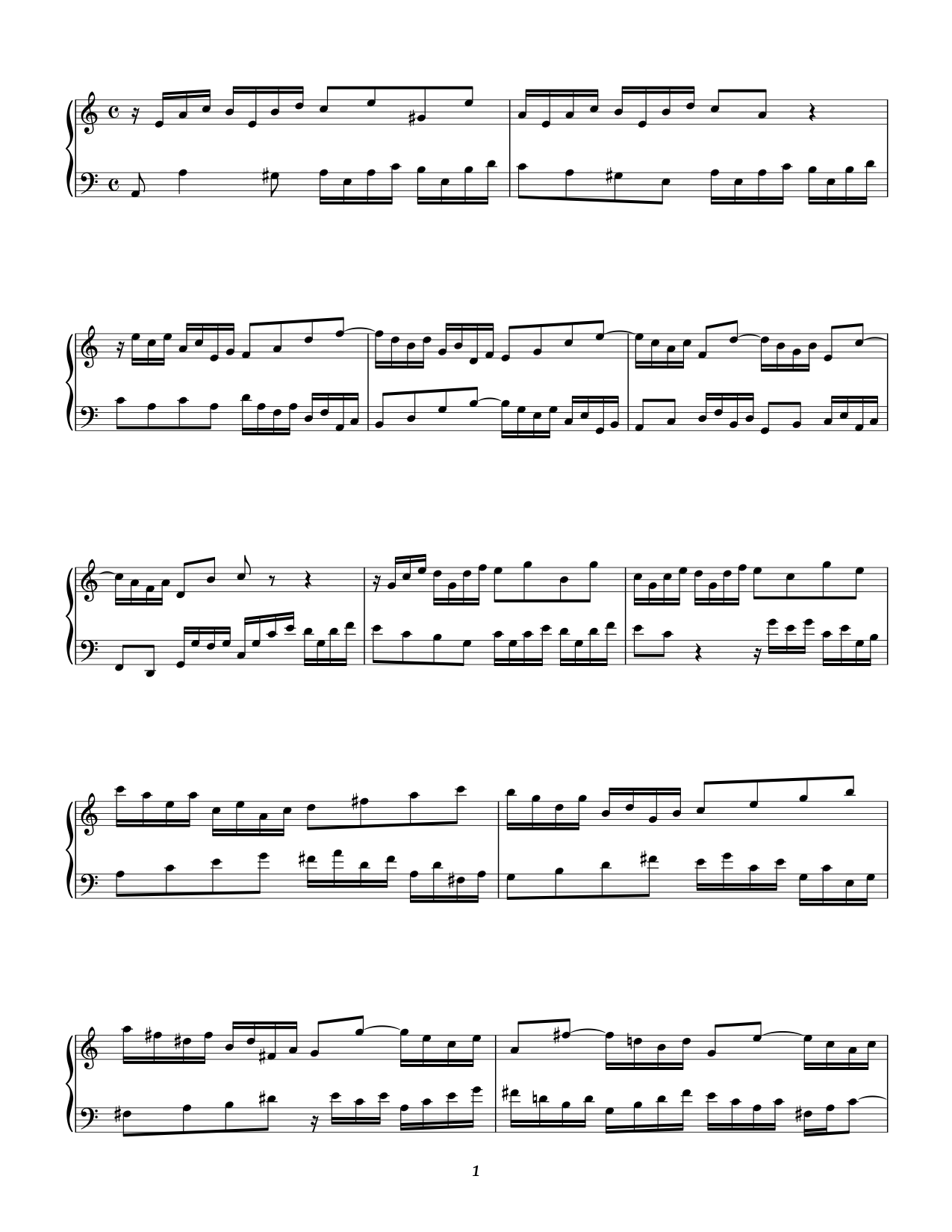
Example: Test Suite Specimen

Layout
Belle uses a clean, flat folder structure that is easy to navigate.
Makefile— Makefile for Mac and LinuxREADME.md— this READMEbin— output folder created for utilities and demo programsdefinitions— MICA music concept definitionsinclude— the library sourceinclude/belle*.h— belle source filesinclude/mica.h— generated MICA source fileinclude/prim*.h— prim source filesinclude/resources.h— generated binary resources file
resources— resources and example scorestemplates— MICA programming language API templatestool— source code for utilities and demo programs
Building
Mac and Linux
Assuming you have a C++ compiler, run:
make # requires an internet connection to download FreeType and fonts
For a simple example of how to use the library to programmatically create music, see tool/util-simple.cpp. To execute this program, run:
make simple
bin/simple
# creates: output.pdf
To execute the tests including generating the test suite specimen, run:
make test
To build all of the demos in the tool directory, run:
make demo
To learn more about the engraver's options run it without any arguments:
bin/engrave
For example to render the Bach Invention MusicXML example to PDF with wrapping enabled, run:
bin/engrave resources/bach-invention.xml --wrap
To convert the MusicXML file to the native graph format, run:
bin/engrave resources/bach-invention.xml --export
See the demos in the tool directory for more examples. You can create your own demo-*.cpp and build it using make demo.
Windows
While there are not presently Visual Studio project files for Belle, it does build nicely on Windows with a little extra work. If you have Cygwin, then you can follow the same steps for Mac and Linux. For Visual Studio, you will first need to generate the include/mica.h and include/resources.h files (for example by running make on a Mac or Linux system). Then it is just a matter of adding all the files from the include folder and the source program you want to build into a new project and setting the appropriate header search path.
MICA
Belle uses an internal library called MICA (Music Information Concept Archive) to store content pertaining to music concepts. MICA defines music concepts as language-agnostic labeled identifiers. The labels are things like en:C4 or en:DynamicMarkForte (the pitch C4 or the dynamic forte expressed in English) and the identifiers are UUIDs. MICA allows a given identifier to have more than one label. For example, both en:EighthNote and en-GB:Quaver refer to the same underlying concept; they simply have different names. Music concepts can relate to each other through one of two built-in data structures sequences and maps
A concept may optionally contain a sequence. For example, the concept en:A contains the letter sequence en:A en:B en:C en:D en:E en:F en:G. Through the MICA API, one can thus ask “what is the 3rd letter after en:A” and get back en:D.
Maps are global mappings that define a function on an unordered set of concepts. For example, the map 1 en:TrebleClef en:C5 means that result of the staff position 1 (the position just above the middle line) and en:TrebleClef is en:C5. In other words the staff position 1 on a staff containing a treble clef yields the pitch C5. The MICA API does not use math to calculate this as these relationships are defined in data. The MICA API does however provide some helper functions to help calculate more complex relationships like intervals, but these calculations are themselves just a series of MICA lookups.
MICA uses version 3 UUIDs that are derived from the MD5 of a namespace identifier and a text string, which is often just the English label of the concept. MICA also stores ratios in the same 128-bit UUID space using a big-endian 64-bit signed numerator followed by a big-endian 64-bit signed but always positive denominator. Due to this encoding, a ratio can always be distinguished from a version 3 UUID. The special concept en:Undefined is equivalent to 0/0. The concept en:Undefined is returned whenever a MICA operation has no result.
The Graph Representation of Music
Overview
Sheet music is represented in Belle using a graph.
A graph
is formally a list of nodes and a list of edges connecting the nodes. Graphs may take many forms. Belle uses a edge- and node-labeled multidigraph. A multidigraph has directed edges and multiple edges between nodes are permitted. The labels are key-value pairs where the key or value can be a MICA music concept (e.g. en:Value->en:C4), ratio (e.g. en:NoteValue->1/4), or string (e.g. "Text"->"Andante"). These graphs may be thought of as having structure (relationships between nodes content (information, i.e. labels on the nodes and edges). Since both the structure and content are generalizable, graphs are ideal for representing music notation.
Adding nodes to a graph involves creating the nodes and connecting the nodes by edges. Accessing the graph structure and content is achieved by traversing the graph through its nodes and edges. Graphs may have multiple edges departing from a node, so filters are used to decide which paths to take during traversal. A filter is a label with partial information specified, and an edge is followed if the filter matches the edge's label. In Belle, a filter match occurs when the edge label contains all of the keys of the filter. The edge label may contain more information than the filter and still match so long as each item in the filter is found in the edge label.
The main single-edge traversal functions are next and previous. These look for a single filter match and return the corresponding node if found. If more than one node matches the filter, then no node is returned and a multi-node traversal function must be used.
The two main types of multi-node traversal are **s
