
AFSubtitleNavigationItem
Extending the native navigationItem capabilities to instantly add custom title and subtitle labels. The labels are fully customizable and works very well with the bar button items
Install / Use
/learn @amfathi/AFSubtitleNavigationItemREADME
AFSubtitleNavigationItem


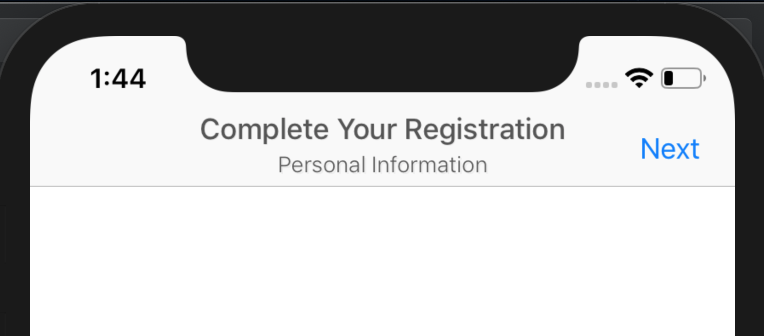
Create custom title and subtitle labels in your native navigation item.
Example
To run the example project, clone the repo, and run pod install from the Example directory first.
Requirements
Requires iOS 9.0 or later.
Installation
AFSubtitleNavigationItem is available through CocoaPods. To install it, simply add the following line to your Podfile:
pod 'AFSubtitleNavigationItem'
Usage
Start by importing AFSubtitleNavigationItem in your AppDelegate
import AFSubtitleNavigationItem
In your viewController's viewDidLoad method write the below:
navigationItem.isSubtitleEnabled = true
navigationItem.titleLabel?.text = "Title"
navigationItem.subtitleLabel?.text = "Subtitle"
Warning Make sure this view controller actually have a navigationController, i.e. it's not directly presented without being in a navigation controller stack.
You can also your custom navigation item to your presented view controller and use AFSubtitleNavigationItem properties directly.
Customiziations
Actually there is not limit here but only your imagination. titleLabel and subtitleLabel are both just mere UILabels.
navigationItem.titleLabel?.textColor = UIColor.blue
navigationItem.titleLabel?.attributedText = NSAttributedString(string: "Attributed Title")
navigationItem.titleLabel?.textAlignment = .left
Appearance allover the app
You can customize all your navigationItems allover the application easily by using the below code:
Customizing titles:
UINavigationItem.appearance.titleTextColor = .darkGray
UINavigationItem.appearance.titleTextFont = UIFont.systemFont(ofSize: 17, weight: .medium)
UINavigationItem.appearance.titleTextShadowColor = UIColor.black.withAlphaComponent(0.05)
UINavigationItem.appearance.titleTextShadowOffset = CGSize(width: 0.5, height: 0.5)
Customizing Subtitles:
UINavigationItem.appearance.subtitleTextColor = .darkGray
UINavigationItem.appearance.subtitleTextFont = UIFont.systemFont(ofSize: 13, weight: .thin)
UINavigationItem.appearance.subtitleTextShadowColor = UIColor.black.withAlphaComponent(0.05)
UINavigationItem.appearance.subtitleTextShadowOffset = CGSize(width: 1, height: 1)
Author
Ahmed Fathi, AhmedFathi680@gmail.com
License
This code is distributed under the terms and conditions of the MIT license.
Related Skills
node-connect
345.9kDiagnose OpenClaw node connection and pairing failures for Android, iOS, and macOS companion apps
frontend-design
106.4kCreate distinctive, production-grade frontend interfaces with high design quality. Use this skill when the user asks to build web components, pages, or applications. Generates creative, polished code that avoids generic AI aesthetics.
openai-whisper-api
345.9kTranscribe audio via OpenAI Audio Transcriptions API (Whisper).
qqbot-media
345.9kQQBot 富媒体收发能力。使用 <qqmedia> 标签,系统根据文件扩展名自动识别类型(图片/语音/视频/文件)。
