
Carden
Flashcards with spaced repetition and gamification 🌱
Install / Use
/learn @alyssaxuu/CardenREADME
Carden
 <br>
<br>
Flashcards with spaced repetition and gamification 🌱
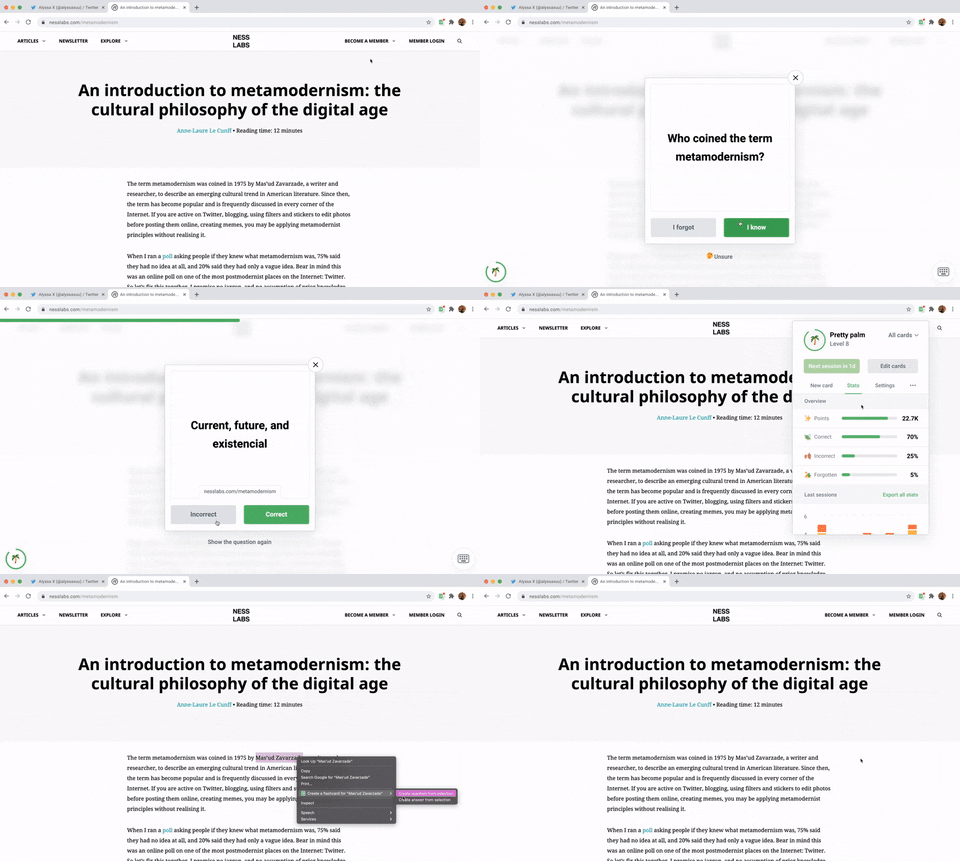
Carden is a Chrome Extension that helps you turn the content you consume into long-term knowledge. Create flashcards in context, view in-depth stats, collect points and level up, and much more.
Made by Anne-Laure Le Cunff & Alyssa X
<a href="https://www.producthunt.com/posts/carden?utm_source=badge-featured&utm_medium=badge&utm_souce=badge-carden" target="_blank"><img src="https://api.producthunt.com/widgets/embed-image/v1/featured.svg?post_id=300325&theme=light" alt="Carden - Science-based flashcard app with spaced repetition | Product Hunt" style="width: 250px; height: 54px;" width="250" height="54" /></a> <a href="https://news.ycombinator.com/item?id=27512769" target="_blank"><img height=53 src="https://hackerbadge.now.sh/api?id=27512769&type=orange" alt="Featured on HackerNews"></a>
Table of contents
Features
🔬 Practice using spaced repetition based on the evidence-based SM2 algorithm<br> ✏️ Create flashcards in context whenever you read something interesting<br> 🗄️ Organize your flashcards into decks<br> 🏆 Collect points and level up as you practice and grow your knowledge<br> 🧩 Cross-compatible with apps like Anki, Quizlet, Brainscape, and more<br> 📦 Import and export flashcards as .txt and .csv files<br> 📊 View and download in-depth stats<br> ...and much more!
Self-hosting Carden
You can run Carden locally without having to install it from the Chrome Store. Here's how:
- Download the code. In the web version of GitHub, you can do that by clicking the green "Code" button, and then "Download ZIP".
- Note that there's a server folder for the back-end. You will need to setup a server with a MySQL database.
- Add the appropriate credentials in config.php to access your database.
- Modify the access-control-allow-origin in all PHP files to allow requests from the extension (with its unique ID).
- Replace the POST URLs throughout the javascript files in the chrome-extension folder.
- Go to chrome://extensions/ in your browser, and enable developer mode.
- Drag the chrome-extension folder (make sure it's a folder and not a ZIP file, so unzip first), or click on the "Load unpacked" button and locate the folder.
- That's it, you will now be able to use Carden locally. Make sure you pin it on the toolbar by clicking the "puzzle" icon in the toolbar and pinning Carden.
Libraries used
- jQuery - for better event handling and DOM manipulation
- jQuery Nice Select - for better, more stylish dropdowns
- Chart.js - for rendering the chart for the stats
- ExtensionPay - for handling the yearly subscription
- Twemoji - for the cool emojis throughout the extension ✨
Feel free to reach out to me through email at hi@alyssax.com or on Twitter if you have any questions or feedback! Hope you find this useful 💜
Related Skills
YC-Killer
2.7kA library of enterprise-grade AI agents designed to democratize artificial intelligence and provide free, open-source alternatives to overvalued Y Combinator startups. If you are excited about democratizing AI access & AI agents, please star ⭐️ this repository and use the link in the readme to join our open source AI research team.
groundhog
398Groundhog's primary purpose is to teach people how Cursor and all these other coding agents work under the hood. If you understand how these coding assistants work from first principles, then you can drive these tools harder (or perhaps make your own!).
sec-edgar-agentkit
10AI agent toolkit for accessing and analyzing SEC EDGAR filing data. Build intelligent agents with LangChain, MCP-use, Gradio, Dify, and smolagents to analyze financial statements, insider trading, and company filings.
last30days-skill
4.4kAI agent skill that researches any topic across Reddit, X, YouTube, HN, Polymarket, and the web - then synthesizes a grounded summary
