
Commando
Utilities for creating cli user interfaces
Install / Use
/learn @alveflo/CommandoREADME
Commando
C# library for creating command line user interfaces.
Install
PM> Install-Package Commando.UI
Table of content
Setup
In order to use the color printing, you need to plug Commando into the console:
static void Main(string[] args)
{
   CommandoTextWriter.Use();
}
Features
Printing
Font style
Example
CommandoTextWriter.Use();
"Red text".Red();
"Blue bold text".Blue().Bold();
Available styles
Colors
WhiteGreyBlackBlueCyanGreenMagentaRedYellowZebraRainbow
Font weight
BoldItalicUnderlineInverse
Other
Reset- resets format
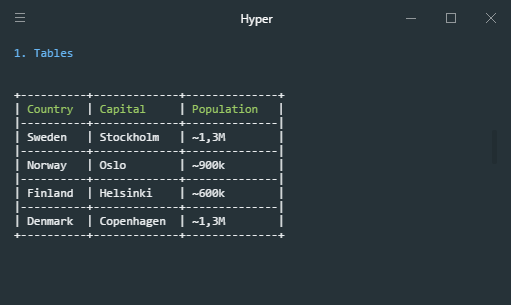
Table print
var table = new TablePrinter("Country", "Capital", "Population");
table.AddRow("Sweden", "Stockholm", "~1,3M");
table.AddRow("Norway", "Oslo", "~900k");
table.AddRow("Finland", "Helsinki", "~600k");
table.AddRow("Denmark", "Copenhagen", "~1,3M");
table.Print();
Pretty print
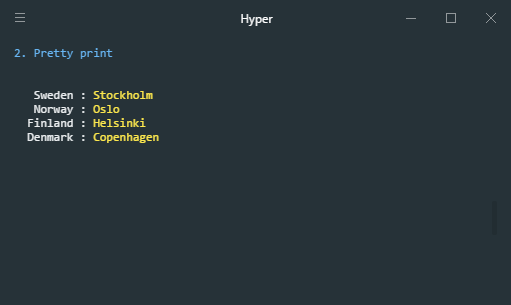
var pretty = new PrettyPrinter();
pretty.Add("Sweden", "Stockholm");
pretty.Add("Norway", "Oslo");
pretty.Add("Finland", "Helsinki");
pretty.Add("Denmark", "Copenhagen");
pretty.Print();
Select lists
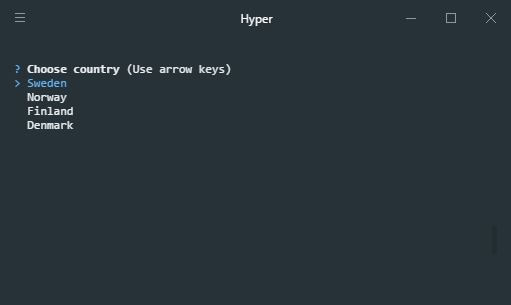
Single select list
var prompt = new SelectPrompt("Choose country");
prompt.Add(new PromptItem("Sweden", "SE"));
prompt.Add(new PromptItem("Norway", "NO"));
prompt.Add(new PromptItem("Finland", "FI"));
prompt.Add(new PromptItem("Denmark", "DK"));
var item = prompt.Prompt();
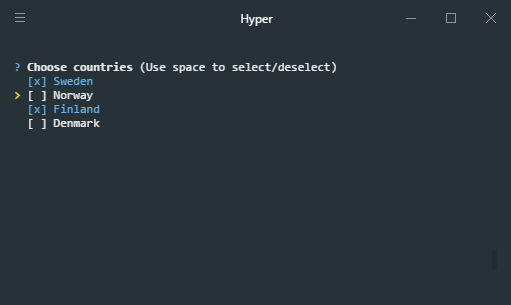
Multi select/checkbox list
var multiprompt = new MultiSelectPrompt("Choose countries");
multiprompt.Add(new PromptItem("Sweden", "SE"));
multiprompt.Add(new PromptItem("Norway", "NO"));
multiprompt.Add(new PromptItem("Finland", "FI"));
multiprompt.Add(new PromptItem("Denmark", "DK"));
var answer = multiprompt.Prompt();
Prompts
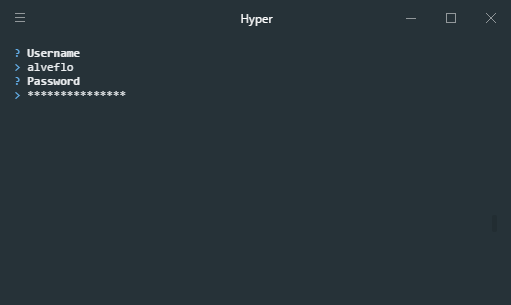
Question prompts
Available prompt types is Password and Text.
var username = new Question("Username", QuestionType.Text).Prompt();
var password = new Question("Password", QuestionType.Password).Prompt();
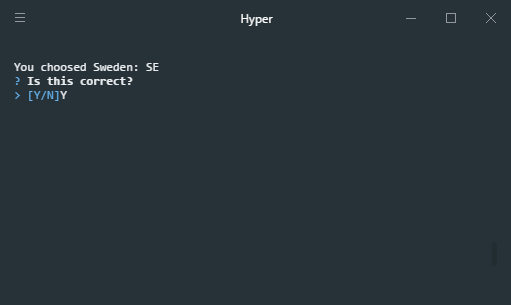
Yes/No prompt
Console.WriteLine($"You choosed Sweden: SE");
var answer = new YesNoQuestion("Is this correct?").Prompt();
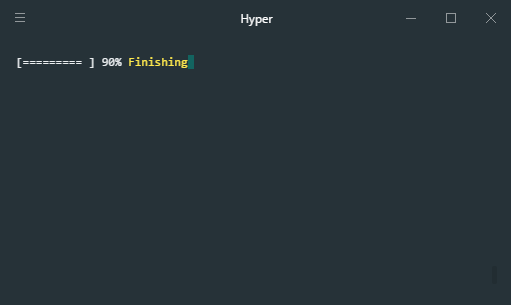
Progress bar
ProgressBar progressBar = new ProgressBar();
progressBar.Set(10, "Initializing");
progressBar.Set(20, "Downloading...");
progressBar.Set(30);
progressBar.Set(40);
progressBar.Set(50, "Building");
progressBar.Set(60);
progressBar.Set(70);
progressBar.Set(80);
progressBar.Set(90, "Finishing");
progressBar.Set(100);
Contribution
- Port to .NET Core 2.2 (@domischenk)
License
MIT License
Copyright (c) 2016 Victor Alveflo
Permission is hereby granted, free of charge, to any person obtaining a copy of this software and associated documentation files (the "Software"), to deal in the Software without restriction, including without limitation the rights to use, copy, modify, merge, publish, distribute, sublicense, and/or sell copies of the Software, and to permit persons to whom the Software is furnished to do so, subject to the following conditions:
The above copyright notice and this permission notice shall be included in all copies or substantial portions of the Software.
THE SOFTWARE IS PROVIDED "AS IS", WITHOUT WARRANTY OF ANY KIND, EXPRESS OR IMPLIED, INCLUDING BUT NOT LIMITED TO THE WARRANTIES OF MERCHANTABILITY, FITNESS FOR A PARTICULAR PURPOSE AND NONINFRINGEMENT. IN NO EVENT SHALL THE AUTHORS OR COPYRIGHT HOLDERS BE LIABLE FOR ANY CLAIM, DAMAGES OR OTHER LIABILITY, WHETHER IN AN ACTION OF CONTRACT, TORT OR OTHERWISE, ARISING FROM, OUT OF OR IN CONNECTION WITH THE SOFTWARE OR THE USE OR OTHER DEALINGS IN THE SOFTWARE.
