
IQML
Matlab connector to IQFeed
Install / Use
npx skills add altmany/IQMLInstalls into whichever agent you are using.
README
IQML
A toolbox for connecting MATLAB to DTN IQFeed, to retrieve financial market data and news.
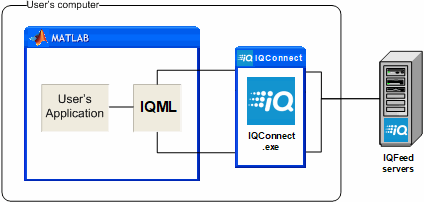
Table of contents
- Overview
- Main functionalities
- Additional program features
- Requirements
- Compatibility
- Installation
- Usage examples
- Disclaimer
- Contact us
Overview
IQML is a Matlab connector to IQFeed, enabling users to leverage Matlab’s superior analysis and visualization capabilities, with IQFeed’s reliable data-feed of live and historic market data for stocks, ETFs, mutual funds, bonds, options, futures, commodities and Forex. IQML can be used for both automated algo-trading and selective manual trading, as well as continuous market data feed. IQML provides a reliable, easy-to-use Matlab interface to IQFeed that works right out of the box, and was optimized for excellent performance, reliability, stability and compatibility.
IQML includes a very detailed User Guide, complete with working usage examples and implementation tips.
This downloaded version is fully-functional and can run for 30 days for free. If you wish to use IQML beyond this time, you can purchase a license on IQML's webpage.
Main functionalities
Simple Matlab commands fetch market data from IQFeed, in either blocking (snapshot) or non-blocking (streaming) modes:
- Live Level1 top-of-book market data (quotes and trades)
- Live Level2 market-depth data
- Historic, intra-day and live market data (individual ticks or interval bars)
- Fundamental info on assets
- Market scanner based on fundamental and trading criteria
- Options and futures chains lookup (with market data, Greeks)
- Symbols and market codes lookup
- News headlines, story-counts and complete news stories, with user-specified filters
- Ability to attach user-defined Matlab callback functions to IQFeed messages and market events
- User-defined custom alerts on streaming market events (news/quotes/interval-bar/regional triggers)
- Connection stats and programmatic connect/disconnect
- Combine all of the above for a full-fledged end-to-end automated trading system using plain Matlab
Additional program features
- Full solution – IQML provides easy-to-use access to IQFeed’s entire data-set within Matlab. Only the core Matlab and IQFeed’s client app are required – no additional toolbox or component is required.
- Stability – IQML has been extensively tested. It is rock solid.
- Easy to use – Users can access IQFeed’s data by simple Matlab commands, without need for any Matlab programming. IQML simplifies the IQFeed API in a very easy-to-use yet powerful interface that can be used by any Matlab user, novice or advanced.
- Novice and advanced users – Users can use easy-to-use Matlab commands, to access IQFeed’s data. Minimal or no programming is required to access this data.
- Blocking and non-blocking (streaming) modes – Users can receive IQFeed data both synchronously (waiting for data to arrive with optional timeout), and asynchronously (streaming data in the background).
- Settable market alerts – Users can define custom alerts on streaming news/quotes/interval-bars/regional-updates, which can be reported in various ways (popup window, console message, email, text (SMS) message, or Matlab callback function).
- User callbacks – Users can attach Matlab code (callbacks) to IQFeed messages. For example, this enables adding an entry in an Excel file, or sending an email, whenever a stock reaches a certain price or trade volume (also note the related alerts functionality).
- Security – IQML does not transmit any information externally except to IQFeed, so your trading information are as safe as your own computer.
- Compilable – IQML can be compiled into a standalone executable or program component, running as an integral part of your deployed program.
- Performance – IQML is optimized for performance, providing fast and responsive connectivity. While Matlab as a platform is not well-suited for HFT, IQML enables receiving hundreds of streaming quotes or other IQFeed messages per second, with message latencies as low as 1ms and parallelization supported.
- Development – IQML was developed by an acknowledged Matlab expert, who wrote the reference textbooks on Matlab-Java connectivity and Matlab performance, as well as the acclaimed IB-Matlab connector (Matlab connector to Interactive Brokers). IQML is continuously improved and maintained.
- Support – Custom development and ongoing support is available directly from the developer, with extremely fast response times.
- Documentation – Extensive and comprehensive documentation, with numerous code examples and usage tips (see below).
- Backtesting – IQML does not include backtesting functionality. IQML’s author (Yair Altman) has extensive experience in developing complete backtesting and real-time trading applications. Yair will be happy to either develop a new application based on your specifications, or to integrate IQML into an existing application, under a consulting contract.
Requirements
IQML is a Matlab connector to IQFeed, so it naturally needs the user to have both
- a locally-installed Matlab (no toolbox is required) or MCR (for a compiled application)
- a locally-installed IQFeed client (IQConnect)
- an active IQFeed data account
Compatibility
- Platforms: IQML works on all platforms on which IQFeed runs: Windows, Mac OS, Linux.
- IQFeed: IQML works with all recent IQFeed installations, including the latest IQFeed API (6.2).
- Matlab: IQML works on all Matlab releases since 2008, including the latest release (R2025a).
Installation
- Download or clone IQML into a local folder on your computer (preferably a separate IQML folder)
- Add the local folder to your Matlab path using the path tool (in the Matlab Desktop’s toolstrip, click HOME / ENVIRONMENT / Set path… and save). The folder needs to be in your Matlab path whenever you run IQML.
- Ensure that your local IQFeed client is working and can be used to log-in to IQFeed. This client would be IQConnect.exe on Windows, IQFeed application on MacOS, or ran as a Windows app on Mac/Linux using Parallels/Wine.
- You can now run IQML within Matlab. To verify that IQML is properly installed, retrieve the latest IQFeed server time, as follows (see section 9.2 in the User Guide):
>> t = IQML('time');
Additional usage examples are provided below.
Usage examples
This is a short sampling of IQML’s functionality. The product contains many more features and query types. Review the full IQML User Guide for a detailed description of the available functionality.
- Get market data (snapshot) for a security
- Get fundamental data for a security
- Get the latest interval bars for a security
- Calculate option Greeks, fair value and implied volatility
- Get historic/intra-day data
- Get streaming quotes data
- Get news data
- Get options/futures chains
- Connect/disconnect from IQFeed
- Get connection information/stats
- Specify message event callbacks
1) Get market data (snapshot) for a security
>> data = IQML('quotes', 'symbol','GOOG')
data =
                            Symbol: 'GOOG'
                 Most_Recent_Trade: 1092.14
            Most_Recent_Trade_Size: 1
            Most_Recent_Trade_Time: '09:46:31.960276'
   Most_Recent_Trade_Market_Center: 25
                      Total_Volume: 113677
                               Bid: 1092.13
                          Bid_Size: 100
                               Ask: 1092.99
                          Ask_Size: 100
                              Open: 1099.22
                              High: 1099.22
                               Low: 1092.38
                             Close: 1090.93
                  Message_Contents: 'Cbaohlcv'
               Message_Description: 'Last qualified trade; A bid update occurred, An ask update occurred; An open
                                     declaration occurred; A high declaration occurred; A low declaration occurred;
                                     A close declaration occurred; A volume update occurred'
      Most_Recent_Trade_Conditions: '3D87'
      Trade_Conditions_Description: 'Intramaket Sweep; Odd lot trade'
           Most_Recent_Market_Name: 'Direct Edge A (EDGA)'
Available parameters that affect the query: Symbols, Timeout, NumOfEvents, MsgParsingLevel, Fields, UseParallel.
2) Get fundamental data for a security
>> data = IQML('fundamental', 'symbol','IBM')
data =
                     Exchange_ID: 7
                              PE: 25.7
                  Average_Volume: 4588000
                   x52_Week_High: 180.95
                    x52_Week_Low: 139.13
              Calendar_Year_High: 171.13
               Calendar_Year_Low: 144.395
                  Dividend_Yield: 3.79
                 Dividend_Amount: 1.5
                   Dividend_Rate: 6
                        Pay_Date: '03/10/2018'
                Ex_dividend_Date: '02/08/2018'
                  Short_Interest: 17484332
                Current_Year_EPS: 6.17
Related Skills
node-connect
385.6kDiagnose OpenClaw Android, iOS, or macOS node pairing, QR/setup code, route, auth, and connection failures.
blender-python-addon
40.5kBlender Python add-on rules for operators, panels, properties, registration, testing, and API-safe scripting
flutter-development-guidelines-cursorrules-prompt-file
40.5kCursor rules for Flutter development with MVVM architecture, Riverpod state management, Material widgets, and Dart style guidelines.
commit-push-pr
140.7kCommit, push, and open a PR
