
Goaccess
GoAccess is a real-time web log analyzer and interactive viewer that runs in a terminal in *nix systems or through your browser.
Install / Use
/learn @allinurl/GoaccessREADME
GoAccess 

What is it?
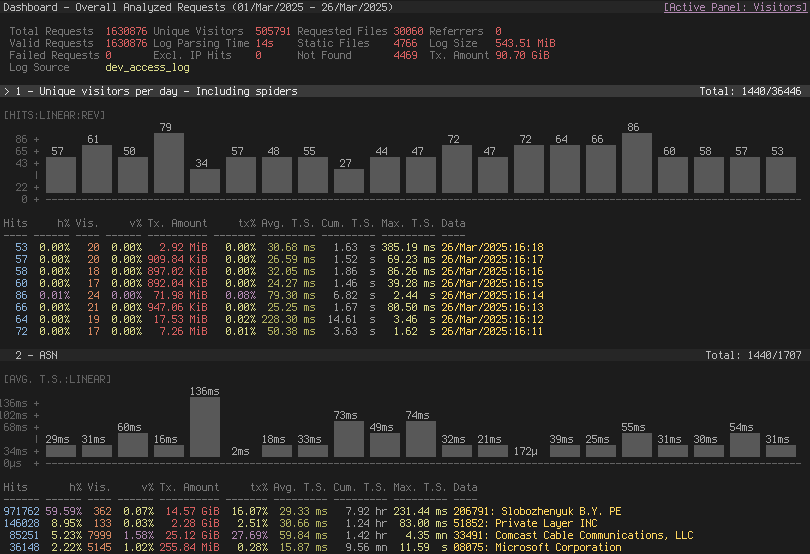
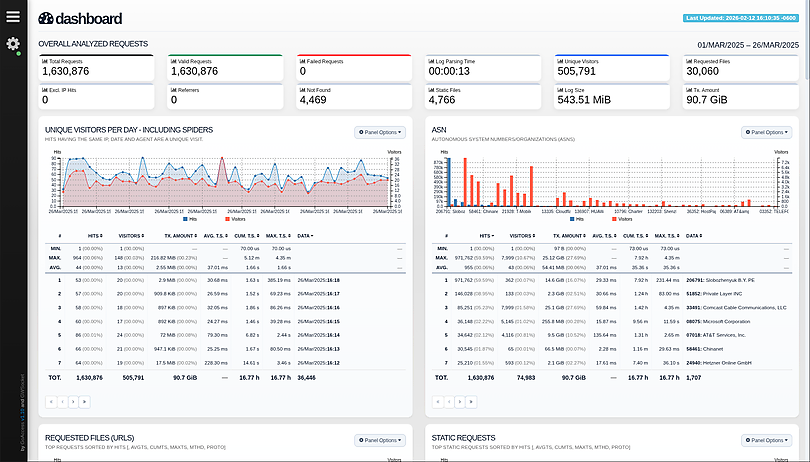
GoAccess is an open source, real-time web log analyzer and interactive viewer that runs in a terminal on *nix systems or directly in your browser. Designed with system administrators, DevOps engineers, and security professionals in mind, it delivers fast, actionable HTTP statistics and visual server reports on the fly. GoAccess parses your web server logs in real time and presents the data directly in the terminal or via a live HTML dashboard, making it easy to monitor traffic, detect anomalies, and troubleshoot issues instantly.
More info at: https://goaccess.io.
Features
GoAccess parses the specified web log file and outputs the data to the X terminal. Features include:
-
Completely Real Time<br> All panels and metrics are timed to be updated every 200 ms on the terminal output and every second on the HTML output.
-
Minimal Configuration needed<br> You can just run it against your access log file, pick the log format and let GoAccess parse the access log and show you the stats.
-
Track Application Response Time<br> Track the time taken to serve the request. Extremely useful if you want to track pages that are slowing down your site.
-
WebSocket Authentication:<br> GoAccess offers enhanced WebSocket authentication, supporting local and external JWT verification, with secure token refresh capabilities and seamless integration with external authentication systems.
-
Nearly All Web Log Formats<br> GoAccess allows any custom log format string. Predefined options include, Apache, Nginx, Amazon S3, Elastic Load Balancing, CloudFront, etc.
-
Incremental Log Processing<br> Need data persistence? GoAccess has the ability to process logs incrementally through the on-disk persistence options.
-
Only one dependency<br> GoAccess is written in C. To run it, you only need ncurses as a dependency. That's it. It even features its own Web Socket server — http://gwsocket.io/.
-
Visitors<br> Determine the amount of hits, visitors, bandwidth, and metrics for slowest running requests by the hour, or date.
-
Metrics per Virtual Host<br> Have multiple Virtual Hosts (Server Blocks)? It features a panel that displays which virtual host is consuming most of the web server resources.
-
ASN (Autonomous System Number mapping)<br> Great for detecting malicious traffic patterns and block them accordingly.
-
Color Scheme Customizable<br> Tailor GoAccess to suit your own color taste/schemes. Either through the terminal, or by simply applying the stylesheet on the HTML output.
-
Support for Large Datasets<br> GoAccess features the ability to parse large logs due to its optimized in-memory hash tables. It has very good memory usage and pretty good performance. This storage has support for on-disk persistence as well.
-
Docker Support<br> Ability to build GoAccess' Docker image from upstream. You can still fully configure it, by using Volume mapping and editing
goaccess.conf. See Docker section below. There is also documentation how to use docker-compose.
Nearly all web log formats...
GoAccess allows any custom log format string. Predefined options include, but not limited to:
- Amazon CloudFront (Download Distribution).
- Amazon Simple Storage Service (S3)
- AWS Elastic Load Balancing
- Combined Log Format (XLF/ELF) Apache | Nginx
- Common Log Format (CLF) Apache
- Google Cloud Storage.
- Apache virtual hosts
- Squid Native Format.
- W3C format (IIS).
- Caddy's JSON Structured format.
- Traefik's CLF flavor
Why GoAccess?
GoAccess was designed to be a fast, terminal-based log analyzer. Its core idea is to quickly analyze and view web server statistics in real time without needing to use your browser (great if you want to do a quick analysis of your access log via SSH, or if you simply love working in the terminal).
It also serves as a practical tool for security monitoring, making it easy to spot suspicious activity, unusual traffic patterns, brute-force attempts, scanners, bots, and anomalous requests directly from your logs.
While the terminal output is the default output, it has the capability to
generate a complete, self-contained, real-time HTML
report, as well as a JSON, and
CSV report.
You can see it more of a monitor command tool than anything else.
Installation
<a href="https://repology.org/project/goaccess/versions"> <img src="https://repology.org/badge/vertical-allrepos/goaccess.svg" alt="Packaging status" align="right"> </a>Build from release
GoAccess can be compiled and used on *nix systems.
Download, extract and compile GoAccess with:
$ wget https://tar.goaccess.io/goaccess-1.10.1.tar.gz
$ tar -xzvf goaccess-1.10.1.tar.gz
$ cd goaccess-1.10.1/
$ ./configure --enable-utf8 --enable-geoip=mmdb --with-zlib
$ make
# make install
Build from GitHub (Development)
$ git clone https://github.com/allinurl/goaccess.git
$ cd goaccess
$ autoreconf -fiv
$ ./configure --enable-utf8 --enable-geoip=mmdb
$ make
# make install
Distributions
It is easiest to install GoAccess on GNU+Linux using the preferred package manager of your GNU+Linux distribution. Please note that not all distributions will have the latest version of GoAccess available.
Debian/Ubuntu
# apt-get install goaccess
Note: It is likely this will install an outdated version of GoAccess. To make sure that you're running the latest stable version of GoAccess see alternative option below.
Official GoAccess Debian & Ubuntu repository
$ wget -O - https://deb.goaccess.io/gnugpg.key | gpg --dearmor | sudo tee /usr/share/keyrings/goaccess.gpg >/dev/null
$ echo "deb [signed-by=/usr/share/keyrings/goaccess.gpg arch=$(dpkg --print-architecture)] https://deb.goaccess.io/ $(lsb_release -cs) main" | sudo tee /etc/apt/sources.list.d/goaccess.list
$ sudo apt-get update
$ sudo apt-get install goaccess
Note:
.debpackages in the official repo are available through HTTPS as well. You may need to installapt-transport-https.
Fedora
# yum install goaccess
Arch
# pacman -S goaccess
Gentoo
# emerge net-analyzer/goaccess
OS X / Homebrew
# brew install goaccess
FreeBSD
# cd /usr/ports/sysutils/goaccess/ && make install clean
# pkg install sysutils/goaccess
OpenBSD
# cd /usr/ports/www/goaccess && make install clean
# pkg_add goaccess
openSUSE
# zypper ar -f obs://server:http http
# zypper in goaccess
OpenIndiana
# pkg install goaccess
pkgsrc (NetBSD, Solaris, SmartOS, ...)
# pkgin install goaccess
Windows
GoAccess can be used in Windows through Cygwin. See Cygwin's <a href="https://goaccess.io/faq#installation">packages</a>. Or through the GNU+Linux Subsystem on Windows 10.
Docker
A Docker image has been updated, capable of directing output from an access log. If you only want to output a report, you can pipe a log from the external environment to a Docker-based process:
touch report.html
cat access.log | docker run --rm -i -v ./report.html:/report.html -e LANG=$LANG allinurl/goaccess -a -o report.html --log-format COMBINED -
OR real-time
tail -F access.log | docker run -p 7890:7890 --rm -i -e LANG=$LANG allinurl/goaccess -a -o report.html --log-format COMBINED --real-time-html -
There is also documentation how to use docker-compose.
Build in isolated container
You can also build the binary for Debian based systems in an isolated container environment to prevent cluttering your local system with the development libraries:
$ curl -L "https://github.com/allinurl/goaccess/archive/refs/heads/master.tar.gz" | tar -xz && cd goaccess-master
$ docker build -t goaccess/build.debian-12 -f Dockerfile.debian-12 .
$ docker run -i --rm -v $PWD:/goaccess goaccess/build.debian-12 > goaccess
You can read more about using the docker image in DOCKER.md.
Distribution Packages
GoAccess has minimal requirements, it's written in C and requires only ncurses. However, below is a table of some optional dependencies in some distros to build GoAccess from source.
| Distro | NCurses | GeoIP (opt) | GeoIP2 (opt) | OpenSSL (opt) | | ---------------------- | ---------------- | ---------------- | --------------------- | -------------------| | Ubuntu/Debian | libncurses-dev | libgeoip-dev | libmaxminddb-dev | libssl-dev | | RHEL/CentOS | ncurses-devel | geoip-devel | libmaxminddb-devel | openssl-devel | | Arch | ncurses | geoip | libmaxminddb | openssl | | Gentoo | sys-libs/ncurses | dev-libs/geoip | dev-libs/libmaxminddb | dev-libs/openssl | | Slackware | ncurses | GeoIP | libmaxminddb | openssl |
Note: You may need to install b
Related Skills
tmux
329.0kRemote-control tmux sessions for interactive CLIs by sending keystrokes and scraping pane output.
blogwatcher
329.0kMonitor blogs and RSS/Atom feeds for updates using the blogwatcher CLI.
product
Cloud-agnostic Kubernetes infrastructure with Terraform & Helm for homelabs, edge, and production clusters.
Unla
2.1k🧩 MCP Gateway - A lightweight gateway service that instantly transforms existing MCP Servers and APIs into MCP servers with zero code changes. Features Docker deployment and management UI, requiring no infrastructure modifications.
