
Bounce
2D bouncing robot simulator, using haskell and diagrams
Install / Use
/learn @alexandroid000/BounceREADME
bounce
This is a simulator and analysis engine for bouncing robots, a dynamical system similar to pinball billiards. This simulation is built using the diagrams library for Haskell. Diagrams provides a framework for both modelling affine vector spaces and immediately producing figures from those models, which is handy. This library is packaged with stack.
There is also functionality for making animated gifs and for producing some of the usual plots for analysis of dynamical systems. See below for more documentation and examples.
Research Questions
Imagine a robot, in a 2D polygonal environment, which travels in a straight line until colliding with the boundary. It then can orient itself to an angle with respect to environment boundary and set off again (we call this angle the "bounce angle").
- Given a polygonal environment, for what bounce angles and initial conditions will the robot get "stuck" in a periodic orbit (predictable "patrolling" behavior)
- Conversely, are there bounce angles and initial conditions for which the robot will visit every point on (a subset of) the environment boundary ("exploratory" behavior)?
Installation
- Install stack, guide here
- Clone repo
cdintobounceand runstack init- Run
stack buildand wait while it builds all the dependencies.
Usage
Static Bounce Simulations
Usage:
Usage: bounce-exe (-o|--output FILENAME) [-e|--environment ENV_NAME]
                  [-n|--num NUM_BOUNCES] [-a|--angle ANGLE]
                  [-b|--bouncelaw BLAW] [-s|--start START_PARAM]
                  [-r|--random RAND_ADD]
    creates diagram of simulation at FILENAME

Available options:
-h,--help                       Show this help text
-o,--output FILENAME            file name / path (svg most likely)
-e,--environment ENV_NAME       name of environment in Maps.hs
-n,--num NUM_BOUNCES            number of bounces
-a,--angle ANGLE                angle to bounce at
-b,--bouncelaw BLAW             fixed, relative, or specular bouncing
-s,--start START_PARAM          parameter in interval (0,1)
-r,--random RAND_ADD            random offset added to theta
Only the output filename (-o) argument is required, the rest have defaults.
Bounce laws
The default argument to -b, --bouncelaw is Fixed, meaning the robot bounces
at a fixed angle $\theta$, measured relative to the wall normal. The default
bounce angle is 0.2 radians, and can be changed with the -a, --angle argument.
There are two other bounce laws: Relative and Specular. Relative bouncing
also requires specifying an angle $\theta$, but the robot will now rotate
counterclockwise relative to its incoming trajectory when it collides with a
wall (ignoring the wall normal). If one rotation by $\theta$ is not enough to
point the robot back into the interior of the space, the robot will rotate by
$\theta$ again until it points into the interior.
Specular bouncing is the same as bouncing like a pool ball or laser beam - the
outgoing angle of the bounce will be equal in magnitude to the incoming angle.
Examples
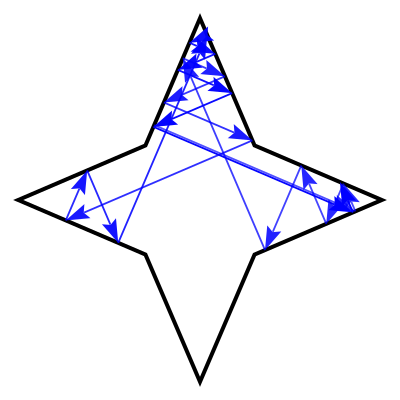
Bounce at the wall normal in a star, 20 times:
stack exec -- bounce-exe -o star.svg -n 20 -e star -a 0.0
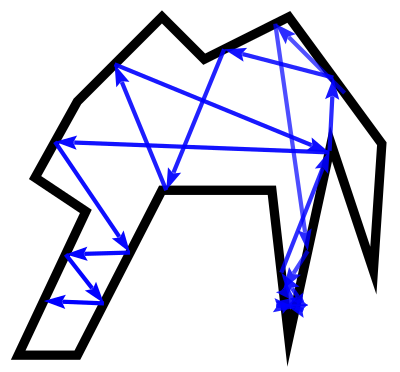
Bounce specularly:
stack exec -- bounce-exe -o poly.svg -n 20 -e poly2 -b Specular -s 0.1
Adding New Environments
Edit src/Maps.hs and add your own environment (there are many examples there
to get you started).
Environments can be either:
Pts: A list of points in CCW order, defining a simple closed polygon.Trl: A Trail V2 Double type, as defined by the Diagrams package. Trails are just collections (stored in a fingertree) of straight line segments and/or Bezier curves. Thus, they do not need to be simple or closed. Some handy shapes are defined here, including regular polygons.
You will also need to add a (string, fname) pair in the hash map at the top of
Maps.hs to allow for command line interfacing.
If you edit Maps.hs you'll need to run stack build again in the top level
directory to recompile.
Generating Dynamical Systems Analysis Plots
- Run
stack ghciin thebouncedirectory - If you get a message about which main module to use, hit enter and ignore it
- The function
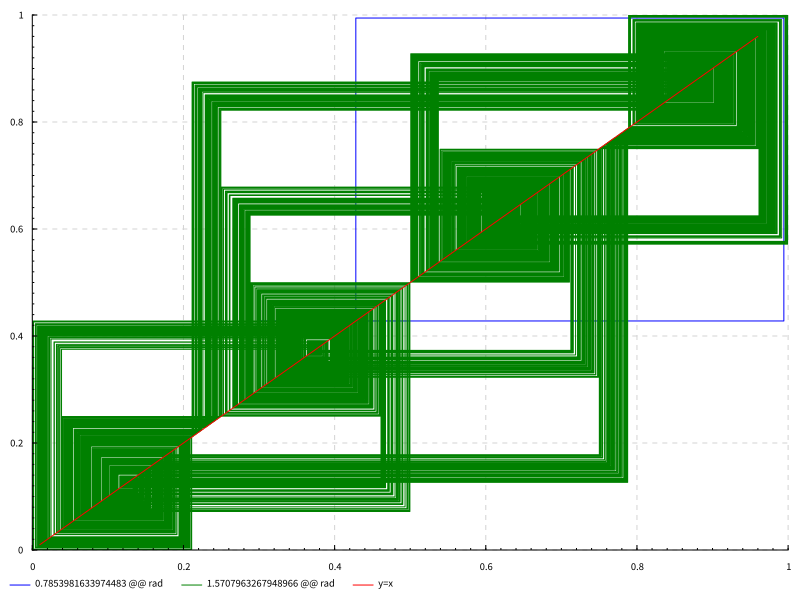
mkChartis what generates the plots. It has many parameters, all required. An example is below.
λ> mkChart (mkPoly $ maps ! star) [pi/4,pi/2] 0.2 5000 "cobweb" "cobweb.svg"
- Map: The first argument is the polygon map, created with the helper function
pts2polyfrom any of the maps specified insrc/Maps.hs. - Angles: The second argument is a list of bounce angles to generate plots for (data will be overlaid on one plot, in different colors w/ legends). If doing just one angle, you still need to wrap in in the list syntax [].
- Start Parameter: The third argument is the parameter on the polygon to start bouncing (used by "return" and "cobweb" plots, see below)
- Number of bounces: Fourth parameter is an integer number of bounces to do, used by return and cobweb plots.
- Plot type: Currently the following plot types are supported:
- "scan": Scatter plot of $x_n$ vs $x_{n+1}$ for 20 values of $x_n$ between 0 and 1
- "return": Plots the return map starting at the specified parameter. Connects successive bounce points with lines.
- "cobweb": Makes a cobweb plot starting at the specified parameter (TODO: animate as a function of bounce angle like in that wiki article).
- Filename: desired filename. Will save relative to directory where
stack ghciis running.
Plot generated from the above example:
Suggestions welcome!
